A checkpoint failure event in Stream Compute Service indicates that, for a job for which checkpointing is enabled, a checkpoint fails due to timeout or any other reason.
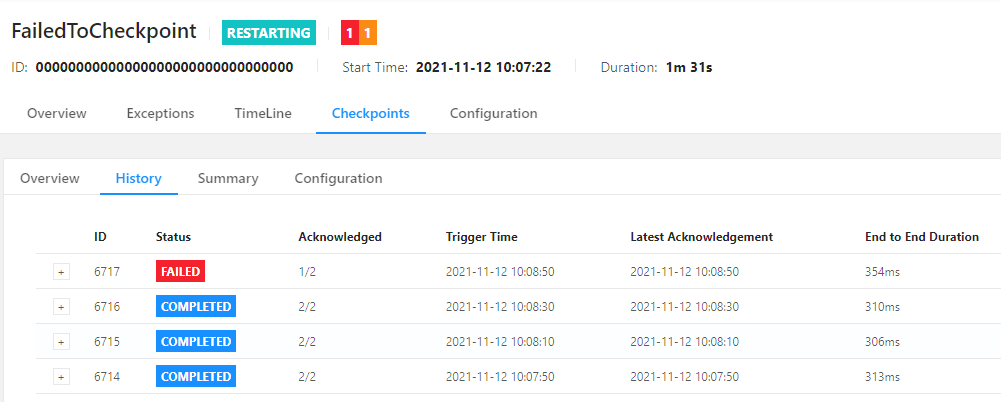
For a long-running job, an occasional checkpoint failure may not represent severe exceptions in the job, and you just need to handle the issue only when checkpoints fail frequently. For example, a checkpoint (ID: 6717) of a job fails, as shown on the Checkpoints page of the Flink UI.
Conditions
Trigger
A checkpoint of a job fails, with FAILED as its final status.
Clearing
A subsequent checkpoint of the job succeeds, with COMPLETED as its final status.
Alarms
You can configure an alarm policy for this event to receive trigger and clearing notifications in real time.
Suggestions
The causes of a checkpoint failure event are available on the events page. Depending on the Flink execution links used, the direct causes of checkpoint failure or some common errors may be displayed, so further analysis is required based on the specific issue.
You can also, based on the time of checkpoint failure, view the error logs of the JobManager and TaskManagers near this time point on the logs and the Flink UI pages of the job as instructed in Viewing the Logs of a Job and Viewing the Flink UI of a Job, respectively.
If you fail to identify errors as stated above due to too many TaskManagers or logs, you can search for exception logs under the instance ID of the checkpoint failure event as instructed in Diagnosis with Logs.
If the problem is still not found with the above diagnosis, please check as instructed in Viewing Monitoring Information whether resource overuse exists. In particular, you can focus on TaskManager CPU usage, heap memory usage, full GC count, full GC time, and other critical metrics to check whether exceptions exist.