Here are some key concepts to help you get started with Tencent Cloud Organization.
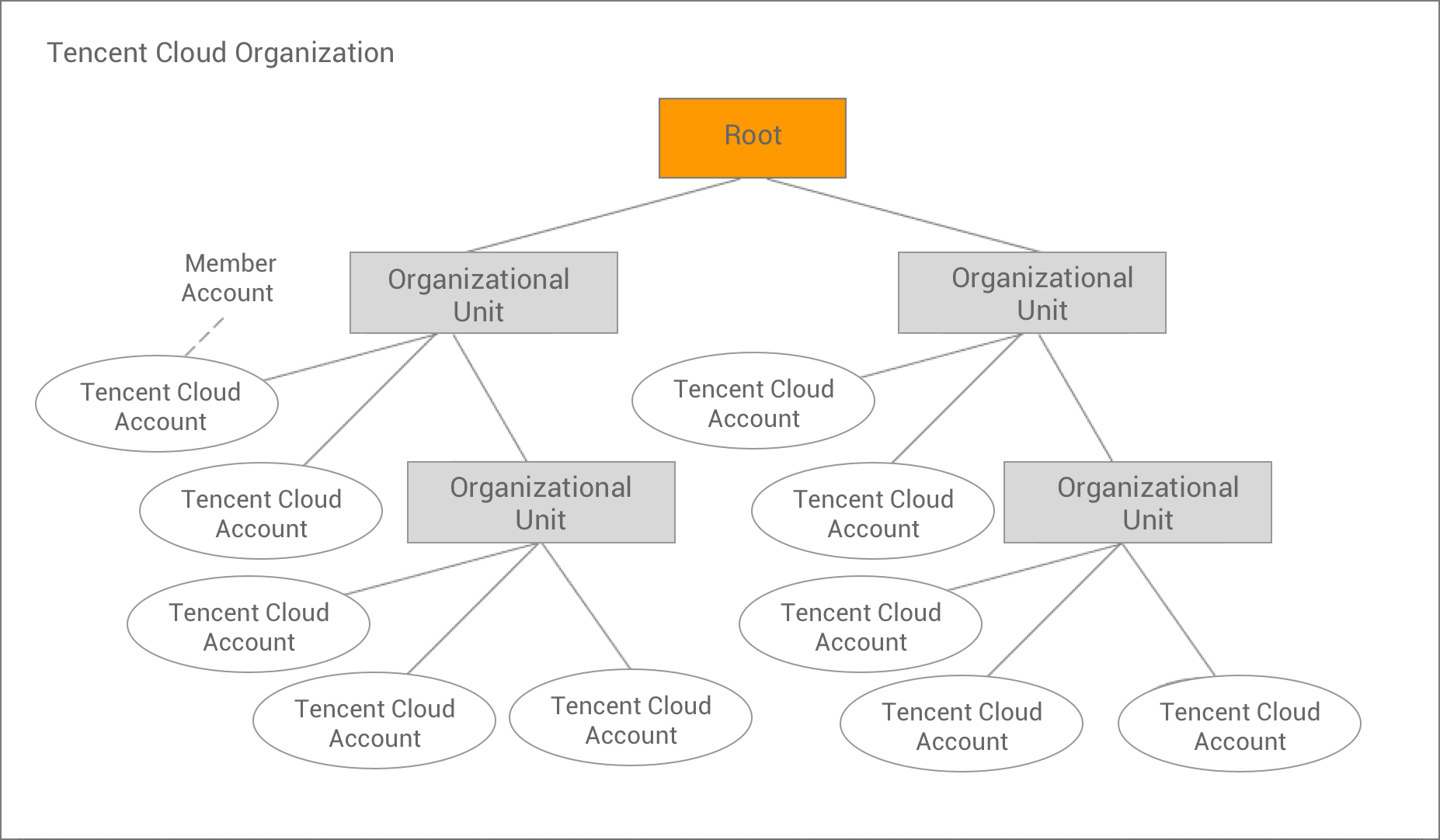
The following diagram shows a basic organization that consists of 10 accounts that are organized into four organizational units under one root. See below for a description of each of these items.
Root
The parent container for all the accounts within your organization.
Note:
Currently, you can have only one root. Tencent Cloud Organization automatically creates it for you when you create an organization.
Organization
An entity that you create to consolidate your Tencent Cloud accounts. You can use the Tencent Cloud Organization Console to centrally view and manage all the your accounts within your organization. An organization has one master account along with zero or more member accounts. You can organize the accounts in a hierarchical, tree-like structure with a root at the top and organizational units nested under the root. Each account can be directly placed under the root, or it can be placed in one of the organizational units.
Organizational Unit
A container for accounts under the root. A unit can also contain other units, enabling you to create a hierarchy that resembles an upside-down tree, with the root at the top and branches of units extending down, ending in accounts as the leaves.
Account
A standard Tencent Cloud account that contains your Tencent Cloud resources.
Master Account:
An organization has one account that is designated as the master account. This is the account that creates the organization. The master account is responsible for paying all the fees that are accrued by the member accounts.
Account:
The rest of the accounts that belong to an organization are called member accounts. The master account can create accounts in the organization, invite other existing accounts to the organization, remove accounts from the organization, manage invitations, and apply policies to entities (root, units, or accounts) within the organization. An account can be a member of only one organization at a time.
Invitation
The process of inviting another account to join your organization. An invitation can be issued only by the organization's master account and can be extended to the account ID that is associated with the invited account. After the invited account accepts an invitation, it becomes a member account in the organization.