This document shows you how to create a sub-account and grant permissions to it to manage SSM.
Directions
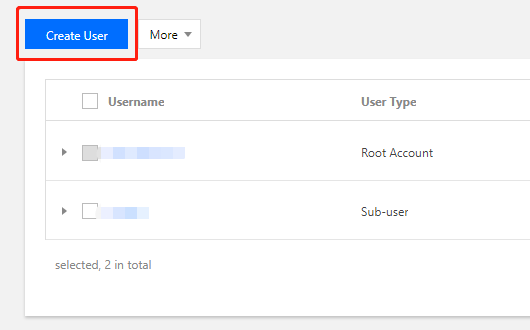
1. Create a sub-account. Log in to the Tencent Cloud CAM console using the root account. In the left sidebar, click Users -> User List. On the User List page, click Create User to create a sub-account.
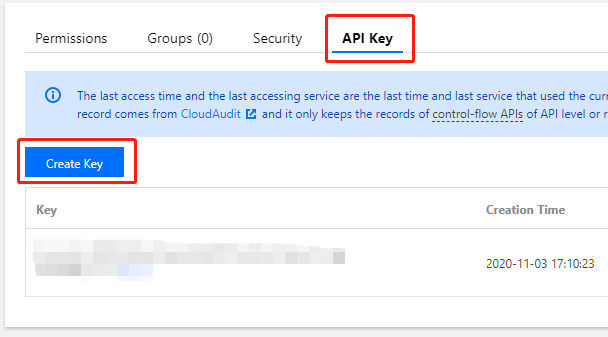
2. Create an API key. You can click the name of the sub-account to go to its User Details page. Click API Key -> Create Key to create SecretId and SecretKey. You can use this API key to access SSM.
Note:
If you do not need to manage SSM through APIs, you can authorize the sub-account directly.
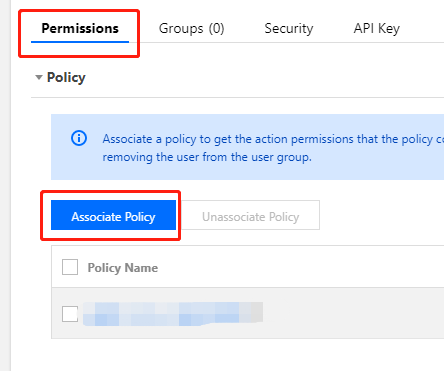
3. Authorize the sub-account. You can add the SSM policy to the newly created sub-account so that it can access SSM. On the User Details page of the sub-account, click Permissions > Associate Policy to go to the Add Policy page.
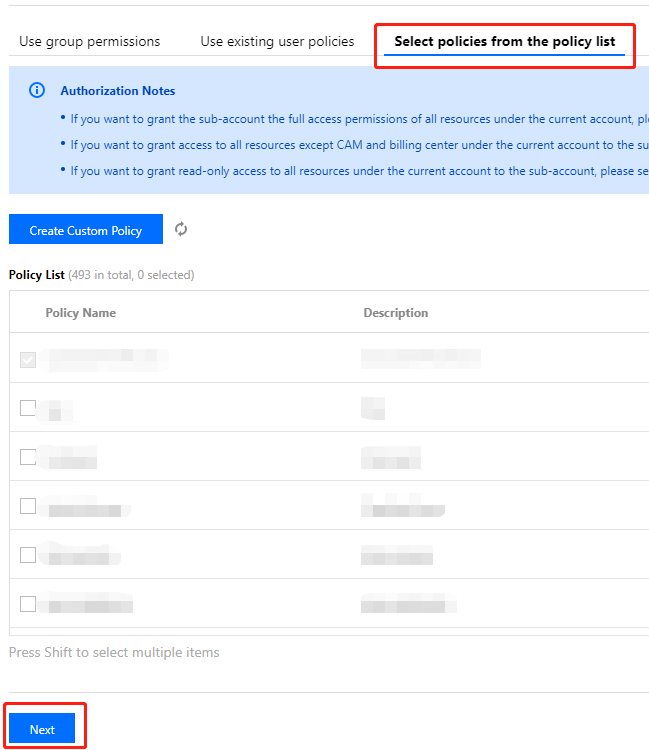
4. Add a policy. On the Add Policy page, click Select policies from the policy list, choose the appropriate SSM policy, and click Next > Confirm. In this way, you can grant permissions to the sub-account to access SSM.