Hosting and Using Secrets
Baixar
Modo Foco
Tamanho da Fonte
Normally, various types of verification information (i.e., passwords, tokens, SSH keys, and API keys) for identity verification are embedded in the configuration file of the application as plaintext, which offers lower security. You can use SSM to encrypt and store sensitive information to avoid risks caused by the plaintext coding of sensitive secrets.
Directions
The following uses the hosted username and password of a database as an example to introduce the basic use cases of secret hosting.
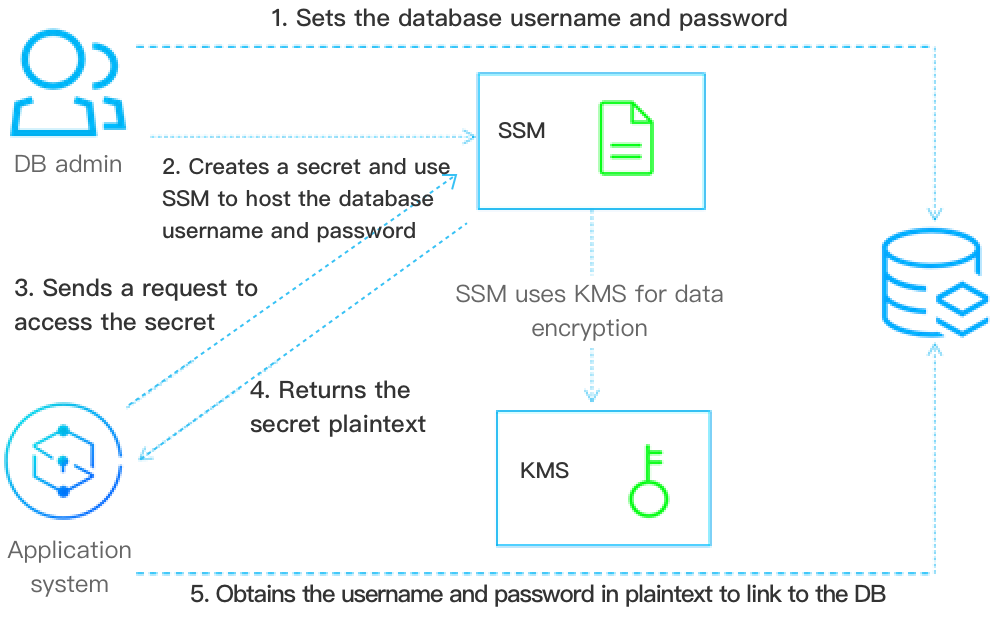
1. DB admin sets the database username and password.
2. DB admin creates a secret object in SSM. The secret object is used to store the encrypted username and password obtained in Step 1.
3. When the application needs to access the database, it needs to send a request to SSM to access the secret.
4. After SSM receives the secret plaintext, it decrypts the secret and sends the secret plaintext to the application over HTTPS.
5. The application reads and parses the secret plaintext returned by SSM to obtain the username and password for accessing the target database.
6. DB admin can create multiple versions for a secret. Also, it can update the version content to implement configuration synchronization, version management, and secret rotation.
Application Effects
The application system can call the SSM APIs or SDK to obtain the sensitive secret plaintext, avoiding leakage risks caused by coding secret as plaintext in the application or configuration file. The calling comparison is as follows:
The following are examples of storing the username and password of a database as plaintext in the local configuration or the code file, which brings a higher risk of sensitive secret leakage.
Sample code of obtaining the secret plaintext:
func GetDBConfig() string {dbConnStr := "user:password@tcp(127.0.0.1:3306)/test"return dbConnStr}
Sample code of using the secret plaintext:
conn, err := sql.Open("mysql", GetDBConfig())if err != nil {// error handler}
The following are examples of using SSM to store the username and password for connecting to the database. It avoids storing the username and password as plaintext in the code or local configuration file.
Sample code of obtaining the secret plaintext:
func GetDBConfig(secretName, version *string) string {credential := common.NewCredential(secretId,secretKey,)cpf := profile.NewClientProfile()cpf.HttpProfile.Endpoint = endpointclient, _ := ssm.NewClient(credential, region, cpf)request := ssm.NewGetSecretValueRequest()request.SecretName = secretNamerequest.VersionId = versionresp, err := client.GetSecretValue(request)if err != nil {// error handler}return *resp.Response.SecretString}
Sample code of using the secret plaintext:
secretName := "MySecret1"version := "MyVersion1"conn, err := sql.Open("mysql", GetDBConfig(&secretName, &version))if err != nil {// error handler}
Ajuda e Suporte
Esta página foi útil?
Você também pode entrar em contato com a Equipe de vendas ou Enviar um tíquete em caso de ajuda.
comentários