Caching Table or Partition to Memory
下载
聚焦模式
字号
Doris supports caching all data of a table or a specified partition to memory, which can improve query performance. However, because memory capacity is limited, it is best to use tables with small volume of data.
Usage
Caching an Entire Table
For a new table, you can add the configuration
"in_memory"="true" in PROPERTIES during table creation, such as:CREATE TABLE IF NOT EXISTS example_db.expamle_tbl(`user_id` LARGEINT NOT NULL COMMENT "user id",`date` DATE NOT NULL COMMENT "data import date",`city` VARCHAR(20) COMMENT "user's city",`age` SMALLINT COMMENT "user's age",`sex` TINYINT COMMENT "user's gender",`last_visit_date` DATETIME REPLACE DEFAULT "1970-01-01 00:00:00" COMMENT "last visit time of user",`cost` BIGINT SUM DEFAULT "0" COMMENT "total consumption of user",`max_dwell_time` INT MAX DEFAULT "0" COMMENT "user's maximum stay time",`min_dwell_time` INT MIN DEFAULT "99999" COMMENT "user's minimum stay time")AGGREGATE KEY(`user_id`, `date`, `city`, `age`, `sex`)DISTRIBUTED BY HASH(`user_id`) BUCKETS 1PROPERTIES ("replication_allocation" = "tag.location.default: 1","in_memory"="true");
For existing tables, modify the table configuration and set
"in_memory"="true":ALTER TABLE example_db.my_table set ("in_memory" = "true");
Caching a Specified Partition
Both official and temporary partitions can be cached.
For a new partition, add setting
"in_memory"="true" when creating the partition:ALTER TABLE example_db.my_table ADD [TEMPORARY] PARTITION p1 VALUES LESS THAN ("2020-02-01") ("in_memory" = "true", "replication_num" = "1")
For existing partitions, modify the configuration and set
"in_memory"="true":ALTER TABLE example_db.my_table MODIFY PARTITION (p1, p2, p4) SET("in_memory"="true");
Removing Data from Cache
When there is no need to cache data for speeding up computation, it is necessary to release the cached data from memory in a timely manner to reduce unnecessary data release. To remove cache, you only need to modify the configuration of the corresponding table or partition to
"in_memory"="false".ALTER TABLE example_db.my_table set ("in_memory" = "false");
ALTER TABLE example_db.my_table MODIFY PARTITION (p1, p2, p4) SET("in_memory"="false");
Notes
in_memory attribute
If the table is created with the
"in_memory" = "true" attribute, Doris will try to cache the data blocks of the table in the storage engine's PageCache to reduce disk IO. However, this attribute does not guarantee that the data blocks will always reside in memory, and it is merely a best-effort indicator.Related Configuration Parameters
The caching method of memory table is using Doris page cache, which needs to ensure the page cache feature is enabled and appropriate memory is allocated. Related parameters are adjusted by be.conf.
disable_storage_page_cache
Type: bool
Description: Whether to use the page cache for index caching, this configuration is only effective in BETA storage format.
Default value: false
chunk_reserved_bytes_limit
Description: The reserved bytes limit for the Chunk Allocator is typically set as a percentage of mem_limit. The default unit is byte, values must be multiples of 2 and greater than 0. If the value is larger than physical memory, it will be set to the size of physical memory. Increasing this variable can enhance performance but will there will be more idle memory that other modules can't use.
Default value: 10%
Best Practice
Try comparing the performance difference before and after enabling memory tables.
Environment preparations
Test version: 1.2.6
FE node configuration: 4 cores, 16GB, 1 node, 400GB disk
BE node configuration: 4 cores, 16GB, 3 nodes, 300GB disk
configuration :chunk_reserved_bytes_limit=30%
Start the test
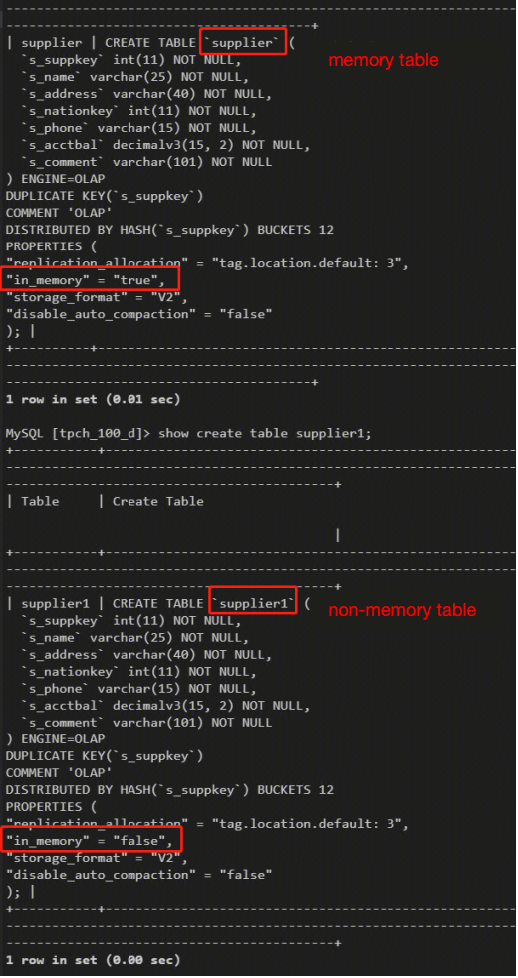
Using the supplier table from the TPC-H test set, where the supplier table is a memory table, and supplier1 table is a non-memory table.
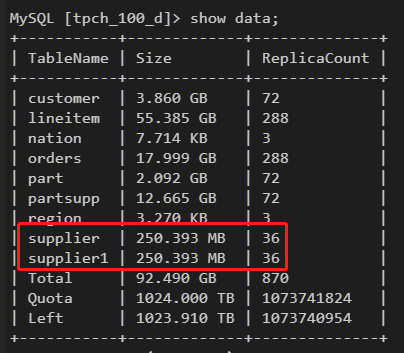
Both are 250M in size with 1 million records.
Using mysqlslap for stress testing, the test SQL is a full transverse of the supplier.
[root@9 data]# tail test.sqlselect * from supplier where s_suppkey=1;...select * from supplier where s_suppkey=999991;select * from supplier where s_suppkey=999992;select * from supplier where s_suppkey=999993;select * from supplier where s_suppkey=999994;select * from supplier where s_suppkey=999995;select * from supplier where s_suppkey=999996;select * from supplier where s_suppkey=999997;select * from supplier where s_suppkey=999998;select * from supplier where s_suppkey=999999;[root@9 data]# tail test2.sqlselect * from supplier1 where s_suppkey=1;...select * from supplier1 where s_suppkey=999991;select * from supplier1 where s_suppkey=999992;select * from supplier1 where s_suppkey=999993;select * from supplier1 where s_suppkey=999994;select * from supplier1 where s_suppkey=999995;select * from supplier1 where s_suppkey=999996;select * from supplier1 where s_suppkey=999997;select * from supplier1 where s_suppkey=999998;select * from supplier1 where s_suppkey=999999;
Stress test SQL:
mysqlslap -h127.0.0.1 -uadmin -P9030 -pxxxxx --iterations=1 --concurrency=500 --number-of-queries=1000000 --create-schema=tpch_100_d --query="/data/test1.sql" --delimiter=";";
Test Results
Average time for memory table is 160 seconds
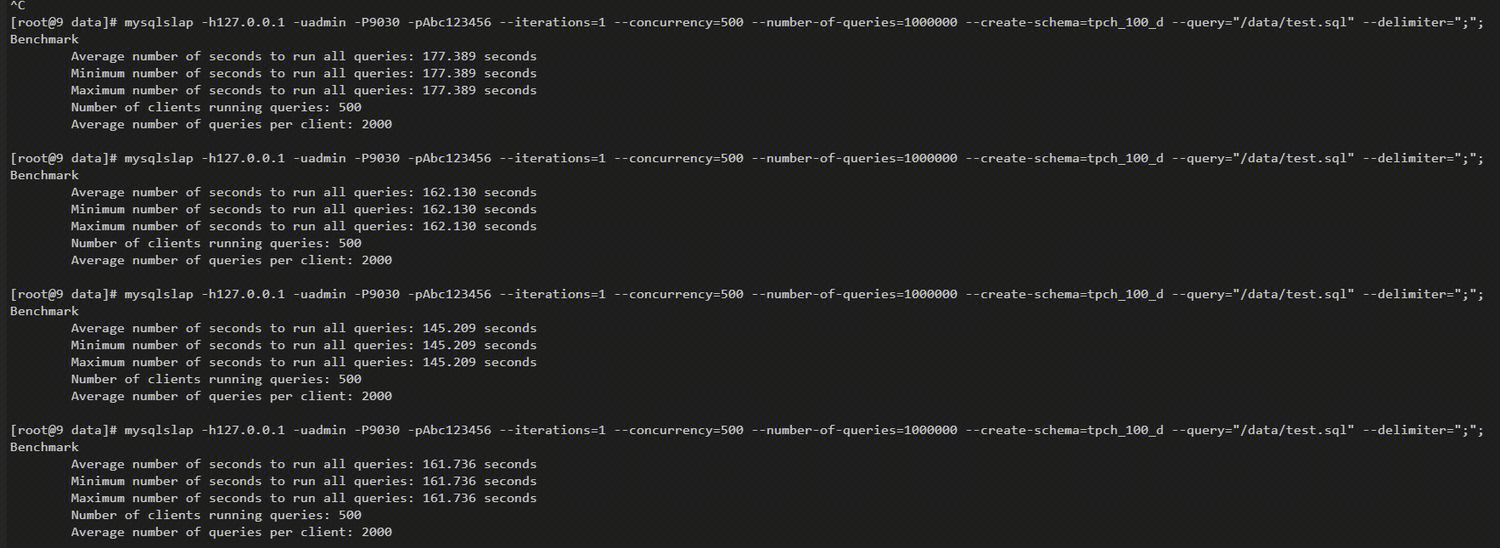
Average time for non-memory table is 260 seconds

Memory table improves by 38% compared with non-memory table.
Usage Recommendations
The data volume in the configuration memory table should not be too large, and it is recommended to be less than 300M.
The main consideration is that the page cache is a globally shared Cache, and a single table data being too large will occupy the space of other sql page caches. At the same time, the memory table does not guarantee that all pages of the table are loaded into memory. It is a best-effort indicator to the system. It is easy to mutually occupy other table data page caches, reducing the memory residence time of the page cache, and therefore lowering the hit rate of the page cache.
文档反馈