When pay-as-you-go resources are no longer in use, delete them promptly to stop billing.
Your actual resource consumption may be constantly changing, resulting in a balance alert that may be subject to some error.
Balance Alert
The system estimates the time when your account balance will run out based on the current balance and usage of your pay-as-you-go resource in the past 24 hours. If the estimated time is within 5 days, the system will push a balance alert message to you. The message will be delivered via a specified method (email, SMS, or Message Center) to the Tencent Cloud account owner and collaborators who have subscribed to the message.
Overdue Payment Alert
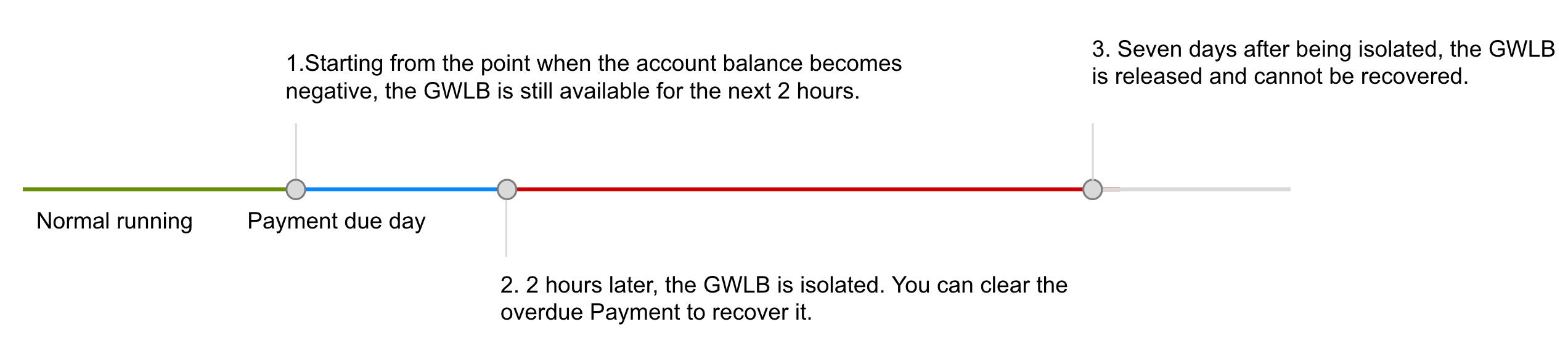
Pay-as-you-go resources are billed on an hourly basis. When your account balance becomes negative (Point 1 in the figure above), an alert message is delivered via a specified method (email, SMS, or Message Center) to the Tencent Cloud account owner and collaborators who have subscribed to the message.
Overdue Payment Policy
Starting from the moment when your account balance becomes negative, pay-as-you-go GWLB instances will be still available and incur fees for the next 2 hours. 2 hours later (Point 2 in the figure above), the GWLB instances will be isolated and suspended (unavailable only with configuration data retained), incurring no more fees. They will become available again after renewal.
Isolated and suspended GWLB instances will be released 7 days later. After release, related configuration data will be deleted permanently and cannot be recovered.