Adding a Shard
Scenarios
Adjusting the shard quantity is a core operation for achieving elastic scaling of a sharded cluster. When business enters a period of rapid growth, with continuously increasing data volume or a surge in read/write concurrency, the existing sharded cluster may encounter performance bottlenecks. As a result, the request latency will increase and throughput will reach the limit. Increasing the shard quantity distributes data and requests across more resources, enabling horizontal scaling. This enhances the cluster's overall data processing capability and concurrent performance, thus helping you easily handle business peaks.
Impacts and Constraints
Before adjusting the shard quantity, please carefully read the following key information to ensure that the operation meets expectations and does not impact service stability.
Dimension | Shard Addition |
Billing Impact | Yearly/monthly subscription: The price difference between the new and original specifications will be settled. At the next renewal cycle, charges will be based on the new specifications. Pay-as-you-go: Charges for the original specifications will be settled, and billing restarts based on the new specifications. For the detailed billing information, see Configuration Adjustment Billing. |
Version Requirement | General Edition: TencentDB for MongoDB 3.6 and later. Cloud Disk Edition: TencentDB for MongoDB 4.0 and later. It is recommended to use the latest stable version for optimal performance. |
Service Impact | During the operation, no service interruption will occur and database read and write operations are normal. Newly added shards automatically participate in data distribution. |
Limits and Constraints | The operation is irreversible. Once submitted, it cannot be canceled midway. Concurrent tasks are prohibited. Shard removal must be performed separately. |
Prerequisites
Instance type: sharded instance.
Instance status: running (normal).
Please ensure that your Tencent Cloud account has sufficient balance.
Adding a Shard
1. Log in to the TencentDB for MongoDB console.
2. In the MongoDB drop-down list on the left sidebar, select Shard Instance.
3. Above the Instance List page on the right, select the target region.
4. In the instance list, find the target instance.
5. Click Instance ID of the instance to go to the Instance Details page and click the Node Management tab.
6. On the Mongod Node tab on the Node Management tab, click Add Shard.

7. In the Add Shard dialog box, review the considerations for increasing the number of shards and refer to the table below to specify the number of shards to be added and confirm the cost.
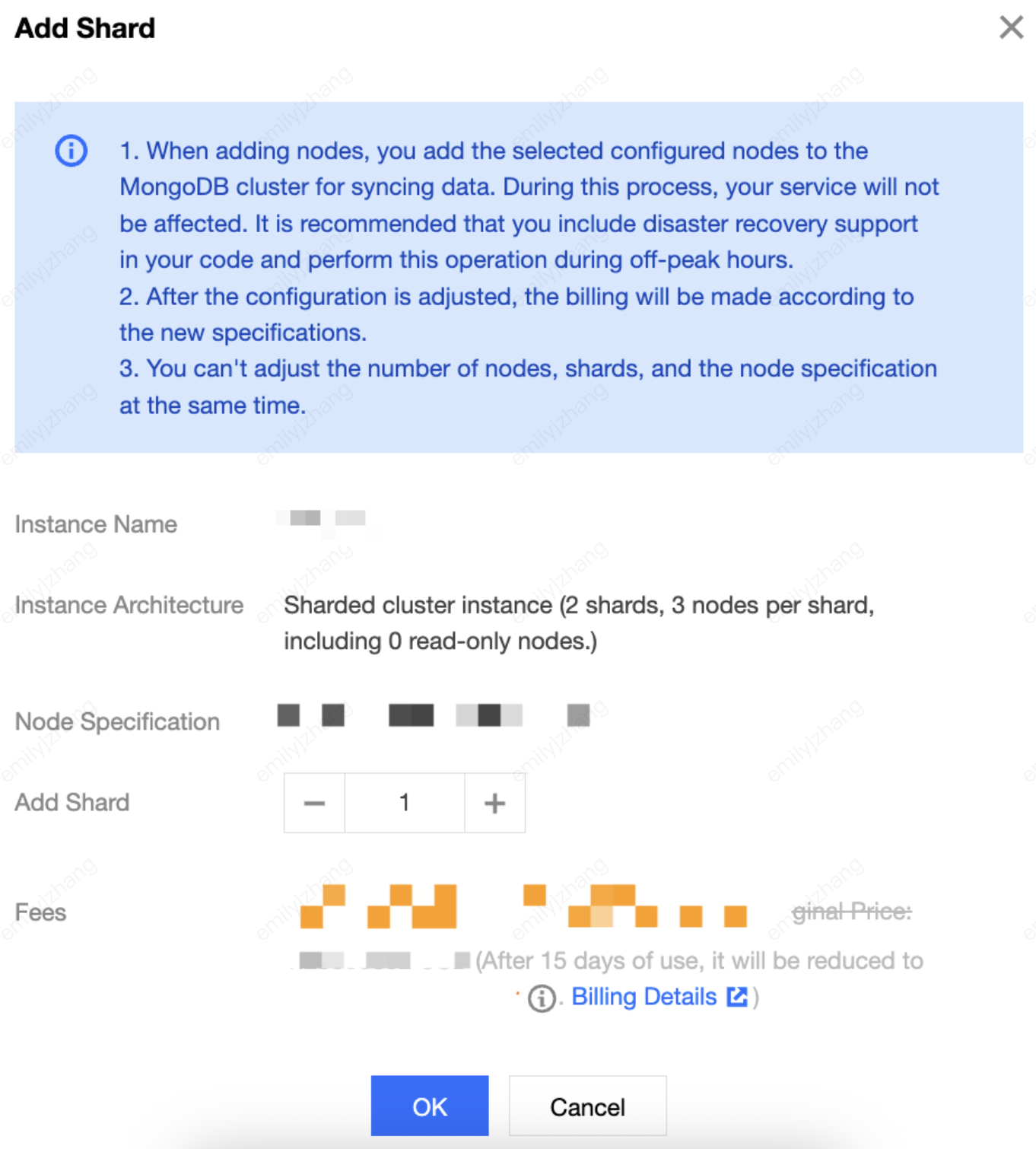
Parameter Category | Parameter Name | Example | Description |
Basic Instance Information | Instance Name | test-4dot2-XXX | Name of the instance for which the shard quantity is to be increased. |
| Expiration Time | 2022-04-24 19:23:43 | Service expiration time of a yearly/monthly subscription instance. |
| Instance Architecture | A sharded cluster instance that has 3 shards, each with 4 nodes, among which there is 1 read-only node | Cluster architecture of the instance: sharded cluster instance. Shard quantity: shard quantity before removal. Nodes per shard: number of nodes per shard and number of read-only nodes. |
| Node Specification | 2 cores, 4 GB memory, 50 GB storage, 12 nodes in total, including 3 read-only nodes | Single shard node specification: including CPU cores, memory, and storage capacity. Total number of cluster nodes: total number of nodes in the instance before addition (Number of shards x Nodes per shard = Total number of cluster nodes). |
Configuration Upgrade | Add Shard | 3 | Select the number of shards to be added for the instance. Value range: [Current number of shards, 36]. |
Cost Information | Fees | 6.69 CNY/hour | Pay-as-you-go: The hourly billing rate after shard addition for the instance will be displayed. Yearly/monthly subscription: The price difference you need to pay for the upgrade to the new specifications will be displayed. |
8. After confirming the details, click OK. If the instance uses yearly/monthly subscription billing, you must pay the price difference between the original and new specifications on the Confirm Product Information page to successfully complete the configuration upgrade.
Related APIs
API | Description |
Adjusts the cloud database instance configurations | |
Queries the sales specifications of cloud databases |
Ajuda e Suporte
Esta página foi útil?
Você também pode entrar em contato com a Equipe de vendas ou Enviar um tíquete em caso de ajuda.
comentários