How do I view the details of a TencentDB for MongoDB instance?
You can click an instance ID in the instance list to enter the details page and view the details.
How do I access a TencentDB for MongoDB instance?
TencentDB for MongoDB can be connected by using a variety of programming languages, such as Shell, PHP, Node.js, Java, and Python.
For more information, see Connecting to TencentDB for MongoDB Instance.
Is the time required for upgrading TencentDB for MongoDB instance specifications related to the used capacity of the instance?
The time required for upgrading an instance depends on its used capacity. Primary-secondary switch will occur once during the upgrade, and the instance will be temporarily inaccessible for about ten seconds.
How do I create a TencentDB for MongoDB instance?
On the purchase page, specify the specification and usage period and click Buy Now to create an instance.
How do I find a TencentDB for MongoDB instance assigned to a specific project?
To find an instance assigned to a specific project, call the DescribeDBInstances API to query the list of instances.
What is the number of connections to a TencentDB for MongoDB instance? Can I increase the number?
See Use Limits. The number of connections depends on instance specifications. You can increase the number by upgrading instance specifications.
How do I view the slow logs of a TencentDB for MongoDB instance?
You can log in to the console and select Database Management > Slow Query Management on the instance management page to query slow logs.
How do I query the instance specifications supported by TencentDB for MongoDB?
You can call the DescribeSpecInfo API to query the supported instance specifications.
How do I choose between a replica set instance and sharded cluster instance?
A replica set instance consists of one primary node and one or more secondary nodes. You can select a replica set instance in the following business scenarios:
The data volume does not exceed the total instance capacity.
You can check whether the capacity specification of the replica set instance selected during instance creation meets your requirements to select an appropriate instance.
The write traffic is low while the read traffic is high.
You can scale out secondary nodes to solve the performance bottleneck of excessive read traffic. For detailed directions, see Adjusting Instance Specification.
There are a large number of database collections, but the document data volume in each collection is low.
In scenarios where multiple randomly combined fields are queried, if a sharded cluster instance is used and it is hard to select an appropriate shard key index, we recommend that you use a replica set instance.
Compared with a replica set instance, a sharded cluster instance breaks through the bottlenecks of data capacity and write traffic and has a complete horizontal scalability. Select a sharded cluster instance in the following scenarios:
The estimated data volume exceeds the capacity limit of a replica set instance.
You can view the capacity limit of a replica set instance during instance creation to select an appropriate instance.
The write traffic exceeds the write traffic limit of a replica set instance.
How do I set the priority for database read operations?
If your business does not require a high data consistency, you can configure read/write separation to reduce the request pressure on the primary node and improve the read performance. By default, TencentDB for MongoDB reads the primary node first. If you want to specify access to secondary nodes, set the Read Preference parameter on the client to configure the read policy. The values of Read Preference are as detailed below:
Value
Description
Default
primary
Reads the primary node only.
Yes
primaryPreferred
Reads the primary node first. If it is not available, a secondary node will be read.
No
secondary
Reads a secondary node only. If it is not available, an error will be reported.
No
secondaryPreferred
Reads a secondary node first. If it is not available, the primary node will be read.
No
nearest
Reads the nearest node with the lowest network latency.
No
To read a secondary node first, you can configure the URI as follows:
How do I solve the problem of reduced write performance when the majority of nodes are written?
Issue
For data writes, you can select different write concern policies based on your requirements for business data reliability.
Option
Description
Scenario
{w: 0}
No acknowledgment messages are required for data writes by the client.
The data integrity is not concerned.
{w: 1}
An acknowledgment message will be sent to the client after data is written to the primary node. This is the default write concern option.
A balance between the performance and data reliability is required.
{w: majority}
An acknowledgment message will be sent to the client after data is written to the majority of nodes in the replica set.
A high data integrity is required in order to avoid data rollbacks.
If you requires a high data reliability, you can set the write concern option w to majority and use the {j: true} option to ensure that the acknowledgment message will be returned only after the journal log is persisted during data write. This can avoid data rollbacks but significantly decreases the write performance.
Optimization
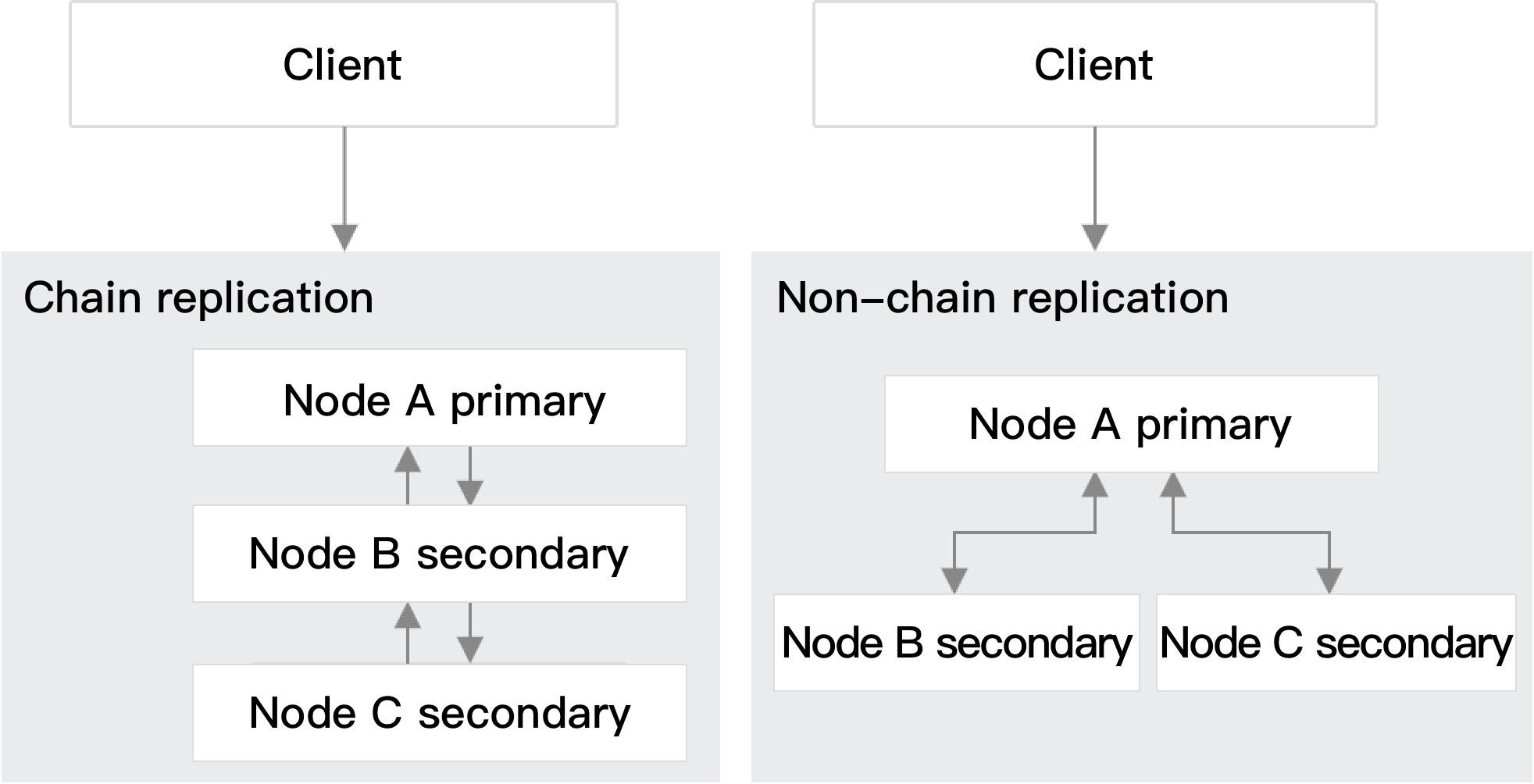
You can optimize the write performance by disabling the chained replication feature. If there are three nodes A, B, and C, among which node B syncs data from node A and node C syncs data from node B, then a chain sync structure (A > B > C) is formed as shown below:
1. TencentDB for MongoDB multi-node replica set instances support chained replication. Run the following command to check whether the current replica set supports chained replication:
2. Check whether chained replication exists in the current replica set nodes. You can view the sync source of each node. If a sync source is a secondary node, there is chained replication in the replica set. Below is the sample code:
1. cmgo-xx:SECONDARY> rs.status().syncSourceHost
2. xx.xx.xx.xx:7021
3. cmgo-xx:SECONDARY>
3. Run the following command to disable chained replication: