Application Scenarios
Versioning allows you to store multiple versions of objects in a bucket and retrieve, delete, and restore specified version objects.
Note:
Only the root account and authorized sub-accounts can configure the versioning status of a bucket.
Usage
Using the COS Console
1. Log in to the COS console. 2. In the left sidebar, click Bucket List to go to the bucket list page.
3. Click the bucket that requires configuration for version control to enter the bucket details page.
4. Select Fault Tolerance and Disaster Recovery > Versioning, find the version control configuration item, change the current status to "enabled", then click Save. In the confirmation pop-up, click OK to enable version control.
Note:
Once you enable versioning for a storage bucket, it cannot revert to unversioned state (initial status). However, you can suspend versioning for the bucket (by changing the current status from "on" to "off"). This way, subsequent overwrite, delete or modify operations will not generate earlier versions.
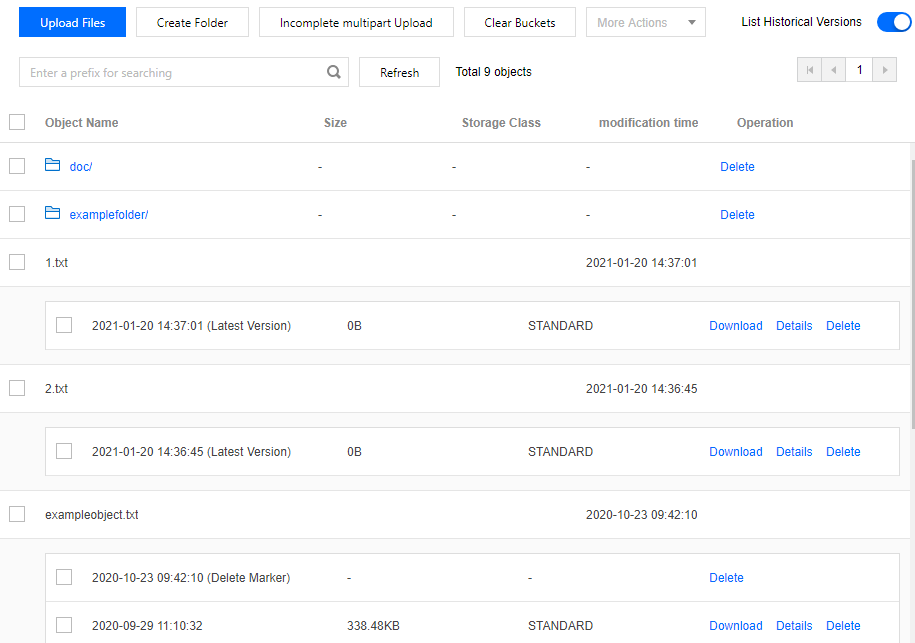
Since enabling version control will occupy storage space with historical versions of objects, these historical versions also incur storage capacity fees. If you do not need to retain older object versions, it is recommended to enable periodic cleanup of historical versions. This shortcut will create a lifecycle rule for periodic deletion of historical versions (default: execute the rule 3 days after file modification). The rule name follows the format RegularlyClean_HistoricalVersions_timestamp, which you can query on the lifecycle page. Alternatively, you can customize a more granular lifecycle rule according to your business needs. For details, see Set Lifecycle. 5. After enabling version control, enter the File List interface, toggle on the List Historical Versions option. You can view all versions of files with the same name and manage them.
If you upload a file with the same name to the bucket, you can view the uploaded files at different time points.
If you delete a file without specifying a version ID, a deletion marker will be inserted for the current version (latest version) after deletion. This marker means "objects have been deleted." When listing historical versions, you will see records of deleted files, while the existing files with the same name before deletion are retained. You can search historical files based on version ID or last modified time to restore, download, or delete them. Note:
To permanently delete a certain earlier version, retrieve and specify a version ID to delete it completely. In the console bucket file list, List Historical Versions of the file, then delete the specified version.
The number of historical versions of an object is without any limitations.
Using REST API/SDK
Use the REST API to configure bucket versioning and manage objects in buckets with different versioning states. See the following API documentation:
You can directly call the version control method in the SDK. See the SDK documentation for different languages:
Android, C, C++, .NET, Go, iOS, Java, JavaScript, Node.js, PHP, Python, Mini Program. Using Tools