After enabling the metadata acceleration capability, COS generates a mount point for the metadata-accelerated bucket. You can download the HDFS client and input the bucket information in the client to mount the metadata-accelerated bucket. This article details how to mount a metadata-accelerated bucket in a compute cluster to achieve access using HDFS.
Client Introduction
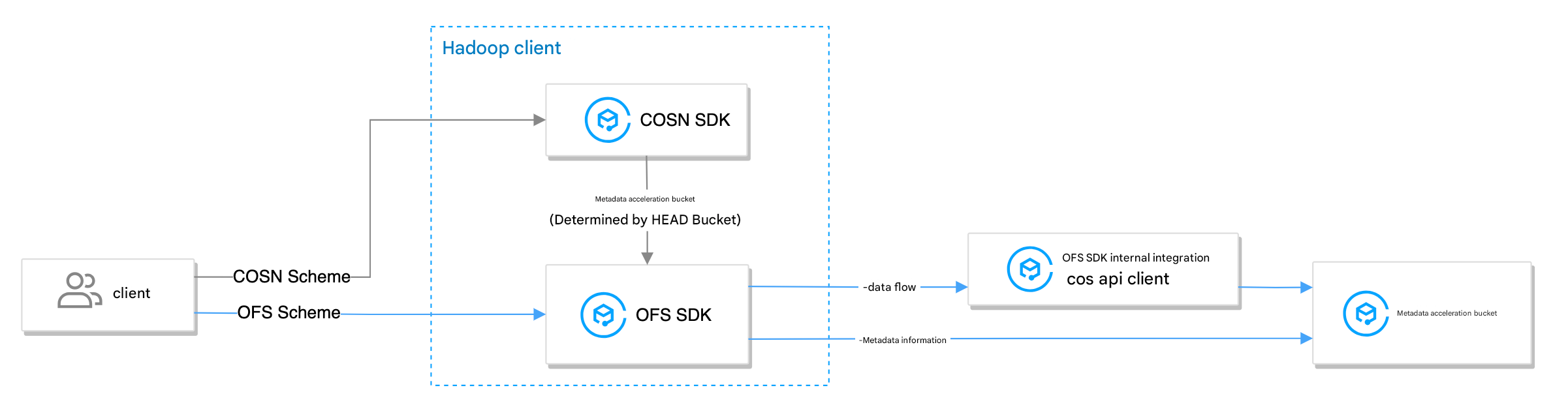
Using HDFS to access COS requires two clients: the Hadoop client (used to implement HDFS semantics) and the cos api client (used to access COS buckets). The metadata-accelerated bucket is compatible with two types of Hadoop clients: Hadoop-COS (using COSN as the scheme, also known as the COSN client) and chdfs-hadoop-plugin (using OFS as the scheme, also known as the OFS client).
If the COSN client is used, it will first send a HEAD Bucket request to determine whether the bucket is a metadata-accelerated bucket, and then forward subsequent requests to the OFS client for processing. Therefore, unless compatibility with standard COS buckets is required, it is recommended to use the OFS client for a more native experience.
The OFS client automatically pulls the cos api client without requiring installation. After successful mounting, you can view the corresponding JAR packages and their versions in the directory configured at fs.ofs.tmp.cache.dir.
Using the COSN client requires downloading the Hadoop-COS (COSN) jar package, the chdfs-hadoop-plugin (OFS) jar package, and the cos_api-bundle jar package:
Version requirement: Corresponds to the COSN version. Check COSN github releases for confirmation.
Mount to Tencent Cloud EMR Environment
EMR is a secure, low-cost, and highly reliable open-source big data platform based on cloud-native technologies and open-source technologies from the pan-Hadoop ecosystem, and has seamlessly integrated the metadata acceleration bucket.
EMR clusters have been created in the same region to ensure network connectivity. For specific operations, see EMR Beginner's Guide.
The EMR temrfs client has integrated COSN and the api bundle, but requires an additional download of the CHDFS client. Download address: chdfs-hadoop-plugin.
Operation Steps
1. Log in to the created EMR environment and run the following command on that machine to check whether the JAR package version in the EMR environment meets the requirements in Environment Dependencies.
find / -name "chdfs*"
find / -name "temrfs_hadoop*"
Check the search results to ensure that both temrfs_hadoop_plugin and chdfs_hadoop_plugin jar packages exist in the environment, and that the chdfs_hadoop_plugin version is 2.7 or higher.
2. (Optional) If you need to update the chdfs_hadoop_plugin version, run the following actions.
2.1 Download the script file to update jar packages. The download address(es) are as follows:
2.2 Place the two script files above in the /root directory of the server, grant execute permission to update_cos_jar.sh, and run the following command.
Note:
Replace the URL parameter with the bucket in the corresponding region. For example, for the Guangzhou region, replace it with https://hadoop-jar-guangzhou-1259378398.cos.ap-guangzhou.myqcloud.com/hadoop_plugin_network/2.7.
sh update_cos_jar.sh https://hadoop-jar-beijing-1259378398.cos.ap-beijing.myqcloud.com/hadoop_plugin_network/2.7
2.3 Perform the above steps sequentially on each EMR node until all jar packages on the machine are replaced.
3. (Optional) If you need to update the hadoop-cos package or cos_api-bundle version, see EMR Update Documentation.
4. On the EMR console, configure core-site.xml and add the configuration item fs.cosn.bucket.region. fs.cosn.trsf.fs.ofs.bucket.region This parameter specifies the COS region where the bucket is located, for example: ap-shanghai.
Note:
fs.cosn.bucket.region and fs.cosn.trsf.fs.ofs.bucket.region are mandatory configurations used to specify the COS region where the bucket is located, for example ap-shanghai. To obtain the region corresponding to the bucket, see COS Region Documentation.
5. Restart resident services such as Yarn, Hive, Presto, and Impala, and synchronize core-site.xml to all Hadoop nodes.
6. Mount verification.
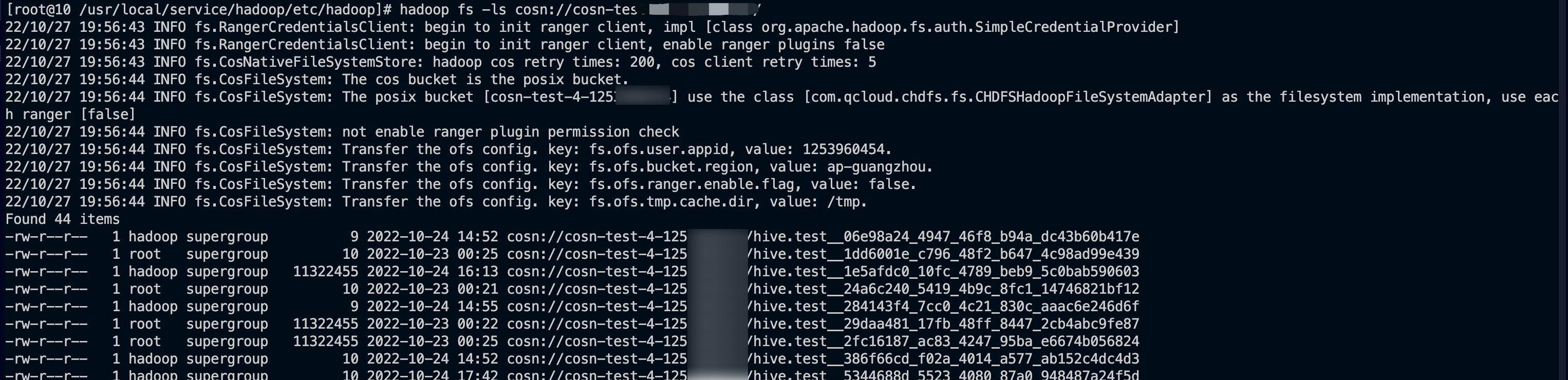
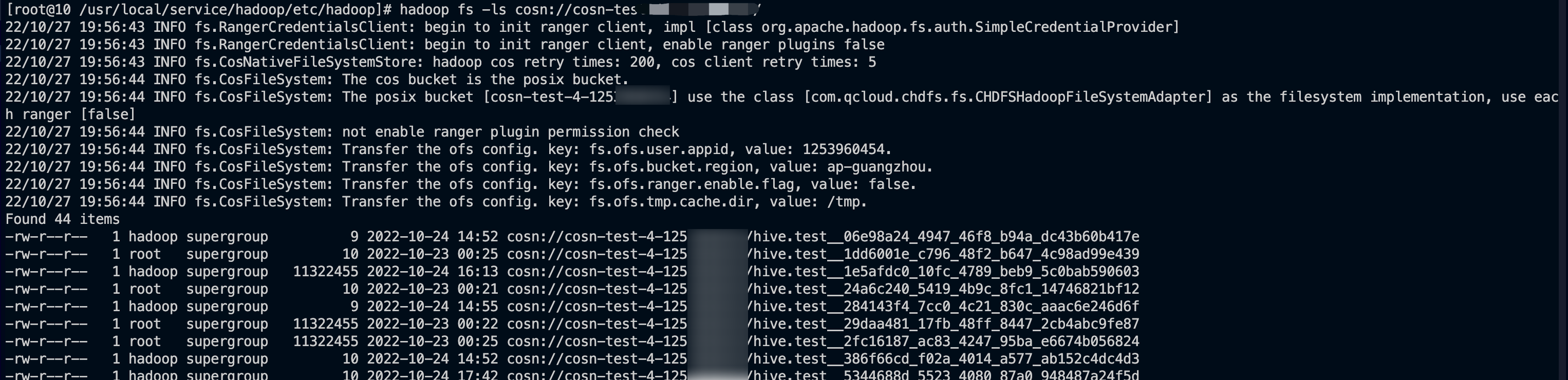
Use the hadoop fs command-line tool to run the command hadoop fs -ls cosn://${bucketname-appid}/ (where bucketname-appid is the mount point, i.e., the bucket name). If the file list is displayed normally, it indicates that the COS bucket has been successfully mounted.
Ensure that Java 1.8 or Java 11 is installed in the machines or containers to be mounted within the compute cluster.
The packages in environment dependencies that meet the version requirements have been downloaded.
Operation Steps
1. Place the installation packages from environment dependencies correctly into the classpath path of each server in the Hadoop cluster.
Note:
Path reference: /usr/local/service/hadoop/share/hadoop/common/lib/; should be placed according to actual conditions, as the location may vary across different components.
2. Modify the hadoop-env.sh file. Go to the $HADOOP_HOME/etc/hadoop directory, edit the hadoop-env.sh file, and add the following content to include the COSN-related jar packages in the Hadoop environment variables.
3. Configure core-site.xml in the compute cluster and add the following required configurations.
Use the OFS Client
Using the COSN client
The required configuration items for the OFS client are as follows:
Configuration Item
Configuration Item Content
Description
fs.AbstractFileSystem.ofs.impl
com.qcloud.chdfs.fs.CHDFSDelegateFSAdapter
Metadata bucket access implementation class
fs.ofs.impl
com.qcloud.chdfs.fs.CHDFSHadoopFileSystemAdapter
Metadata bucket access implementation class
fs.ofs.tmp.cache.dir
Format: /data/emr/hdfs/tmp/posix-cosn/
Please set an actual existing local directory where temporary files generated during operation will be temporarily stored. It is also recommended to configure sufficient space and permissions for this directory on each node, for example: /data/emr/hdfs/tmp/posix-cosn/
fs.ofs.user.appid
Format: 12500000000
Required. User appid
fs.ofs.bucket.region
Format: ap-beijing
Required. The region corresponding to the user's bucket
<!--Temporary directory for local cache. For read/write data, when the memory cache is insufficient, data will be written to the local disk. If this path does not exist, it will be created automatically-->
<property>
<name>fs.ofs.tmp.cache.dir</name>
<value>/data/chdfs_tmp_cache</value>
</property>
<!--User's appId, which can be viewed by logging in to the Tencent Cloud console (https://console.tencentcloud.com/developer)-->
<property>
<name>fs.ofs.user.appid</name>
<value>1250000000</value>
</property>
<!--Region information for the user's bucket, in a format such as ap-guangzhou-->
<property>
<name>fs.ofs.bucket.region</name>
<value>ap-guangzhou</value>
</property>
As described in Client Introduction, when using the COSN client, it will first request HEAD Bucket to determine that the bucket type is a metadata-accelerated bucket, and then forward subsequent requests to the CHDFS OFS client for processing. Therefore, the configuration items include the following two parts:
COSN configuration items: used to initiate HEAD Bucket requests. Required configuration items are as follows:
Note:
Users are advised to avoid using permanent secret keys in configurations. Employing sub-account secret keys or temporary secret keys helps enhance business security. When authorizing sub-accounts, please follow the principle of least privilege to prevent unexpected data leaks
If you must use a permanent key, it is recommended to restrict its permission scope. For enhanced security, refer to the Principle of Least Privilege to limit the operations, resources, and conditions (e.g., access IP) allowed for the permanent key
Configuration Item
Configuration Item Content
Description
fs.cosn.userinfo.secretId/secretKey
format like ************************************
Fill in your account's API key information. If needed, log in to the CAM console to view TencentCloud API keys.
fs.cosn.impl
org.apache.hadoop.fs.CosFileSystem
The implementation class of cosn for FileSystem is fixed as org.apache.hadoop.fs.CosFileSystem.
fs.AbstractFileSystem.cosn.impl
org.apache.hadoop.fs.CosN
The implementation class of cosn for AbstractFileSystem is fixed as org.apache.hadoop.fs.CosN.
fs.cosn.bucket.region
format such as ap-beijing
Please fill in the region information for the bucket to be accessed. For values, see Regions and Access Domains for region abbreviations, such as ap-beijing, ap-guangzhou, etc. Compatible with the original configuration: fs.cosn.userinfo.region.
fs.cosn.tmp.dir
Default/tmp/hadoop_cos
Please set an actual existing local directory where temporary files generated during operation will be temporarily stored. It is also recommended to configure sufficient space and permissions for this directory on each node.
OFS configuration items: used to handle forwarded requests. By adding trsf.fs.ofs to COSN configuration items to implement configuration mapping. Required configuration items are as follows:
Configuration Item
Configuration Item Content
Description
fs.cosn.trsf.fs.AbstractFileSystem.ofs.impl
com.qcloud.chdfs.fs.CHDFSDelegateFSAdapter
Metadata bucket access implementation class
fs.cosn.trsf.fs.ofs.impl
com.qcloud.chdfs.fs.CHDFSHadoopFileSystemAdapter
Metadata bucket access implementation class
fs.cosn.trsf.fs.ofs.tmp.cache.dir
Format: /data/emr/hdfs/tmp/posix-cosn/
Please set an actual existing local directory where temporary files generated during operation will be temporarily stored. It is also recommended to configure sufficient space and permissions for this directory on each node, for example: /data/emr/hdfs/tmp/posix-cosn/
fs.cosn.trsf.fs.ofs.user.appid
Format: 12500000000
Required. User appid
fs.cosn.trsf.fs.ofs.bucket.region
Format: ap-beijing
Required. The region corresponding to the user's bucket
core-site.xml configuration reference example:
<!--API key information for the account. You can log in to the [CAM console](https://console.tencentcloud.com/capi) to view TencentCloud API keys.-->
<!--It is recommended to use sub-account keys or temporary keys for configuration to enhance security. When granting permissions to sub-accounts, please follow the [Principle of Least Privilege](https://www.tencentcloud.com/document/product/436/32972).-->
<!--Temporary directory for local cache. For read/write data, when the memory cache is insufficient, data will be written to the local disk. If this path does not exist, it will be created automatically-->
<property>
<name>fs.cosn.trsf.fs.ofs.tmp.cache.dir</name>
<value>/data/chdfs_tmp_cache</value>
</property>
<!--User's appId, which can be viewed by logging in to the Tencent Cloud console (https://console.tencentcloud.com/developer)-->
<property>
<name>fs.cosn.trsf.fs.ofs.user.appid</name>
<value>1250000000</value>
</property>
<!--Region information for the user's bucket, in a format such as ap-guangzhou-->
<property>
<name>fs.cosn.trsf.fs.ofs.bucket.region</name>
<value>ap-guangzhou</value>
</property>
4. Mount verification.
Use the hadoop fs command-line tool to run the command hadoop fs -ls cosn://${bucketname-appid}/ (where bucketname-appid is the mount point, i.e., the bucket name). If the file list is displayed normally, it indicates that the COS bucket has been successfully mounted.
Note:
For resident service components such as Yarn, Hive, Trino (Presto), and Impala, you need to restart the components in the EMR console to load the configurations.