Create a Metadata Acceleration Bucket and Enable the HDFS Protocol
Download
Modo Foco
Tamanho da Fonte
Última atualização: 2025-12-22 16:06:03
Note:
The Metadata Acceleration feature can only be enabled during bucket creation and cannot be disabled once enabled. Please carefully consider whether to enable it based on your business requirements.
The current Metadata Acceleration feature is a public beta feature. Please contact us to apply for beta access.
Advantages of Using the HDFS Protocol
The Metadata Acceleration feature's underlying layer adopts CHDFS's excellent metadata management feature, supporting users in accessing the COS service through file system semantics. The system design metrics can achieve hundreds of GB-level bandwidth, hundreds of thousands of QPS, and millisecond-level latency.
Buckets with Metadata Acceleration enabled are fully compatible with the HCFS (Hadoop Compatible File System) protocol and can be accessed directly using the native HDFS interface.
Compared to using Hadoop tools to access ordinary COS buckets, when accessing using the HDFS protocol, there is no need to adapt the HCFS interface to the COS Restful interface within the tools, saving the overhead of protocol conversion. It can also provide some native HDFS features, such as atomic and efficient directory Rename, file Atime and Mtime updates, efficient directory DU statistics, Posix ACL permission support, and other native features.
Note:
It is recommended to access the metadata bucket using the HDFS protocol rather than the COS Restful interface to achieve practices for optimal performance due to the underlying architecture of the metadata acceleration bucket.
Step 1: Create a Metadata Acceleration Bucket
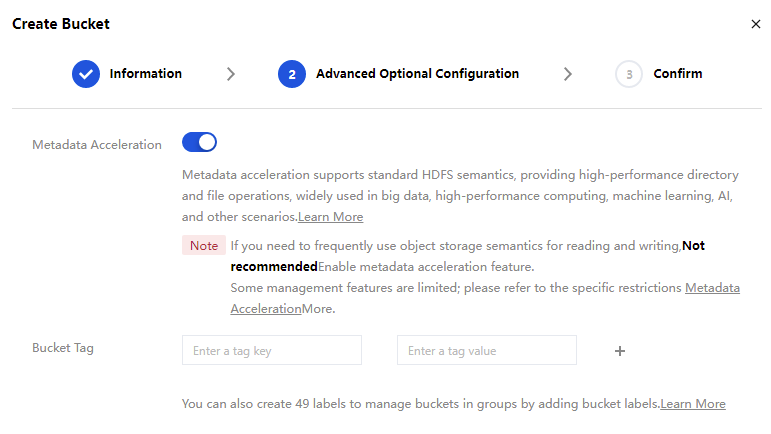
Refer to Create Bucket to log in to the COS console and create a bucket with Metadata Acceleration enabled. If you have not authorized the HDFS service role, you need to click Authorize Now to go to the Authorize Role page. The bucket can be created successfully only after Agree to Authorization.
Note:
If you frequently use COS semantics for read and write operations, it is not recommended to enable the metadata acceleration feature.
Some management features of the metadata bucket are limited. For specific restrictions, see Usage Limits.
Step 2: Enable HDFS Protocol Access
1. Find the created metadata acceleration bucket, click the bucket name, and go to the bucket details page.
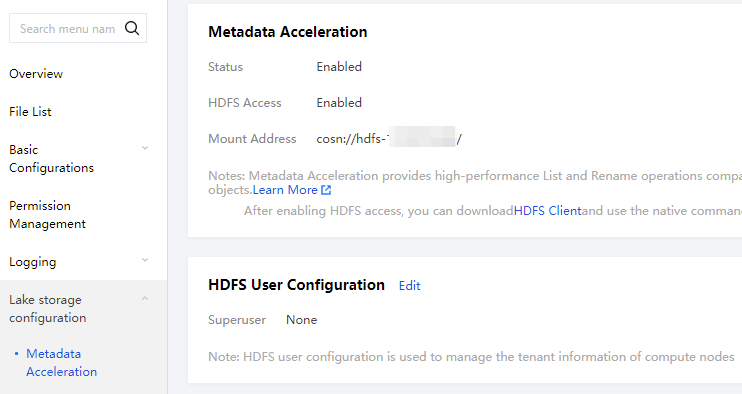
2. In the left menu bar, select Lake Storage Configuration > Metadata Acceleration Capability to see that the Metadata Acceleration Capability has been enabled, along with the default bucket mount point information, as shown in the figure below:
3. In the HDFS Metadata Permission Configuration section, click Add Permission Configuration, configure the following parameters, and then click Save after completion.
VPC Network Name/ID Select the VPC network address where the compute cluster is located.
Node IP Address Enter the IP address or IP address range that needs to be allowed under the VPC CIDR block.
Access Type Select Read-Write or Read-Only.
Note:
When the HDFS protocol is accessed, the metadata acceleration bucket first verifies whether the compute node IP address meets this configuration. Before use, please ensure this configuration item has been correctly set.
4. According to your requirements, you can select one of the three file system authentication methods in HDFS Metadata Authentication Configuration: No Authentication, POSIX Authentication, or Ranger Authentication. Click Edit to go to the modification page.
Note:
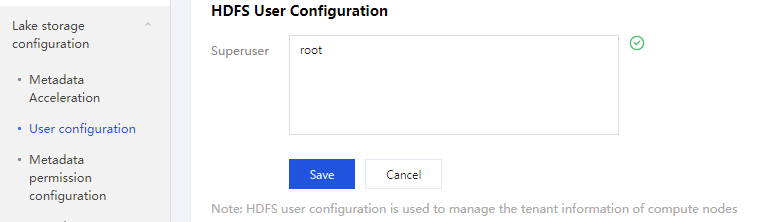
If you need to use POSIX authentication, you can configure the superuser list in HDFS User Configuration, as shown in the figure below.