A StatefulSet is used to manage stateful applications. A Pod created by a StatefulSet has a persistent identifier that is created according to the specifications. The identifier will be retained after the Pod is migrated, terminated, or restarted. When using persistent storage, you can map storage volumes to identifiers. If your application does not require any persistent identifier, we recommend that you use a Deployment to deploy the application.
Operation Guide for StatefulSets in the Console
Creating a StatefulSet
1. Log in to the TKE console and select Clusters in the left sidebar.
2. Click the ID of the cluster where StatefulSet needs to be created to enter the cluster management page.
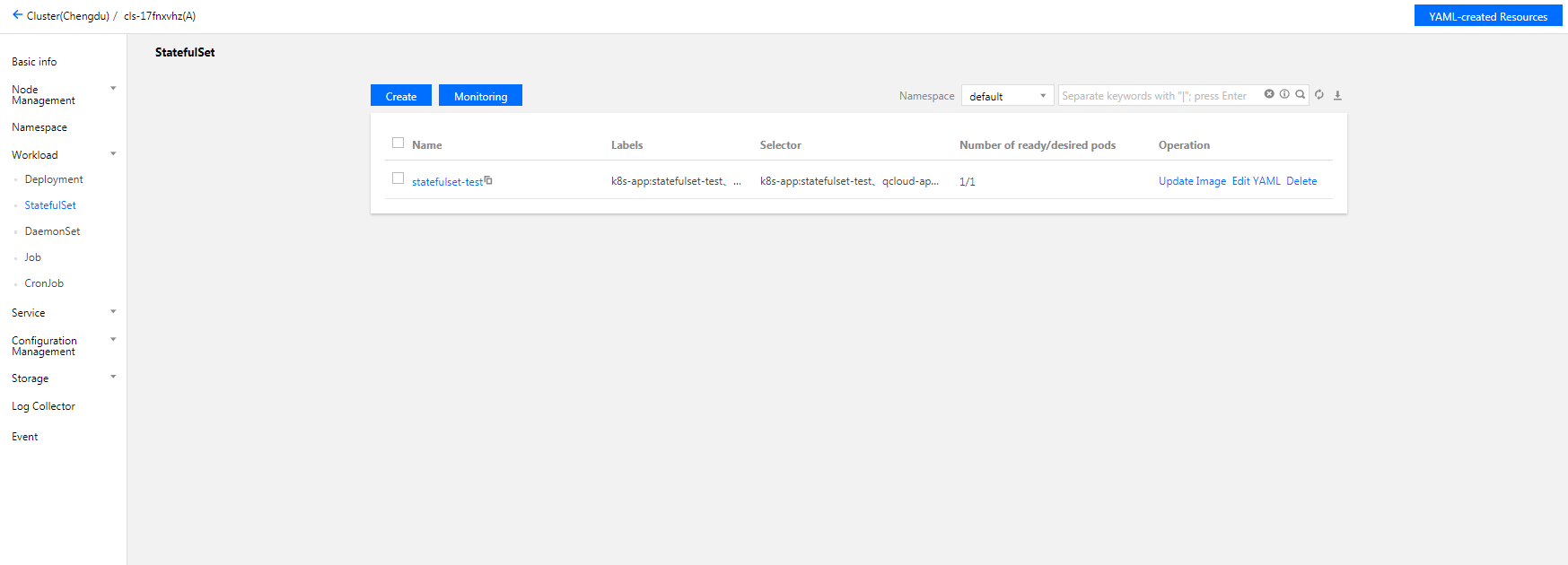
3. Choose Workload > StatefulSet to go to the StatefulSet management page, as shown below:
4. Click Create to open the Create Workload page.
Set the StatefulSet parameters as needed. Key parameters are as follows:
Workload: enter the customized name.
Label: a key-value pair, which is used for classified management of resources.
Namespace: select a namespace based on your requirements.
Type: Select StatefulSet (run the Pod in a stateful manner).
Volume (optional): provides storage for the container. It can be a temp path, CVM path, CBS volume, file storage NFS, configuration file and PVC, and it must be mounted to the specified path of the container.
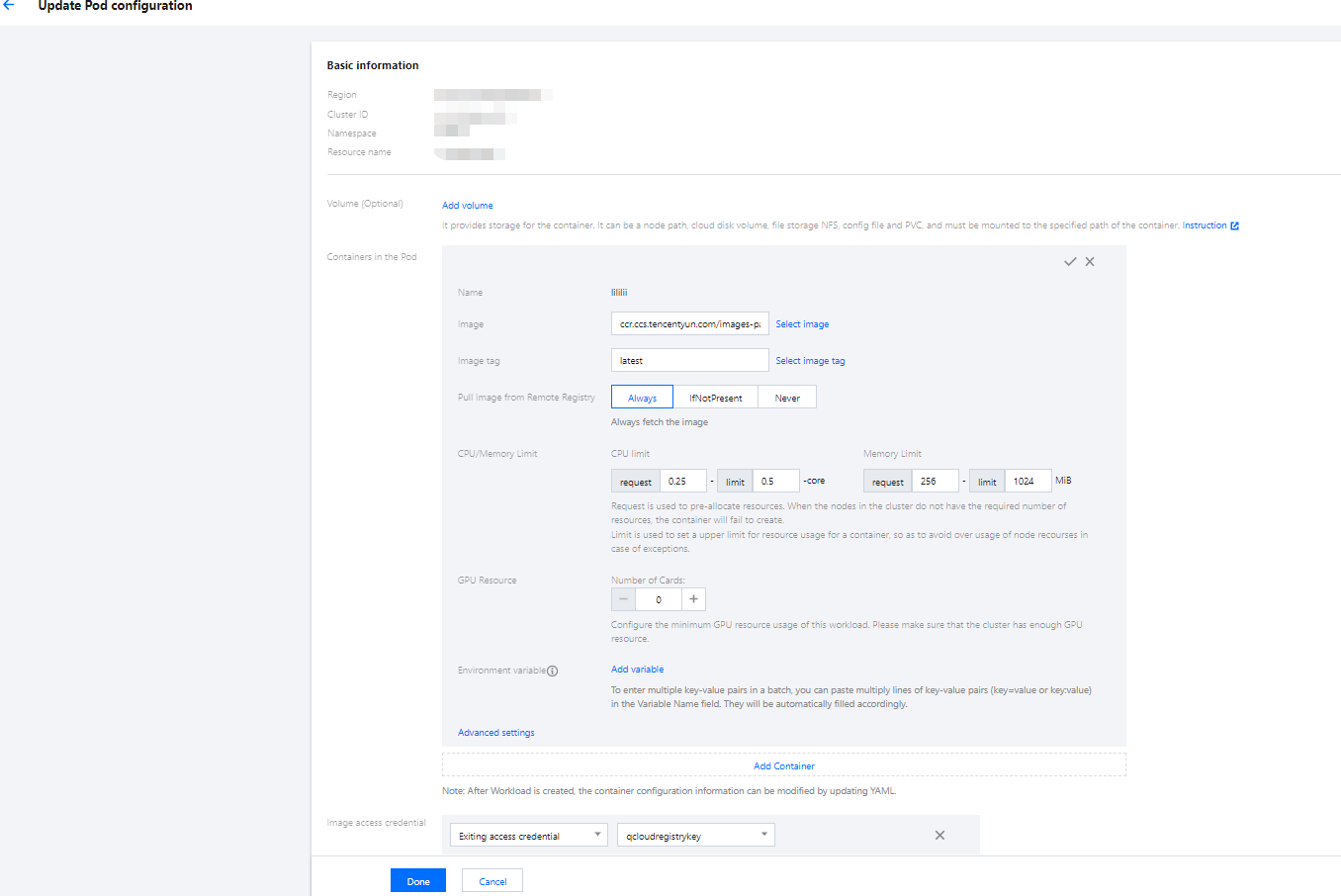
Containers in the Pod: set one or more different containers for a Pod of the StatefulSet as needed.
Name: custom.
Image: select as needed.
Image tag: fill as needed.
Image Pull Policy: the following three policies are available. Select as needed.
If you do not set any image pull policy and Image Tag is left empty or latest, the Always policy is used. Otherwise, the IfNotPresent policy is used.
Always: always pull the image from the remote end.
IfNotPresent: a local image is used by default. If no local image is available, the image is pulled remotely.
Never: only use a local image. If no local image is available, an exception occurs.
CPU/memory limits: set the CPU and memory limit according to Kubernetes' resource limits to improve the robustness of the business.
GPU Resource: you can configure the least GPU resource used by the workload.
Advanced settings: parameters such as "working directory", "run commands", "run parameters", "container health check", and "privilege level" can be set.
Image Access Credential: a container image is private by default. You need to select the image access credential for the TCR instance when creating a workload.
Number of Pods: select the adjustment method and set the number of Pods based on actual needs.
Node Scheduling Policy: the Pod can be scheduled to the node of the Label that meets the expectation according to the scheduling rules.
Access Settings: set Service parameters according to actual needs. For more information, see Service Access.
5. Click Create Workload to complete the process.
Updating a StatefulSet
Updating YAML
1. Log in to the TKE console and select Clusters in the left sidebar.
2. Click the ID of the cluster for which to update the YAML to go to the management page of the cluster.
3. Select Workload > StatefulSet to go to the StatefulSet information page, as shown below:
4. In the row of the StatefulSet for which YAML should be updated, click More > Edit YAML to go to the StatefulSet updating page.
5. On the Update a StatefulSet page, edit the YAML and click Done to update the YAML.
Updating Pod configuration
1. On the cluster management page, click the ID of the StatefulSet cluster for which the Pod configuration needs to be updated to enter the StatefulSet cluster management page.
2. In the StatefulSet row for which Pod configuration needs to be updated, click Update Pod Configuration, as shown below:
3. On the Update Pod Configuration page, modify the updating method and set parameters as needed, as shown below:
4. Click Done to update the Pod configuration.
Using Kubectl to Manipulate StatefulSets
YAML sample
apiVersion: v1
kind: Service ## Create a Headless Service to control the network domain
metadata:
name: nginx
namespace: default
labels:
app: nginx
spec:
ports:
- port: 80
name: web
clusterIP: None
selector:
app: nginx
---
apiVersion: apps/v1
kind: StatefulSet ### Create a Nginx StatefulSet
metadata:
name: web
namespace: default
spec:
selector:
matchLabels:
app: nginx
serviceName: "nginx"
replicas: 3 # by default is 1
template:
metadata:
labels:
app: nginx
spec:
terminationGracePeriodSeconds: 10
containers:
- name: nginx
image: nginx:latest
ports:
- containerPort: 80
name: web
volumeMounts:
- name: www
mountPath: /usr/share/nginx/html
volumeClaimTemplates:
- metadata:
name: www
spec:
accessModes: [ "ReadWriteOnce" ]
storageClassName: "cbs"
resources:
requests:
storage: 10Gi
kind: this identifies the StatefulSet resource type.
metadata: basic information such as StatefulSet name and Label.
metadata.annotations: an additional description of the StatefulSet. You can set additional enhancements to TKE through this parameter.
spec.template: detailed template configuration of the Pod managed by the StatefulSet.
spec.volumeClaimTemplates: provides a templates for creating PVCs and PVs.
1. Prepare the StatefulSet YAML file as instructed by YAML sample.
2. Install kubectl and connect to a cluster. For detailed operations, see Connecting to a Cluster.
3. Run the following command to create the StatefulSet YAML file.
kubectl create -f <StatefulSet YAML filename>
For example, to create a StatefulSet YAML file named web.yaml, run the following command:
kubectl create -f web.yaml
4. Run the following command to check whether the Job is successfully created.
kubectl get StatefulSet
If a message similar to the following is returned, the creation is successful.
NAME DESIRED CURRENT AGE
test11 10s
Updating a StatefulSet
Run the following command to view the update policy type of the StatefulSet.
kubectl get ds/<daemonset-name> -o go-template='{{.spec.updateStrategy.type}}{{"\\n"}}'
StatefulSet has the following two update policy types:
OnDelete: the default upgrade policy. With this policy, after the StatefulSet is updated, you have to manually delete the old StatefulSet Pod to create a new one.
RollingUpdate: Kubernetes 1.7 or later is supported. With this policy, after the StatefulSet template is updated, the old StatefulSet Pod will be terminated, and a new StatefulSet Pod will be created in a rolling update manner (only for Kubernetes v1.7 or later).
Method 1
Run the following command to update a StatefulSet.
kubectl edit StatefulSet/[name]
This method applies to simple debug verification. It is not recommended to use it in production environments. You can update any StatefulSet parameters in this way.
Method 2
Run the following command to update the image of the specified container.
It is recommended to keep other StatefulSet parameters unchanged and only update the container image when the business is updated.
If the StatefulSet is roll updated, you can view the update status by running the following command:
kubectl rollout status sts/<StatefulSet-name>
Deleting a StatefulSet
Run the following command to delete a StatefulSet.
kubectl delete StatefulSet [NAME] --cascade=false
The --cascade=false parameter indicates that Kubernetes only deletes the StatefulSet but not the Pods. Run the following command if you need to delete Pod.