Request: This refers to the minimum requirement of resources used by a container, which serves as a judgment criterion of resource allocation when the container is scheduled. The container is allowed to be scheduled to a node only when the amount of resources available on the node is greater than or equal to the container resource request quantity. However, the Request parameter does not limit the maximum value of resources available to the container.
Limit: This is the maximum value of resources available to a container.
Note:
For more information about the Limit and Request parameters, click here.
CPU Limit Description
For CPU resources, you can set the amount of resources for CPU Request and CPU Limit, which is in cores (U) and can be decimals.
Note:
CPU Request is used as the basis for scheduling. When a container is created, CPU resources are allocated to it on the node, which are called "allocated CPU" resources.
CPU Limit is the upper limit of the container's CPU resources. If it is not set, there will be no limit (CPU Limit >= CPU Request).
Memory Limit Description
For memory resources, you can only limit the maximum amount of memory available to a container. It is in MiB and can be decimals.
Note:
Memory Request is used as the basis for scheduling. When a container is created, memory resources are allocated to it on the node, which is called the "allocated memory" resources.
Memory resources are non-scalable. There will be a risk of OOM if the memory resources used by all containers on the node exceed the limit. Therefore, if Limit is not set, containers can use all resources available on the node, which causes resources of other containers to be occupied and the Pod on which this type of containers located is easy to be drained. It is recommended to set Limit = Request.
CPU Usage and CPU Utilization
The CPU usage is an absolute value indicating the number of physical CPU cores actually used. Both the CPU resource Request and CPU resource Limit are judged based on the CPU usage.
CPU utilization is a relative value indicating the ratio of CPU usage to a single CPU core (or total CPU cores on the node).
Examples
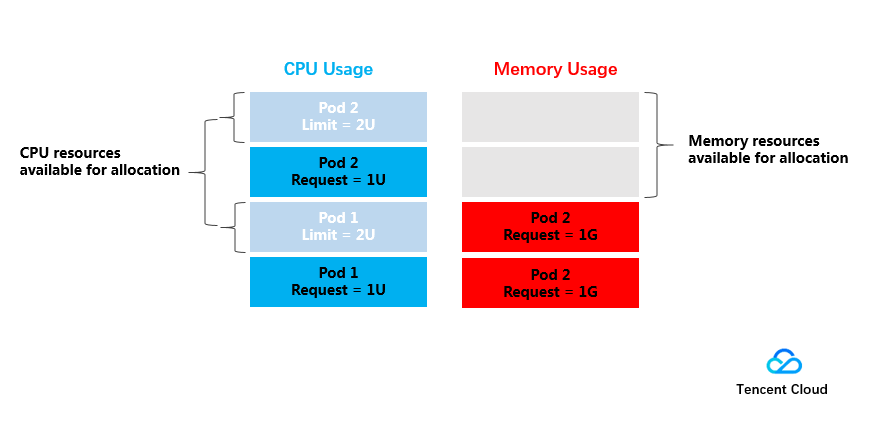
Below is a simple example that illustrates the roles of Request and Limit. The test cluster consists of one 4U4G node, two deployed Pods (Pod1 and Pod2), and the resources of each Pod are set as (CPU Request, CPU Limit, Memory Request, Memory Limit) = (1U, 2U, 1G, 1G). (1.0G = 1000MiB)
The usage of CPU and memory resources on the node is as shown in the figure below:
The allocated CPU resources are 1U (for Pod1) + 1U (for Pod2) = 2U, and the remaining CPU resources available for allocation are 2U.
The allocated memory resources are 1G (for Pod1) + 1G (for Pod2) = 2G, and the remaining memory resources available for allocation are 2G.
Therefore, one more (CPU Request, Memory Request) = (2U, 2G) Pod or 2 more (CPU Request, Memory Request) = (1U, 1G) Pods can be deployed on the node.
In terms of resource limitations, the upper limit of the resources used by Pod1 and Pod2 is (2U, 1G), which means that the maximum CPU resources available to the Pods are 2U if there are idle resources.
Recommended Service Resource Limitations
TKE will recommend the Request and Limit values based on the historical load of your current container image. Using the recommended values will ensure that your container runs more smoothly and reduce the probability of exceptions.
Recommendation algorithm:
The algorithm first takes the values of load per minute in the current container image in the past seven days, and then uses the 95th percentile value to determine the recommended Request, which is half of the Limit.
Request = Percentile(actual load[7d],0.95)
Limit = Request * 2
If the current sample size (actual load) does not meet the quantity requirement of recommendation calculation, the algorithm will expand the sample value range accordingly and try to recalculate. For example, it will retry after removing filter criteria such as image tag, namespace, and serviceName. If no valid values are obtained after multiple calculations, the recommended values will be blank.
Blank recommended values:
During normal use, you may find that there are no recommendations for some values, which may be caused by the following:
1. The current data does not meet the calculation requirements. At least 1440 samples (actual load), i.e., the data of one day, should be present.
2. The recommended value is less than the Request or Limit that has already been configured for your current container.
Note:
1. As the recommended values are calculated based on the historical load, in principle, the longer the container image runs real businesses, the more accurate the recommended values.
2. When you create a service using the recommended values, container scheduling may fail due to insufficient cluster resources. When saving the service, you should carefully check the remaining resources in the current cluster.
3. The recommended values are only for reference. You can make adjustments based on the actual business needs.
References
The Request and Limit values of containers need to be set based on service types, demands and scenarios. For more information, see Setting Request and Limit.