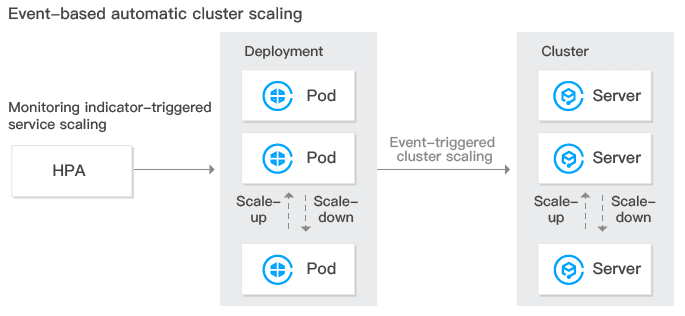
Tencent Kubernetes Engine (TKE) provides elastic scalability at cluster and service levels. It can monitor the metrics of a container including CPU, memory, and bandwidth and perform auto scaling. At the same time, clusters can be auto scaled if a container does not have sufficient resources or has more resources than necessary. Please see the figure below:
Cluster Auto Scaling Features
TKE allows users to enable auto scaling for clusters, helping users manage their computing resources efficiently. Users can set scaling policies based on their needs. Cluster auto scaling has the following features:
Cluster auto scaling can dynamically and automatically create and release Cloud Virtual Machines (CVMs) in real time based on the project load situation to help users cope with project situation with the optimal number of instances. No human intervention is needed throughout the whole process, freeing users from manual deployment.
Cluster auto scaling can help users handle project situation with the optimal amount of node resources. When there are more needs, it seamlessly and automatically adds CVMs to container clusters. When there are fewer needs, it automatically removes unnecessary CVMs to increase device ultilization and reduce the costs of deployment and instances.
Cluster Auto Scaling Feature Description
Basic Features of Kubernetes Cluster Auto Scaling
Supports setting multiple scaling groups.
Supports setting scale-in and scale-out policies. For more information, see Cluster Autoscaler.
Advanced TKE Scaling Group Features
Supports using custom models while creating the scaling groups (recommended).
Supports using a node in a cluster as a template while creating a scaling group.
Supports adding spot instances to scaling groups (recommended).
Supports automatically matching an appropriate scaling group when a model is sold out.
Supports configuring scaling groups across availability zones.
Cluster Auto Scaling Restrictions
The number of nodes that can be added by cluster auto scaling is limited by the VPC, container network, TKE cluster node quota, and the quota of CVMs that can be purchased.
Whether nodes can be scaled out depends on whether the model you want to use is still available. If the model is sold out, nodes cannot be scaled out. It is recommended to configure multiple scaling groups.
You need to configure the request value of the container under the workload. With the request value, whether the resources in the cluster are sufficient can be assessed in order to decide whether to trigger automatic scale-out.
It is not recommended to enable monitoring metric-based auto scaling of nodes.
Deleting a scaling group will also terminate the CVM instances in it. Please be cautious when doing so.
Configuring Cluster Scaling Groups
Configuring multiple scaling groups (recommended)
When there are multiple scaling groups in a cluster, the auto scaling component will select a scaling group for scale-out according to the scaling algorithm you select. The component will only select one scaling group each time. If it fails to scale out the target scaling group for reasons such as CVM model sold-out, the scaling group will be put to sleep for a period of time. At the same time, the second matching scaling group will be selected for scale-out.
Random: select a random scaling group for scale-out.
Most-Pods: select the scaling group that can schedule the most Pods based on the pending Pods and the models you select for the scaling groups.
Least-waste: select the scaling group that can ensure the fewest remaining resources after Pod scheduling based on the pending Pods and the models you select for the scaling groups.
It is recommended to configure multiple scaling groups with different models in the cluster, so as to prevent the scaling failures caused by model sold-out. At the same time, you can use a combination of spot instances and normal instances to reduce costs.
Configuring a single scaling group
If you only want to use one specific model for cluster scale-out, we recommend that you configure the scaling group to multiple subnets and availability zones.