Using tke-autoscaling-placeholder to Implement Auto Scaling in Seconds
Download
Modo Foco
Tamanho da Fonte
Última atualização: 2024-12-13 21:25:13
Operation Scenarios
If a TKE cluster is configured with a node pool and enables Auto Scaling, automatic node scale-out (automatically purchasing of devices and adding them to the cluster) can be triggered when node resources are insufficient. This scale-out process takes some time and may be too slow to ensure normal business operations in some scenarios with sudden traffic increases. tke-autoscaling-placeholder can be used to implement scale-out on TKE in seconds, which is suitable for scenarios with sudden traffic increases. This document introduces how to use tke-autoscaling-placeholder to implement Auto Scaling in seconds.
How It Works
tke-autoscaling-placeholder utilizes low-priority pods to preemptively occupy resources (pause containers with request, consuming only a small amount of resources), reserving some resources as a buffer for high-priority businesses prone to sudden traffic spikes. When pod scale-out is needed, high-priority pods will quickly occupy the resources of low-priority pods for scheduling. In this case, the low-priority pods of tke-autoscaling-placeholder will change to the Pending status. If you have configured a node pool and enabled Auto Scaling, node scale-out will be triggered. As some resources are used as a buffer, even if the node scale-out process is slow, some pods can still be quickly scaled out and scheduled, achieving scaling in seconds. You can adjust the amount of resources reserved as the buffer by adjusting request in tke-autoscaling-placeholder or the number of replicas based on your needs.
Use limits
To use the tke-autoscaling-placeholder app, the cluster version must be later than 1.18.
2. In the left sidebar, click App Market to go to the "App Market" management page.
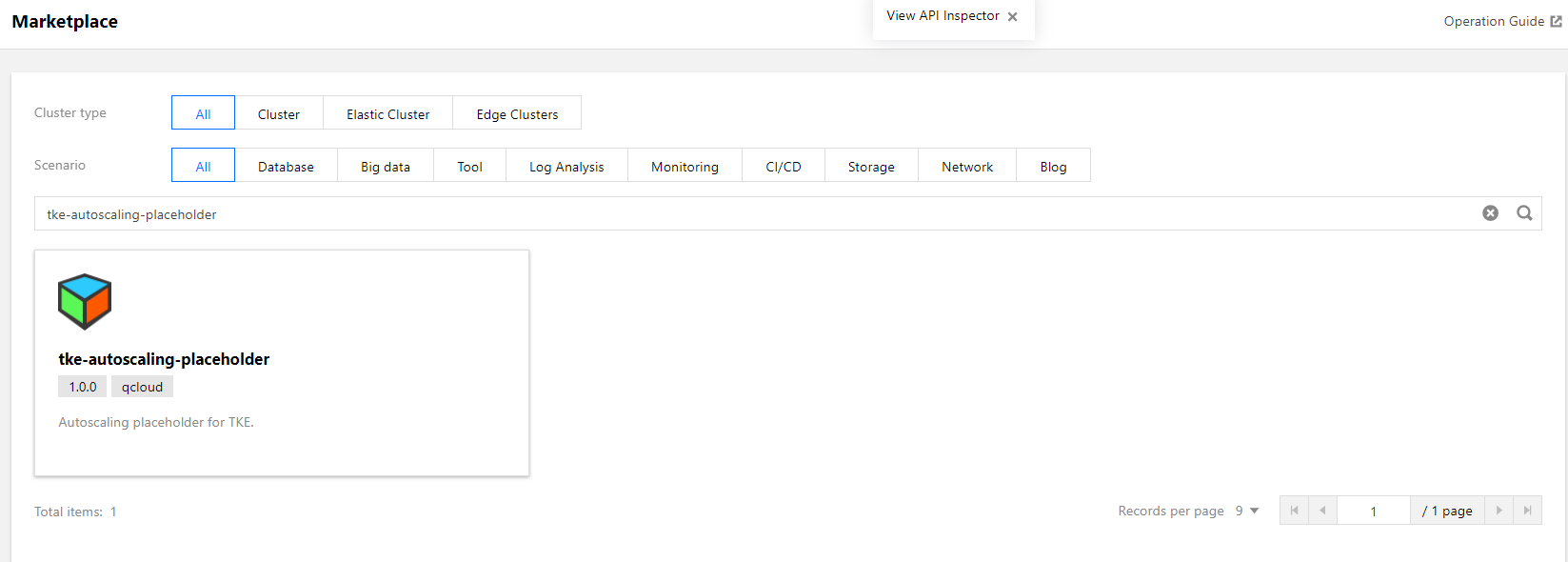
3. In the search box of the "App Market" page, enter tke-autoscaling-placeholder to search for the app, as shown in the figure below:
4. On the "App Details Page", click Create an App in the "Basic Information" module.
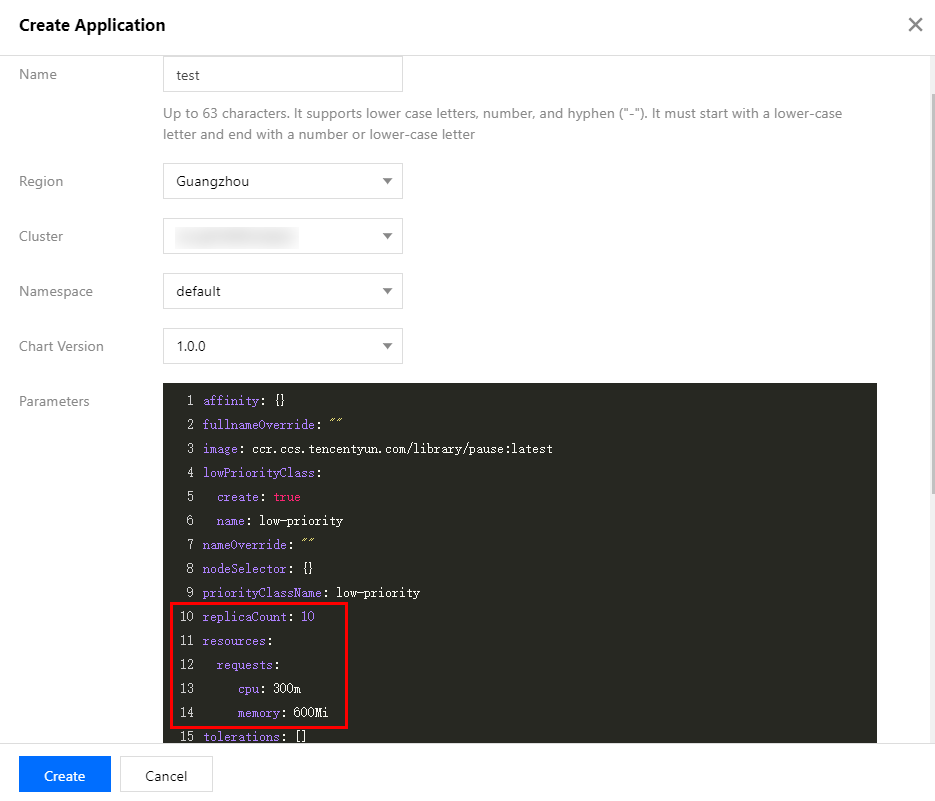
5. In the "Create an App" window that pops up, configure and create an app based on your needs, as shown in the figure below:
Configuration instructions:
Name: enter the app name. It can contain up to 63 characters, including lowercase letters, numbers, and hyphens ("-"). It must begin with a lowercase letter and end with a number or lowercase letter.
Region: select the region for deployment.
Cluster Type: select Standard Cluster.
Cluster: select the ID of the cluster for deployment.
Namespace: select the namespace for deployment.
Chart Version: select the chart version for deployment.
Parameters: among the configuration parameters, the most important ones are replicaCount and resources.request, which indicate the number of replicas of tke-autoscaling-placeholder and the amount of resources occupied by each replica, respectively. They collectively determine the size of buffer resources. You can set them based on the estimated amount of extra resources needed for sudden traffic increases.
For complete parameter configuration descriptions for tke-autoscaling-placeholder, see the following table:
Parameter Name
Description
Default Value
replicaCount
Number of placeholder replicas
10
image
placeholder image address
ccr.ccs.tencentyun.com/library/pause:latest
resources.requests.cpu
Amount of CPU resources occupied by a single placeholder replica
300m
resources.requests.memory
Size of memory occupied by a single placeholder replica
600Mi
lowPriorityClass.create
Whether to create a low PriorityClass (to be imported by placeholder)
true
lowPriorityClass.name
Name of the low PriorityClass
low-priority
nodeSelector
Specifies the node with a specific label to which placeholder will be scheduled.
{}
tolerations
Specifies the taint to be tolerated by placeholder.
[]
affinity
Specifies the affinity configuration of placeholder.
{}
6. Click Create to deploy the tke-autoscaling-placeholder app.
7. Run the following commands to check whether the pod for resource preemptive occupation starts successfully. Below is a sample:
By default, the priority of tke-autoscaling-placeholder is low. You can specify a high PriorityClass for its business pod to facilitate preemptive resource occupation and implement quick scale-out. If you have not yet created a PriorityClass, you can refer to the following sample to create one:
apiVersion: scheduling.k8s.io/v1
kind: PriorityClass
metadata:
name: high-priority
value:1000000
globalDefault:false
description:"high priority class"
In the business Pod, set priorityClassName to a high PriorityClass. Below is a sample:
apiVersion: apps/v1
kind: Deployment
metadata:
name: nginx
spec:
replicas:8
selector:
matchLabels:
app: nginx
template:
metadata:
labels:
app: nginx
spec:
priorityClassName: high-priority # Specify a high PriorityClass here.
containers:
-name: nginx
image: nginx
resources:
requests:
cpu: 400m
MEM: 800Mi
When cluster node resources are insufficient, the scaled-out high-priority business pod can occupy the resources of low-priority pods of tke-autoscaling-placeholder and schedule the resources. At this time, the status of the tke-autoscaling-placeholder pods changes to Pending. Below is a sample:
If you have configured Auto Scaling for the node pool, node scale-out will be triggered. As the buffer resources have been allocated to the business pod, your business can be scaled out quickly. Therefore, despite the slow node speed, the normal running of your business is not affected.
Summary
This document introduces the tke-autoscaling-placeholder tool for implementing scaling in seconds. It takes advantage of pod priorities and the preemptive occupation feature to pre-deploy some low-priority "empty pods" to occupy resources, which become buffer resources. Then, in the event of a traffic spike that results in insufficient cluster resources, the resources of these low-priority "empty pods" can be occupied while triggering node scale-out at the same time. In this way, scaling can be implemented in seconds even in the case of resource shortages, and normal business operation will not be affected.