Deleting Native Nodes
Download
Modo Foco
Tamanho da Fonte
This document describes how to delete native nodes from node pools.
Note
Native nodes support declarative management. If you delete nodes while not modifying the required number of nodes in a node pool, new nodes are created immediately after you delete nodes.
Native nodes are managed in node pools and cannot be managed directly in clusters.
Deleting a native node releases all the resources on the node and does not support restoration. We recommend that you proceed with caution.
Directions
Pay-as-you-go node pool
1. Log in to the TKE console and select Cluster in the left sidebar.
2. On the cluster list page, click the ID of the target cluster to go to the details page.
3. Select Node Management > Worker Node > Node Pool in the left sidebar , and click the node pool ID in the node pool list to enter the node pool details page.
4. In the node list, select the target node and then click Delete . In the pop-up window, check Adjust the expected number of instances (If checked, it means that after deleting the current node, the node pool quantity will be reduced by 1. Otherwise the node pool will maintain the current expected instance number through continuous expansion).
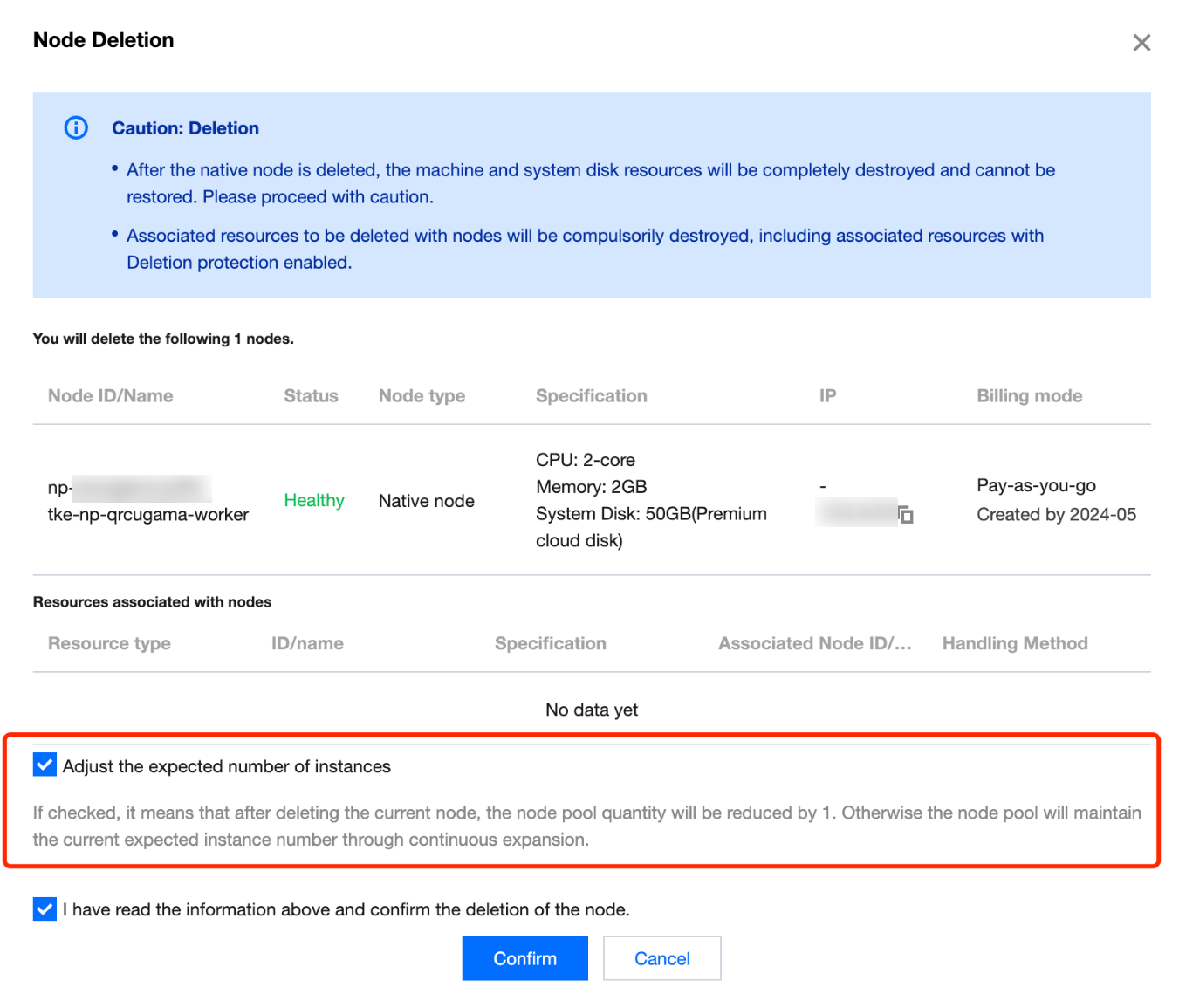
5. Click Confirm to complete the node deletion.
Note:
For the pay-as-you-go node pool, when no specific nodes are designated for deletion and you choose to reduce the number of nodes directly by clicking Adjust quantity, the system will randomly delete redundant node replicas.
Monthly Subscription Type
1. Log in to the TKE console, and select Clusters in the left sidebar.
2. On the cluster list page, click the ID of the target cluster to go to the details page.
3. Select Node Management > Worker Node > Node Pool in the left sidebar , and click the node pool ID in the node pool list to enter the node pool details page.
4. In the node list, click Adjust quantity , to reduce the number of nodes in the pop-up window. In the subsequent confirmation window and refund window, separately click Confirm to complete the deletion of monthly subscription nodes. For example, if the current node pool has 5 native monthly subscription nodes and you wish to delete 2 specific nodes, first adjust the quantity to 3, and then select 2 monthly subscription nodes from the current node list for deletion.
5. In the node list, you can also select a monthly subscription node or a batch of nodes to be deleted, and then click Delete .
Note:
Since monthly subscription nodes involve refund processes, they cannot be deleted randomly like pay-as-you-go nodes. You must confirm the pop-up window information before deletion.
Refunds for monthly subscription nodes before expiration will be calculated according to the pay-as-you-go price. Proceed with caution.
Handling of Resources Associated with Nodes
Machines and system disks: After the native node is deleted, the machine and system disk resources will be completely terminated and cannot be restored. Proceed with caution.
EIP: If your node was configured with public network bandwidth at the time of creation, the bound EIP will be terminated along with the deletion of the node and cannot be restored. Proceed with caution.
Data disk: If your node was bound to a data disk at the time of creation, it will be terminated along with the deletion of the node and cannot be restored. It is recommended to back up your data in advance before deletion.
Ajuda e Suporte
Esta página foi útil?
Você também pode entrar em contato com a Equipe de vendas ou Enviar um tíquete em caso de ajuda.
comentários