Introduction to KEDA
Download
Modo Foco
Tamanho da Fonte
What Is KEDA?
KEDA (Kubernetes-based Event-Driven Autoscaler) is an event-driven autoscaler in Kubernetes with powerful features. It supports scaling based on the basic CPU and memory indicators, as well as the length of various message queues, database statistics, QPS, Cron scheduled plans, and any other indicators you can imagine. It can even scale the replicas down to zero.
This project was accepted by the Cloud Native Computing Foundation (CNCF) in March 2020, began incubation in August 2021, and eventually graduated in August 2023. It is now very mature and can be safely used in production.
Why Do We Need KEDA?
HPA is Kubernetes' built-in Pod horizontal autoscaler, which can only automatically scale workloads based on the monitoring indicators, primarily the CPU and memory utilization (Resource Metrics) of the workloads. To support other custom metrics, it typically involves installing prometheus-adapter to serve as the implementation for HPA's Custom Metrics and External Metrics, using the monitoring data from Prometheus as the custom metrics for HPA. In theory, HPA + prometheus-adapter could achieve KEDA's features, but the implementation would be very cumbersome. For example, to scale based on the number of pending tasks in a database, it would require writing and deploying an Exporter application to convert the statistical results into Metrics exposed to Prometheus for collection, and then the prometheus-adapter would query Prometheus for the pending tasks to decide whether to scale.
KEDA was primarily introduced to address HPA's inability to scale based on the flexible event sources. It comes with dozens of built-in Scalers, enabling direct integration with various third-party applications, such as the open-source and cloud-managed relational databases, time-series databases, document databases, key-value stores, message queues, event buses, and so on. It also supports scheduled automatic scaling with Cron expressions, covering common scaling scenarios. Furthermore, if an unsupported scenario is encountered, an external Scaler can be created to assist KEDA.
Principle of KEDA
KEDA is not meant to replace HPA but to complement or enhance it. In fact, KEDA is often used together with HPA. Below is the official architecture diagram of KEDA:
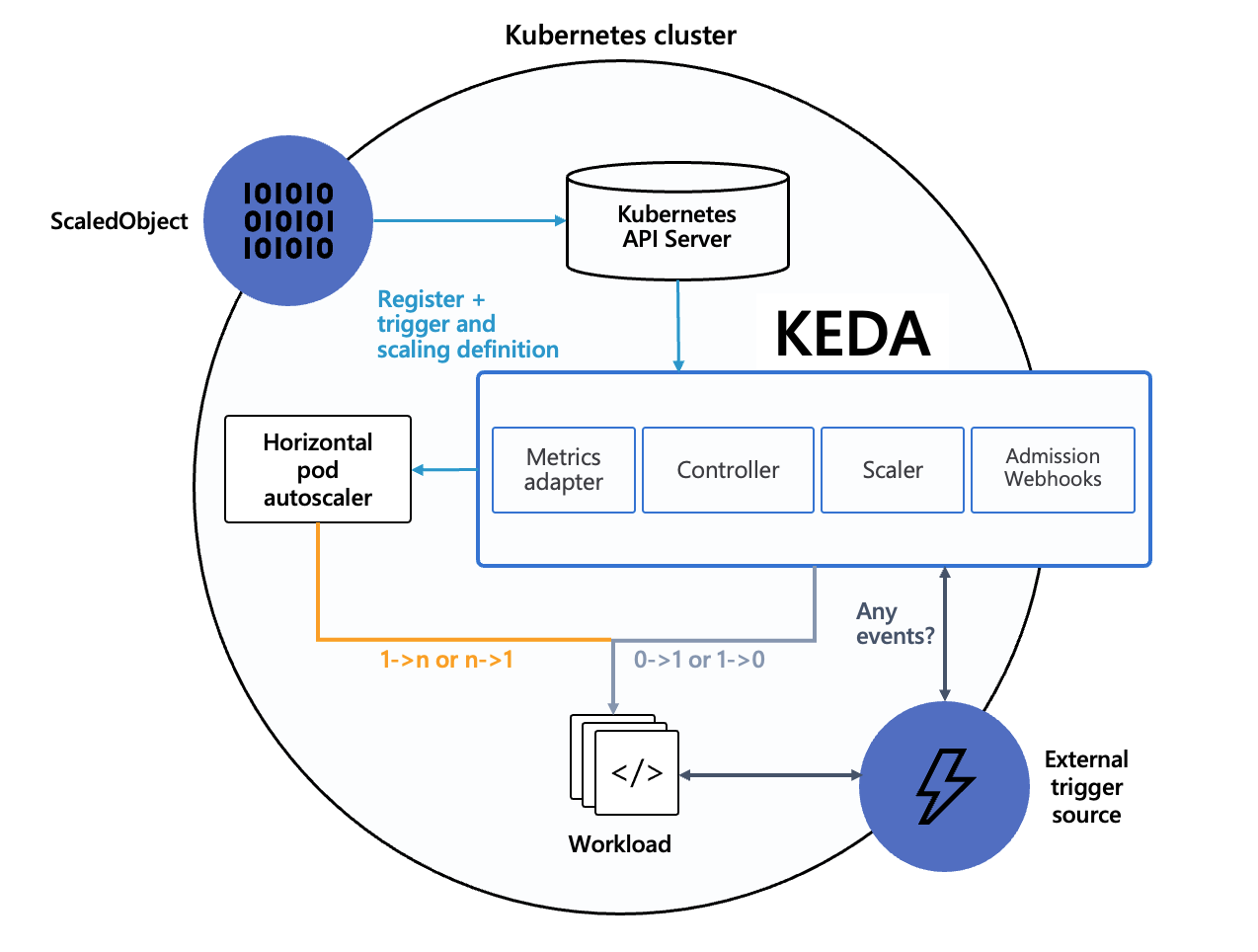
When scaling in the replica count of a workload to the idle replicas count or scaling out the idle replicas count, KEDA achieves this by modifying the workload's replica count (idle replicas count can be less than the
minReplicaCount, including 0, meaning it can be scaled down to 0).In other scaling scenarios, HPA performs the scaling operations, managed automatically by KEDA. HPA uses External Metrics as the data source, and the data for External Metrics is provided by KEDA.
The core of various KEDA Scalers is actually to expose data in the External Metrics format to HPA. KEDA translates various external events into the required External Metrics data, ultimately enabling HPA to auto-scale by using External Metrics data, which effectively reuses HPA's existing capabilities. Management of the details of scaling behavior (such as rapid scale-out or slow scale-in) can be achieved by directly configuring the HPA’s
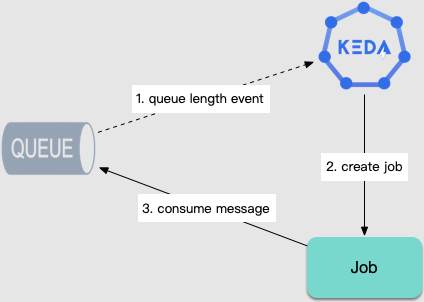
behavior field (requires Kubernetes version ≥1.18).In addition to scaling workloads, for task computing scenarios, KEDA can also automatically create Jobs based on the number of queued tasks to ensure timely task processing:
What Scenarios Are Suitable for KEDA?
The following are scenarios suitable for KEDA.
Microservice Multi-level Call
In microservices, there are business scenarios involving multi-level call where the pressure is transmitted step-by-step. The following shows a common situation:
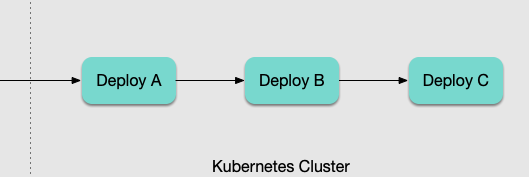
If the traditional HPA is used for scaling based on load, after user traffic enters the cluster:
1.
Deploy A load increases, and the change in metrics forces Deploy A to scale out.2. After A scales out, the throughput increases, and B comes under pressure. The change in metrics is identified again, making
Deploy B scale out.3. As throughput in B increases, C comes under pressure, and
Deploy C scales out.This cascading process is slow and dangerous: the scale-out of each level is directly triggered by a surge in CPU or memory, making it generally susceptible to being 'overwhelmed'. Such a passive and delayed approach is clearly problematic.
At this point, we can use KEDA to achieve multi-level fast scale-out:
Deploy A can scale based on its own load or the QPS indicators recorded by the gateway.Deploy B and Deploy C can scale based on the replica count of Deploy A (maintaining a certain ratio of service replicas at each level).Task Execution (Producer and Consumer)
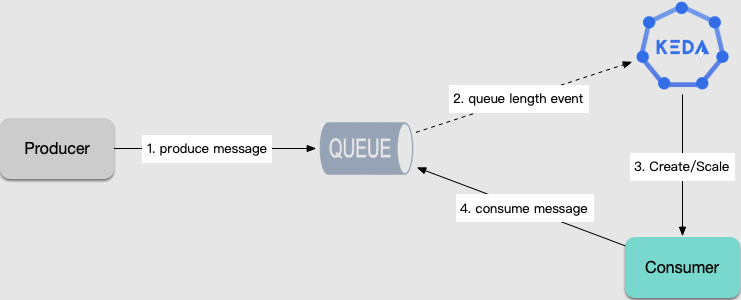
For long-running computing tasks, such as data analysis, ETL, machine learning, and so on, tasks are fetched from the message queue or database for execution, and scaling is required based on the number of tasks. With KEDA, workloads can be auto-scaled according to the number of queued tasks, and jobs can be automatically created to consume tasks.
Periodic Patterns
If the business exhibits periodic peak and trough characteristics, KEDA can be used to configure scheduled scaling. Scale-in can be performed in advance before the peak arrives and scale-out is slowly performed after the peak ends to accommodate periodic changes in the business.
Ajuda e Suporte
Esta página foi útil?
Você também pode entrar em contato com a Equipe de vendas ou Enviar um tíquete em caso de ajuda.
comentários