Viewing the Partition Status of Topic
下载
聚焦模式
字号
During business operations, if exceptions such as message backlogs or excessively high disk load occur in your TDMQ for CKafka (CKafka) instance, you can view partition statuses in the CKafka console to monitor message volumes at the server and consumption offset across partitions for problem identification and analysis.
Operation Steps
1. Log in to the CKafka console.
2. In the left sidebar, click Instance List, and click ID/Name of the target instance to go to the basic instance information page.
3. On the basic instance information page, select the Topic List tab to view the topic list information.
4. On the topic list page, click the right-pointing triangle icon to the left of the topic name to view the partition status and details of the topic.
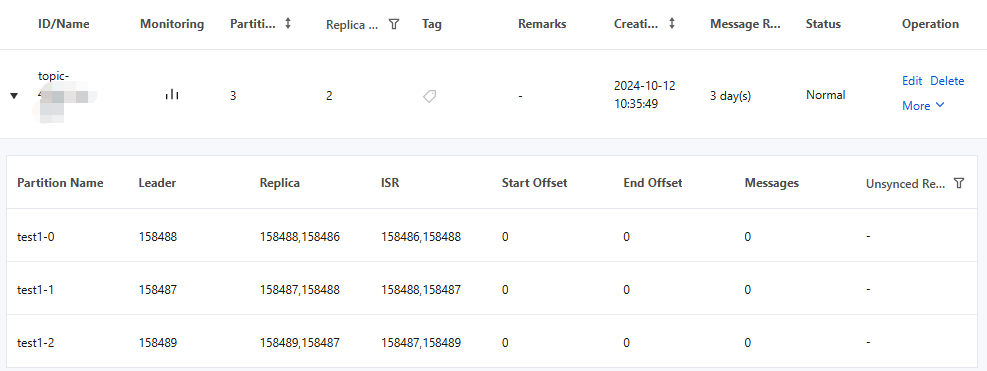
Item | Description |
Partition Name | Name of a partition. |
Leader | A leader handles all read-write requests for the partition, while a follower passively and periodically replicates data from the leader. |
Replica | List of replicas. |
ISR | In-sync replica. |
Start Offset | Last consumption position of a message. |
End Offset | Last written position of a message. |
Messages | Number of messages stored. |
Unsynced Replicas | Number of out-of-sync replicas (OSRs), supporting filtering partitions with OSRs. |
文档反馈