tencent cloud

Tag

Product Introduction
Overview
Features
Scenarios
Use Limits
Resource Types Supporting Tag APIs
Purchase Guide
Getting Started
Creating Tags and Binding Resources
Querying Resources by Tag
Operation Guide
Creating Tags
Tagging Resources
Unbinding Tags
Unbinding or Modifying Tags in Batches
Deleting Tags
Viewing Tagged Resources
Querying and Editing Resource Tags
Setting Tag Quotas
Exporting Resource Tags
Query Tag Modification Record
CreatedBy
Tag Policy
Exporting a Tag List
API Documentation
History
Introduction
API Category
Making API Requests
Write APIs
Read APIs
Project APIs
Data Types
Error Codes
FAQs
Glossary

Tagging Resources

PDF
Modo Foco
Tamanho da Fonte
Última atualização: 2024-12-10 15:18:07

Overview

This document describes how to tag resources in the console so that you can manage your resources centrally and by category.

Prerequisites

You have created a tag. For detailed instructions, please see Creating Tags.

Directions

1. Log in to the Tag console.
2. Click Tag List on the left sidebar.
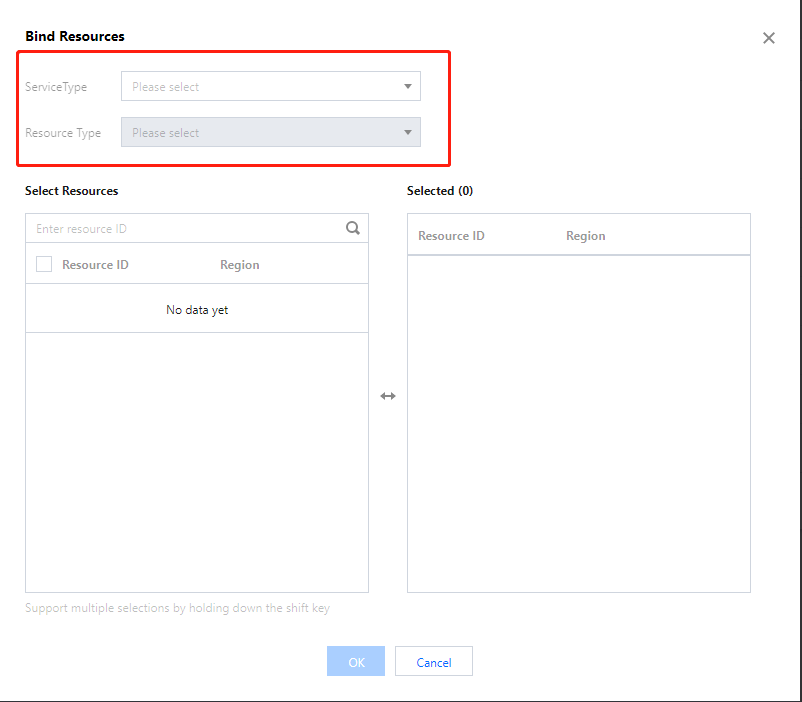
3. Find the key-value pair you created and click Bind Resources in the Operation column.

4. On the Bind Resources page, select a Tencent Cloud service and resource type and choose the resources to tag.

5. Click OK to tag the resources.

Ajuda e Suporte

Esta página foi útil?

comentários