iOS
Download
聚焦模式
字号
产品概述
腾讯云视立方 iOS 播放器组件是腾讯云开源的一款播放器组件,简单几行代码即可拥有类似腾讯视频强大的播放功能,包括横竖屏切换、清晰度选择、手势和小窗等基础功能,还支持视频缓存,软硬解切换和倍速播放等特殊功能,相比系统播放器,支持格式更多,兼容性更好,功能更强大,同时还具备首屏秒开、低延迟的优点,以及视频缩略图等高级能力。
准备工作
2. 下载 Xcode,如您已下载可略过该步骤,您可以进入 App Store 下载安装。
3. 下载 CocoaPods,如您已下载可略过该步骤,您可以进入 Cocoapods 官网 按照指引进行安装。
通过本文您可以学会
集成准备
步骤1:项目下载
您可通过下载播放器组件 ZIP 包 或 Git 命令下载的方式下载腾讯云视立方 iOS 播放器组件项目工程。
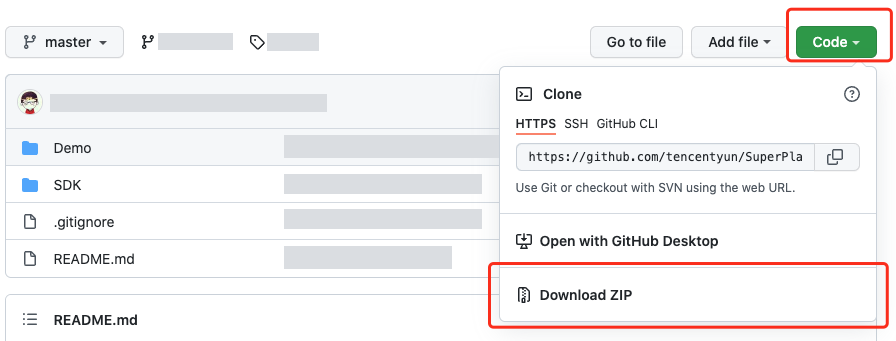
您可以直接下载播放器组件 ZIP 包,单击页面的 Code > Download ZIP 下载。
1. 首先确认您的电脑上安装了 Git。如果没有安装,可以参见 Git 安装教程 进行安装。
2. 执行下面的命令把播放器组件工程代码 clone 到本地。
git clone git@github.com:tencentyun/SuperPlayer_iOS.git
提示下面的信息表示成功 clone 工程代码到本地。
正克隆到 'SuperPlayer_iOS'...remote: Enumerating objects: 2637, done.remote: Counting objects: 100% (644/644), done.remote: Compressing objects: 100% (333/333), done.remote: Total 2637 (delta 227), reused 524 (delta 170), pack-reused 1993接收对象中: 100% (2637/2637), 571.20 MiB | 3.94 MiB/s, 完成.处理 delta 中: 100% (1019/1019), 完成.
下载工程后,工程源码解压后的目录如下:
文件名 | 作用 |
SDK | 存放播放器的 framework 静态库 |
Demo | 存放超级播放器 Demo |
App | 程序入口界面 |
SuperPlayerDemo | 超级播放器 Demo |
SuperPlayerKit | 超级播放器组件 |
步骤2:集成指引
本步骤,用于指导用户如何集成播放器,推荐用户选择使用 CocoaPods 集成 或者 手动下载 SDK 再将其导入到您当前的工程项目中。
1. 本项目支持 CocoaPods 安装,只需要将如下代码添加到 Podfile 中:
Pod 方式直接集成 SuperPlayer
pod 'SuperPlayer
如果您需要依赖 Player 版,可以在 podfile 文件中添加如下依赖:
pod 'SuperPlayer/Player'
如果您需要依赖专业版,可以在 podfile 文件中添加如下依赖:
pod 'SuperPlayer/Professional'
2. 执行
pod install 或 pod update。1. 下载 SDK + Demo 开发包,腾讯云视立方 iOS 播放器项目为 LiteAVSDK/Player_iOS。
2. 导入
TXLiteAVSDK_Player.framework 到工程中,并勾选 Do Not Embed。3. 将 Demo/TXLiteAVDemo/SuperPlayerKit/SuperPlayer 拷贝到自己的工程目录下。
4. SuperPlayer 依赖第三方库包括:AFNetworking、SDWebImage、Masonry、TXLiteAVSDK_Player。
5. 如果是手动集成 TXLiteAVSDK_Player,需要添加所需要的系统库和 library:
系统 Framework 库:MetalKit, ReplayKit、SystemConfiguration、CoreTelephony、VideoToolbox、CoreGraphics、AVFoundation、Accelerate、MobileCoreServices、VideoToolbox。
系统 Library 库:libz、libresolv、libiconv、libc++、libsqlite3。
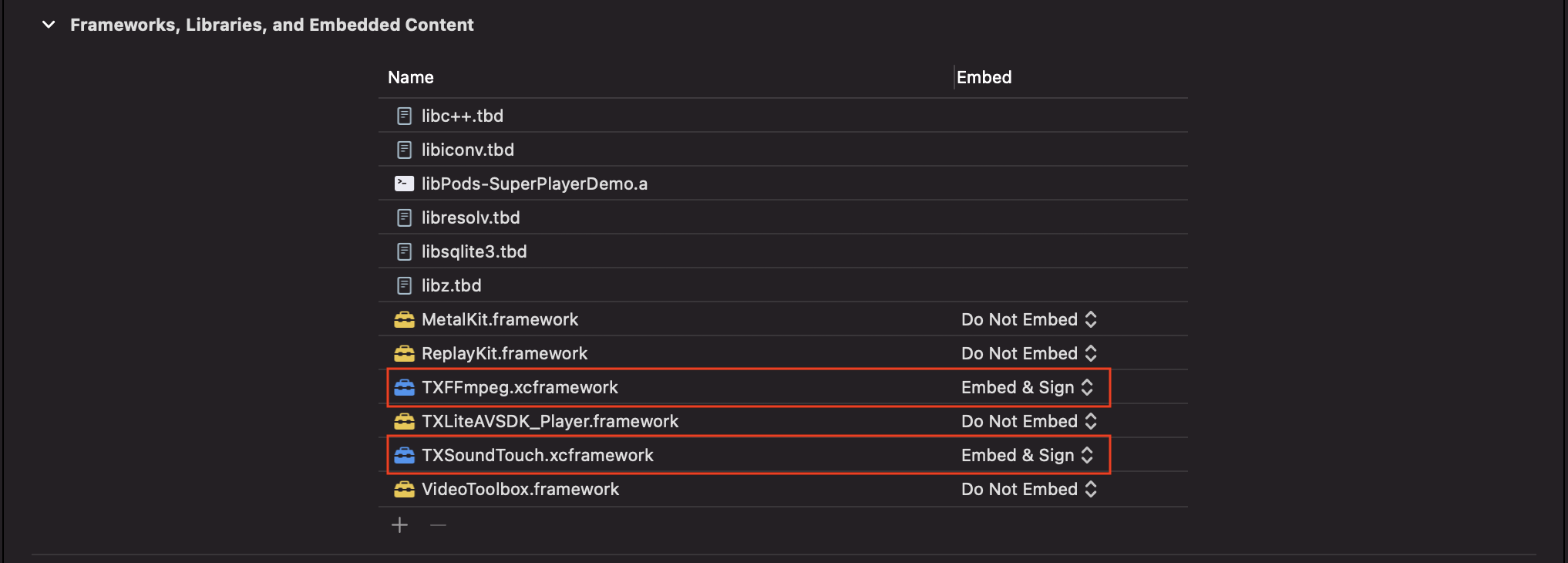
具体操作步骤可以参考 手动集成 SDK。此外还需要把 TXLiteAVSDK_Player 文件下的 TXFFmpeg.xcframework 和 TXSoundTouch.scframework 以动态库的方式加进来如下图所示:
6. 如果是用 Pod 的方式集成 TXLiteAVSDK_Player,不需要添加任何库。
步骤3:使用播放器功能
本步骤,用于指导用户创建和使用播放器,并使用播放器进行视频播放。
1. 创建播放器:
播放器主类为
SuperPlayerView,创建后即可播放视频。// 引入头文件#import <SuperPlayer/SuperPlayer.h>// 创建播放器_playerView = [[SuperPlayerView alloc] init];// 设置代理,用于接受事件_playerView.delegate = self;// 设置父 View,_playerView 会被自动添加到 holderView 下面_playerView.fatherView = self.holderView;
2. 配置 License 授权。
若您暂未获得 License 授权,需 联系我们 获取相关授权。
获取到 License 信息后,在调用 SDK 的相关接口前,通过下面的接口初始化 License,建议在
- [AppDelegate application:didFinishLaunchingWithOptions:] 中进行如下设置:- (BOOL)application:(UIApplication *)application didFinishLaunchingWithOptions:(NSDictionary *)launchOptions {NSString * const licenceURL = @"<获取到的licenseUrl>";NSString * const licenceKey = @"<获取到的key>";//TXLiveBase 位于 "TXLiveBase.h" 头文件中[TXLiveBase setLicenceURL:licenceURL key:licenceKey];NSLog(@"SDK Version = %@", [TXLiveBase getSDKVersionStr]);}
3. 播放视频:
本步骤,用于指导用户播放视频,腾讯云视立方 iOS 播放器组件支持云点播 FileId 或者使用 URL 进行播放,推荐您选择集成 FileId 使用更完善的能力。
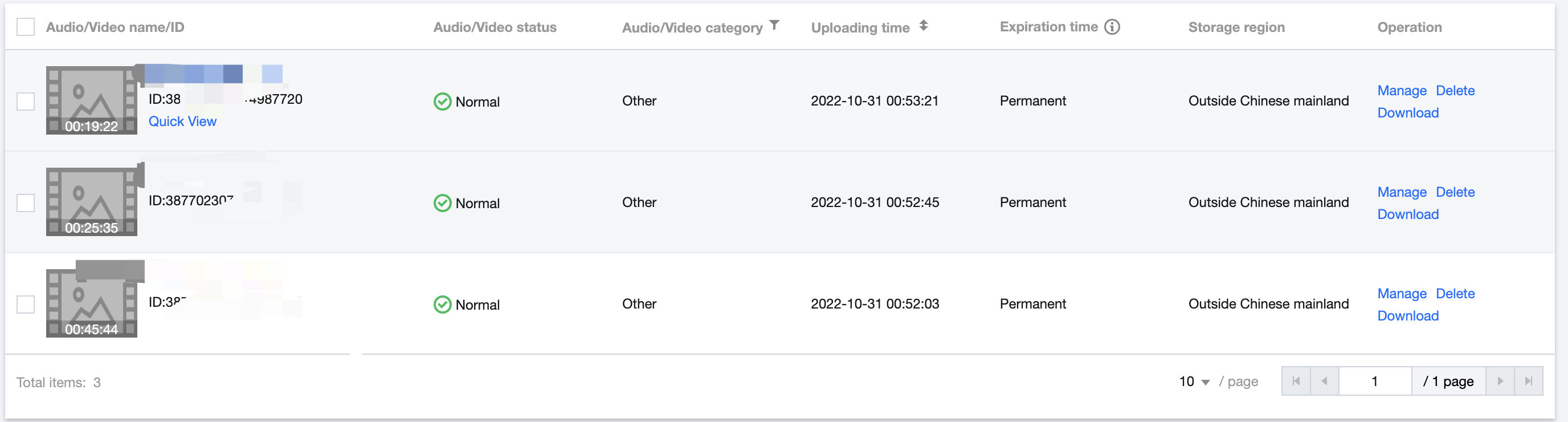
视频 FileId 在一般是在视频上传后,由服务器返回:
1. 客户端视频发布后,服务器会返回 FileId 到客户端。
2. 服务端视频上传时,在 确认上传的通知中包含对应的 FileId。
注意:
通过 FileId 播放时,需要首先使用 Adaptive-HLS(10) 转码模板对视频进行转码,或者使用播放器组件签名 psign 指定播放的视频,否则可能导致视频播放失败。转码教程和说明可参见 用播放器组件播放视频,psign 生成教程可参见 psign 教程。
若您在通过 FileId 播放时出现“no v4 play info”异常,则说明您可能存在上述问题,建议您根据上述教程调整。同时您也可以直接获取源视频播放链接,通过 URL 播放的方式实现播放。
未经转码的源视频在播放时有可能出现不兼容的情况,建议您使用转码后的视频进行播放。
//在未开启防盗链进行播放的过程中,如果出现了“no v4 play info”异常,建议您使用Adaptive-HLS(10)转码模板对视频进行转码,或直接获取源视频播放链接通过url方式进行播放。SuperPlayerModel *model = [[SuperPlayerModel alloc] init];model.appId = 1400329071;// 配置 AppIdmodel.videoId = [[SuperPlayerVideoId alloc] init];model.videoId.fileId = @"5285890799710173650"; // 配置 FileId//私有加密播放需填写 psign, psign 即播放器组件签名,签名介绍和生成方式参见链接:https://www.tencentcloud.com/document/product/266/38099//model.videoId.pSign = @"eyJhbGciOiJIUzI1NiIsInR5cCI6IkpXVCJ9.eyJhcHBJZCI6MTQwMDMyOTA3MSwiZmlsZUlkIjoiNTI4NTg5MDc5OTcxMDE3MzY1MCIsImN1cnJlbnRUaW1lU3RhbXAiOjEsImV4cGlyZVRpbWVTdGFtcCI6MjE0NzQ4MzY0NywidXJsQWNjZXNzSW5mbyI6eyJ0IjoiN2ZmZmZmZmYifSwiZHJtTGljZW5zZUluZm8iOnsiZXhwaXJlVGltZVN0YW1wIjoyMTQ3NDgzNjQ3fX0.yJxpnQ2Evp5KZQFfuBBK05BoPpQAzYAWo6liXws-LzU";[_playerView playWithModelNeedLicence:model];
SuperPlayerModel *model = [[SuperPlayerModel alloc] init];model.videoURL = @"http://your_video_url.mp4"; // 配置您的播放视频url[_playerView playWithModelNeedLicence:model];
4. 退出播放:
当不需要播放器时,调用
resetPlayer 清理播放器内部状态,释放内存。[_playerView resetPlayer];
您已完成了腾讯云视立方 iOS 播放器组件的创建、播放视频和退出播放的能力集成。
功能使用
1、全屏播放
播放器组件支持全屏播放,在全屏播放场景内,同时支持锁屏、手势控制音量和亮度、弹幕、截屏、清晰度切换等功能设置。功能效果可在 腾讯云视立方 App > 播放器 > 播放器组件 中体验,单击界面右下角全屏即可进入全屏播放界面。
在窗口播放模式下,可通过调用下述接口进入全屏播放模式:
- (void)superPlayerFullScreenChanged:(SuperPlayerView *)player {//用户可在此自定义切换全屏后的逻辑}
全屏播放界面功能介绍
通过返回即可返回窗口播放模式,单击后 SDK 处理完全屏切换的逻辑后会触发的代理方法为:
// 返回事件- (void)superPlayerBackAction:(SuperPlayerView *)player;单击左上角返回按钮触发// 全屏改变通知- (void)superPlayerFullScreenChanged:(SuperPlayerView *)player;
锁屏操作可以让用户进入沉浸式播放状态。单击后由 SDK 自己处理,无回调。
// 用户可通过以下接口控制是否锁屏@property(nonatomic, assign) BOOL isLockScreen;
打开弹幕功能后屏幕上会有用户发送的文字飘过。
在这里拿到 SPDefaultControlView 对象,播放器 view 初始化的时候去给 SPDefaultControlView 的弹幕按钮设置事件,弹幕内容和弹幕 view 需要用户自己自定义,详细参见 SuperPlayerDemo 下的 CFDanmakuView、CFDanmakuInfo、CFDanmaku。
SPDefaultControlView *dv = (SPDefaultControlView *)**self**.playerView.controlView;[dv.danmakuBtn addTarget:**self** action:**@selector**(danmakuShow:) forControlEvents:UIControlEventTouchUpInside];
CFDanmakuView:弹幕的属性在初始化时配置。
// 以下属性都是必须配置的--------// 弹幕动画时间@property(nonatomic, assign) CGFloat duration;// 中间上边/下边弹幕动画时间@property(nonatomic, assign) CGFloat centerDuration;// 弹幕弹道高度@property(nonatomic, assign) CGFloat lineHeight;// 弹幕弹道之间的间距@property(nonatomic, assign) CGFloat lineMargin;// 弹幕弹道最大行数@property(nonatomic, assign) NSInteger maxShowLineCount;// 弹幕弹道中间上边/下边最大行数@property(nonatomic, assign) NSInteger maxCenterLineCount;
播放器组件提供播放过程中截取当前视频帧功能,您可以把图片保存起来进行分享。单击截屏按钮后,由 SDK 内部处理,无截屏成功失败的回调,截取到的图片目录为手机相册。
用户可以根据需求选择不同的视频播放清晰度,如高清、标清或超清等。单击后触发的显示清晰度 view 以及单击清晰度选项均由 SDK 内部处理,无回调。
2、悬浮窗播放
// 如果在竖屏且正在播放的情况下单击返回按钮会触发接口[SuperPlayerWindowShared setSuperPlayer:self.playerView];[SuperPlayerWindowShared show];// 单击浮窗返回窗口触发的代码接口SuperPlayerWindowShared.backController = self;
3、视频封面
当播放器组件设置为自动播放模式
PLAY_ACTION_AUTO_PLAY 时,视频自动播放,此时将在视频首帧加载出来之前展示封面。当播放器组件设置为手动播放模式
PLAY_ACTION_MANUAL_PLAY 时,需用户单击播放后视频才开始播放。在单击播放前将展示封面;在单击播放后到视频首帧加载出来前也将展示封面。视频封面支持使用网络 URL 地址或本地 File 地址,使用方式可参见下述指引。若您通过 FileID 的方式播放视频,则可直接在云点播内配置视频封面。
SuperPlayerModel *model = [[SuperPlayerModel alloc] init];SuperPlayerVideoId *videoId = [SuperPlayerVideoId new];videoId.fileId = @"8602268011437356984";model.appId = 1400329071;model.videoId = videoId;//播放模式,可设置自动播放模式:PLAY_ACTION_AUTO_PLAY,手动播放模式:PLAY_ACTION_MANUAL_PLAYmodel.action = PLAY_ACTION_MANUAL_PLAY;//设定封面的地址为网络url地址,如果coverPictureUrl不设定,那么就会自动使用云点播控制台设置的封面model.customCoverImageUrl = @"http://1500005830.vod2.myqcloud.com/6c9a5118vodcq1500005830/cc1e28208602268011087336518/MXUW1a5I9TsA.png";[self.playerView playWithModelNeedLicence:model];
4、视频列表轮播
播放器组件支持视频列表轮播,即在给定一个视频列表后:
支持按顺序循环播放列表中的视频,播放过程中支持自动播放下一集也支持手动切换到下一个视频。
列表中最后一个视频播放完成后将自动开始播放列表中的第一个视频。
//步骤1:构建轮播数据的 NSMutableArrayNSMutableArray *modelArray = [NSMutableArray array];SuperPlayerModel *model = [SuperPlayerModel new];SuperPlayerVideoId *videoId = [SuperPlayerVideoId new];videoId.fileId = @"8602268011437356984";model.appId = 1252463788;model.videoId = videoId;[modelArray addObject:model];model = [SuperPlayerModel new];videoId = [SuperPlayerVideoId new];videoId.fileId = @"4564972819219071679";model.appId = 1252463788;model.videoId = videoId;[modelArray addObject:model];//步骤2:调用 SuperPlayerView 的轮播接口[self.playerView playWithModelListNeedLicence:modelArray isLoopPlayList:YES startIndex:0];
(void)playWithModelListNeedLicence:(NSArray *)playModelList isLoopPlayList:(BOOL)isLoop startIndex:(NSInteger)index;
接口参数说明:
参数名 | 类型 | 描述 |
playModelList | NSArray * | 轮播数据列表 |
isLoop | Boolean | 是否循环 |
index | NSInteger | 开始播放的视频索引 |
5、画中画功能
画中画(PictureInPicture)在 iOS 9就已经推出了,不过之前都只能在 iPad 上使用,iPhone 要使用画中画需更新到 iOS 14才能使用。
目前腾讯云播放器可以支持应用内和应用外画中画能力,极大的满足用户的诉求。使用前需要开通后台模式,步骤为:Xcode 选择对应的 Target > Signing & Capabilities > Background Modes,勾选 Audio, AirPlay, and Picture in Picture。

使用画中画能力代码示例:
// 进入画中画if (![TXVodPlayer isSupportPictureInPicture]) {return;}[_vodPlayer enterPictureInPicture];// 退出画中画[_vodPlayer exitPictureInPicture];
6、视频试看
播放器组件支持视频试看功能,可以适用于非 VIP 试看等场景,开发者可以传入不同的参数来控制视频试看时长、提示信息、试看结束界面等。功能效果可在 腾讯云视立方 App > 播放器 > 播放器组件 > 试看功能演示 视频中体验。
//步骤1:创建试看modelTXVipWatchModel *model = [[TXVipWatchModel alloc] init];model.tipTtitle = @"可试看15秒,开通VIP观看完整视频";model.canWatchTime = 15;//步骤2:设置试看modelself.playerView.vipWatchModel = model;//步骤3:调用方法展示试看功能[self.playerView showVipTipView];
TXVipWatchModel 类参数说明:
参数名 | 类型 | 描述 |
tipTtitle | NSString | 试看提示信息 |
canWatchTime | float | 试看时长,单位为秒 |
7、动态水印
播放器组件支持在播放界面添加不规则跑动的文字水印,有效防盗录。全屏播放模式和窗口播放模式均可展示水印,开发者可修改水印文本、文字大小、颜色。功能效果可在 腾讯云视立方 App > 播放器 > 播放器组件 > 动态水印演示 视频中体验。
//步骤1:创建视频源信息 modelSuperPlayerModel * playermodel = [SuperPlayerModel new];//添加视频源其他信息//步骤2:创建动态水印 modelDynamicWaterModel *model = [[DynamicWaterModel alloc] init];//步骤3:设置动态水印的数据model.dynamicWatermarkTip = @"shipinyun";model.textFont = 30;model.textColor = [UIColor colorWithRed:255.0/255.0 green:255.0/255.0 blue:255.0/255.0 alpha:0.8];playermodel.dynamicWaterModel = model;//步骤4:调用方法展示动态水印[self.playerView playWithModelNeedLicence:playermodel];
DynamicWaterModel 类参数说明:
参数名 | 类型 | 描述 |
dynamicWatermarkTip | NSString | 水印文本信息 |
textFont | CGFloat | 文字大小 |
textColor | UIColor | 文字颜色 |
Demo 体验
更多完整功能可直接运行工程 Demo,或扫码下载移动端 Demo 腾讯云视立方 App 体验。
运行工程 Demo
1. 在 Demo 目录,执行命令行
pod update,重新生成 TXLiteAVDemo.xcworkspace 文件。2. 双击打开工程,修改证书选择真机运行。
3. 成功运行 Demo 后,进入 播放器 > 播放器组件,可体验播放器功能。
腾讯云视立方 App
在 腾讯云视立方 App > 播放器 中可体验更多播放器组件功能。

文档反馈