交互数智人实践教程(云渲染)
Download
聚焦模式
字号
注意:
1. 概述
本 Demo 提供了一套完整的腾讯云智能数智人交互驱动方案,支持通过文本 或 音频驱动数智人,并通过 H5 页面实时播放数智人视频画面。
核心能力
能力 | 说明 |
两种建流方式 | AssetVirtualmanKey(形象资产 ID)、VirtualmanProjectId(数智人项目 ID) |
三种流协议 | RTMP、TRTC、WebRTC |
两种驱动模式 | 文本驱动(输入文字让数智人说话)、音频驱动(上传音频文件驱动口型) |
H5 视频播放 | TRTC 和 WebRTC 协议自动弹出浏览器播放页面 |
文件清单
├── tencent_virtual_human_completeV1.py # 主脚本(Python)├── trtc_player.html # TRTC 协议 H5 播放页面├── webrtc_player.html # WebRTC 协议 H5 播放页面└── TcPlayer-2.4.5.js # TCPlayerLite SDK(WebRTC 播放依赖)
2. 环境准备
2.1 Python 依赖
警告:
Python 版本请选择3.11,太高版本下有些依赖不可用或已移除。强烈建议先创建 Python 虚拟环境,在虚拟环境中安装依赖。
pip install requests websocket-client pydub
2.2 系统依赖
音频驱动功能需要 ffmpeg(用于音频格式转换):
# macOSbrew install ffmpeg# Ubuntu/Debiansudo apt install ffmpeg# Windows# 下载 https://ffmpeg.org/download.html 并添加到 PATH
2.3 腾讯云凭据
参数 | 说明 | 获取方式 |
appkey | 应用标识 | 数智人平台 → 应用管理(参考图1) |
accesstoken | 访问令牌 | 数智人平台 → 应用管理(参考图1) |
asset_virtualman_key | 形象资产 ID | 数智人平台 → 形象资产管理(参考图2) |
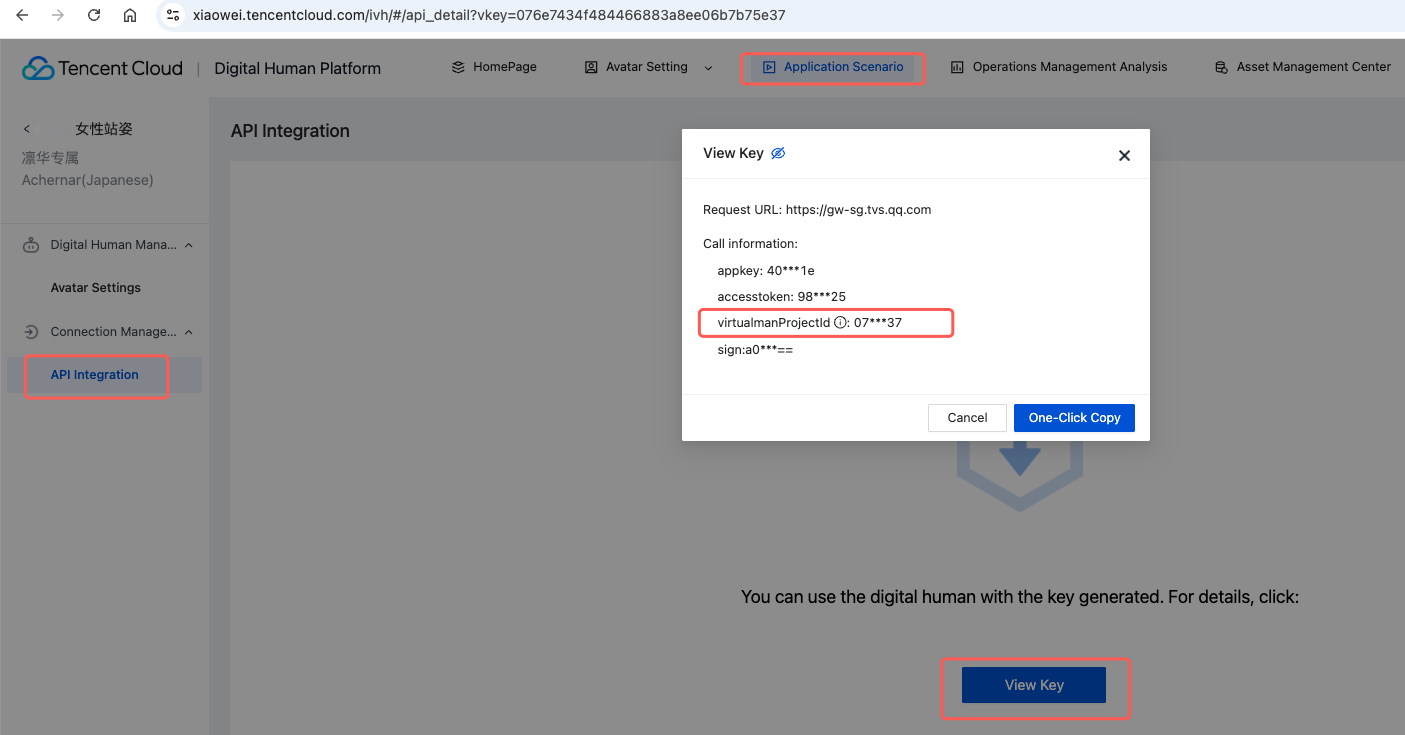
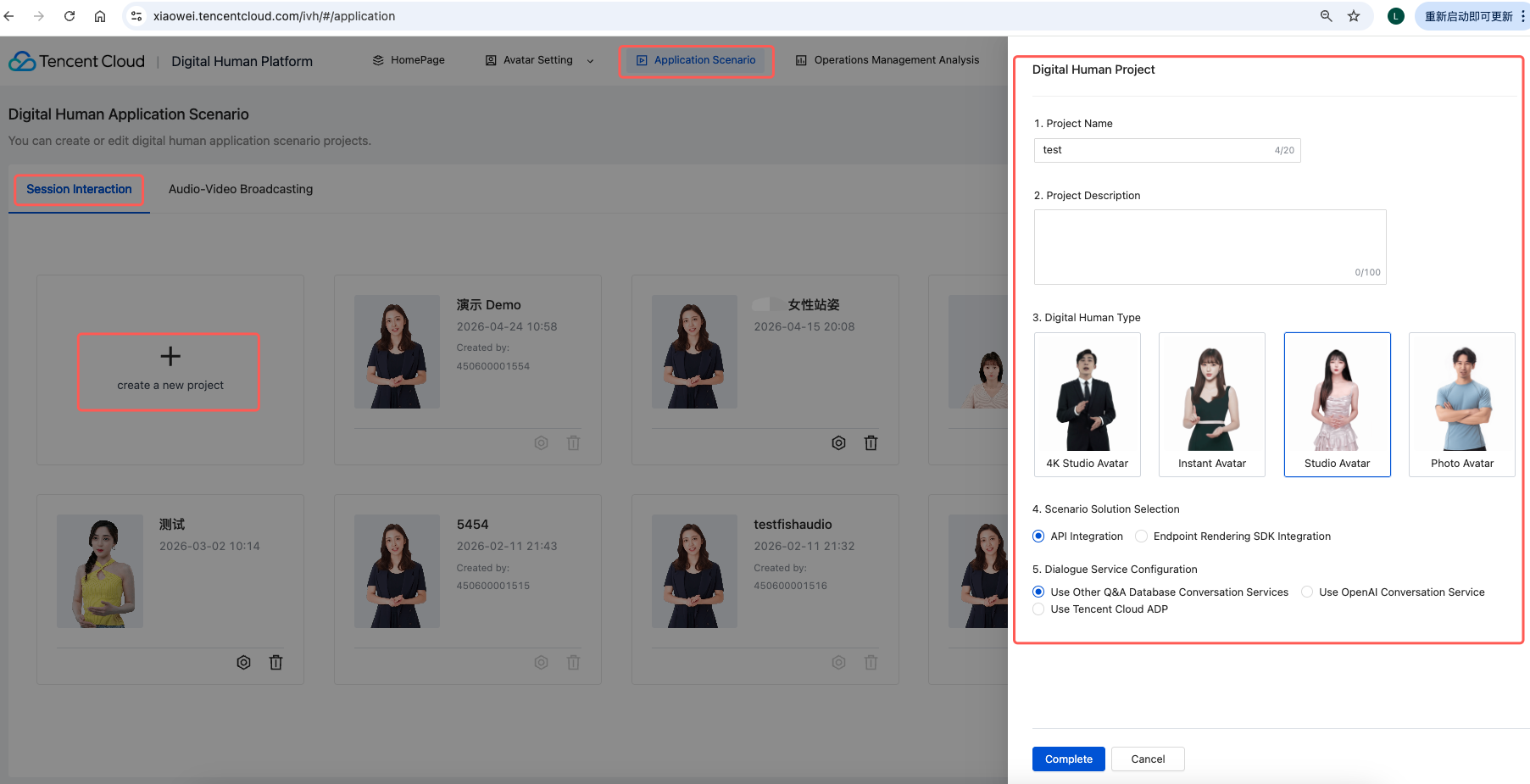
virtualman_project_id | 数智人项目 ID | 数智人平台 → 项目管理 |
说明:
asset_virtualman_key 和 virtualman_project_id 代表两种不同的建流方式,使用时二选一即可。
图1. 获取 appkey 和 accesstoken 的方式
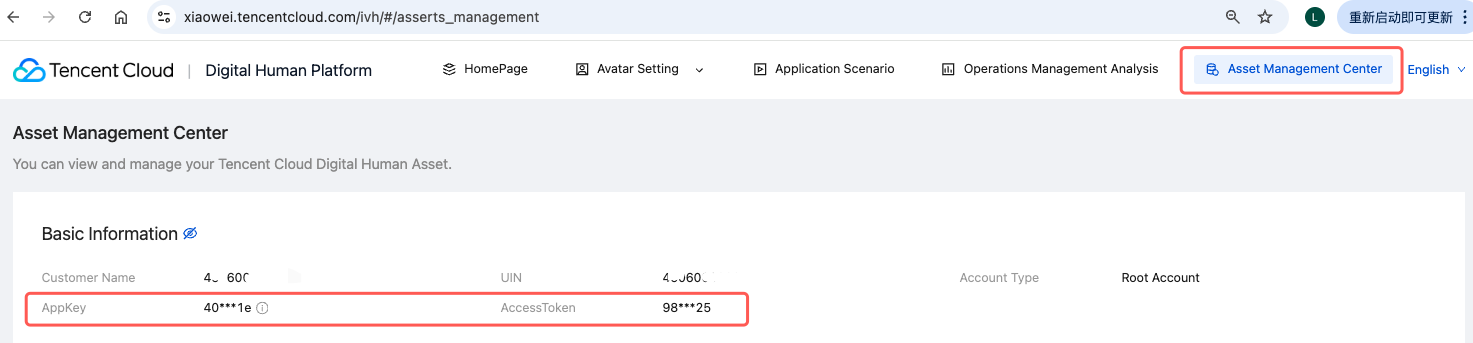
图2. 获取 asset_virtualman_key 的方式
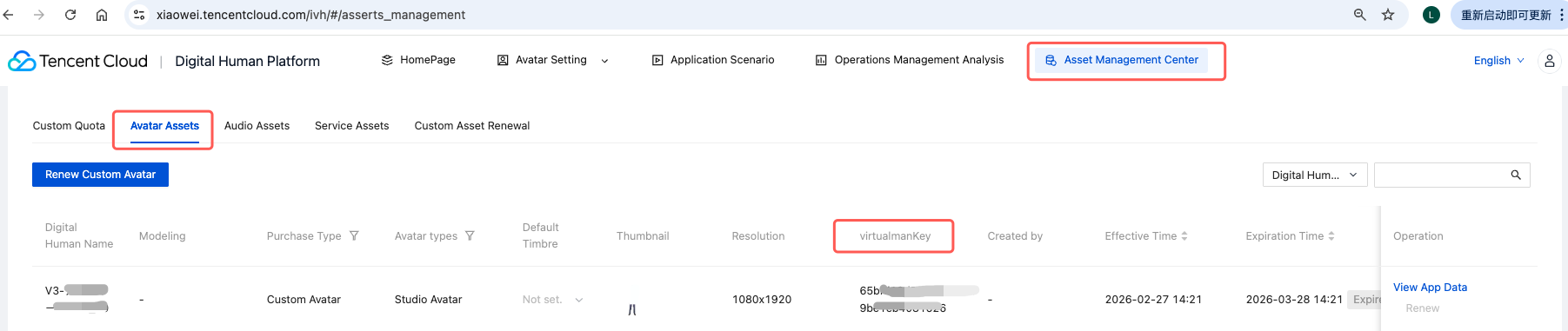
图3. 获取 virtualman_project_id 的方式
注意:
3. 快速开始
3.1 配置参数
编辑
tencent_virtual_human_completeV1.py 文件底部的 CONFIG 字典:CONFIG = {"appkey": "your_appkey","accesstoken": "your_accesstoken","asset_virtualman_key": "your_asset_key", # 形象资产ID(优先使用)"virtualman_project_id": "", # 项目ID(asset_key为空时使用)"protocol": "rtmp", # 流协议: "rtmp" / "trtc" / "webrtc""protocol_option": None, # 协议选项(见第5节)}
Running Environment
Operating System: Ubuntu 24.04.3 LTS / x86_64
Runtime Version: Python 3.11.1
3.2 运行脚本
python tencent_virtual_human_completeV1.py
脚本将自动执行以下流程:
1️⃣ 创建会话(自动选择建流方式)2️⃣ 等待会话就绪(轮询状态,最多120秒)3️⃣ 开启会话🎬 自动启动 H5 播放器(TRTC/WebRTC 协议时)4️⃣ 创建 WebSocket 连接5️⃣ 进入交互模式6️⃣ 关闭会话
3.3 交互模式
进入交互模式后,终端会提示选择驱动方式:
📋 驱动方式选择:1 - 文本驱动(输入文字让数智人说话)2 - 音频驱动(选择音频文件驱动数智人)q - 退出
输入
1:进入文本驱动模式,输入文字后数智人会用 TTS 合成语音并同步口型。输入
2:进入音频驱动模式,输入音频文件路径(支持 mp3、wav 等格式),数智人将用你的音频驱动口型。输入
q:退出并关闭会话。4. 建流方式
4.1 AssetVirtualmanKey 建流(默认)
使用形象资产 ID 创建会话,适用于通过形象资产管理页面创建的数智人。
API 接口:
/v2/ivh/sessionmanager/sessionmanagerservice/createsessionbyassetCONFIG = {"asset_virtualman_key": "your_asset_key","virtualman_project_id": "", # 留空}
Running Environment
Operating System: Ubuntu 24.04.3 LTS / x86_64
Runtime Version: Python 3.11.1
说明:
4.2 VirtualmanProjectId 建流
使用数智人项目 ID 创建会话,适用于通过项目管理页面创建的数智人。
API 接口:
/v2/ivh/sessionmanager/sessionmanagerservice/createsessionCONFIG = {"asset_virtualman_key": "", # 留空"virtualman_project_id": "your_project_id",}
Running Environment
Operating System: Ubuntu 24.04.3 LTS / x86_64
Runtime Version: Python 3.11.1
说明:
4.3 优先级逻辑
脚本内部通过
create_session() 统一入口自动选择建流方式:def create_session(self) -> Tuple[bool, str]:if self.asset_virtualman_key:return self.create_session_by_asset() # 优先elif self.virtualman_project_id:return self.create_session_by_project() # 降级else:return False, "两个参数均为空,无法建流"
5. 流协议与 ProtocolOption
5.1 三种协议对比
协议 | 延迟 | 播放方式 | 适用场景 |
RTMP 协议 | 2~5秒 | VLC 等外部播放器 | 通用场景、兼容性最好 |
TRTC 协议 | 200~400ms | 自动弹出 H5 页面(TRTC Web SDK) | 超低延迟实时交互 |
WebRTC 协议 | 500ms~1秒 | 自动弹出 H5 页面(TCPlayerLite) | 低延迟 Web 播放 |
5.2 RTMP 协议(默认)
CONFIG = {"protocol": "rtmp","protocol_option": None,}
建流成功后返回 RTMP 播放地址,如:
rtmp://liveplay.ivh.qq.com/live/m789。使用 VLC 等播放器打开即可。5.3 TRTC 协议
# 调试模式(使用平台统一 AppId,无需额外配置)CONFIG = {"protocol": "trtc","protocol_option": None,}
建流成功后返回
trtc:// 格式播放地址,脚本自动:1. 在本地 8080 端口启动 HTTP 服务器;
2. 解析
trtc:// 地址中的 appId、roomId、userSig 等参数;3. 在浏览器中打开
trtc_player.html 播放页面;4. H5 页面以观众角色进入 TRTC 房间,自动拉取数智人视频流。
5.4 WebRTC 协议
CONFIG = {"protocol": "webrtc","protocol_option": None,}
建流成功后返回
webrtc:// 格式播放地址,脚本自动:1. 在本地 8080 端口启动 HTTP 服务器;
2. 在浏览器中打开
webrtc_player.html 播放页面;3. 使用 TCPlayerLite SDK 进行超低延迟播放。
5.5 ProtocolOption 高级配置
ProtocolOption 用于 TRTC 生产环境或自定义推流场景。可用字段
字段 | 类型 | 说明 |
TrtcUseExternalApp | bool | 是否使用外部 TRTC AppId |
TrtcAppId | str | TRTC 应用 ID(外部 AppId 时必填) |
TrtcRoomId | int | TRTC 数字房间号 |
TrtcStrRoomId | str | TRTC 字符串房间号(与 TrtcRoomId 二选一) |
TrtcAutoGenRoomIdType | int | 自动生成房间号类型:0=数字(默认),1=字符串 |
TrtcUserSig | str | TRTC 用户签名(外部 AppId 时必填) |
TrtcPrivateMapKey | str | TRTC 权限票据(未开启高级权限填 "dummy") |
CssCustomPushUrl | str | 自定义云直播推流地址(任何协议均可使用) |
场景示例
TRTC 生产模式(使用外部 AppId):
CONFIG = {"protocol": "trtc","protocol_option": {"TrtcUseExternalApp": True,"TrtcAppId": "1400xxxxxx","TrtcRoomId": 12345,"TrtcUserSig": "eJw8js0Kgk...","TrtcPrivateMapKey": "dummy"},}
自定义推流地址(RTMP/WebRTC 均可用):
CONFIG = {"protocol": "rtmp","protocol_option": {"CssCustomPushUrl": "rtmp://domain/appName/streamName?txSecret={0}&txTime={1}"},}
5.6 可选配置
若形象支持透明背景,我们也可以通过调整 Demo 参数体验透明背景效果,如下所示:
"ExtraInfo": {"AlphaChannelEnable":True} # 开启Alpha通道(如果需要透明背景)
6. H5 播放页面
6.1 TRTC 播放页面(trtc_player.html)
技术方案:TRTC Web SDK v5(通过 unpkg CDN 加载)
核心逻辑:
从 URL 参数中解析
appId、roomId、userId、userSig以 观众角色(
role: 'audience')进入 TRTC 房间监听
REMOTE_VIDEO_AVAILABLE 事件,自动拉取远端视频流视频画面使用
object-fit: contain 完整显示
关键代码片段:
// 进入房间(仅观众拉流,不推流)await trtc.enterRoom({sdkAppId: config.appId,userId: config.userId,userSig: config.userSig,roomId: config.roomId,scene: 'live',role: 'audience'});// 监听并播放远端视频trtc.on(TRTC.EVENT.REMOTE_VIDEO_AVAILABLE, async (event) => {await trtc.startRemoteVideo({userId: event.userId,streamType: event.streamType,view: 'remote-video',option: { objectFit: 'contain' }});});
独立使用(不依赖 Python 脚本时):
http://localhost:8080/trtc_player.html?appId=1400695865&roomId=402183450&userId=user_xxx&userSig=eJw8...&virtualManUserId=402183450_ivh_anchor
6.2 WebRTC 播放页面(webrtc_player.html)
技术方案:TCPlayerLite v2.4.5(本地部署
TcPlayer-2.4.5.js)
核心逻辑:
从 URL 参数
?url=webrtc://... 读取 WebRTC 播放地址使用 TCPlayerLite 初始化播放器,直播模式自动播放
关键代码片段:
player = new TcPlayer('player-container', {"webrtc": webrtcUrl,"width": '100%',"height": '540',"autoplay": true,"live": true,"controls": "none","webrtcConfig": {"streamType": "auto"},"listener": function (msg) {handlePlayerEvent(msg);}});
独立使用:
http://localhost:8080/webrtc_player.html?url=webrtc://liveplay.ivh.qq.com/live/m11533590420520971383?min_delay_ms=100
注意:
WebRTC 播放页面必须通过 HTTP 服务器访问,不能直接打开本地文件(
file:// 协议不支持)。
7. API 签名机制
所有 API 请求均需要签名认证,签名流程:
1. 参数排序:将所有请求参数按字典序排序;
2. 拼接字符串:
key1=value1&key2=value2&...;3. HMAC-SHA256:使用
accesstoken 作为密钥计算签名;4. Base64 + URL 编码:对签名结果进行编码。
def _generate_signature(self, parameters: Dict[str, str]) -> str:sorted_params = sorted(parameters.items())signing_content = '&'.join(f'{k}={v}' for k, v in sorted_params)h = hmac.new(self.accesstoken.encode('utf-8'),signing_content.encode('utf-8'),hashlib.sha256)hash_in_base64 = base64.b64encode(h.digest()).decode('utf-8')return quote(hash_in_base64)
8. 会话生命周期
┌─────────────┐│ 创建会话 │ create_session()└──────┬──────┘▼┌─────────────┐│ 等待就绪 │ wait_for_session_ready() ← 轮询 SessionStatus└──────┬──────┘ SessionStatus=3 → 准备中▼ SessionStatus=1 → 已就绪┌─────────────┐│ 开启会话 │ start_session()└──────┬──────┘▼┌─────────────┐│ H5 播放器 │ start_h5_player() ← TRTC/WebRTC 时自动启动└──────┬──────┘▼┌─────────────┐│ WebSocket │ create_websocket_connection()│ 长连接通道 │└──────┬──────┘▼┌─────────────┐│ 交互驱动 │ send_text_drive() / send_audio_drive()│ (循环) │└──────┬──────┘▼┌─────────────┐│ 关闭会话 │ close_session()└─────────────┘
9. 驱动指令
9.1 文本驱动
通过 WebSocket 发送文本,数智人使用 TTS 合成语音并同步口型。
drive_cmd = {"Header": {},"Payload": {"ReqId": req_id,"SessionId": self.session_id,"Command": "SEND_TEXT","Data": {"Text": "你好,欢迎来到腾讯云数智人平台","ChatCommand": "NotUseChat"}}}self.ws.send(json.dumps(drive_cmd, ensure_ascii=False))
9.2 音频驱动
将音频文件转换为 PCM 格式(16kHz、单声道、16bit),分包通过 WebSocket 发送。
音频转换:
audio = AudioSegment.from_file(audio_file_path)audio = audio.set_channels(1).set_frame_rate(16000).set_sample_width(2)pcm_data = audio.raw_data
分包发送策略:
每包 5120 字节(160ms 音频)
前 6 个包快速发送(无间隔)
后续包间隔 120ms 发送
最后发送
IsFinal: True 结束包
10. 常见问题
Q1: 音频转换失败
确保已安装 ffmpeg 并在 PATH 中。脚本会自动查找 ffmpeg 路径:
_ffmpeg_path = shutil.which('ffmpeg')
Q2: TRTC 播放页面视频被裁剪
H5 页面已配置
object-fit: contain,如果仍有问题,检查浏览器是否为最新版本。
Q3: WebRTC 播放页面无法打开
确保
TcPlayer-2.4.5.js 文件与 webrtc_player.html 在同一目录必须通过 HTTP 服务器访问(脚本会自动启动),不能用
file:// 协议直接打开
Q4: 会话创建超时
会话创建后状态为"准备中"(SessionStatus=3)属于正常现象,需要等待模型加载。脚本默认轮询等待最多 120 秒。
Q5: 端口 8080 被占用
H5 播放器默认使用 8080 端口。如需更换,修改
start_h5_player() 的 h5_port 参数:h5_url = self.start_h5_player(h5_port=9090)
11. 参考文档
新建直播流会话
查询会话状态
文档反馈