Superapp 实践教程
Download
聚焦模式
字号
1.初始化
Superapp在开发时,需要将SDK头文件 引入到 AppDelegate 中:
//TCSAS#import <TCMPPSDK/TCMPPSDK.h>
SDK 可以支持直接进行引擎初始化,提前准备网络链接,并更新基础库信息和配置信息,加速小程序加载,也可以支持在需要的时候进行初始化:
NSString *filePath = [[NSBundle mainBundle] pathForResource:@"tcsas-ios-configurations" ofType:@"json"];if(filePath) {TMAServerConfig *config = [[TMAServerConfig alloc] initWithFile:filePath];[[TMFMiniAppSDKManager sharedInstance] setConfiguration:config];}
使用者可根据需要,设置开放接口实现实例。如果需要集成扩展模块时,初始化扩展接口准备:
[TMFMiniAppSDKManager sharedInstance].miniAppSdkDelegate = [MIniAppDemoSDKDelegateImpl sharedInstance];
MIniAppDemoSDKDelegateImpl 必须实现 TMFMiniAppSDKDelegate 协议,可以参考 定制 SDK 能力 和 Superapp 工程中的 MIniAppDemoSDKDelegateImpl 文件。
2.打开小程序
打开小程序时,会先判断本地是否有缓存的小程序,如果没有,则会自动从远程服务器上下载小程序,然后打开。如果有缓存的小程序,则会先打开本地小程序,同时后台校验服务器端是否有新版本。
说明:
如果有新版本,则下载新版小程序,下次打开时,就会使用新版小程序。
// 通过小程序id打开小程序// Open the mini program through the mini program id// @param appID 小程序ID - Mini program ID// @param verType 指定打开的小程序类型 - The version type of mini program to open// @param scene 场景值 - scene value// @param firstPage 打开页面 - open the page// @param paramsStr 带入参数 - brings in parameters// @param parentVC 从哪个vc呼起 - Which vc to call from// @param completion 错误回调 - error callback- (void)startUpMiniAppWithAppID:(NSString *)appIDverType:(TMAVersionType)verTypescene:(TMAEntryScene)scenefirstPage:(NSString * _Nullable)firstPageparamsStr:(NSString * _Nullable)paramsStrparentVC:(UIViewController *)parentVCcompletion:(void (^)(NSError * _Nullable))completion;
options 支持的参数列表:
名称 | 是否必填 | 类型 | 作用 |
appID | YES | NSString | 打开指定小程序的小程序 id |
verType | YES | TMAVersionType | 打开小程序的类型 |
scene | YES | TMAEntryScene | 打开小程序使用的场景值 |
firstPage | NO | NSString | 打开页面 |
paramsStr | NO | NSString | 打开传递参数 |
parentVC | YES | UIViewController | 从哪个 VC 呼起 |
completion | YES | block | 错误回调 |
2.1 根据小程序 ID(appId)打开小程序
在 Superapp 首页列表中,可打开正式版本(通过审核并已经发布上线)的小程序。参考如下代码:
[[TMFMiniAppSDKManager sharedInstance] startUpMiniAppWithAppID:info.appIdverType:TMAEntrySceneNonescene:TMAEntrySceneAIOEntryfirstPage:nilparamsStr:[NSString stringWithFormat:@"noServer=%@",noServerStr]parentVC:selfcompletion:^(NSError * _Nullable error) {}];
说明:
appId 字段为小程序的 ID,需要通过小程序开发者或者小程序搜索接口获取。
2.2 扫码打开小程序
小程序 SDK 提供根据扫码打开小程序的接口;在使用小程序 SDK 提供的扫码能力前,需要提前接入扩展库TCMPPExtScanCode。
[[TMFMiniAppSDKManager sharedInstance] startUpMiniAppWithQRCodeWithParentVC:self completion:^(NSError * _Nullable err) {}];
从2.0.9版本开始,正式版小程序二维码可通过控制台生成和修改,Superapp 成功配置 scheme 后即可通过系统相机扫描二维码打开小程序。
在控制台-应用管理-小程序审核-已上架菜单下,点击下载二维码,弹出如下弹窗:
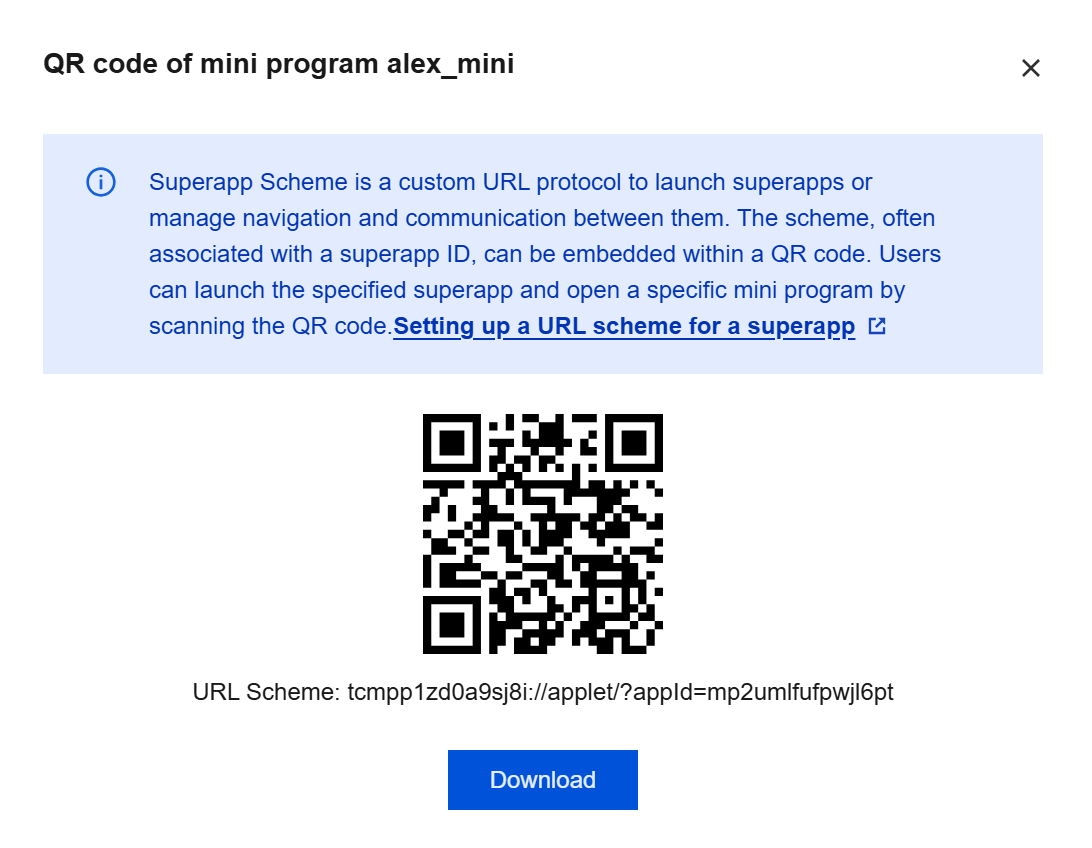
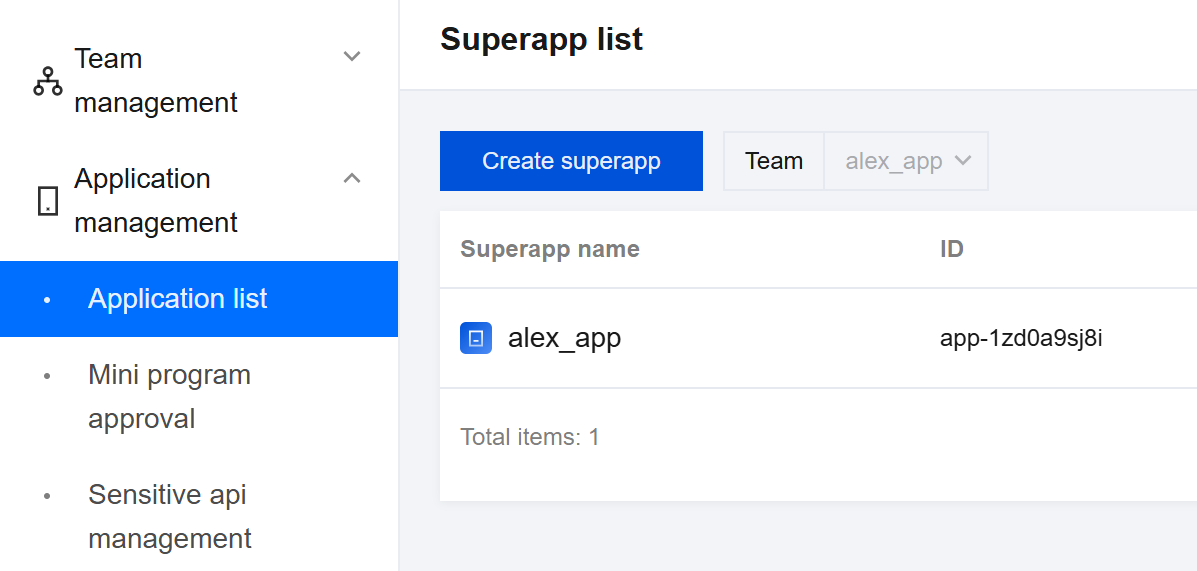
这里的默认协议tcmpp+appid 后几位,appid 可在应用管理-应用列表中获取:
Superapp 需要通过 getAppScheme 代理接口返回 scheme 协议名,示例代码:
- (NSString *)getAppScheme{return @"tcsas";}
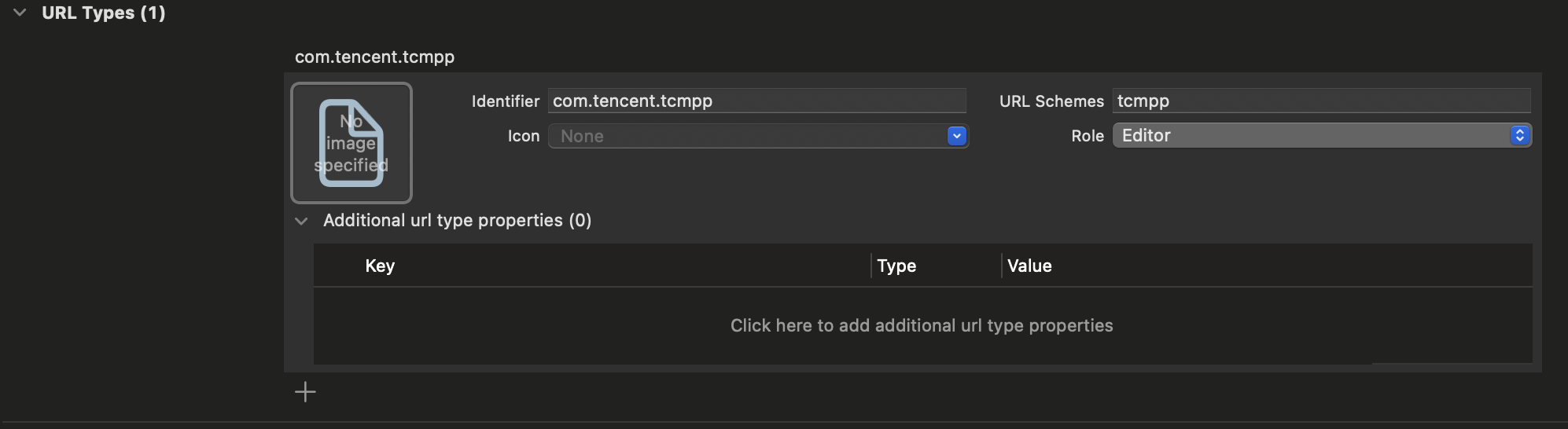
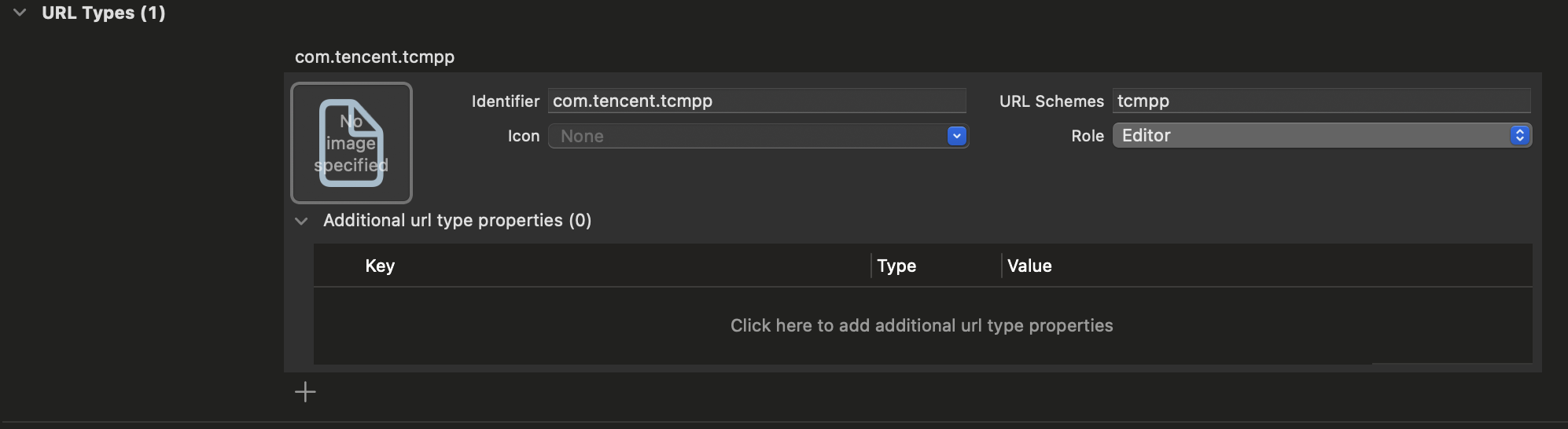
在主工程 info.plist 文件的 URL Types 中配置相同的 scheme:
在 openUrl 方法中实现 handleOpenUrl 方法,示例代码:
- (BOOL)application:(UIApplication *)app openURL:(NSURL *)url options:(NSDictionary<UIApplicationOpenURLOptionsKey, id> *)options {if ([[TMFMiniAppSDKManager sharedInstance] handleOpenUrl:url]){return YES;}return YES;}
完成以上操作后,即可通过系统相机扫描控制台二维码来打开正式版小程序。
3.小程序列表展示
3.1 使用搜索接口获取全部小程序
小程序 SDK 提供线上小程序搜索的接口,可以通过此接口对小程序按关键字和分类进行搜索。若关键字和分类传入为空,则返回所有小程序:
[[TMFMiniAppSDKManager sharedInstance] searchAppletsWithName:@"" completion:^(NSArray<TMFAppletSearchInfo *> * _Nonnull result, NSError * _Nonnull aError) {}];
3.2 获取之前使用过的小程序
//获取最近打开的所有小程序信息///@return 小程序数组<TMFMiniAppInfo>- (NSArray *)loadAppletsFromCache;
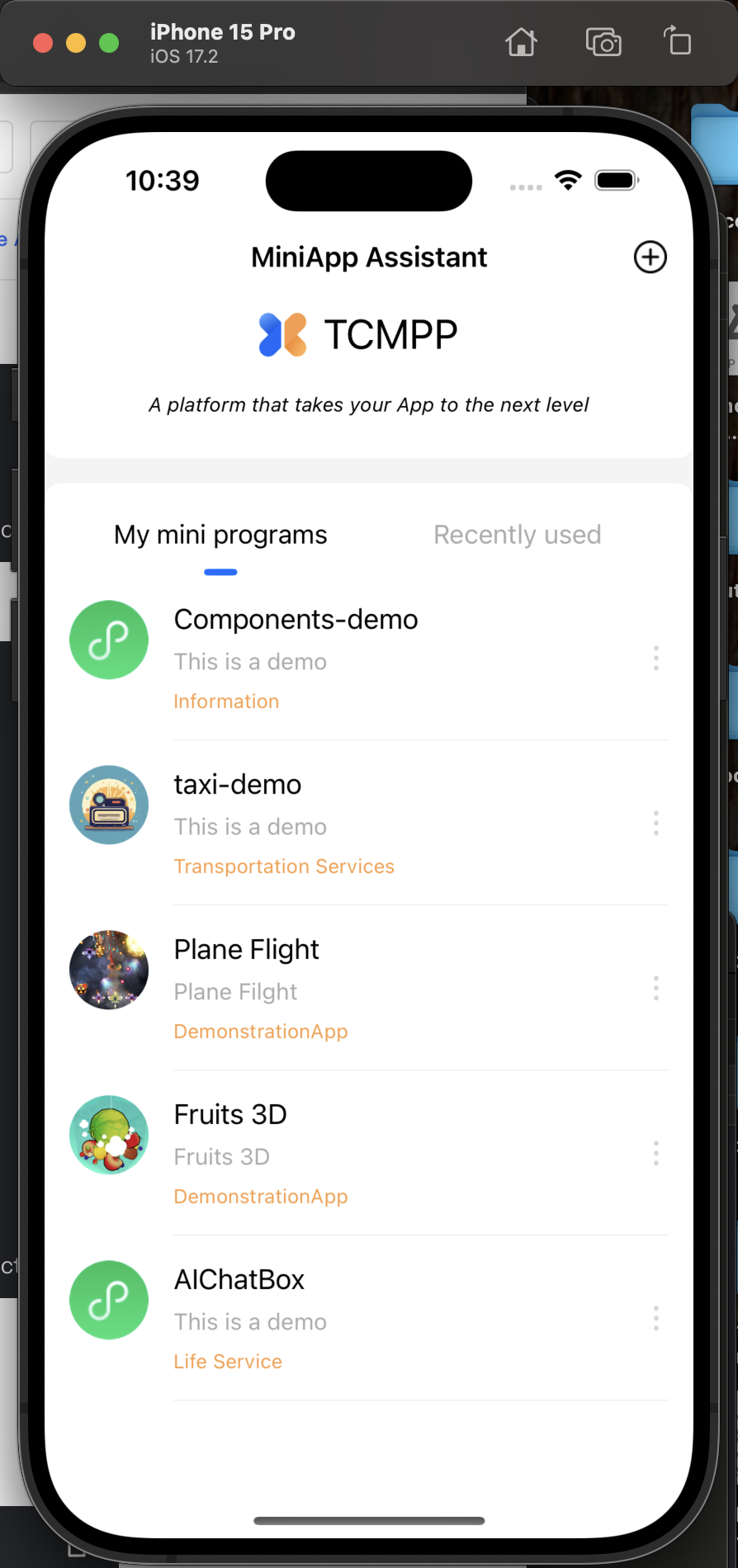
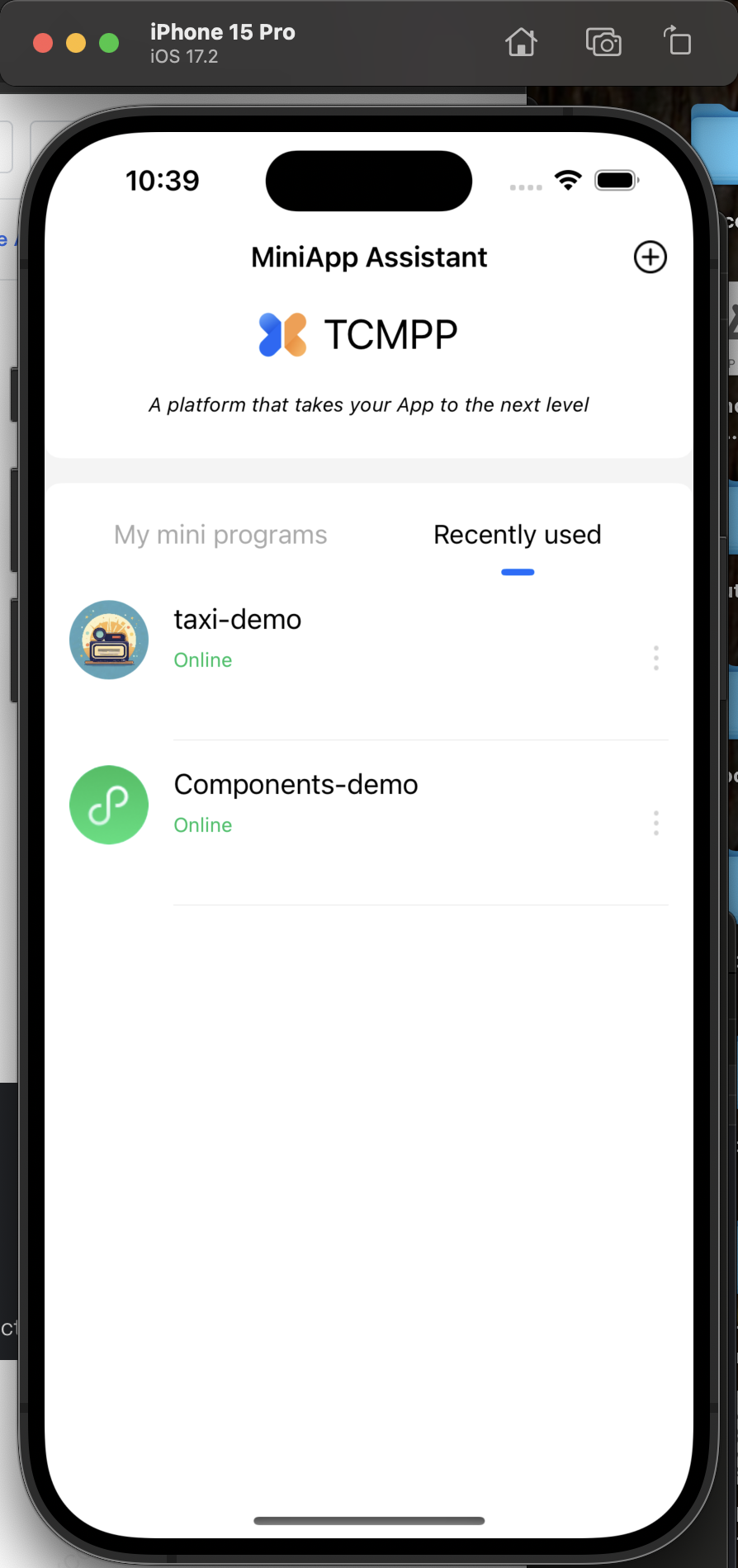
Superapp首页“我的小程序”和“最近使用”小程序数据源示例代码:
NSArray *list = [[TMFMiniAppSDKManager sharedInstance] loadAppletsFromCache];self.recentList = [NSMutableArray arrayWithArray:list];if (self.demoList) {[self.demoList removeAllObjects];} else {self.demoList = [[NSMutableArray alloc] init];}[[TMFMiniAppSDKManager sharedInstance] searchAppletsWithName:@"" completion:^(NSArray<TMFAppletSearchInfo *> * _Nullable datas, NSError * _Nullable error) {[self.demoList addObjectsFromArray:datas];if (self.selectIndex == 0) {self.dataSource = self.demoList;}[self.tableView reloadData];}];
4.语言切换
SDK 引擎目前支持简体中文、繁体中文、英语、法语、阿拉伯语、印尼语。小程序可通过代理接口设置小程序的语言:
/*** @brief Superapp设置的当前语言 - Get current language set by the app* @return 格式 - format : "zh-Hans"*/- (NSString *)getCurrentLocalLanguage;
在 Superapp 设置语言页面中,可根据选择的语言进行设置:
- (void)tableView:(UITableView *)tableView didSelectRowAtIndexPath:(NSIndexPath *)indexPath {NSString *language = @"en";if (indexPath.row == 0) {language = @"zh-Hans";} else if (indexPath.row == 1) {language = @"en";} else if (indexPath.row == 2) {language = @"fr";} else if (indexPath.row == 3) {language = @"id";}[[LanguageManager shared] setCurrentLanguage:language];/// 注意需要终止小程序[[TMFMiniAppSDKManager sharedInstance] terminateAllApplications];}
注意:
切换语言时,代理类返回切换后设置的语言类型,示例代码:
- (NSString *)getCurrentLocalLanguage {return [[LanguageManager shared] currentLanguage];}
5.账号切换
小程序 SDK 提供开放接口,用于调用和实现登录、获取用户信息、支付等Superapp提供的能力。
注意:
2.1.0版本后,若需要走默认实现,则需要在 Superapp 登录后,将获取到的 UID(Superapp的当前用户账号标识)通过代理接口返回给 SDK 引擎。例如在 Superapp 登录或切换账号后,将 UID 设置在 [DemoUserInfo sharedInstance].userId 中,则代理接口的实现如下:
- (NSString *)getAppUID {return [DemoUserInfo sharedInstance].userId;}
注意:
当退出登录时,需要调用终止小程序,示例代码:
[[TMFMiniAppSDKManager sharedInstance] terminateAllApplications];
6.胶囊定制
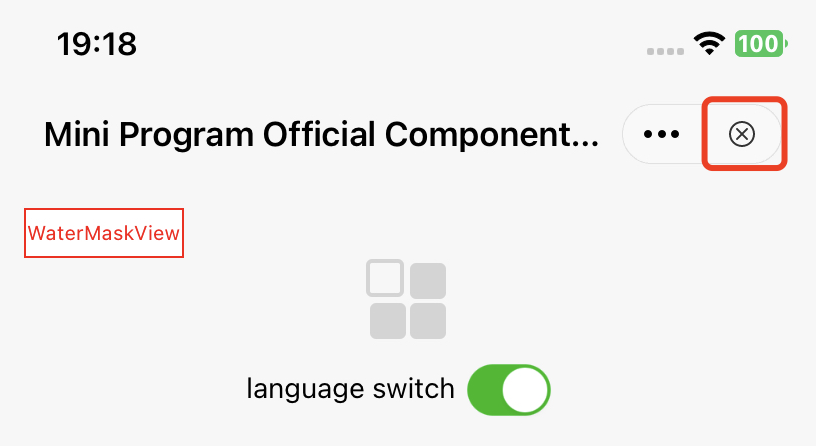
定制关闭按钮事件监听
定制胶囊按钮的关闭事件监听,能够让 Superapp 在关闭按钮点击时获取到对应的回调事件。
关闭按钮示意图:
API 说明:
#pragma mark - 退出挽留 - Exit retention- (BOOL)shouldDetainUser:(TMFMiniAppInfo *)app;
单击关闭时,会触发此 API,如果返回 YES,则会出现弹窗挽留用户,如果返回 NO,则会直接退出小程序。
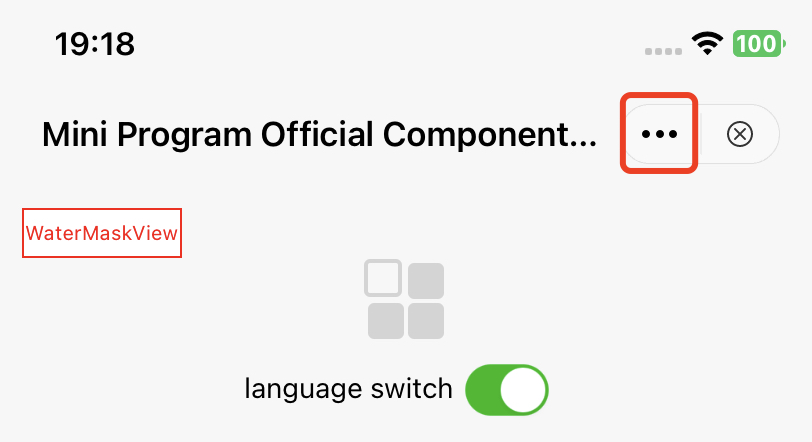
定制更多按钮事件监听
定制更多按钮的事件监听,能够让 Superapp 在单击更多按钮时监听到对应 item 的回调事件。
更多按钮示意图:
API 说明:
// 点击胶囊按钮呼起面板 - Click the capsule button to call up the panel// 如果此方法不实现,则会调用showActionSheetWithTitle:cancelButtonTitle:cancelAction:otherButtonTitleAndActions:dismissBlock:presentingViewController: - If this method is not implemented, showActionSheetWithTitle:cancelButtonTitle:cancelAction:otherButtonTitleAndActions:dismissBlock:presentingViewController: will be called.// @param app 小程序信息 - Mini program information// @param cancelButtonTitle 取消标题 - cancel title// @param cancelAction 取消操作 - cancel the operation// @param otherButtonTitleAndActions 其他按钮及响应操作 - other buttons and response operations// @param dismissBlock 面板收起后需要执行的操作(一定要调用以保证功能正确!!!)- The operation that needs to be performed after the panel is closed (must be called to ensure correct function!!!)// @param parentVC 呼起面板的vc - calls up the vc of the panel- (void)showMoreButtonActionSheetWithApp:(TMFMiniAppInfo *)appcancelButtonTitle:(nullable NSString *)cancelButtonTitlecancelAction:(nullable dispatch_block_t)cancelActionotherButtonTitleAndActions:(nullable NSArray *)otherButtonTitleAndActionsdismissBlock:(nullable dispatch_block_t)dismissBlockparentVC:(UIViewController *)parentVC;
定制更多按钮展示列表
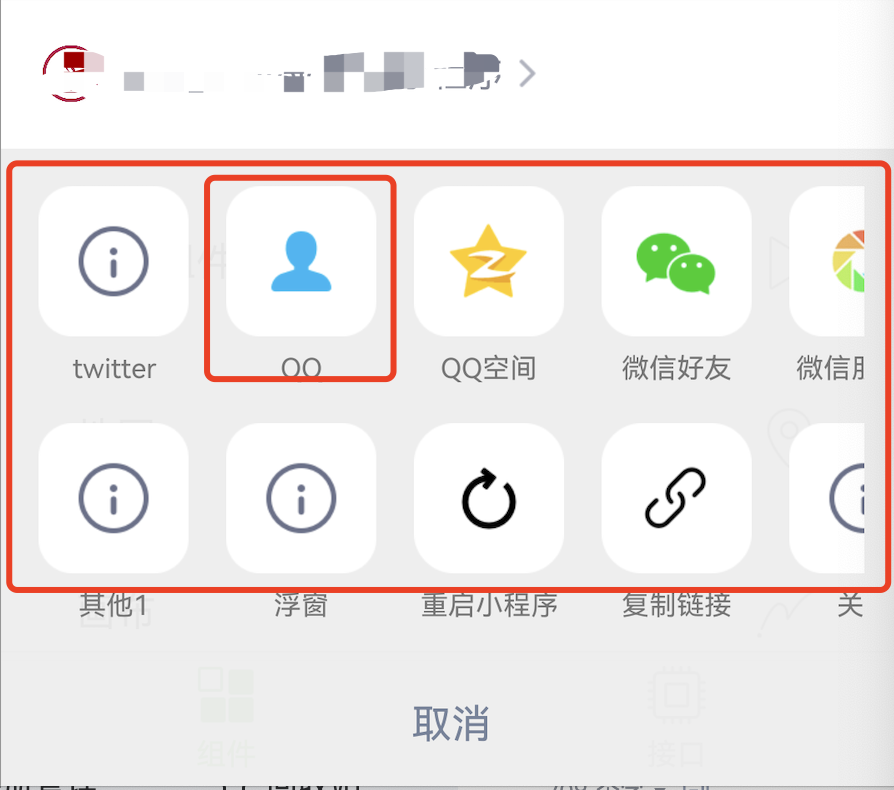
当用户触发更多按钮点击事件时,会弹出如下的可选扩展按钮列表,默认列表示意图如下:
方法1
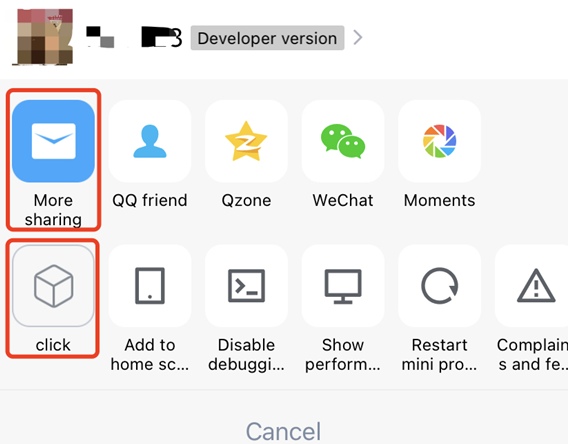
通过重写 customizedConfigForShare 方法,可以自定义分享途径、决定展示顺序。
API 说明:
// Superapp可以自定义分享途径、决定展示顺序,目前使用在点击更多按钮、button组件(open-type="share")呼起的ActionSheet中// 1、默认渠道:QQ好友、QQ空间、微信、朋友圈(具体type参见MAUIDelegateShareViewType),由开发商决定,Superapp只能更改展示顺序// 2、自定义分享渠道:Superapp自定义(type填MAUIDelegateShareViewTypeCustomizedShare,自定义MAShareTarget,建议大于100,在小程序页面中onShareAppMessage 回传分享内容,统一走shareMessageWithModel由Superapp根据ShareTarget来分别处理)// 3、自定义事件:Superapp自定义(type填MAUIDelegateShareViewTypeCustomizedAction)// 以上三种渠道展示顺序支持混排///// The host App can customize the sharing path and determine the display order. It is currently used in the ActionSheet called up by clicking the more button or button component (open-type="share")// 1. Default channels: QQ Friends, QQ Space, WeChat, Moments (for specific types, see MAUIDelegateShareViewType), decided by the developer, the host App can only change the display order// 2. Customized sharing channel: Host App customization (type fills in MAUIDelegateShareViewTypeCustomizedShare, custom MAShareTarget, it is recommended to be greater than 100, in the mini program page, onShareAppMessage returns the sharing content, use shareMessageWithModel uniformly, and the host handles it separately according to ShareTarget)// 3. Custom event processing: Host App customization (type fills in MAUIDelegateShareViewTypeCustomizedAction)// The display order of the above three channels- (NSArray<TMASheetItemInfo *> *)customizedConfigForShare;
示例代码:
- (NSArray<TMASheetItemInfo *> *)customizedConfigForShare {NSMutableArray *arrays = [[NSMutableArray alloc] init];TMASheetItemInfo *item1 = [[TMASheetItemInfo alloc] initWithTitle:@"More sharing" type:MAUIDelegateShareViewTypeCustomizedShare shareTarget:100 shareKey:@"my"];item1.icon = [UIImage imageNamed:@"icon_moreOperation_shareChat"];[arrays addObject:item1];TMASheetItemInfo *item2 = [[TMASheetItemInfo alloc] initWithTitle:@"click" type:MAUIDelegateShareViewTypeCustomizedAction action:^(TMASheetActionParams * _Nullable params) {NSLog(@"click 点击");}];item2.icon = [UIImage imageNamed:@"icon_moreOperation_collect"];[arrays addObject:item2];return arrays;}
效果如下:
方法2
通过 TMFMiniAppSDKDelegate 协议中的 customizedConfigForMoreButtonActions 可以根据小程序信息增加或者删除列表,实现胶囊视图列表的自定义显示。
- (void)customizedConfigForMoreButtonActions:(NSMutableArray *)moreButtonTitleAndActions withApp:(TMFMiniAppInfo *)app{/*//增加一个自定义分享项TMASheetItemInfo *item = [[TMASheetItemInfo alloc] initWithTitle:@"Share" type:MAUIDelegateShareViewTypeCustomizedShare shareTarget:100 shareKey:@"my"];item.icon = [UIImage imageNamed:@"icon_moreOperation_shareChat"];[moreButtonTitleAndActions addObject:item];*//*//删除复制链接菜单NSMutableArray *newArrays = [[NSMutableArray alloc] initWithCapacity:moreButtonTitleAndActions.count];for (TMASheetItemInfo *item in moreButtonTitleAndActions) {if(item.type != MAUIDelegateShareViewTypeCopyLink) {[newArrays addObject:item];}}[moreButtonTitleAndActions removeAllObjects];[moreButtonTitleAndActions addObjectsFromArray:newArrays];*/}
7.小程序内部 UI
SDK 也支持小程序内部使用的 UI 自定义显示,在 TMFMiniAppSDKDelegate 实现对应的方法即可,目前支持的内容如下:
小程序 API | TMFMiniAppSDKDelegate 方法 |
wx.showLoading |
|
wx.hideLoading |
|
wx.showToast |
|
wx.hideToast |
|
wx.showActionSheet (actionSheetType = 0) |
|
wx.showActionSheet (actionSheetType = 1) |
|
wx.showModal |
|
8.SDK 运行日志打印
在开发阶段实现日志输出代理接口,方便在控制台查看日志,从而进行问题排查。
Note:
Superapp 发布上线时,建议关闭日志输出,保证安全性及性能。
/// 打印Log/// @param level log级别,参考PLTLogLevel/// @param msg log信息- (void)log:(MALogLevel)level msg:(NSString *)msg;
9.暗黑模式处理
目前 SDK 里的 UI 是系统跟随,Superapp 可通过代理方法 getAppTheme 给小程序设置当前 Superapp 主题。
- (NSString *)getAppTheme{return @"dark";}
10.桌面快捷方式
单击胶囊按钮,在第二排面板菜单中,找到“添加到桌面”的菜单:
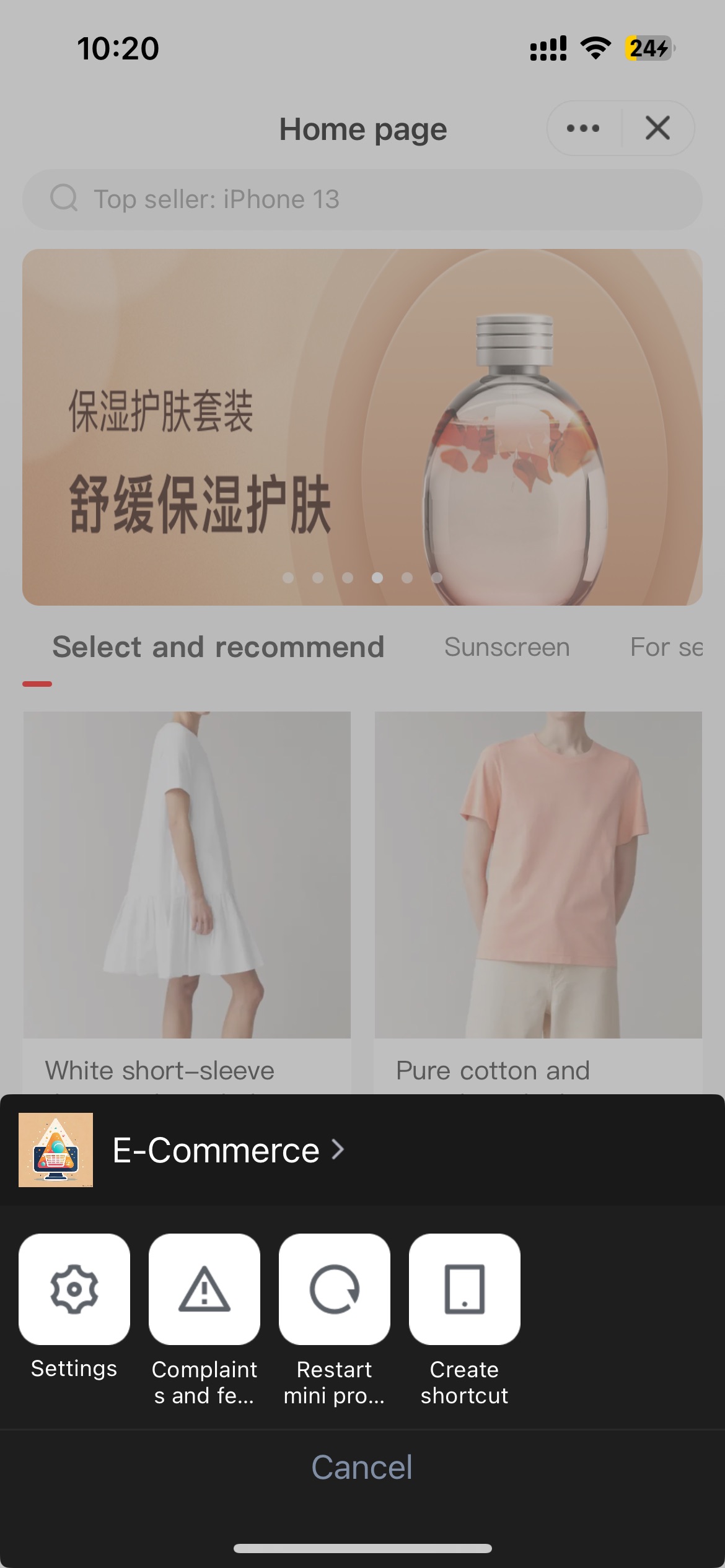
单击后跳转到系统 Safari 页面:
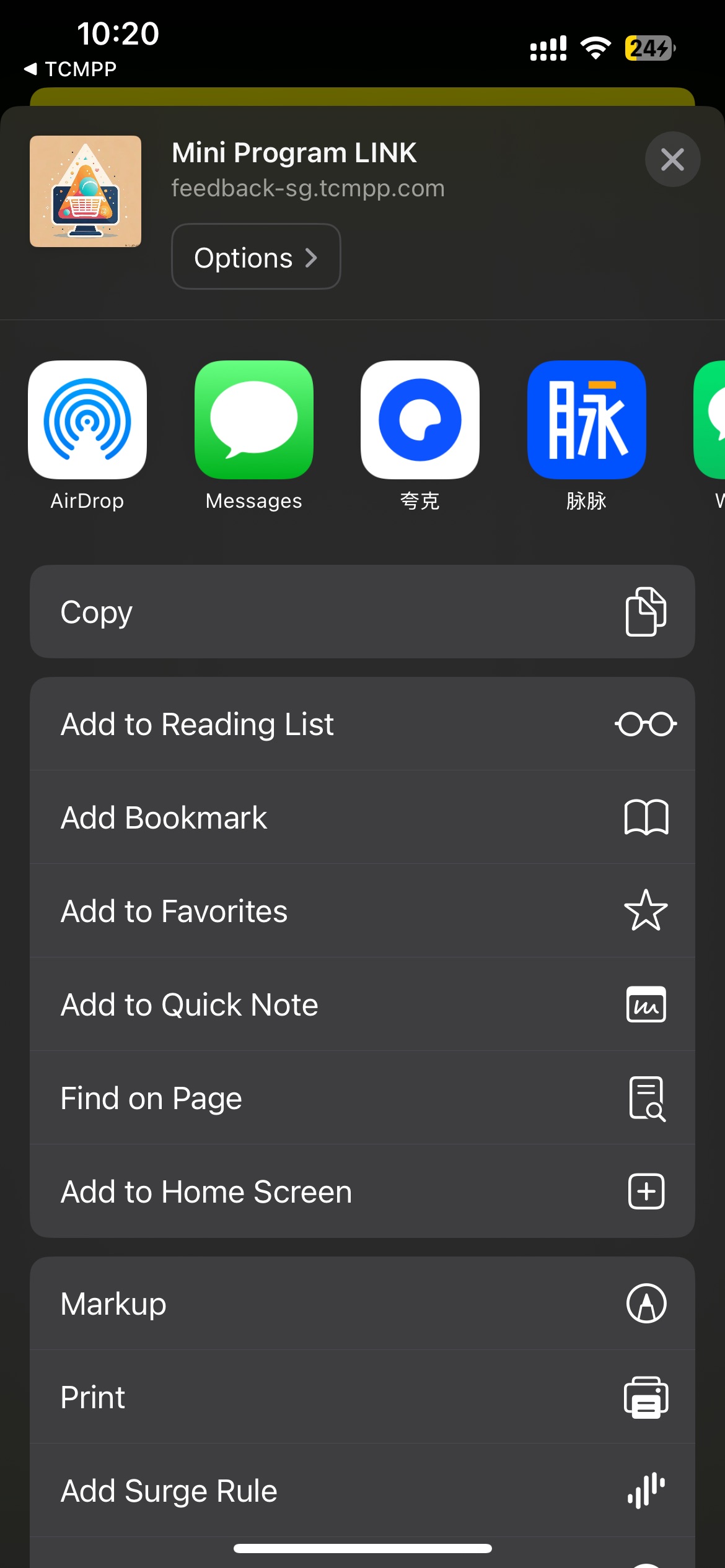
单击添加到主屏幕,即可创建小程序的快捷打开方式。使用该功能需要做如下配置:
1. Superapp 需要通过 getAppScheme 代理接口返回 scheme 协议名,示例代码:
- (NSString *)getAppScheme{return @"tcsas";}
2. 在主工程 info.plist 文件的 URL Types 中配置相同的 scheme:
3.在 openUrl 方法中实现 handleOpenUrl 方法,示例代码:
- (BOOL)application:(UIApplication *)app openURL:(NSURL *)url options:(NSDictionary<UIApplicationOpenURLOptionsKey, id> *)options {if ([[TMFMiniAppSDKManager sharedInstance] handleOpenUrl:url]){return YES;}return YES;}
完成以上操作后,即可通过桌面快捷方式来打开正式版小程序。
11.自定义API
无UI类型
SDK 引擎提供扩展机制,允许Superapp 自定义 API 供小程序调用。
实现步骤
1. 自定义一个类,并导入 TMAExternalJSPlugin。
#import <TCMPPSDK/TCMPPSDK.h>@interface NativePluginTest : NSObject@end
2. 声明 TMA_REGISTER_EXTENAL_JSPLUGIN 并通过 TMAExternalJSAPI_IMP() 添加自定义 API。
参考用例
#import "NativePluginTest.h"#import <TCMPPSDK/TCMPPSDK.h>@implementation NativePluginTestTMA_REGISTER_EXTENAL_JSPLUGIN;//自定义同步 apiTMAExternalJSAPI_IMP(testSync) {TMFMiniAppInfo *appInfo = context.tmfAppInfo;NSDictionary *data = params[@"data"];NSLog(@"************ invokeNativePlugin testSync,appId:%@,data is %@",appInfo.appId, data);TMAExternalJSPluginResult *pluginResult = [TMAExternalJSPluginResult new];pluginResult.result = @{};return pluginResult;}TMAExternalJSAPI_IMP(test) {TMFMiniAppInfo *appInfo = context.tmfAppInfo;NSDictionary *data = params[@"data"];NSLog(@"************ invokeNativePlugin test,appId:%@,data is %@",appInfo.appId, data);//异步处理,在异步回调中把结果返回给小程序 async callback//{// TMAExternalJSPluginResult *pluginResult = [TMAExternalJSPluginResult new];// pluginResult.result = @{@"result" : result.data};// [context doCallback:pluginResult];// }return nil;}@end
在小程序中可以这样使用。
//异步api调用var opts = {api_name: 'test',success: function(res) {},fail: function(res) {},complete: function(res) {},data: { // 入参name : 'kka',age : 22}}wx.invokeNativePlugin(opts);//同步api调用var opts = {api_name: 'testSync',sync:true}var rst = wx.invokeNativePlugin(opts);
进阶使用
自定义 API 支持在 Superapp 配置文件的方式进行配置,在小程序中通过直接调用 wx.api 的方式来调用。
1. 将 Superapp 中实现的配置文件统一放在 customapi-config.json,参考内容如下:
{"extApi":[{"name": "test","sync": false,"params": {"data": ""}},{"name": "testSync","sync": true,"params": {"name": "","title": ""}}]}
2. 把 customapi-config.json 放入 iOS 工程中:
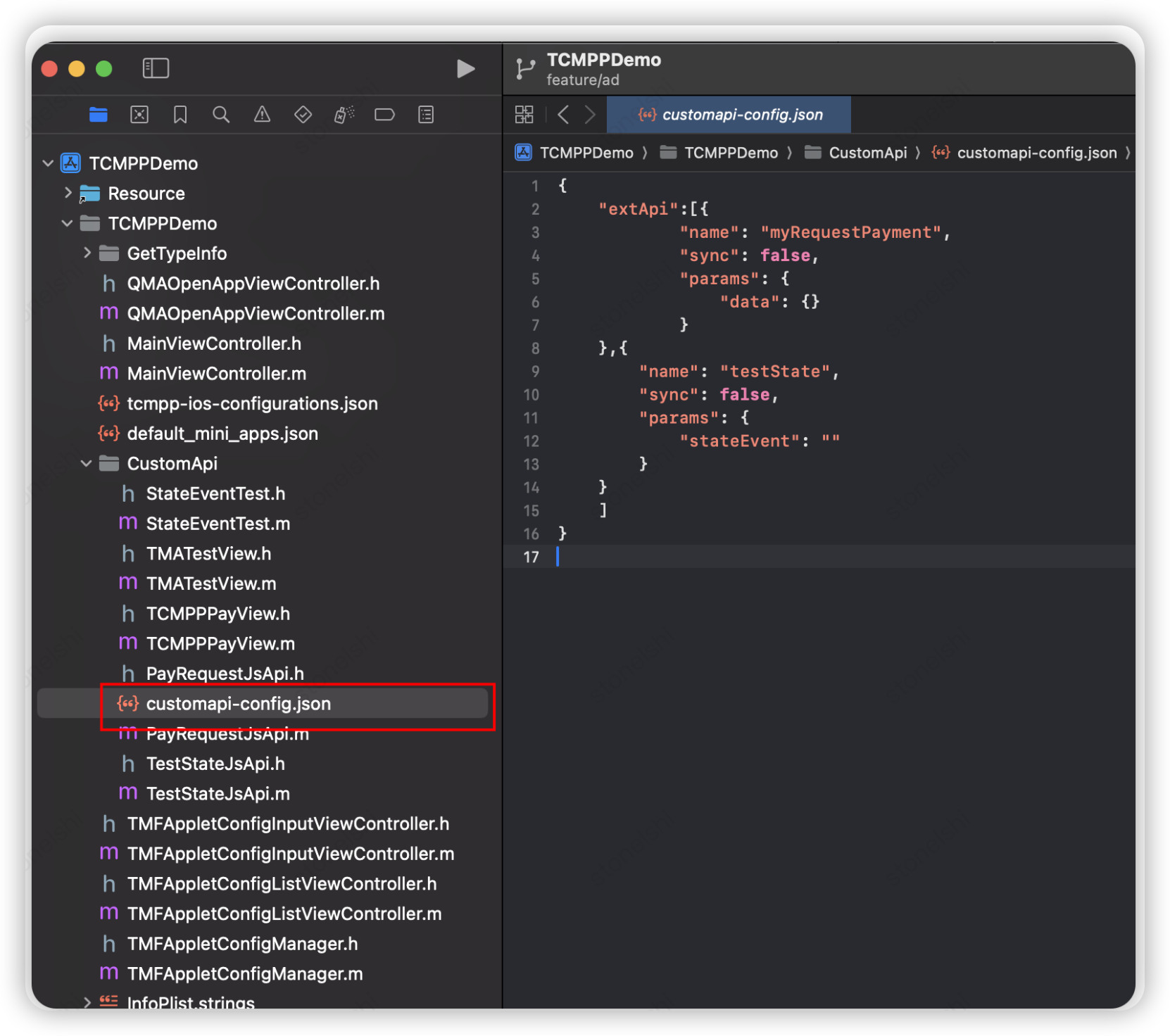
3. 在SDK初始化时,设置配置文件路径。
[[TMFMiniAppSDKManager sharedInstance] setCustomApiConfigFile:[[NSBundle mainBundle] pathForResource:@"customapi-config" ofType:@"json"]];
4. 在小程序中直接用 wx.test() 的方式调用。
//异步api调用var opts = {success: function(res) {},fail: function(res) {},complete: function(res) {},data: {name : 'kka',age : 22}}wx.test(opts);//同步api调用var rst = testSync(opts);
自定义UI
我们支持自定义 UI 组件,小程序端的自定义组件为 <external-element>。如果您想使用自定义 UI 组件,请遵循以下步骤:
1. Superapp 接入 SDK 后新建继承自 UIView 的类,例如 QMATestView,导入"TMAExternalJSPlugin.h"文件,使 QMATestView 遵循“TMAExternalElementView”协议。
2. 调用 TMARegisterExternalElement 方法,注册 QMATestView 类为 maTestView。
3. 实现“TMAExternalElementView”协议中的 createWithParams 和 operateWithParams 方法。
#import "QMATestView.h"#import "TMAExternalJSPlugin.h"@interface QMATestView () <TMAExternalElementView>@end@implementation QMATestView {UILabel *_textLabel;UIButton *_clickButton;id<TMAExternalJSContextProtocol> _context;}TMARegisterExternalElement(maTestView);+ (UIView *)createWithParams:(NSDictionary *)params context:(id<TMAExternalJSContextProtocol>)context {QMATestView *testView = [[QMATestView alloc] initWithFrame:CGRectZero];NSDictionary *testViewParams = QQ_Dict_DictValue(params, @"params");[testView setText:QQ_Dict_StringValue(testViewParams, @"text")];testView->_context = context;return testView;}//接收小程序端的调用事件进行处理- (void)operateWithParams:(NSDictionary *)param context:(id<TMAExternalJSContextProtocol>)context {NSDictionary *data = QQ_Dict_DictValue(param, @"data");NSDictionary *params1 = QQ_Dict_DictValue(data, @"params1");NSInteger age = [QQ_Dict_NumberValue(params1, @"age") integerValue];NSString *name = QQ_Dict_StringValue(params1, @"name");qq_weakify(self);[MAUtils executeOnThread:[NSThread mainThread] block:^{qq_strongify(self);if (self) {self->_textLabel.text = [NSString stringWithFormat:@"name = %@ , age = %ld",name,(long)age];// 把结果返回给小程序端TMAExternalJSPluginResult *result = [TMAExternalJSPluginResult new];result.result = @{@"result":@"success"};[context doCallback:result];}}];}
发送事件给小程序端
在自定义原生组件里如果想发送事件给小程序端,先在 createWithParams:context: 方法中记录 context:
_context = context;
发送事件时这样写:
- (void)onClickButton:(UIButton *)button {_textLabel.text = @"What do you want me to do";// 组装数据 发送事件NSString *data = [MAUtils JSONStringify:@{@"externalElementId":_elementId,@"type": @"elvisgao callback"}];[_context doSubscribe:kTMAOnExternalElementEvent data:data];}
小程序端使用
1. 在小程序 wxml 中引入:
<external-elementid="comp1"type="maTestView"_insert2WebLayerstyle="width: 200px;height: 100px;"bindexternalelementevent="handleEvent"></external-element>
说明:
type 需与 native 端约定,如非同层则不设置 _insert2WebLayer 属性。
bindexternalelementevent 可监听 native 传递的操作,回调参数包括:
{target,currentTarget,timeStamp,touches,detail, // native传递的参数}
2. 小程序 js 中创建实例。
this.ctx = wx.createExternalElementContext('comp1');
说明:
wx.createExternalElementContext 参数为 wxml 中元素 id。
3. 在小程序中调用实例方法:
this.ctx.call({params1: {name: 'name1',age: 11},params2: {name: 'name2',age: 22},success: (e) => {console.log('====operate success=====', e)},fail: (e) => {console.log('====operate fail=====', e)},complete: (e) => {console.log('====operate complete=====', e)}})
说明:
实例提供 call 方法,success、fail、complete 回调;通过参数区分调用方法,基础库会调用 invoke 方法透传参数到 native。
文档反馈