小程序虚拟支付实践教程
Download
聚焦模式
字号
概念说明
虚拟支付是指消费者使用货币(包括法定货币或其数字形式)购买虚拟商品或虚拟服务的行为,使用虚拟支付交易的标的物是数字化的、非实体的。
虚拟支付特征:
非实体性:商品没有物理形态,无法通过物流进行配送。
数字化交付:商品或服务通过互联网直接创建、分发和消费。
使用权而非所有权:用户购买的通常是“许可”或“服务”,而非永久拥有。例如,购买腾讯视频会员,是购买在会员期内的视频观看权,而非永久拥有视频本身。
注意:
1. 小程序虚拟支付目前仅支持道具直购模式。
2. 道具直购是指在小程序中,玩家可以通过虚拟支付功能,直接购买虚拟道具(如会员、电子书、在线音乐、数字产品等)的行为。
3. 大多数平台要求开发者的虚拟支付业务必须使用其内置支付系统(如 Apple App Store 和 Google Play 要求使用 Apple Pay 和 Google Play Billing),且不同平台对虚拟支付的抽成比例不同。
Superapp 支持虚拟支付实现路径
前提条件
您需要确保您的 superapp 具备以下条件:
superapp 已实现或集成了支付渠道。
支付渠道支持商户管理。
说明:
小程序虚拟支付技术方案
虚拟支付与标准支付方案的差异
小程序的虚拟支付流程与标准支付大体相同,仅在业务流程上存在轻微差异:
与标准支付方式相同,密钥及商户账号申请方式一致;但对应的字段名称可能不同。
对于标准支付,向 SAS 后端发送请求的行为由前端直接触发,而虚拟支付则由小程序后端发起。
在购买物品时,虚拟支付要求开发者事先在控制台中注册需要售卖的游戏内物品。
购买过程中,虚拟支付不生成预订单 ID,而是直接触发支付流程。
准备工作
加解密和签名
道具录入
支付使用示例流程图
小程序支付的总体流程图如下图所示,总体分为三大流程,下单支付、发货通知、支付结果确认:
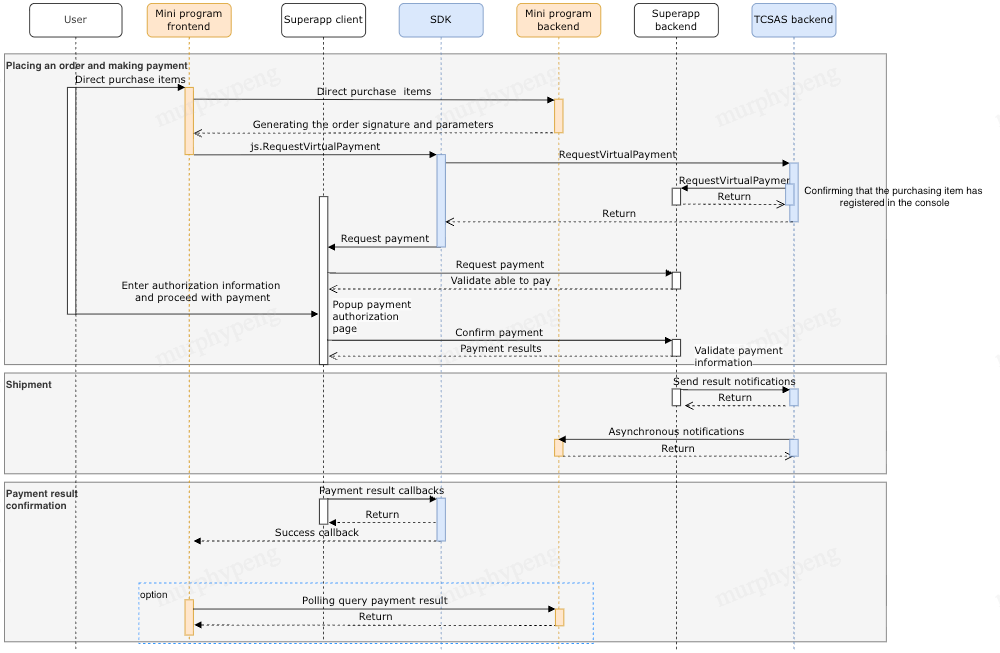
下单和支付
1. 下单:
小程序开发时,开发者须在控制台小程序商业化-虚拟支付-基础配置中配置发送推送配置,以及在商业化-虚拟支付-道具管理中开启道具发货推送才能收到下单成功后的回调请求。其他开发注意事项可查看 虚拟支付-技术手册。
当用户在小程序中发起道具购买下单时,小程序前端应先与小程序服务端确认支付相关信息,将包含道具购买相关的数据传递给小程序服务端。
小程序服务端收到下单请求后,需使用密钥完成数据签名以及业务订单创建(此时未完成支付,订单应为未支付状态),签名的密钥需保存在小程序服务端。为了自身的数据安全,开发者服务器不应该把密钥下发到小程序前端,也不应该对外提供这个密钥。
小程序服务端将生成的签名数据(
signData、 paySig、signature)回调给小程序前端,小程序服务端签名示例请参考:是由小程序服务端通过小程序前端下单时所传递的道具购买相关数据生成的 JSON 字符串,参数描述请查看 signData 参数说明,示例如下:
signData'{"mode":"goods","buyQuantity":1,"env":0,"currencyType":"USD","platform":"android","productId":"testproductId","goodsPrice":10,"outTradeNo":"xxxxxx","attach":"testdata"}'
paySig生成,参数如下:字段 | 类型 | 描述 |
signData | string | 支付原串 |
appkey | string | 支付签名密钥(由小程序后端保存,且与 superapp 后端自行完成密钥的交换) |
method | string | 固定格式:requestMidasPaymentGameItem |
生成示例:
import hmacimport hashlibimport urllib.parse# signData 支付原串 注意这里 signData 需要和前端一致,原格式传递(包括空格和回车),建议后台下发,# appkey 支付密钥# method 需要签名方法 requestMidasPaymentGameItemdef gen_pay_sig(signData, appkey, method):need_encode_body = method + '&' + sign_dataprint(need_encode_body)return hmac.new(key=appkey.encode('utf-8'), msg=need_encode_body.encode('utf-8'),digestmod=hashlib.sha256).hexdigest()
signature生成,参数如下:字段 | 类型 | 描述 |
session_key | string | |
post_body | string | signData 支付原串 |
生成示例:
import hmacimport hashlibimport jsonimport timedef calc_signature(post_body, session_key):## 用户登录态 signature 签名算法## Args:## post_body - http POST 的数据包体## session_key - 当前用户有效的 session_key,参考 jscode2session 接口## Returns:## 用户登录态签名 signature"""need_sign_msg = post_bodysignature = hmac.new(key = session_key.encode('utf-8'), msg = need_sign_msg.encode('utf-8'),digestmod=hashlib.sha256).hexdigest()return signature
2.支付:
小程序前端收到小程序服务端业务订单创建成功的回调后,即可调用 SAS SDK 提供的 API 接口 wx.requestVirtualPayment 拉起 superapp 支付,传入小程序后端返回的签名数据,小程序前端示例代码参考如下:
wx.requestVirtualPayment({signData: JSON.stringify({offerId: '123',buyQuantity: 1,currencyType: 'USD',productId: 'testproductId',goodsPrice: 10,outTradeNo: 'xxxxxx',attach: 'testdata',}),paySig: 'd0b8bbccbe109b11549bcfd6602b08711f46600965253a949cd6a2b895152f9d',signature: 'd0b8bbccbe109b11549bcfd6602b08711f46600965253a949cd6a2b895152f9d',mode: 'short_series_goods',success(res) {console.log('requestVirtualPayment success', res)},fail({ errMsg, errCode }) {console.error(errMsg, errCode)},})
SAS SDK 接收到该请求后,将会代表小程序向 SAS 后端(openServer)发起请求。
SAS后端(openServer)收到请求后,会验证该道具在 SAS 上是否已注册,且校验每个道具的 ID 和价格是否能完全匹配 SAS 上注册的数据,随后将请求转发给 superapp 后端的 /requestVirtualPayment 接口,接口参数请参见 小程序虚拟支付下单接口。
superapp 在接收到游戏道具直购支付请求后,需要完成验签,并做好该笔订单的支付信息及业务相关参数的检查,以确保购买操作可以被执行。
superapp 后端实现 RequestVirtualPayment 接口,校验该物品是否可购买,并返回有效响应。SAS SDK 随后通知 superapp 客户端继续执行支付。客户端需要实现如下代码逻辑:
Android:
Android 客户端开发者需要实现 SDK 提供的 MiniOpenApiProxy 的代理,并重写 requestVirtualPayment 方法,在该方法中完成小程序支付的业务逻辑,并通过 AsyncResult 返回支付结果给小程序,示例代码(Android-1)如下:
@ProxyService(proxy = MiniOpenApiProxy.class)public class MiniOpenApiProxyImpl extends MiniOpenApiProxy {@Overridepublic void requestVirtualPayment(IMiniAppContext miniAppContext, JSONObject params, AsyncResult result) {// call your custom payment implementationboolean paySuccess = PaymentManagerV2.g().startMidasPayment(miniAppContext, params, result);// notify payment result with AsynResultif(paySuccess){result.onReceiveResult(true,successData);}else{result.onReceiveResult(false,failedData);}}}
iOS:
superapp 客户端需要实现 requestVirtualPayment 代理接口,接收 SDK 传入的参数,然后请求 superapp 后端,示例代码(iOS-1):
- (void)requestVirtualPayment:(TMFMiniAppInfo *)app params:(NSDictionary *)params completionHandler:(MACommonCallback)completionHandler{[[TCMPPDemoPayManager sharedInstance] checkPreOrder:params appType:1 completionHandler:^(NSError * _Nullable err, PayResponseData * _Nullable result) {if (!err) {dispatch_async(dispatch_get_main_queue(), ^{TCMPPDemoPaymentMethodsController *payMethodVC = [[TCMPPDemoPaymentMethodsController alloc]init];payMethodVC.payResponseData = result;payMethodVC.app = app;[[[DebugInfo sharedInstance] topViewController].navigationController pushViewController:payMethodVC animated:NO];payMethodVC.completeHandle = ^(NSDictionary * _Nullable result, NSError * _Nullable error) {completionHandler(result,error);};});}}];}
其中 TCMPPDemoPayManager 是封装请求 superapp 后端的工具类。
用户在客户端拉起的支付页输入支付授权信息,superapp 在完成支付验证后,通知 superapp 后端该笔小程序道具直购支付已完成。
发货通知
小程序道具直购支付完成后,superapp 后端应主动通知 SAS 后端(openServer),接口及参数请参见 小程序虚拟支付回调,并确保响应结果的returnCode 返回 0,若多次重试调用失败,应当及时发送告警通知。
SAS后端(openServer)接收到发货通知后,将会立即调用在下单阶段填写的回调 url 地址,若小程序后端没有正确响应,后端将持续重试直到小程序返回正确响应为止。
支付结果确认
superapp 应当实现支付成功后回调 SAS SDK 支付结果的逻辑。
TCMPPDemoPaymentMethodsController 是支付页面,待用户完成支付操作后,执行 completeHandle 弹出,将支付结果通过 completionHandler 传入 SDK,详见示例代码(iOS-1)。
随后SAS SDK 将会回调下单时 requestMidasPaymentGameItem 函数调用传入的 success 回调函数。
强烈建议:小程序前端再次查询小程序后端,确认支付结果是真实完成的。
小程序虚拟支付功能控制台操作流程
在 superapp 开启支付开关后,小程序开发者可以在控制台上绑定商户号,并添加游戏道具,道具发布后即可在小程序内使用,小程序开发者操作请参见:
文档反馈