iOS
下载
聚焦模式
字号
业务流程
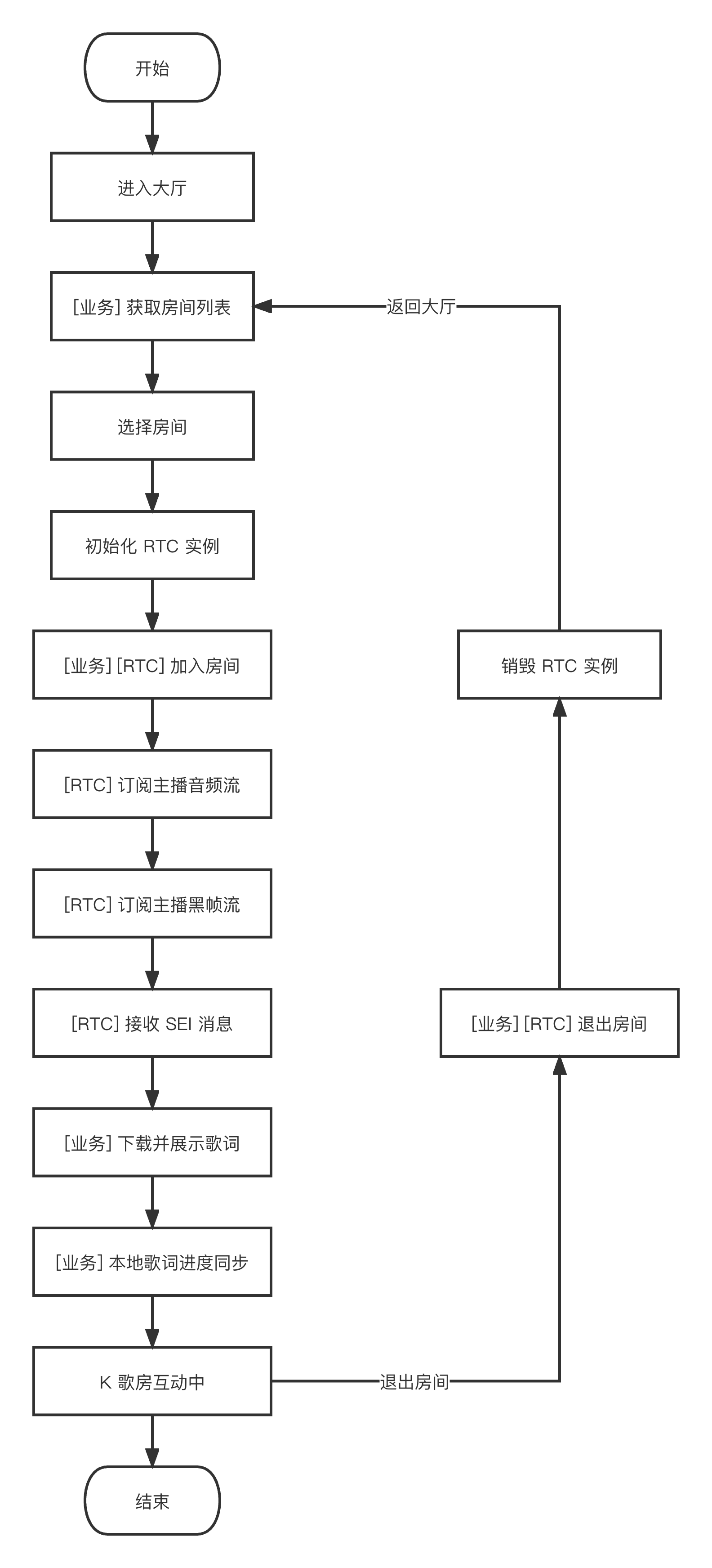
本节汇总了在线 K 歌中一些常见的业务流程,帮助您更好地理解整个场景的实现流程。
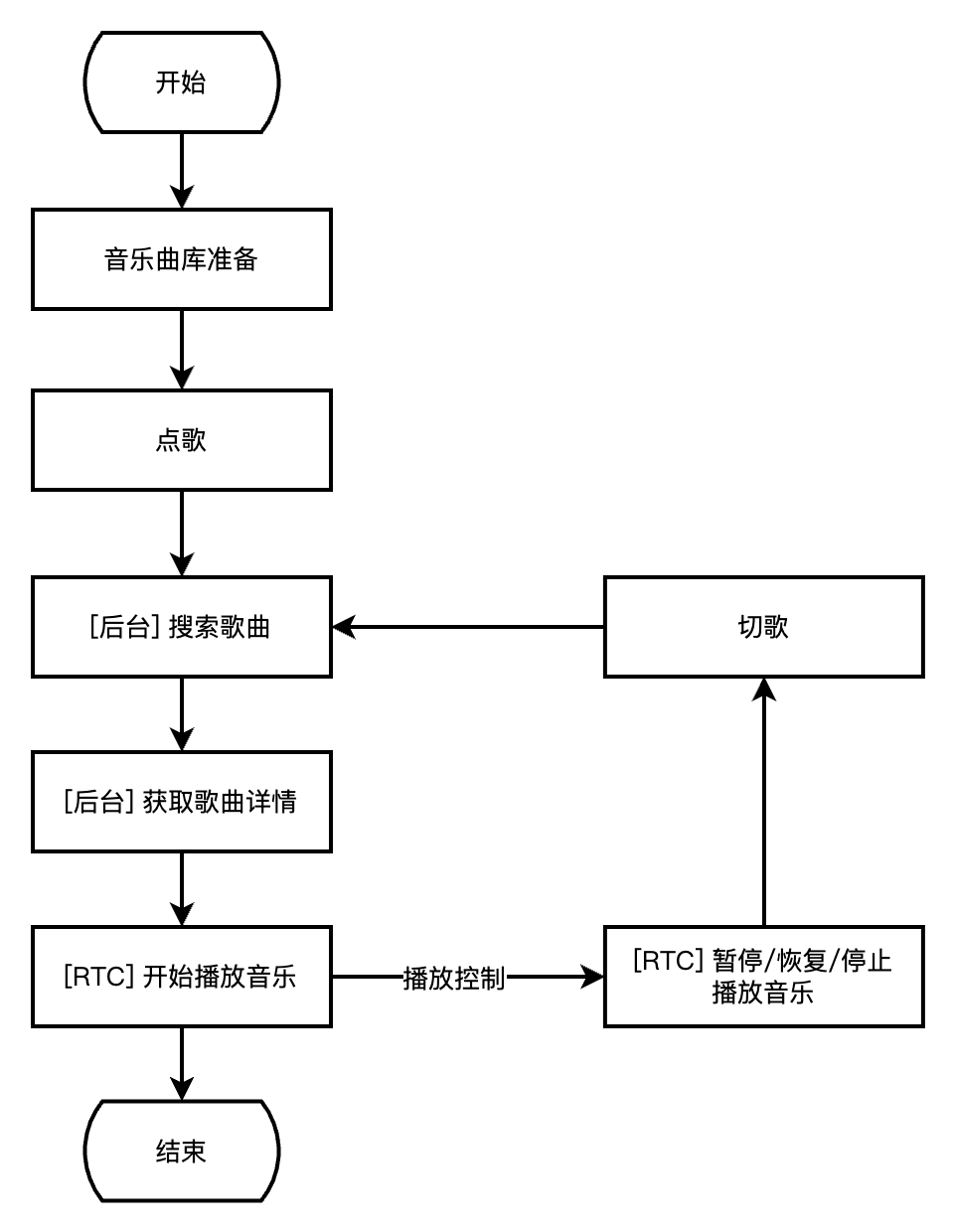
下图展示了业务侧结合音乐曲库进行点歌,并使用 TRTC SDK 进行播放的流程。
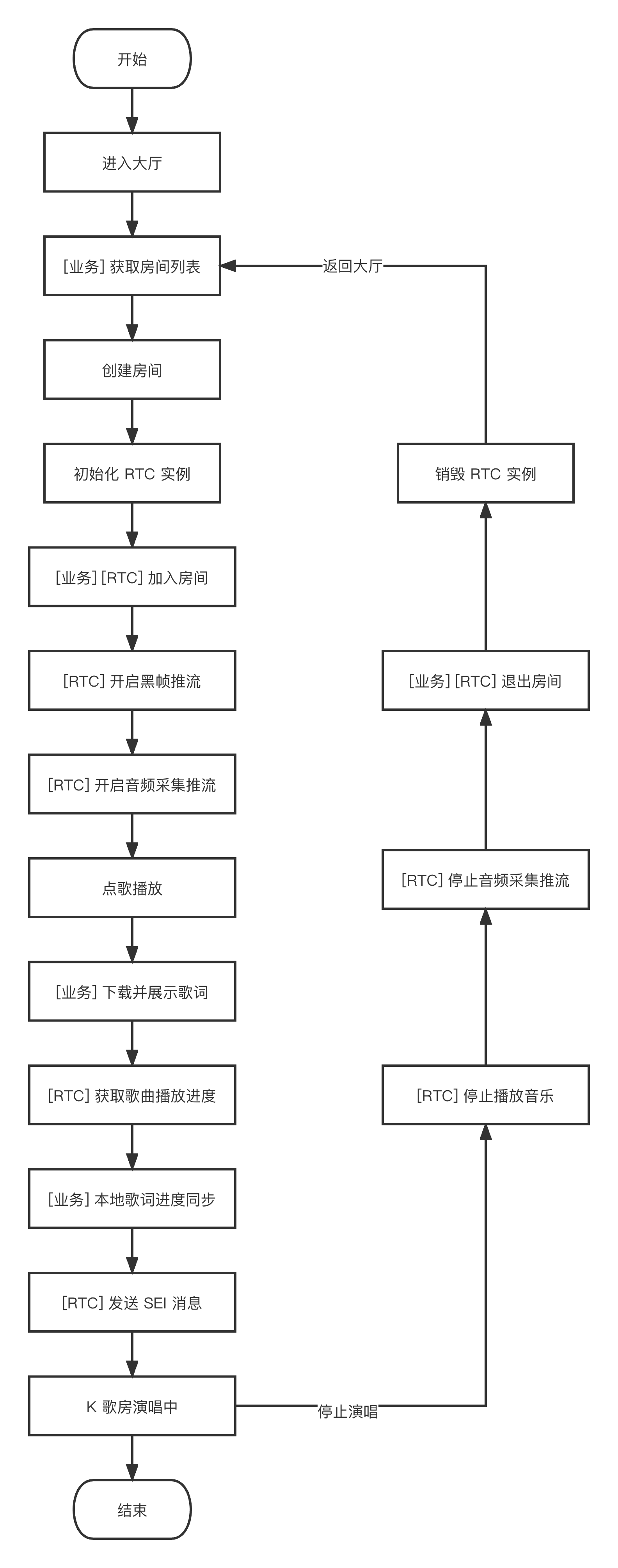
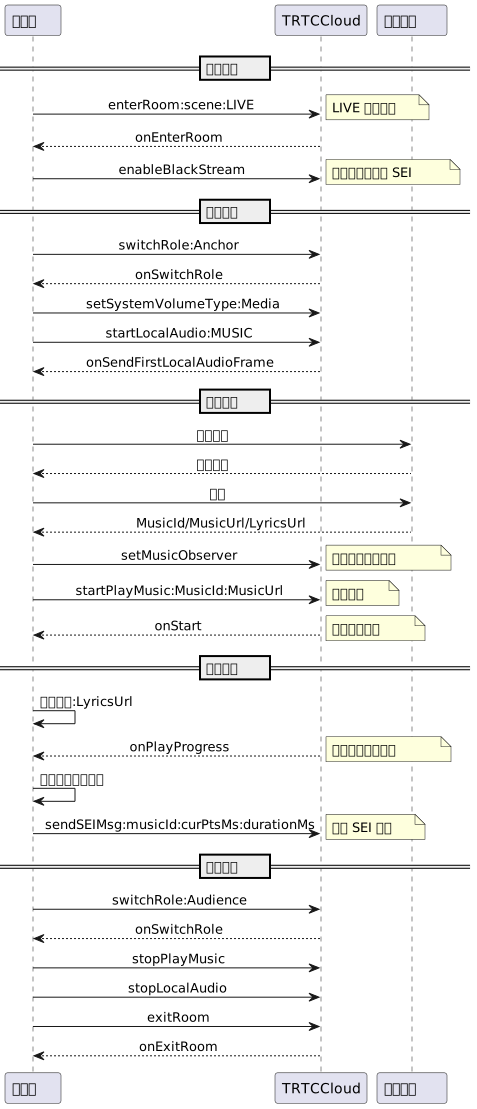
下图展示了排麦独唱玩法中,演唱者进房演唱及停止演唱并退房的流程。
下图展示了实时合唱玩法中,主唱者发起合唱及停止合唱并退房的流程。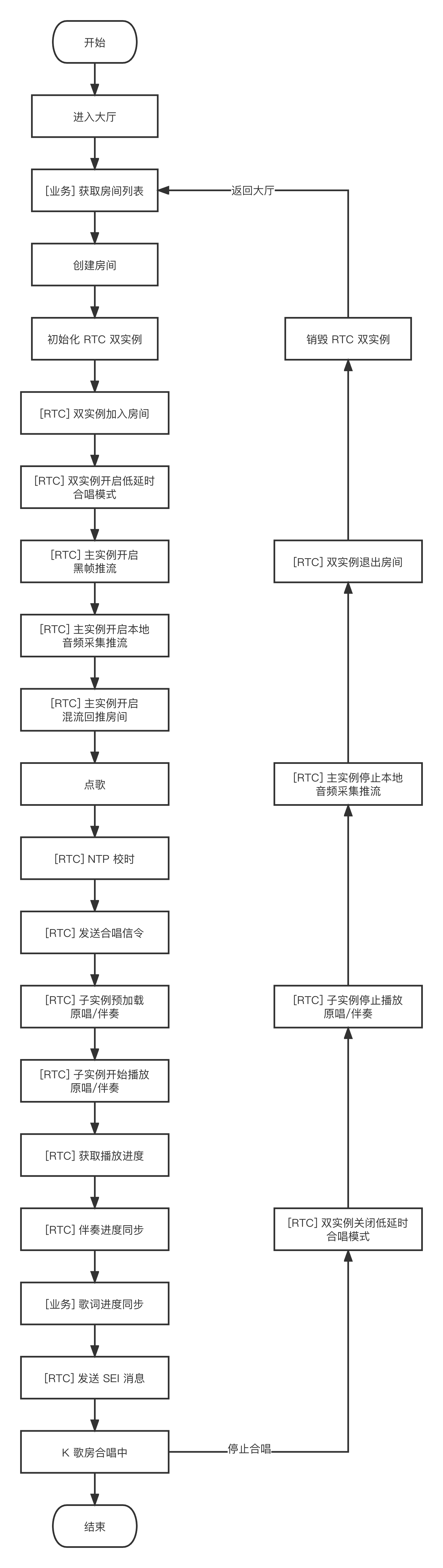
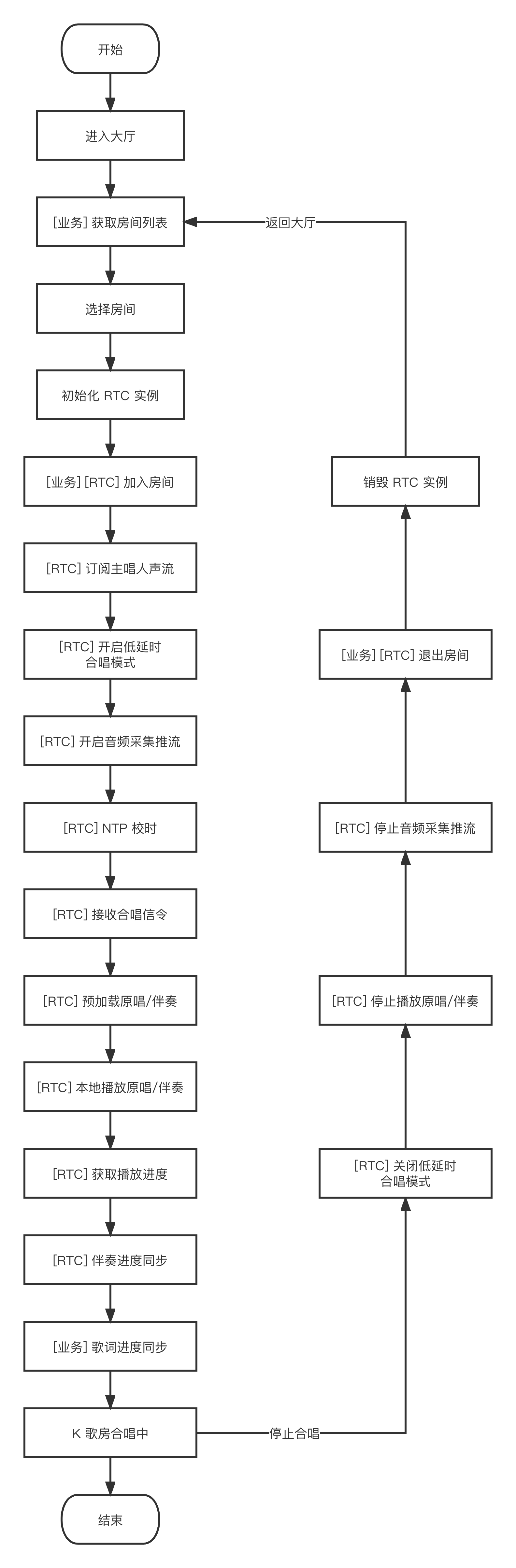
下图展示了实时合唱玩法中,合唱者参与合唱及停止合唱并退房的流程。
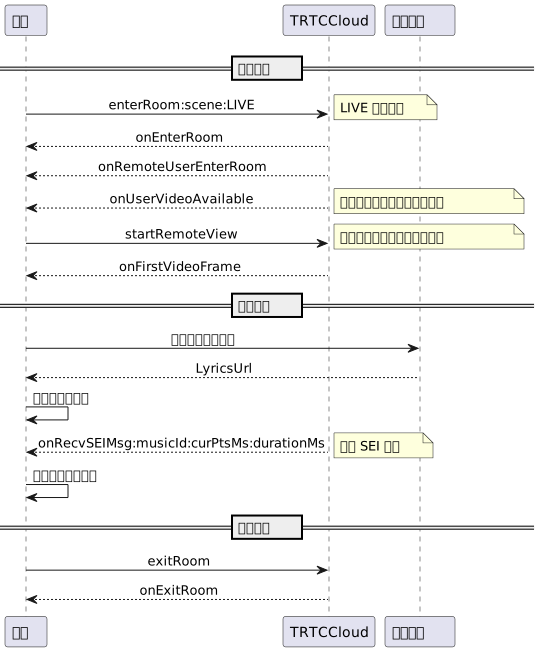
下图展示了在线 K 歌场景中,听众进房听歌及歌词同步的流程。
接入准备
步骤一:开通服务
在线 K 歌场景通常需要依赖腾讯云 实时音视频 TRTC 和 智能音乐解决方案 两项付费 PaaS 服务构建。其中 TRTC 负责提供实时音频互动能力,智能音乐解决方案负责提供歌词识别、智能作曲、听歌识曲、音乐评分等能力。
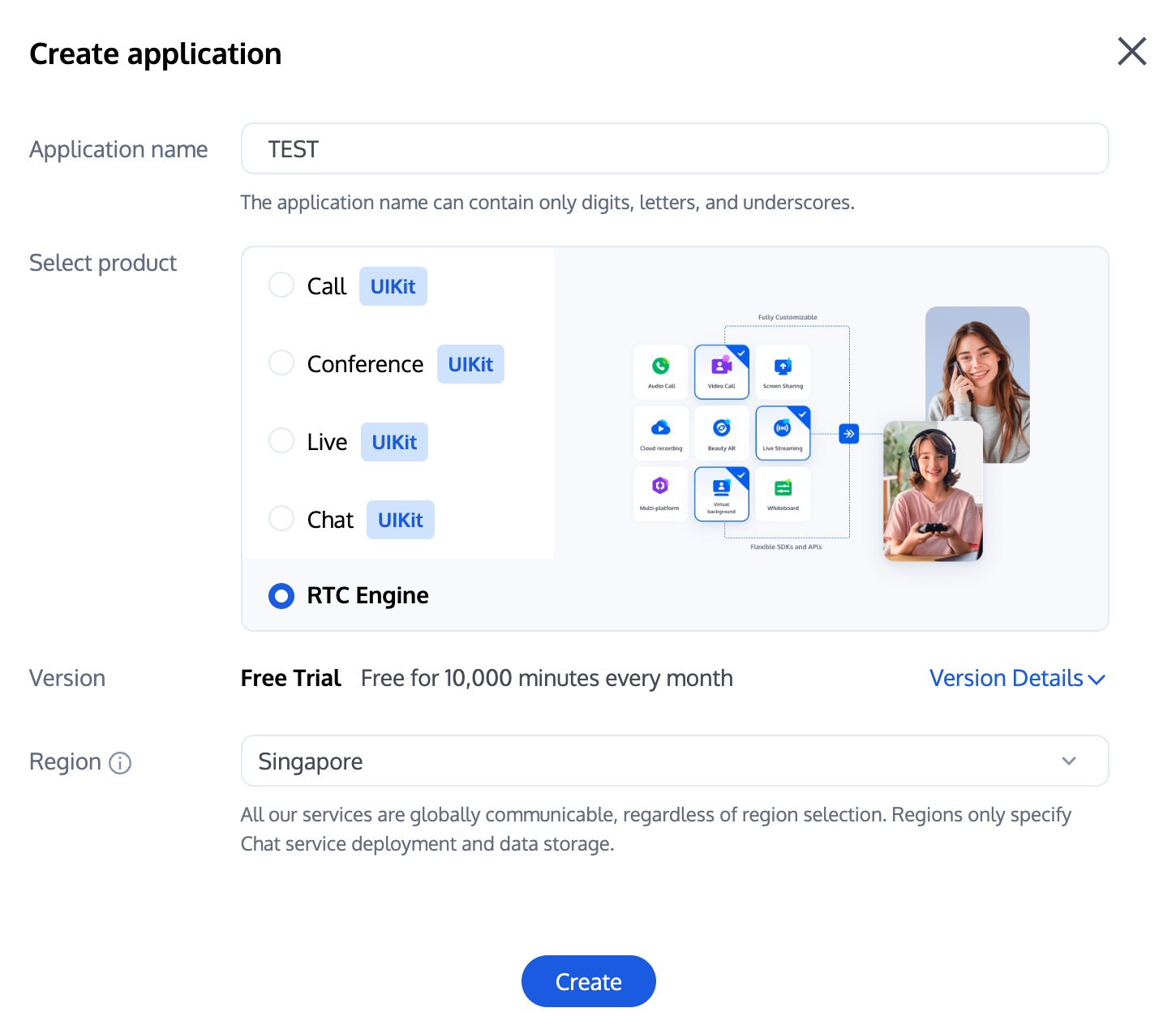
1. 首先,您需要登录 实时音视频 TRTC 控制台 创建应用,您可根据需要选择升级 TRTC 应用版本,例如专业版可解锁更多增值功能服务。
说明:
建议创建两个应用分别用于测试环境和生产环境,一年内每个腾讯云账号(UIN)每月赠送10,000分钟免费时长。
TRTC 包月套餐分为体验版(默认)、基础版和专业版,可解锁不同的增值功能服务,详情可见 版本功能与包月套餐说明。
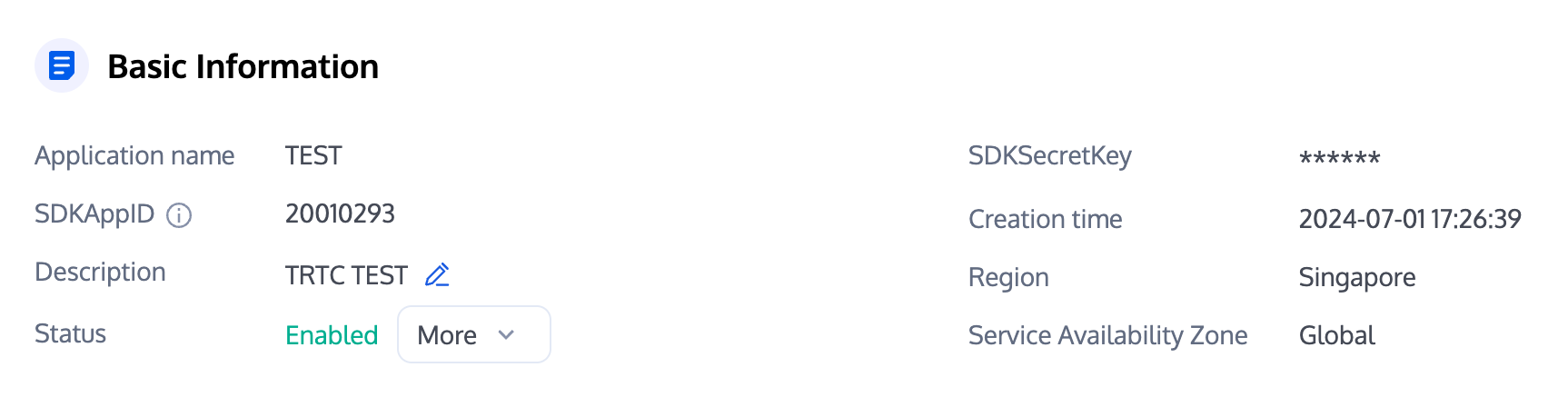
2. 应用创建完毕之后,您可以在应用管理-应用概览栏目看到该应用的基本信息,其中需要您保管好 SDKAppID、SDKSecretKey 便于后续使用,同时应避免密钥泄露造成流量盗刷。
前置准备
1. 到 购买页 进行音乐服务开通,选择合适的功能如音乐评分进行开通。
2. 在 CAM 创建一个 AK/SK 密钥对(即一个访问方式为编程访问用户,不需要登录和任何用户权限)。
3. 创建一个 COS(对象存储)桶,并在 COS 桶管理界面给已创建的仅编程用户授权 COS 桶的读写权限。
4. 准备参数。
operateUin: 腾讯云子用户的账号 ID
cosConfig: 对象存储相关参数
secretId: 存储桶的 secretId
secretKey: 存储桶的 secretKey
bucket: 存储桶的名称
region: 存储桶的地区,例如 "ap-guangzhou"
激活注册
在完成前置准备后,通过发起请求的方式,进行注册激活,预计等待 2 分钟左右。
curl -X POST \\http://service-mqk0mc83-1257411467.bj.apigw.tencentcs.com/release/register \\-H 'Content-Type: application/json' \\-H 'Cache-control: no-cache' \\-d '{"requestId": "test-regisiter-service","action": "Register","registerRequest": {"operateUin": <operateUin>,"userName": <customedName>,"cosConfig": {"secretId": <CosConfig.secretId>,"secretKey": <CosConfig.secretKey>,"bucket": <CosConfig.bucket>,"region": <CosConfig.region>}}}'
{"requestId": "test-regisiter-service","registerInfo": {"tmpContentId": <tmpContentId>,"tmpSecretId": <tmpSecretId>,"tmpSecretKey": <tmpSecretKey>,"apiGateSecretId": <apiGateSecretId>,"apiGateSecretKey": <apiGateSecretKey>,"demoCosPath": "UIN_demo/run_musicBeat.py","usageDescription": "请从COS桶[CosConfig.bucket]中下载python版本demo文件[UIN_demo/run_musicBeat.py], 替换demo中的输入文件后,执行python run_musicBeat.py","message": "注册成功,感谢注册","createdAt": <createdAt>,"updatedAt": <updatedAt>}}
运行验证
完成上述激活注册服务后,会在
demoCosPath 目录下生成一个以音乐鼓点识别能力为例的 python 版本的可执行 demo,请在有网络的环境下,执行命令 python run_musicBeat.py 验证。说明:
步骤二:导入 SDK
TRTC SDK 已经发布到 CocoaPods,建议您通过 CocoaPods 集成 SDK。
1. 安装 CocoaPods
在终端窗口中输入如下命令(需要提前在 Mac 中安装 Ruby 环境):
sudo gem install cocoapods
2. 创建 Podfile 文件
进入项目所在路径,输入以下命令行之后项目路径下会出现一个 Podfile 文件。
pod init
3. 编辑 Podfile 文件
根据您的项目需要选择合适的版本,并编辑 Podfile 文件。
platform :ios, '8.0'target 'App' do# TRTC 精简版# 安装包体积增量最小,但仅支持实时音视频(TRTC)和 直播播放器(TXLivePlayer)两项功能。pod 'TXLiteAVSDK_TRTC', :podspec => 'https://liteav.sdk.qcloud.com/pod/liteavsdkspec/TXLiteAVSDK_TRTC.podspec'# Professional 专业版# 包含实时音视频(TRTC)、直播播放器(TXLivePlayer)、RTMP 推流(TXLivePusher)、点播播放器(TXVodPlayer)和短视频录制和编辑(UGSV)等众多功能。# pod 'TXLiteAVSDK_Professional', :podspec => 'https://liteav.sdk.qcloud.com/pod/liteavsdkspec/TXLiteAVSDK_Professional.podspec'end
4. 更新并安装 SDK
在终端窗口中输入如下命令以更新本地库文件,并安装 SDK。
pod install
或使用以下命令更新本地库版本。
pod update
pod 命令执行完后,会生成集成了 SDK 的 .xcworkspace 后缀的工程文件,双击打开即可。
说明:
若 pod 搜索失败,建议尝试更新 pod 的本地 repo 缓存。更新命令如下。
pod setuppod repo updaterm ~/Library/Caches/CocoaPods/search_index.json
除了 CocoaPods 集成方式,您还可以选择下载 SDK 并手动导入,详见 手动集成 TRTC SDK。
步骤三:工程配置
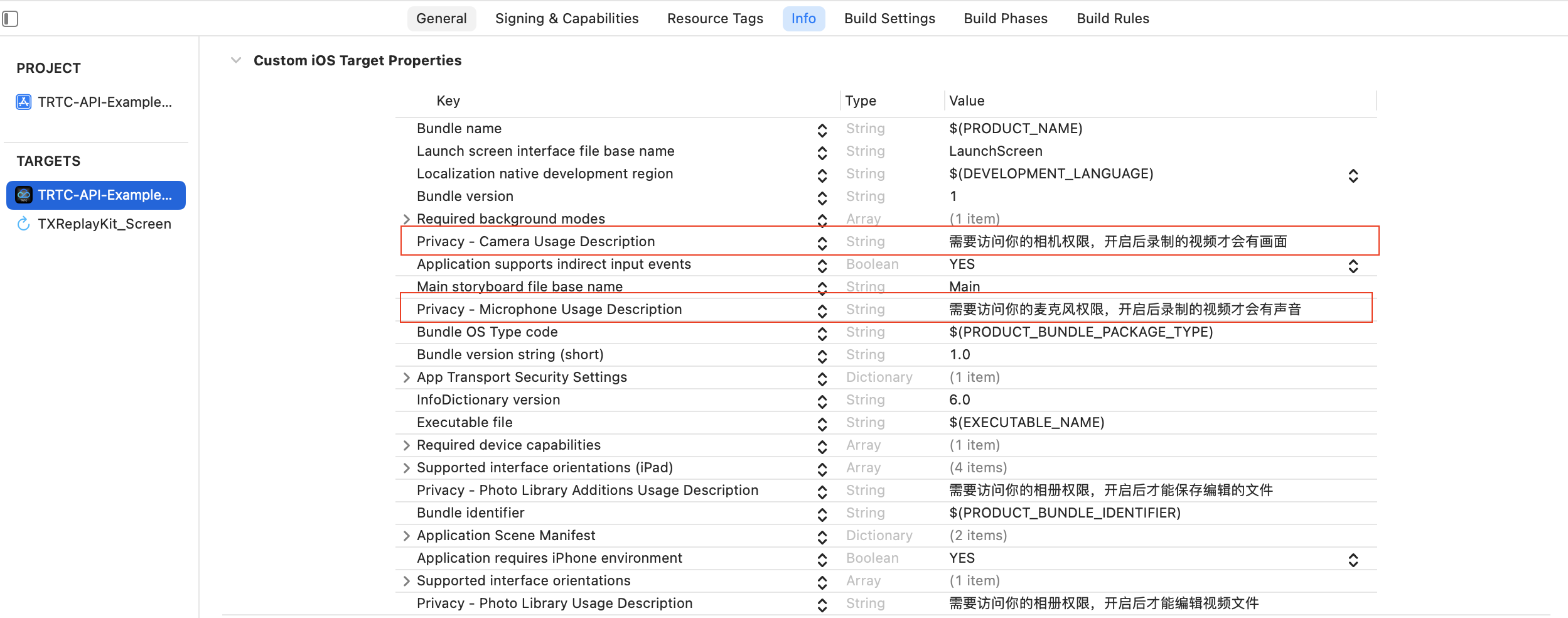
1. K 歌场景下 TRTC SDK 需要被授权麦克风权限,在 App 的 Info.plist 中添加以下内容,对应麦克风在系统弹出授权对话框时的提示信息:
Privacy - Microphone Usage Description, 同时填入麦克风使用目的提示语
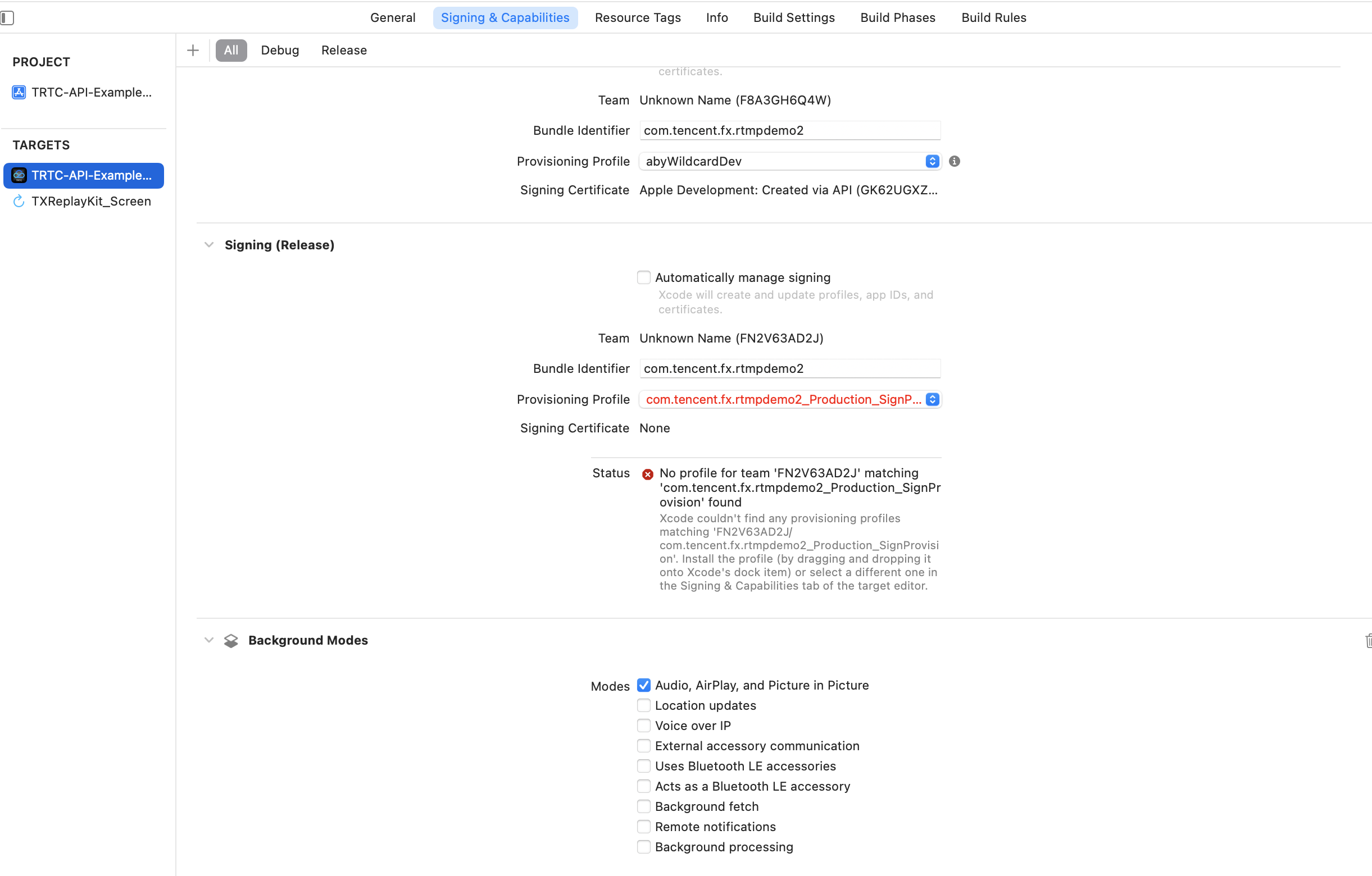
2. 如需 App 进入后台仍然运行相关功能,可在 Xcode 中选中当前工程项目,并在 Capabilities 下将设置项 Background Modes 设定为 ON,并勾选 Audio,AirPlay and Picture in Picture ,如下图所示:
步骤四:鉴权与许可
UserSig 是腾讯云设计的一种安全保护签名,目的是为了阻止恶意攻击者盗用您的云服务使用权,TRTC 在进房时校验该鉴权凭证。
正式运行阶段:推荐安全等级更高的服务端计算 UserSig 方案,防止客户端被逆向破解泄露密钥。
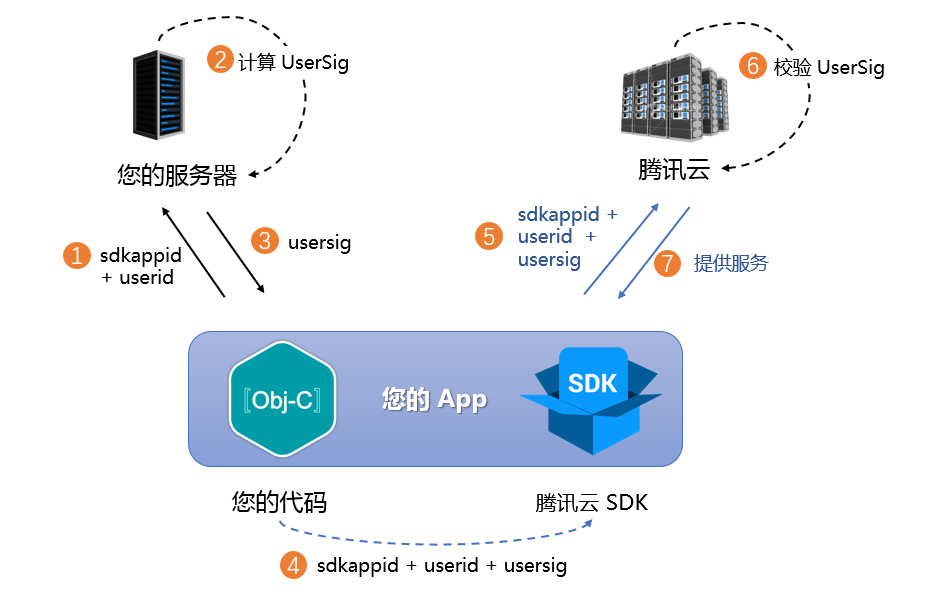
具体实现流程如下:
1. 您的 App 在调用 SDK 的初始化函数之前,首先要向您的服务器请求 UserSig。
2. 您的服务器根据 SDKAppID 和 UserID 计算 UserSig。
3. 服务器将计算好的 UserSig 返回给您的 App。
4. 您的 App 将获得的 UserSig 通过特定 API 传递给 SDK。
5. SDK 将 SDKAppID + UserID + UserSig 提交给腾讯云服务器进行校验。
6. 腾讯云校验 UserSig,确认合法性。
7. 校验通过后,会向 TRTC SDK 提供实时音视频服务。
注意:
调试跑通阶段的本地 UserSig 计算方式不推荐应用到线上环境,容易被逆向破解导致密钥泄露。
我们提供了多个语言版本(Java/Go/PHP/Nodejs/Python/C#/C++)的 UserSig 服务端计算源代码,详见 服务端计算 UserSig。
步骤五:初始化 SDK
// 创建 TRTC SDK 实例(单例模式)self.trtcCloud = [TRTCCloud sharedInstance];// 设置事件监听器self.trtcCloud.delegate = self;// 来自 SDK 的各类事件通知(比如:错误码,警告码,音视频状态参数等)- (void)onError:(TXLiteAVError)errCode errMsg:(nullable NSString *)errMsg extInfo:(nullable NSDictionary *)extInfo {NSLog(@"%d: %@", errCode, errMsg);}- (void)onWarning:(TXLiteAVWarning)warningCode warningMsg:(nullable NSString *)warningMsg extInfo:(nullable NSDictionary *)extInfo {NSLog(@"%d: %@", warningCode, warningMsg);}// 移除事件监听器self.trtcCloud.delegate = nil;// 销毁 TRTC SDK 实例(单例模式)[TRTCCloud destroySharedIntance];
说明:
场景一:排麦独唱
视角一:演唱者动作
时序图
1. 进入房间
- (void)enterRoomWithRoomId:(NSString *)roomId userID:(NSString *)userId {TRTCParams *params = [[TRTCParams alloc] init];// 以字符串房间号为例params.strRoomId = roomId;params.userId = userId;// 从业务后台获取到的 UserSigparams.userSig = [self generateUserSig:userId];// 替换成您的 SDKAppIDparams.sdkAppId = SDKAppID;// 建议均以观众角色进房params.role = TRTCRoleAudience;// 进房场景须选择 LIVE[self.trtcCloud enterRoom:params appScene:TRTCAppSceneLIVE];}
注意:
为了更好地透传 SEI 消息用于歌词同步,建议进房场景选用
TRTCAppSceneLIVE。// 进房结果事件回调- (void)onEnterRoom:(NSInteger)result {if (result > 0) {// result 代表加入房间所消耗的时间(毫秒)NSLog(@"Enter room succeed!");// 开启补黑帧的实验性接口[self.trtcCloud callExperimentalAPI:@"{\\"api\\":\\"enableBlackStream\\",\\"params\\": {\\"enable\\":true}}"];} else {// result 代表进房失败的错误码NSLog(@"Enter room failed!");}}
注意:
纯音频模式下演唱者需要开启补黑帧以携带 SEI 消息,该接口需要在进房成功之后调用。
2. 上麦推流
// 切换为主播角色[self.trtcCloud switchRole:TRTCRoleAnchor];// 切换角色事件回调- (void)onSwitchRole:(TXLiteAVError)errCode errMsg:(NSString *)errMsg {if (errCode == ERR_NULL) {// 设置媒体音量类型[self.trtcCloud setSystemVolumeType:TRTCSystemVolumeTypeMedia];// 上行本地音频流,设置音质[self.trtcCloud startLocalAudio:TRTCAudioQualityMusic];}}
注意:
K 歌场景下建议设置全程媒体音量、Music 音质,以获得高保真听感体验。
3. 点歌演唱
搜索歌曲,获取音乐资源
通过向业务后台搜索目标歌曲,获取歌曲标识 MusicId、歌曲地址 MusicUrl、歌词地址 LyricsUrl 等音乐资源。
建议业务侧自行选择合适的音乐曲库类产品来提供正版音乐资源。
播放伴奏,开始演唱。
// 获取音频特效管理类self.audioEffectManager = [self.trtcCloud getAudioEffectManager];// originMusicId: 自定义原唱音乐标识;originMusicUrl: 原唱音乐资源地址TXAudioMusicParam *originMusicParam = [[TXAudioMusicParam alloc] init];originMusicParam.ID = originMusicId;originMusicParam.path = originMusicUrl;// 是否将原唱发布到远端(否则仅本地播放)originMusicParam.publish = YES;// accompMusicId: 自定义伴奏音乐标识;accompMusicUrl: 伴奏音乐资源地址TXAudioMusicParam *accompMusicParam = [[TXAudioMusicParam alloc] init];accompMusicParam.ID = accompMusicId;accompMusicParam.path = accompMusicUrl;// 是否将伴奏发布到远端(否则仅本地播放)accompMusicParam.publish = YES;// 开始播放原唱音乐[self.audioEffectManager startPlayMusic:originMusicParam onStart:^(NSInteger errCode) {// onStart} onProgress:^(NSInteger progressMs, NSInteger durationMs) {// onProgress} onComplete:^(NSInteger errCode) {// onComplete}];// 开始播放伴奏音乐[self.audioEffectManager startPlayMusic:originMusicParam onStart:^(NSInteger errCode) {// onStart} onProgress:^(NSInteger progressMs, NSInteger durationMs) {// onProgress} onComplete:^(NSInteger errCode) {// onComplete}];// 切换至原唱音乐[self.audioEffectManager setMusicPlayoutVolume:originMusicId volume:100];[self.audioEffectManager setMusicPublishVolume:originMusicId volume:100];[self.audioEffectManager setMusicPlayoutVolume:accompMusicId volume:0];[self.audioEffectManager setMusicPublishVolume:accompMusicId volume:0];// 切换至伴奏音乐[self.audioEffectManager setMusicPlayoutVolume:originMusicId volume:0];[self.audioEffectManager setMusicPublishVolume:originMusicId volume:0];[self.audioEffectManager setMusicPlayoutVolume:accompMusicId volume:100];[self.audioEffectManager setMusicPublishVolume:accompMusicId volume:100];
注意:
K 歌场景下需要同时播放原唱和伴奏(使用 MusicID 区分),通过调整本地和远端播放音量来实现原唱和伴奏的切换。
如果播放的是双音轨(包含原唱和伴奏)音乐,可通过 setMusicTrack 指定音乐的播放音轨来实现原唱和伴奏的切换。
4. 歌词同步
下载歌词
通过向业务后台获取目标歌词下载链接 LyricsUrl,将目标歌词缓存到本地。
本地歌词同步,以及 SEI 传递歌曲进度。
[self.audioEffectManager startPlayMusic:musicParam onStart:^(NSInteger errCode) {// 音乐开始播放} onProgress:^(NSInteger progressMs, NSInteger durationMs) {// 根据最新进度和本地歌词进度误差,判断是否需要 seek// 通过发送 SEI 消息传递歌曲进度NSDictionary *dic = @{@"musicId": @(self.musicId),@"progress": @(progressMs),@"duration": @(durationMs),};JSONModel *json = [[JSONModel alloc] initWithDictionary:dic error:nil];[self.trtcCloud sendSEIMsg:json.toJSONData repeatCount:1];} onComplete:^(NSInteger errCode) {// 音乐播放完成}];
注意:
5. 下麦退房
// 切换为观众角色[self.trtcCloud switchRole:TRTCRoleAudience];// 切换角色事件回调- (void)onSwitchRole:(TXLiteAVError)errCode errMsg:(NSString *)errMsg {if (errCode == ERR_NULL) {// 停止播放伴奏音乐[[self.trtcCloud getAudioEffectManager] stopPlayMusic:self.musicId];// 停止本地音频的采集和发布[self.trtcCloud stopLocalAudio];}}// 退出房间[self.trtcCloud exitRoom];// 退出房间事件回调- (void)onExitRoom:(NSInteger)reason {if (reason == 0) {NSLog(@"主动调用 exitRoom 退出房间");} else if (reason == 1) {NSLog(@"被服务器踢出当前房间");} else if (reason == 2) {NSLog(@"当前房间整个被解散");}}
注意:
待 SDK 占用的所有资源释放完毕后,SDK 会抛出
onExitRoom 回调通知到您。如果您要再次调用
enterRoom 或切换到其他音视频 SDK,请等待 onExitRoom 回调到来后再执行相关操作。否则可能会遇到例如摄像头、麦克风设备被强占等各种异常问题。视角二:听众动作
时序图
1. 进入房间
// 进入房间- (void)enterRoomWithRoomId:(NSString *)roomId userID:(NSString *)userId {TRTCParams *params = [[TRTCParams alloc] init];// 以字符串房间号为例params.strRoomId = roomId;params.userId = userId;// 从业务后台获取到的 UserSigparams.userSig = [self generateUserSig:userId];// 替换成您的 SDKAppIDparams.sdkAppId = SDKAppID;// 建议均以观众角色进房params.role = TRTCRoleAudience;// 进房场景须选择 LIVE[self.trtcCloud enterRoom:params appScene:TRTCAppSceneLIVE];}// 进房结果事件回调- (void)onEnterRoom:(NSInteger)result {if (result > 0) {// result 代表加入房间所消耗的时间(毫秒)NSLog(@"Enter room succeed!");} else {// result 代表进房失败的错误码NSLog(@"Enter room failed!");}}
注意:
为了更好地透传 SEI 消息用于歌词同步,建议进房场景选用
TRTCAppSceneLIVE。自动订阅模式下(默认)观众进房会自动订阅并播放麦上主播音频流。
2. 歌词同步
下载歌词
通过向业务后台获取目标歌词下载链接 LyricsUrl,将目标歌词缓存到本地。
听众端歌词同步
- (void)onUserVideoAvailable:(NSString *)userId available:(BOOL)available {if (available) {[self.trtcCloud startRemoteView:userId view:nil];} else {[self.trtcCloud stopRemoteView:userId];}}- (void)onRecvSEIMsg:(NSString *)userId message:(NSData *)message {JSONModel *json = [[JSONModel alloc] initWithData:message error:nil];NSDictionary *dic = json.toDictionary;int32_t musicId = [dic[@"musicId"] intValue];NSInteger progress = [dic[@"progress"] integerValue];NSInteger duration = [dic[@"duration"] integerValue];// ......// TODO 更新歌词控件逻辑:// 根据接收到的最新进度和本地歌词进度误差,判断是否需要 seek 歌词控件// ......}
注意:
听众需要主动订阅演唱者的视频流,以便接收黑帧携带的 SEI 消息。
3. 退出房间
// 退出房间[self.trtcCloud exitRoom];// 退出房间事件回调- (void)onExitRoom:(NSInteger)reason {if (reason == 0) {NSLog(@"主动调用 exitRoom 退出房间");} else if (reason == 1) {NSLog(@"被服务器踢出当前房间");} else if (reason == 2) {NSLog(@"当前房间整个被解散");}}
场景二:实时合唱
视角一:主唱动作
时序图
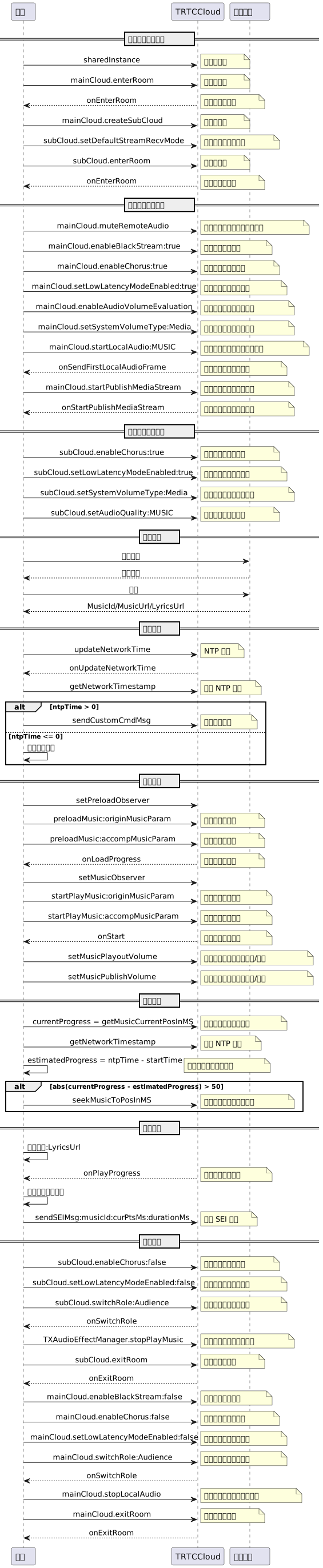
1. 双实例进房
- (void)enterRoomWithRoomId:(NSString *)roomId userID:(NSString *)userId {// 创建 TRTCCloud 主实例(人声实例)TRTCCloud *mainCloud = [TRTCCloud sharedInstance];// 创建 TRTCCloud 子实例(音乐实例)TRTCCloud *subCloud = [mainCloud createSubCloud];// 主实例(人声实例)进房TRTCParams *params = [[TRTCParams alloc] init];params.strRoomId = roomId;params.userId = userId;params.userSig = userSig;params.sdkAppId = SDKAppID;params.role = TRTCRoleAnchor;[mainCloud enterRoom:params appScene:TRTCAppSceneLIVE];// 子实例开启手动订阅模式,默认不订阅远端流[subCloud setDefaultStreamRecvMode:NO video:NO];// 子实例(音乐实例)进房TRTCParams *bgmParams = [[TRTCParams alloc] init];bgmParams.strRoomId = roomId;// 子实例用户名不能与房间内其他用户重复bgmParams.userId = [userId stringByAppendingString:@"_bgm"];bgmParams.userSig = userSig;bgmParams.sdkAppId = SDKAppID;bgmParams.role = TRTCRoleAnchor;[subCloud enterRoom:bgmParams appScene:TRTCAppSceneLIVE];}
注意:
实时合唱方案中,主唱端需要分别创建主实例和子实例,分别用于上行人声及伴奏音乐。
子实例无需订阅房间内其他用户音频流,因此建议开启手动订阅模式,须在进房前开启。
2. 进房后设置
// 主实例进房结果事件回调- (void)onEnterRoom:(NSInteger)result {if (result > 0) {// 主实例取消订阅子实例发布的音乐流[self.trtcCloud muteRemoteAudio:[self.userId stringByAppendingString:@"_bgm"] mute:YES];// 主实例开启补黑帧的实验性接口[self.trtcCloud callExperimentalAPI:@"{\\"api\\":\\"enableBlackStream\\",\\"params\\": {\\"enable\\":true}}"];// 主实例开启合唱模式的实验性接口[self.trtcCloud callExperimentalAPI:@"{\\"api\\":\\"enableChorus\\",\\"params\\":{\\"enable\\":true,\\"audioSource\\":0}}"];// 主实例开启低延时模式的实验性接口[self.trtcCloud callExperimentalAPI:@"{\\"api\\":\\"setLowLatencyModeEnabled\\",\\"params\\":{\\"enable\\":true}}"];// 主实例启用音量大小回调TRTCAudioVolumeEvaluateParams *aveParams = [[TRTCAudioVolumeEvaluateParams alloc] init];aveParams.interval = 300;[self.trtcCloud enableAudioVolumeEvaluation:YES withParams:aveParams];// 主实例设置全程媒体音量类型[self.trtcCloud setSystemVolumeType:TRTCSystemVolumeTypeMedia];// 主实例采集和发布本地音频,同时设置音质[self.trtcCloud startLocalAudio:TRTCAudioQualityMusic];} else {// result 代表进房失败的错误码NSLog(@"Enter room failed");}}// 子实例进房结果事件回调- (void)onEnterRoom:(NSInteger)result {if (result > 0) {// 子实例开启合唱模式的实验性接口[self.subCloud callExperimentalAPI:@"{\\"api\\":\\"enableChorus\\",\\"params\\":{\\"enable\\":true,\\"audioSource\\":1}}"];// 子实例开启低延时模式的实验性接口[self.subCloud callExperimentalAPI:@"{\\"api\\":\\"setLowLatencyModeEnabled\\",\\"params\\":{\\"enable\\":true}}"];// 子实例设置全程媒体音量类型[self.subCloud setSystemVolumeType:TRTCSystemVolumeTypeMedia];// 子实例设置音质[self.subCloud setAudioQuality:TRTCAudioQualityMusic];} else {// result 代表进房失败的错误码NSLog(@"Enter room failed");}}
注意:
主实例和子实例均需使用实验性接口开启合唱模式和低延时模式以优化合唱体验,需注意
audioSource 参数的不同。3. 混流回推房间
- (void)startPublishMediaToRoomWithRoomId:(NSString *)roomId userId:(NSString *)userId {// 创建 TRTCPublishTarget 对象TRTCPublishTarget *target = [[TRTCPublishTarget alloc] init];// 混流后回推到房间target.mode = TRTCPublishMixStreamToRoom;TRTCUser *mixStreamIdentity = [[TRTCUser alloc] init];mixStreamIdentity.strRoomId = roomId;// 混流机器人用户名不能与房间内其他用户重复mixStreamIdentity.userId = [userId stringByAppendingString:@"_robot"];target.mixStreamIdentity = mixStreamIdentity;// 设置转码后的音频流的编码参数(可自定义)TRTCStreamEncoderParam *encoderParam = [[TRTCStreamEncoderParam alloc] init];encoderParam.audioEncodedChannelNum = 2;encoderParam.audioEncodedKbps = 64;encoderParam.audioEncodedCodecType = 2;encoderParam.audioEncodedSampleRate = 48000;// 设置转码后的视频流的编码参数(混入黑帧必填)encoderParam.videoEncodedFPS = 15;encoderParam.videoEncodedGOP = 3;encoderParam.videoEncodedKbps = 30;encoderParam.videoEncodedWidth = 64;encoderParam.videoEncodedHeight = 64;// 设置音频混流参数TRTCStreamMixingConfig *mixingConfig = [[TRTCStreamMixingConfig alloc] init];// 默认情况下填空值即可,代表会混合房间中的所有音频mixingConfig.audioMixUserList = nil;// 配置视频混流模板(混入黑帧必填)TRTCVideoLayout *layout = [[TRTCVideoLayout alloc] init];mixingConfig.videoLayoutList = @[layout];// 开始混流回推[self.trtcCloud startPublishMediaStream:target encoderParam:encoderParam mixingConfig:mixingConfig];}
注意:
为了保持合唱人声和伴奏音乐的对齐,建议开启混流回推房间,麦上合唱者互相订阅单流,麦下听众默认只订阅混流。
混流机器人作为一个独立用户进房拉流、混流及转推,其用户名不能与房间内其他用户名重复,否则会引起互踢。
4. 搜索与点歌
通过向业务后台搜索目标歌曲,获取歌曲标识 MusicId、歌曲地址 MusicUrl、歌词地址 LyricsUrl 等音乐资源。
建议业务侧自行选择合适的音乐曲库类产品来提供正版音乐资源。
5. NTP 校时
- (void)updateNetworkTimeExample {[TXLiveBase sharedInstance].delegate = self;[TXLiveBase updateNetworkTime];}- (void)onUpdateNetworkTime:(int)errCode message:(NSString *)errMsg {// errCode 0: 校时成功且偏差在30ms以内;1: 校时成功但偏差可能在30ms以上;-1: 校时失败if (errCode == 0) {// 校时成功,获取 NTP 时间戳NSInteger ntpTime = [TXLiveBase getNetworkTimestamp];} else {NSLog(@"校时失败,可尝试重新校时");}}
注意:
NTP 校时结果能够反应用户当前的网络质量,为了保证良好的合唱体验,建议在校时失败时不允许用户发起合唱。
6. 发送合唱信令
- (void)sendChorusSignalExample {__weak typeof(self) weakSelf = self;NSTimer *timer = [NSTimer timerWithTimeInterval:1.0 repeats:YES block:^(NSTimer * _Nonnull timer) {__strong typeof(weakSelf) strongSelf = weakSelf;NSDictionary *dic = @{@"cmd": @"startChorus",// 约定合唱开始时间: 当前 NTP 时间 + 延迟播放时间(例如3秒)@"startPlayMusicTS": @([TXLiveBase getNetworkTimestamp] + 3000),@"musicId": @(self.musicId),@"musicDuration": @([[strongSelf.subCloud getAudioEffectManager] getMusicDurationInMS:strongSelf.originMusicUri]),};JSONModel *json = [[JSONModel alloc] initWithDictionary:dic error:nil];[strongSelf.trtcCloud sendCustomCmdMsg:1 data:json.toJSONData reliable:NO ordered:NO];}];[[NSRunLoop currentRunLoop] addTimer:timer forMode:NSRunLoopCommonModes];}
注意:
主唱需要按固定时间频率(例如1秒)循环向房间内广播合唱信令,以便新进房用户也可中途加入合唱。
7. 加载播放伴奏
// 获取音频特效管理类TXAudioEffectManager *audioEffectManager = [self.subCloud getAudioEffectManager];// originMusicId: 自定义原唱音乐标识;originMusicUrl: 原唱音乐资源地址TXAudioMusicParam *originMusicParam = [[TXAudioMusicParam alloc] init];originMusicParam.ID = originMusicId;originMusicParam.path = originMusicUrl;// 是否将原唱发布到远端(否则仅本地播放)originMusicParam.publish = YES;// 音乐开始播放的时间点(毫秒)originMusicParam.startTimeMS = 0;// accompMusicId: 自定义伴奏音乐标识;accompMusicUrl: 伴奏音乐资源地址TXAudioMusicParam *accompMusicParam = [[TXAudioMusicParam alloc] init];accompMusicParam.ID = accompMusicId;accompMusicParam.path = accompMusicUrl;// 是否将伴奏发布到远端(否则仅本地播放)accompMusicParam.publish = YES;// 音乐开始播放的时间点(毫秒)accompMusicParam.startTimeMS = 0;// 预加载原唱音乐[audioEffectManager preloadMusic:originMusicParam onProgress:nil onError:nil];// 预加载伴奏音乐[audioEffectManager preloadMusic:accompMusicParam onProgress:nil onError:nil];// 延迟播放时间(例如3秒)后开始播放原唱音乐[self.audioEffectManager startPlayMusic:originMusicParam onStart:^(NSInteger errCode) {// onStart} onProgress:^(NSInteger progressMs, NSInteger durationMs) {// onProgress} onComplete:^(NSInteger errCode) {// onComplete}];// 延迟播放时间(例如3秒)后开始播放伴奏音乐[self.audioEffectManager startPlayMusic:originMusicParam onStart:^(NSInteger errCode) {// onStart} onProgress:^(NSInteger progressMs, NSInteger durationMs) {// onProgress} onComplete:^(NSInteger errCode) {// onComplete}];// 切换至原唱音乐[self.audioEffectManager setMusicPlayoutVolume:originMusicId volume:100];[self.audioEffectManager setMusicPublishVolume:originMusicId volume:100];[self.audioEffectManager setMusicPlayoutVolume:accompMusicId volume:0];[self.audioEffectManager setMusicPublishVolume:accompMusicId volume:0];// 切换至伴奏音乐[self.audioEffectManager setMusicPlayoutVolume:originMusicId volume:0];[self.audioEffectManager setMusicPublishVolume:originMusicId volume:0];[self.audioEffectManager setMusicPlayoutVolume:accompMusicId volume:100];[self.audioEffectManager setMusicPublishVolume:accompMusicId volume:100];
注意:
建议开始播放音乐前先进行预加载,提前将音乐资源载入到内存当中,可有效降低音乐播放的加载延迟。
K 歌场景下需要同时播放原唱和伴奏(使用 MusicID 区分),通过调整本地和远端播放音量来实现原唱和伴奏的切换。
如果播放的是双音轨(包含原唱和伴奏)音乐,可通过 setMusicTrack 指定音乐的播放音轨来实现原唱和伴奏的切换。
8. 伴奏同步
// 约定的合唱开始时间@property (nonatomic, assign) NSInteger startPlayMusicTS;- (void)syncBgmExample {// 当前伴奏音乐的实际播放进度NSInteger currentProgress = [[self.subCloud getAudioEffectManager] getMusicCurrentPosInMS:self.musicId];// 当前伴奏音乐的理想播放进度NSInteger estimatedProgress = [TXLiveBase getNetworkTimestamp] - self.startPlayMusicTS;// 当进度差超过50ms,进行修正if (estimatedProgress >= 0 && labs(currentProgress - estimatedProgress) > 50) {[[self.subCloud getAudioEffectManager] seekMusicToPosInMS:self.musicId pts:estimatedProgress];}}
9. 歌词同步
下载歌词
通过向业务后台获取目标歌词下载链接 LyricsUrl,将目标歌词缓存到本地。
本地歌词同步,以及 SEI 传递歌曲进度。
[[self.subCloud getAudioEffectManager] startPlayMusic:musicParam onStart:^(NSInteger errCode) {// 音乐开始播放} onProgress:^(NSInteger progressMs, NSInteger durationMs) {// 根据最新进度和本地歌词进度误差,判断是否需要 seek// 通过发送 SEI 消息传递歌曲进度NSDictionary *dic = @{@"musicId": @(self.musicId),@"progress": @(progressMs),@"duration": @(durationMs),};JSONModel *json = [[JSONModel alloc] initWithDictionary:dic error:nil];[self.trtcCloud sendSEIMsg:json.toJSONData repeatCount:1];} onComplete:^(NSInteger errCode) {// 音乐播放完成}];
注意:
10. 下麦退房
- (void)exitRoomExample {// 子实例关闭合唱模式的实验性接口[self.subCloud callExperimentalAPI:@"{\\"api\\":\\"enableChorus\\",\\"params\\":{\\"enable\\":false,\\"audioSource\\":1}}"];// 子实例关闭低延时模式的实验性接口[self.subCloud callExperimentalAPI:@"{\\"api\\":\\"setLowLatencyModeEnabled\\",\\"params\\":{\\"enable\\":false}}"];// 子实例切换为观众角色[self.subCloud switchRole:TRTCRoleAudience];// 子实例停止播放伴奏音乐[[self.subCloud getAudioEffectManager] stopPlayMusic:self.musicId];// 子实例退出房间[self.subCloud exitRoom];// 主实例关闭补黑帧的实验性接口[self.trtcCloud callExperimentalAPI:@"{\\"api\\":\\"enableBlackStream\\",\\"params\\": {\\"enable\\":false}}"];// 主实例关闭合唱模式的实验性接口[self.trtcCloud callExperimentalAPI:@"{\\"api\\":\\"enableChorus\\",\\"params\\":{\\"enable\\":false,\\"audioSource\\":0}}"];// 主实例关闭低延时模式的实验性接口[self.trtcCloud callExperimentalAPI:@"{\\"api\\":\\"setLowLatencyModeEnabled\\",\\"params\\":{\\"enable\\":false}}"];// 主实例切换为观众角色[self.trtcCloud switchRole:TRTCRoleAudience];// 主实例停止本地音频采集和发布[self.trtcCloud stopLocalAudio];// 主实例退出房间[self.trtcCloud exitRoom];}
视角二:合唱动作
时序图
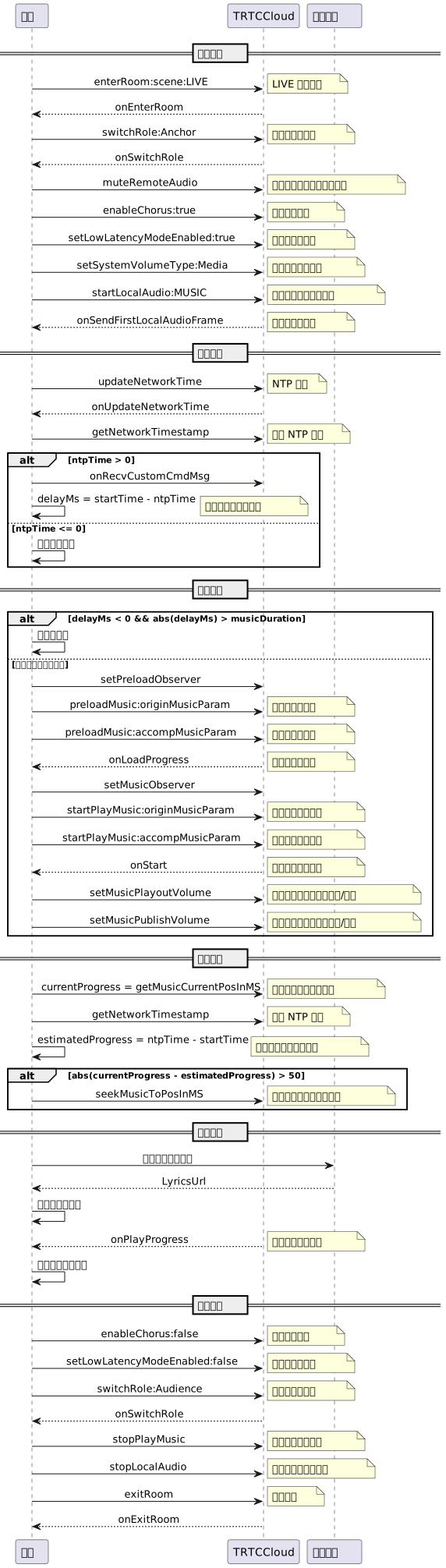
1. 进入房间
- (void)enterRoomWithRoomId:(NSString *)roomId userID:(NSString *)userId {TRTCParams *params = [[TRTCParams alloc] init];// 以字符串房间号为例params.strRoomId = roomId;params.userId = userId;// 从业务后台获取到的 UserSigparams.userSig = [self generateUserSig:userId];// 替换成您的 SDKAppIDparams.sdkAppId = SDKAppID;// 示例以观众角色进房params.role = TRTCRoleAudience;// 进房场景须选择 LIVE[self.trtcCloud enterRoom:params appScene:TRTCAppSceneLIVE];}// 进房结果事件回调- (void)onEnterRoom:(NSInteger)result {if (result > 0) {// result 代表加入房间所消耗的时间(毫秒)NSLog(@"Enter room succeed!");} else {// result 代表进房失败的错误码NSLog(@"Enter room failed!");}}
2. 上麦推流
// 切换为主播角色[self.trtcCloud switchRole:TRTCRoleAnchor];// 切换角色事件回调- (void)onSwitchRole:(TXLiteAVError)errCode errMsg:(NSString *)errMsg {if (errCode == ERR_NULL) {// 取消订阅主唱子实例发布的音乐流[self.trtcCloud muteRemoteAudio:self.bgmUserId mute:YES];// 开启合唱模式的实验性接口[self.trtcCloud callExperimentalAPI:@"{\\"api\\":\\"enableChorus\\",\\"params\\":{\\"enable\\":true,\\"audioSource\\":0}}"];// 开启低延时模式的实验性接口[self.trtcCloud callExperimentalAPI:@"{\\"api\\":\\"setLowLatencyModeEnabled\\",\\"params\\":{\\"enable\\":true}}"];// 设置媒体音量类型[self.trtcCloud setSystemVolumeType:TRTCSystemVolumeTypeMedia];// 上行本地音频流,设置音质[self.trtcCloud startLocalAudio:TRTCAudioQualityMusic];}}
注意:
为了尽可能降低延迟,合唱者均本地播放伴奏音乐,因此需要取消订阅主唱发布的音乐流。
合唱者也需要使用实验性接口开启合唱模式和低延时模式,以优化合唱体验。
K 歌场景下建议设置全程媒体音量、Music 音质,以获得高保真听感体验。
3. NTP 校时
- (void)updateNetworkTimeExample {[TXLiveBase sharedInstance].delegate = self;[TXLiveBase updateNetworkTime];}- (void)onUpdateNetworkTime:(int)errCode message:(NSString *)errMsg {// errCode 0: 校时成功且偏差在30ms以内;1: 校时成功但偏差可能在30ms以上;-1: 校时失败if (errCode == 0) {// 校时成功,获取 NTP 时间戳NSInteger ntpTime = [TXLiveBase getNetworkTimestamp];} else {NSLog(@"校时失败,可尝试重新校时");}}
注意:
NTP 校时结果能够反应用户当前的网络质量,为了保证良好的合唱体验,建议在校时失败时不允许用户参与合唱。
4. 接收合唱信令
- (void)onRecvCustomCmdMsgUserId:(NSString *)userId cmdID:(NSInteger)cmdID seq:(UInt32)seq message:(NSData *)message {JSONModel *json = [[JSONModel alloc] initWithData:message error:nil];NSDictionary *dic = json.toDictionary;// 匹配合唱信令if ([dic[@"cmd"] isEqualToString:@"startChorus"]) {self.startPlayMusicTS = [dic[@"startPlayMusicTS"] integerValue];self.musicId = [dic[@"musicId"] intValue];self.musicDuration = [dic[@"musicDuration"] intValue];// 约定合唱时间和当前时间差值self.delayMs = self.startPlayMusicTS - [TXLiveBase getNetworkTimestamp];}}
注意:
合唱者接收到合唱信令并参与合唱后,状态应转为“合唱中”,本轮合唱结束前不再重复响应合唱信令。
5. 播放伴奏,开始合唱。
- (void)playBmgExample {// 合唱未开始if (self.delayMs > 0) {// 开始预加载音乐[self preloadMusicWithStartTimeMS:0];// 延迟 delayMs 后开始播放音乐[self startPlayMusicWithStartTimeMS:0];} else if (labs(self.delayMs) < self.musicDuration) {// 合唱进行中// 开始播放时间: 时间差值绝对值 + 预加载延迟(例如400ms)NSInteger startTimeMS = labs(self.delayMs) + 400;// 开始预加载音乐[self preloadMusicWithStartTimeMS:startTimeMS];// 预加载延迟(例如400ms)后开始播放音乐[self startPlayMusicWithStartTimeMS:startTimeMS];} else {// 合唱已结束// 不允许加入合唱}}// 预加载音乐- (void)preloadMusicWithStartTimeMS:(NSInteger)startTimeMS {// musicId: 从合唱信令获取;musicUrl: 对应的音乐资源地址TXAudioMusicParam *musicParam = [[TXAudioMusicParam alloc] init];musicParam.ID = self.musicId;musicParam.path = self.musicUrl;// 仅本地播放音乐musicParam.publish = NO;musicParam.startTimeMS = startTimeMS;[self.audioEffectManager preloadMusic:musicParam onProgress:nil onError:nil];}// 开始播放音乐- (void)startPlayMusicWithStartTimeMS:(NSInteger)startTimeMS {// musicId: 从合唱信令获取;musicUrl: 对应的音乐资源地址TXAudioMusicParam *musicParam = [[TXAudioMusicParam alloc] init];musicParam.ID = self.musicId;musicParam.path = self.musicUrl;// 仅本地播放音乐musicParam.publish = NO;musicParam.startTimeMS = startTimeMS;[self.audioEffectManager startPlayMusic:musicParam onStart:nil onProgress:nil onComplete:nil];}
注意:
为了尽可能降低传输延迟,合唱者跟随本地播放的伴奏音乐演唱,无需发布和接收远端音乐。
根据
delayMs 可判断当前合唱状态,不同状态下的 startPlayMusic 延迟调用需要开发者自行实现。6. 伴奏同步
// 约定的合唱开始时间@property (nonatomic, assign) NSInteger startPlayMusicTS;- (void)syncBgmExample {// 当前伴奏音乐的实际播放进度NSInteger currentProgress = [[self.trtcCloud getAudioEffectManager] getMusicCurrentPosInMS:self.musicId];// 当前伴奏音乐的理想播放进度NSInteger estimatedProgress = [TXLiveBase getNetworkTimestamp] - self.startPlayMusicTS;// 当进度差超过50ms,进行修正if (estimatedProgress >= 0 && labs(currentProgress - estimatedProgress) > 50) {[[self.trtcCloud getAudioEffectManager] seekMusicToPosInMS:self.musicId pts:estimatedProgress];}}
7. 歌词同步
下载歌词
通过向业务后台获取目标歌词下载链接 LyricsUrl,将目标歌词缓存到本地。
本地歌词同步
[self.audioEffectManager startPlayMusic:musicParam onStart:^(NSInteger errCode) {// 音乐开始播放} onProgress:^(NSInteger progressMs, NSInteger durationMs) {// TODO 更新歌词控件逻辑:// 根据最新进度和本地歌词进度误差,判断是否需要 seek 歌词控件} onComplete:^(NSInteger errCode) {// 音乐播放完成}];
8. 下麦退房
- (void)exitRoomExample {// 关闭合唱模式的实验性接口[self.trtcCloud callExperimentalAPI:@"{\\"api\\":\\"enableChorus\\",\\"params\\":{\\"enable\\":false,\\"audioSource\\":0}}"];// 关闭低延时模式的实验性接口[self.trtcCloud callExperimentalAPI:@"{\\"api\\":\\"setLowLatencyModeEnabled\\",\\"params\\":{\\"enable\\":false}}"];// 切换为观众角色[self.trtcCloud switchRole:TRTCRoleAudience];// 停止播放伴奏音乐[[self.trtcCloud getAudioEffectManager] stopPlayMusic:self.musicId];// 停止本地音频采集和发布[self.trtcCloud stopLocalAudio];// 退出房间[self.trtcCloud exitRoom];}
视角三:听众动作
时序图
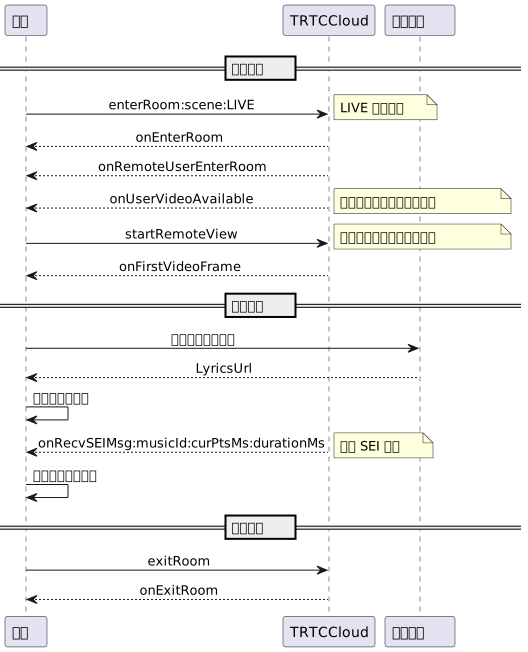
1. 进入房间
- (void)enterRoomWithRoomId:(NSString *)roomId userID:(NSString *)userId {TRTCParams *params = [[TRTCParams alloc] init];// 以字符串房间号为例params.strRoomId = roomId;params.userId = userId;// 从业务后台获取到的 UserSigparams.userSig = [self generateUserSig:userId];// 替换成您的 SDKAppIDparams.sdkAppId = SDKAppID;// 建议均以观众角色进房params.role = TRTCRoleAudience;// 进房场景须选择 LIVE[self.trtcCloud enterRoom:params appScene:TRTCAppSceneLIVE];}// 进房结果事件回调- (void)onEnterRoom:(NSInteger)result {if (result > 0) {// result 代表加入房间所消耗的时间(毫秒)NSLog(@"Enter room succeed!");} else {// result 代表进房失败的错误码NSLog(@"Enter room failed!");}}
注意:
为了更好地透传 SEI 消息用于歌词同步,建议进房场景选用
TRTCAppSceneLIVE。自动订阅模式下(默认)观众进房会自动订阅并播放麦上主播音频流。
2. 歌词同步
下载歌词
通过向业务后台获取目标歌词下载链接 LyricsUrl,将目标歌词缓存到本地。
听众端歌词同步
- (void)onUserVideoAvailable:(NSString *)userId available:(BOOL)available {if (available) {[self.trtcCloud startRemoteView:userId view:nil];} else {[self.trtcCloud stopRemoteView:userId];}}- (void)onRecvSEIMsg:(NSString *)userId message:(NSData *)message {JSONModel *json = [[JSONModel alloc] initWithData:message error:nil];NSDictionary *dic = json.toDictionary;int32_t musicId = [dic[@"musicId"] intValue];NSInteger progress = [dic[@"progress"] integerValue];NSInteger duration = [dic[@"duration"] integerValue];// ......// TODO 更新歌词控件逻辑:// 根据接收到的最新进度和本地歌词进度误差,判断是否需要 seek 歌词控件// ......}
注意:
听众需要主动订阅主唱者的视频流,以便接收黑帧携带的 SEI 消息。
如果主唱混流同时混入黑帧,这里则只需订阅混流机器人的视频流即可。
3. 退出房间
// 退出房间[self.trtcCloud exitRoom];// 退出房间事件回调- (void)onExitRoom:(NSInteger)reason {if (reason == 0) {NSLog(@"主动调用 exitRoom 退出房间");} else if (reason == 1) {NSLog(@"被服务器踢出当前房间");} else if (reason == 2) {NSLog(@"当前房间整个被解散");}}
高级功能
音乐评分模块接入
音乐评分为用户提供多维度唱歌打分能力,目前支持的打分维度包括:音准、节奏。
1. 准备评分相关文件
提前准备好待打分的演唱录制文件、原始音乐标准文件、MIDI 音高文件等,同时将其上传到 COS 存储。
2. 创建音乐评分任务
请求方式: POST(HTTP)
请求地址: https://api.mediax.tencent.com/job
请求头: Content-Type: application/json
请求示例如下:
{"action": "CreateJob","secretId": "{secretId}","secretKey": "{secretKey}","createJobRequest": {"customId": "{customId}","callback": "{callback}","inputs": [{ "url": "{url}" }],"outputs": [{"contentId": "{contentId}","destination": "{destination}","inputSelectors": [0],"smartContentDescriptor": {"outputPrefix": "{outputPrefix}","vocalScore": {"standardAudio": {"midi": {"url":"{url}"},"standardWav": {"url":"{url}"},"alignWav": {"url":"{url}"}}}}}]}}
{"requestId": "ac004192-110b-46e3-ade8-4e449df84d60","createJobResponse": {"job": {"id": "13f342e4-6866-450e-b44e-3151431c578b","state": 1,"customId": "{customId}","callback": "{callback}","inputs": [ { "url": "{url}" } ],"outputs": [{"contentId": "{contentId}","destination": "{destination}","inputSelectors": [ 0 ],"smartContentDescriptor": {"outputPrefix": "{outputPrefix}","vocalScore": {"standardAudio": {"midi": {"url":"{url}"},"standardWav": {"url":"{url}"},"alignWav": {"url":"{url}"}}}}}],"timing": {"createdAt": "1603432763000","startedAt": "0","completedAt": "0"}}}}
3. 获取音乐评分结果
获取方式:分为主动获取和被动回调。
通过创建任务后的回包中的 id 查询,如果查询到的任务成功(state=3),则任务的 Output 中会携带 smartContentResult 结构体,其中的 vocalScore 字段存储结果JSON文件名,用户可根据 Output 中的 cos 及 destination 信息可自行拼接出输出文件的 cos 路径。
{"action": "GetJob","secretId": "{secretId}","secretKey": "{secretKey}","getJobRequest": {"id": "{id}"}}
{"requestId": "c9845a99-34e3-4b0f-80f5-f0a2a0ee8896","getJobResponse": {"job": {"id": "a95e9d74-6602-4405-a3fc-6408a76bcc98","state": 3,"customId": "{customId}","callback": "{callback}","timing": {"createdAt": "1610513575000","startedAt": "1610513575000","completedAt": "1610513618000"},"inputs": [{ "url": "{url}" }],"outputs": [{"contentId": "{contentId}","destination": "{destination}","inputSelectors": [0],"smartContentDescriptor": {"outputPrefix": "{outputPrefix}","vocalScore": {"standardAudio": {"midi": {"url":"{url}"},"standardWav": {"url":"{url}"},"alignWav": {"url":"{url}"}}}},"smartContentResult": {"vocalScore": "out.json"}}]}}}
被动回调需要在创建任务时填写 callback 字段,平台在任务进入完成态(COMPLETED/ERROR)后会将 Job 结构体发送给 callback 所指的地址,平台方推荐使用被动回调的方式获取任务结果。会将进入完成态(COMPLETED/ERROR)的任务的整个 Job 结构体发送到用户在创建任务时指定的 callback 字段对应的地址,Job 结构体见主动查询的示例(getJobResponse 下)。
说明:
混流透传单流音量大小
开启混流后,听众无法直接获取麦上主播单流音量。此时,可采取房主将所有麦上主播的回调音量值通过 SEI 发送出去的方式透传单流音量。
- (void)onUserVoiceVolume:(NSArray<TRTCVolumeInfo *> *)userVolumes totalVolume:(NSInteger)totalVolume {if (userVolumes.count) {// 用于保存麦上用户对应的音量值NSMutableDictionary *volumesMap = [NSMutableDictionary dictionary];for (TRTCVolumeInfo *user in userVolumes) {// 可以设置适当的音量阈值if (user.volume > 10) {volumesMap[user.userId] = @(user.volume);}}JSONModel *json = [[JSONModel alloc] initWithDictionary:volumesMap error:nil];// 通过 SEI 消息发送麦上用户音量集合[self.trtcCloud sendSEIMsg:json.toJSONData repeatCount:1];}}- (void)onRecvSEIMsg:(NSString *)userId message:(NSData *)message {JSONModel *json = [[JSONModel alloc] initWithData:message error:nil];NSDictionary *dic = json.toDictionary;for (NSString *userId in dic.allKeys) {// 打印所有麦上用户单流的音量大小NSLog(@"%@: %@", userId, dic[userId]);}}
注意:
采用 SEI 消息从混流透传单流音量的前提是房主有视频推流或已开启补黑帧,同时听众需要主动订阅房主视频流。
网络质量实时回调
可以通过监听
onNetworkQuality 来实时统计本地及远端用户的网络质量,该回调每隔2秒抛出一次。#pragma mark - TRTCCloudDelegate- (void)onNetworkQuality:(TRTCQualityInfo *)localQuality remoteQuality:(NSArray<TRTCQualityInfo *> *)remoteQuality {// localQuality代表本地用户网络质量评估结果// remoteQuality 代表远端用户网络质量评估结果,其结果受远端和本地共同影响switch(localQuality.quality) {case TRTCQuality_Unknown:NSLog(@"未定义");break;case TRTCQuality_Excellent:NSLog(@"当前网络非常好");break;case TRTCQuality_Good:NSLog(@"当前网络比较好");break;case TRTCQuality_Poor:NSLog(@"当前网络一般");break;case TRTCQuality_Bad:NSLog(@"当前网络较差");break;case TRTCQuality_Vbad:NSLog(@"当前网络很差");break;case TRTCQuality_Down:NSLog(@"当前网络不满足 TRTC 最低要求");break;default:break;}}
高级权限控制
TRTC 高级权限控制可用于对不同房间设置不同进入权限,例如高级 VIP 房;也可用于控制听众上麦权限,例如处理幽灵麦。
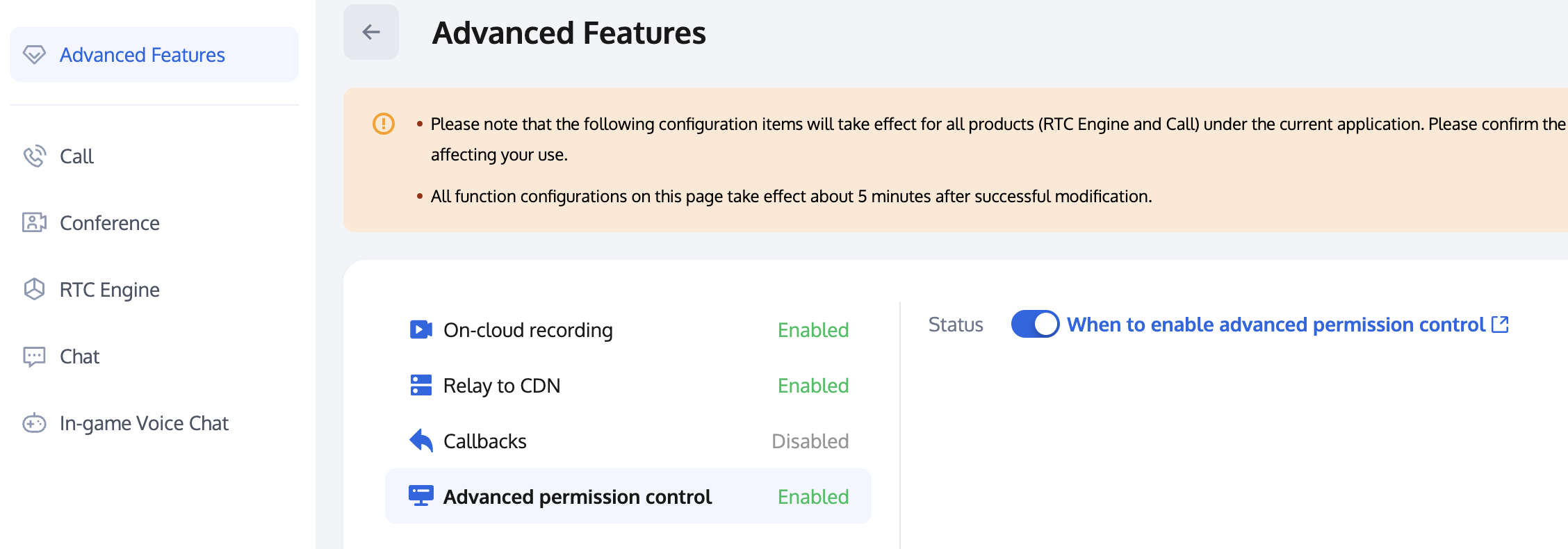
注意:
当某个 SDKAppID 开启高级权限控制后,使用该 SDKAppID 的所有用户都需要在
TRTCParams 中传入 privateMapKey 参数才可以成功进房。因此如果您线上有使用此 SDKAppID 的用户,请不要轻易开启此功能。步骤三:进房校验&上麦校验 PrivateMapKey。
进房校验
TRTCParams *params = [[TRTCParams alloc] init];params.sdkAppId = SDKAppID;params.roomId = self.roomId;params.userId = self.userId;// 从业务后台获取到的 UserSigparams.userSig = [self getUserSig];// 从业务后台获取到的 PrivateMapKeyparams.privateMapKey = [self getPrivateMapKey];params.role = TRTCRoleAudience;[self.trtcCloud enterRoom:params appScene:TRTCAppSceneLIVE];
上麦校验
// 从业务后台获取到最新的 PrivateMapKey 传入切换角色接口[self.trtcCloud switchRole:TRTCRoleAnchor privateMapKey:[self getPrivateMapKey]];
异常处理
异常错误处理
1. UserSig 相关
枚举 | 取值 | 描述 |
ERR_TRTC_INVALID_USER_SIG | -3320 | 进房参数 UserSig 不正确,请检查 TRTCParams.userSig 是否为空。 |
ERR_TRTC_USER_SIG_CHECK_FAILED | -100018 | UserSig 校验失败,请检查参数 TRTCParams.userSig 是否填写正确或已经过期。 |
2. 进退房相关
进房失败请先检查进房参数是否正确,且进退房接口必须成对调用,即便进房失败也需要调用退房接口。
枚举 | 取值 | 描述 |
ERR_TRTC_CONNECT_SERVER_TIMEOUT | -3308 | 请求进房超时,请检查是否断网或者是否开启 VPN,您也可以切换4G进行测试。 |
ERR_TRTC_INVALID_SDK_APPID | -3317 | 进房参数 SDKAppID 错误,请检查 TRTCParams.sdkAppId 是否为空 |
ERR_TRTC_INVALID_ROOM_ID | -3318 | 进房参数 roomId 错误,请检查 TRTCParams.roomId 或 TRTCParams.strRoomId 是否为空,注意 roomId 和 strRoomId 不可混用。 |
ERR_TRTC_INVALID_USER_ID | -3319 | 进房参数 userId 不正确,请检查 TRTCParams.userId 是否为空。 |
ERR_TRTC_ENTER_ROOM_REFUSED | -3340 | 进房请求被拒绝,请检查是否连续调用 enterRoom 进入相同 ID 的房间。 |
3. 设备相关
可监听设备相关错误,在出现相关错误时 UI 提示用户。
枚举 | 取值 | 描述 |
ERR_MIC_START_FAIL | -1302 | 打开麦克风失败,例如在 Windows 或 Mac 设备,麦克风的配置程序(驱动程序)异常,禁用后重新启用设备,或者重启机器,或者更新配置程序。 |
ERR_SPEAKER_START_FAIL | -1321 | 打开扬声器失败,例如在 Windows 或 Mac 设备,扬声器的配置程序(驱动程序)异常,禁用后重新启用设备,或者重启机器,或者更新配置程序。 |
ERR_MIC_OCCUPY | -1319 | 麦克风正在被占用,例如移动设备正在通话时,打开麦克风会失败。 |
耳返相关问题
1. 如何开启耳返功能及设置耳返音量
// 开启耳返[[self.trtcCloud getAudioEffectManager] enableVoiceEarMonitor:YES];// 设置耳返音量[[self.trtcCloud getAudioEffectManager] setVoiceEarMonitorVolume:volume];
注意:
可以提前设置开启耳返,无需监听音频路由变化,接入耳机后耳返功能会自动生效。
2. 开启耳返功能后没有生效
由于蓝牙耳机的硬件延迟非常高,请尽量在用户界面上提示主播佩戴有线耳机。 同时也需要注意,并非所有的手机开启此特性后都能达到优秀的耳返效果,TRTC SDK 已经对部分耳返效果不佳的手机屏蔽了该特性。
3. 耳返延迟过高
请检查是否使用的是蓝牙耳机,由于蓝牙耳机的硬件延迟非常高,请尽量使用有线耳机。另外,可以尝试通过实验性接口
setSystemAudioKitEnabled 开启硬件耳返来改善耳返延迟过高的问题。硬件耳返性能较好,且延迟较低;软件耳返延迟较高,但兼容性较好。目前,对于华为和 VIVO 设备,SDK 默认使用硬件耳返,其他设备默认使用软件耳返。如果硬件耳返存在兼容性问题,可以 联系我们 配置强制使用软件耳返。NTP 校时问题
1. NTP time sync finished, but result may be inaccurate。
NTP 校时成功,但偏差可能在30ms以上,反映客户端网络环境差,rtt 持续抖动。
2. Error in AddressResolver: No address associated with hostname
NTP 校时失败,可能是当前网络环境下本地运营商 DNS 解析暂时异常,请稍后再试。
3. NTP 服务重试处理逻辑
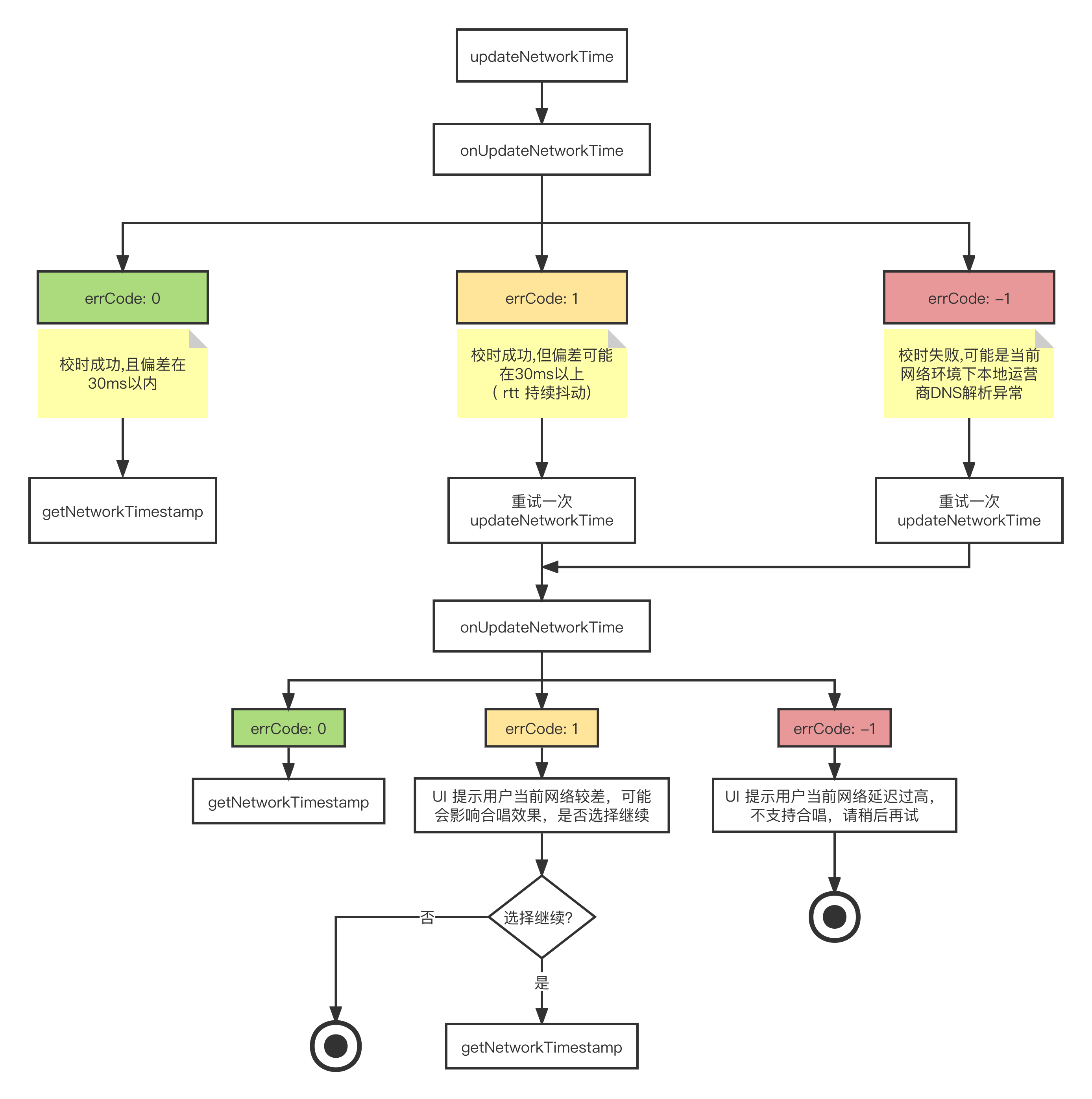
实时合唱相关用法问题
1. 实时合唱场景下主唱为什么要双实例推流?
实时合唱场景下为了尽量降低端到端延迟,从而达到人声和伴奏同步,通常采用主唱端双实例分别上行人声和伴奏,其他合唱端只上行人声,本地播放伴奏的方案。此时合唱端需要订阅主唱人声流,同时不订阅主唱音乐流,这样只有双实例分离推流才能实现。
2. 实时合唱场景下为什么建议开启混流回推?
听众端同时拉取多路单流极有可能导致多路人声流和伴奏流不对齐,而拉取混流则能保证各路流的绝对对齐,同时可以降低下行带宽。
3. SEI 在实时合唱场景中的用途有哪些方面?
传递伴奏音乐进度,用于听众端歌词同步。
混流透传单流音量,用于听众端展示音浪。
4. 伴奏音乐加载耗时长,存在较大播放延迟?
SDK 加载网络音乐资源需要一定耗时,建议在开始播放前提前开启音乐预加载。
[[self.trtcCloud getAudioEffectManager] preloadMusic:musicParam onProgress:nil onError:nil];
5. 随伴奏演唱时听不清人声,音乐压制人声?
如果采用默认音量存在伴奏音乐压制人声的情况,建议适当调整音乐及人声音量占比。
// 设置某一首背景音乐的本地播放音量的大小[[self.trtcCloud getAudioEffectManager] setMusicPlayoutVolume:self.musicId volume:volume];// 设置某一首背景音乐的远端播放音量的大小[[self.trtcCloud getAudioEffectManager] setMusicPublishVolume:self.musicId volume:volume];// 设置所有背景音乐的本地音量和远端音量的大小[[self.trtcCloud getAudioEffectManager] setAllMusicVolume:volume];// 设置人声采集音量的大小[[self.trtcCloud getAudioEffectManager] setVoiceVolume:volume];
文档反馈