GooseFSx-CLI 命令行工具
Download
聚焦模式
字号
概述
GooseFSx-CLI 是腾讯云数据加速器 GooseFSx 的客户端命令行工具,适用于64位 Linux 系统。您可通过命令行指令,自动化、脚本化管理 GooseFSx 中的数据。
下载工具
配置参数
配置参数有以下方式:
方式一:直接执行配置命令
1. 执行如下命令:
./goosefsx-cli
2. 请按照指引,依次输入 AK、SK 和 token:
2023/02/16 19:55:44 Welcome to goosefsx-cli!When you use goosefsx-cli for the first time, you need to input some necessary information to generate the default configuration file of goosefsx-cli.The path of the configuration file: /root/.goosefsx.yamlInput Your Secret ID:xxxInput Your Secret Key:yyyInput Your Session Token:test-token123
方式二:直接编辑配置文件 /root/.goosefsx.yaml
# cat /root/.goosefsx.yamlgoosefsx:base:secretid: xxxsecretkey: yyysessiontoken: test-token123scheme: httpsendpoint: goosefs.internal.tencentcloudapi.com
列出指定目录的对象和虚拟目录
列出指定目录下的文件(对象)和目录(虚拟目录)。
命令格式
./goosefsx-cli cos ls [flags]
包含以下 flag:
flag 全称 | flag 简写 | flag 用途 |
无 | 无 | 列出指定目录下的文件和目录,不会递归列出子目录的文件和子目录 |
无 | -r | 携带 -r 参数递归列出目录;递归列出指定目录下的子目录的文件和子目录 |
--limit | 无 | 携带 --limit 参数指定列出文件和目录的数量;例如,--limit 2 ,按照字典序、列出前2个文件或目录 |
--include | 无 | 携带 --include 参数设置包含的正则过滤条件;例如,--include dir ,列出以 dir 开头的文件和子目录 |
--exclude | 无 | 携带 --exclude 参数设置不包含的正则过滤条件;例如,--exclude dir ,列出不以 dir 开头的文件和子目录 |
无 | > | 将文件列表导入到指定文件;否则,直接输出文件列表 |
叠加 | 叠加 | 同时携带多个参数,实现叠加效果,例如,-r --limit 10 --include dir > list,实现递归列出子目录的文件和子目录,列出前10个文件或目录,列出以 dir 开头的文件和子目录,输出到文件 list |
操作示例
示例一:列出存储桶 goosefs-ofs-test1-xxx 的目录 dir/
./goosefsx-cli cos ls --bucket-name goosefs-ofs-test1-xxx dir/ --bucket-region ap-beijing
返回值
[root@VM-10-214-tencentos ~]# ./goosefsx-cli cos ls --bucket-name goosefs-ofs-test1-xxx dir/ --bucket-region ap-beijingdir/_sssdir/dir2/
示例二:列出存储桶 goosefs-ofs-test1-xxx 的目录 dir/ 所有文件和目录 ,并输出到文件 list
./goosefsx-cli cos ls --bucket-name goosefs-ofs-test1-xxx dir/ --bucket-region ap-beijing -r > list
返回值
[root@VM-10-214-tencentos ~]# ./goosefsx-cli cos ls --bucket-name goosefs-ofs-test1-xxx dir/ --bucket-region ap-beijing -r > list[root@VM-10-214-tencentos ~]# cat listdir/_sssdir/dir2/dir/dir2/_sss (4)
执行数据流动任务命令
data_flow 用于数据流动任务。
前提条件
创建数据流动任务并异步返回结果
创建数据流动任务,立即返回下发任务是否成功;随着数据量不同,数据流动任务执行时间也不同,可通过以下查询命令来查询数据流动任务执行结果。
命令格式
./goosefsx-cli data_flow create [flags]
create 命令包含以下 flag:
flag 全称 | flag 简写 | flag 用途 |
--task-type | 无 | 数据流动任务类型,FS_TO_COS(文件系统到 COS Bucket)或者 COS_TO_FS(COS Bucket 到文件系统) |
--bucket | 无 | COS 存储桶名 |
--region | 无 | 文件系统所属地域 |
--filesystem-id | 无 | 文件系统 ID |
--task-path | 无 | 对于 FS_TO_COS 任务,--task-path 是 Bucket 映射目录的相对路径。对于 COS_TO_FS 任务,--task-path 是 COS 上的路径。如果置为空,则表示全部数据。 示例: 若您将 COS 存储桶 beijing-1250000000 关联到 GooseFSx 目录 beijing-1250000000,配置 --task-path=test/ 和--task-path=level2/level3/ ,则分别表示 COS 存储桶 beijing-1250000000下的 test/ 和 level2/level3/ 路径,或分别表示 GooseFSx 目录 beijing-1250000000下的目录 test/ 和 level2/level3/ ,其中 level3/ 为 level2 的子目录。注意: --task-path 参数值以 /结尾。 |
--task-name | 无 | 任务名称 |
输出参数
参数名称 | 类型 | 描述 |
Task ID | string | 任务 ID |
Task Request ID | string | 唯一请求 ID,每次请求都会返回。定位问题时需要提供该次请求的 RequestId。 |
操作示例
创建数据流动任务
./goosefsx-cli data_flow create --task-type=COS_TO_FS --bucket=bucket_test-1252246555 --region=ap-shanghai --filesystem-id=xxx --task-path=test/ --task-name=test
返回值
Create data repository task successfully!=======================Task ID: x_task_1676551831746Task Request ID: f90a8741-f59b-465c-b44c-4758e7ed68a0
数据流动任务的结果,通过查询命令来查看。
获取数据流动任务的执行结果
查询数据流动任务的执行结果,执行中、已完成、失败。
命令格式
./goosefsx-cli data_flow taskstatus [flags]
taskstatus 命令包含以下 flag:
flag 全称 | flag 简写 | flag 用途 |
--region | 无 | 文件系统所属地域 |
--task-id | 无 | 任务 ID |
--filesystem-id | 无 | 文件系统 ID |
输出参数
参数名称 | 类型 | 描述 |
Query data flow task ID | string | 任务 ID |
Query data flow task status | string | 获取数据流动任务状态,其中包含的数字 0(初始化)、 2(已完成)、3(任务失败) |
Query data flow task Request ID | string | 唯一请求 ID,每次请求都会返回。定位问题时需要提供该次请求的 RequestId。 |
操作示例
获取数据流动实时任务状态
./goosefsx-cli data_flow taskstatus --region=ap-shanghai --task-id=xxx --filesystem-id=xxx
返回值
Query data flow task successfully!=======================Query data flow task ID: x_task_1676551831746Query data flow task Request ID: fad14898-b975-423e-9588-7c5be84ad4e9Query data flow task status: 数据流动任务状态为 2, 已完成
注意:
task-id 为创建数据流动任务的返回值。
创建数据流动任务并实时返回结果
创建数据流动任务并返回执行结果,已完成或失败。
命令格式
./goosefsx-cli data_flow createAndWaitFinish [flags]
createAndWaitFinish 命令包含以下 flag:
flag 全称 | flag 简写 | flag 用途 |
--task-type | 无 | 数据流动任务类型,FS_TO_COS(文件系统到 COS Bucket)或者 COS_TO_FS(COS Bucket 到文件系统) |
--bucket | 无 | COS 存储桶名 |
--region | 无 | 文件系统所属地域 |
--filesystem-id | 无 | 文件系统 ID |
--task-path | 无 | 对于 FS_TO_COS, TaskPath 是 Bucket 映射目录的相对路径, 对于 COS_TO_FS 是 COS 上的路径。如果置为空, 则表示全部数据 |
--task-name | 无 | 任务名称 |
输出参数
参数名称 | 类型 | 描述 |
Task ID | string | 创建数据流动任务 ID |
Task Request ID | string | 创建数据流动任务唯一请求 ID,每次请求都会返回。定位问题时需要提供该次请求的 RequestId |
Query data flow task ID | string | 获取数据流动任务 ID |
Query data flow task Request ID | string | 获取数据流动任务唯一请求 ID,每次请求都会返回。定位问题时需要提供该次请求的 RequestId |
Query data flow task status | string | 获取数据流动任务状态,其中包含的数字 0(初始化)、2(已完成)、3(任务失败) |
操作示例
创建数据流动任务
./goosefsx-cli data_flow createAndWaitFinish --task-type=COS_TO_FS --bucket=bucket_test-xxxx --region=ap-shanghai --filesystem-id=xxx --task-path=test/ --task-name=test
返回值
Create data repository task successfully!=======================Task ID: x_task_1676553288519Task Request ID: 2902f31e-4bfc-4709-828f-999072c92478Query data flow task successfully!=======================Query data flow task ID: x_task_1676553288519Query data flow task Request ID: ee9d0646-9c9b-4589-b661-f492631147afQuery data flow task status: 数据流通任务状态为 2, 已完成
从融合桶加载数据最佳实践
执行两条命令从融合桶加载数据,首先获取融合桶的文件列表,然后按文件列表从融合桶加载数据。
前提条件
步骤一:获取融合桶文件列表
获取文件列表,同步返回执行结果,将文件列表保存到指定文件中;随着数据量不同,执行时间也不同。如示例,400万文件需要6分钟多生成文件列表。
命令格式
./goosefsx-cli cos ls [flags]
操作示例

将 file.list 保存在当前目录。
步骤二:按文件列表从融合桶加载数据
基于文件列表从 COS 融合桶加载数据。
命令格式
./goosefsx-cli data_flow create [flags]
操作示例

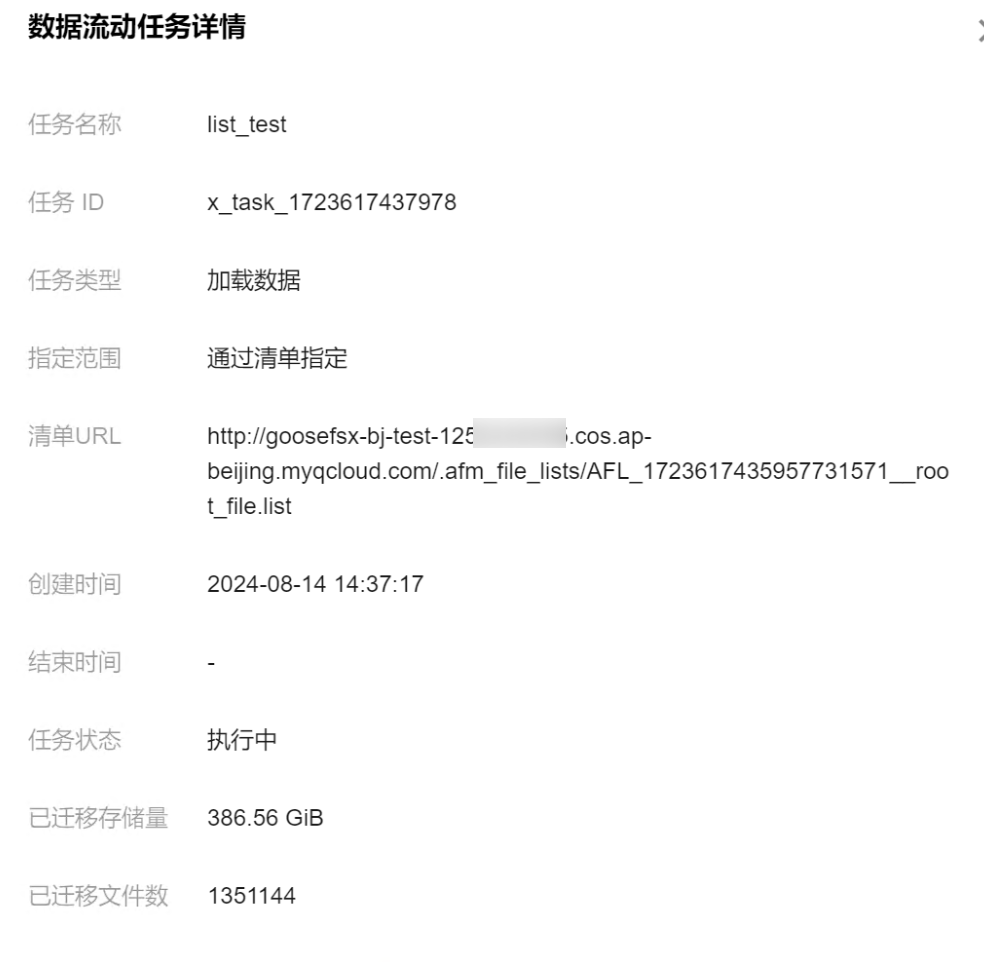
查看任务状态:

可登录控制台查看任务状态:
文档反馈