产品动态
产品近期公告
关于 TRTC Live 正式上线的公告
关于TRTC Conference 正式版上线的公告
Conference 商业化版本即将推出
关于多人音视频 Conference 开启内测公告
关于音视频通话 Call 正式版上线的公告
关于腾讯云音视频终端 SDK 播放升级及新增授权校验的公告
关于 TRTC 应用订阅套餐服务上线的相关说明
AtomicXCore 提供了 CoHostStore 和 BattleStore 两个模块,分别用于处理跨房连线和 PK 对战。本文将指导您如何组合使用这两个工具,完成语聊房场景下的连线和 PK 功能的开发。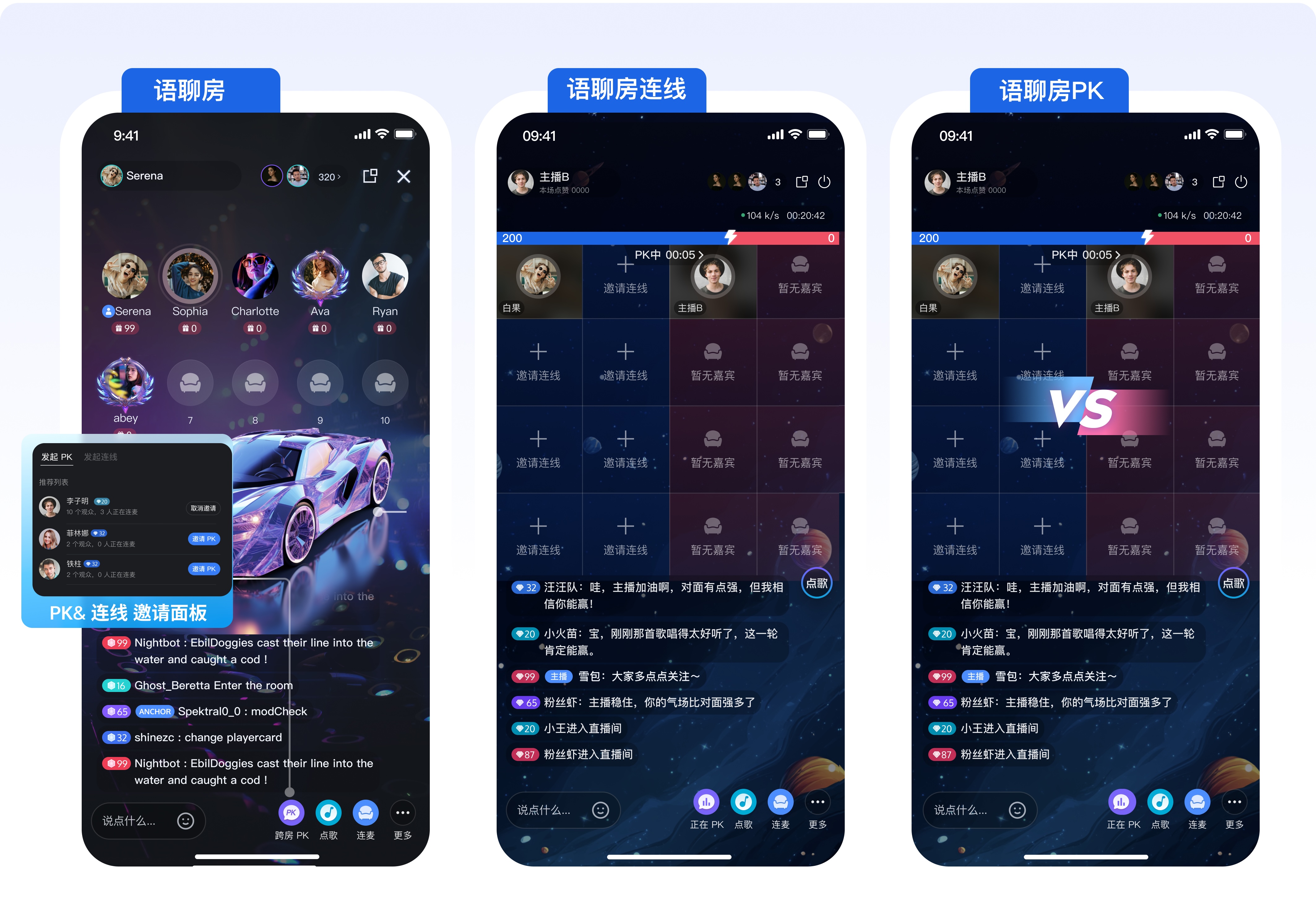
核心概念 | 类型 | 核心职责与描述 |
CoHostStore | class | 管理主播间的连线生命周期,提供连线功能 API( requestHostConnection、acceptHostConnection)。 |
BattleStore | class | 管理跨房 PK 对战的信令与数据,包括 PK 状态。 |
LiveListStore | class | 提供直播房间列表的拉取功能 ( fetchLiveList),用于获取可连线的其他房间信息。 |
LiveSeatStore | class | 管理房间内所有麦位状态(包括连线状态下的跨房间麦位),用于监听用户上下麦、麦克风等状态。 |
CoHostLayoutTemplate | enum | 连线时,用于指定房间麦位布局模板,例如 .hostStaticVoice6v6。 |
BattleConfig | struct | 配置 PK 的详细信息,例如 PK 时长 ( duration) 和是否需要二次响应 (needResponse)。 |
LiveListStore.shared.fetchLiveList。TUILiveInfo 的 isPublicVisible 字段是否为 true;onSuccess 回调中 cursor 作为下一次续拉的游标,如果返回的 cursor 为空,则表示直播间列表已全部拉取完;import AtomicXCorefunc fetchLiveListForCoHost() {var cursor = "" // 首次拉取,游标为空var count = 20 // 每次拉取 20 条数据let liveListStore = LiveListStore.sharedliveListStore.fetchLiveList(cursor: cursor,count: count,completion: { [weak self] result inguard let self = self else {return }switch result {case .success:print("直播间列表拉取成功")// 拉取到的直播列表会更新到 LiveListStore.shared.state.value.liveList 中,在拉取成功之后,更新连线邀请面板推荐的用户。// inviteAdapter.submitList(LiveListStore.shared.state.value.liveList))case .failure(let error):print("拉取直播列表失败: \\(error.code),\\(error.message)")break}})}
CoHostStore 的 requestHostConnection 接口发起连线邀请。completion 回调中检查Result是否为.success。CoHostEventPublisher 的 onCoHostRequestReceived 回调通知给对端主播,您可以在这个字段中携带 “是否立即开始 PK 对战” 等信息,来实现自己的特殊业务。import AtomicXCore// 从 LiveListStore 中获取的目标房间 IDlet targetHostLiveID = "target_host_room_id"// 使用 6v6 语聊房静态布局为例let layoutTemplate = .hostStaticVoice6v6let timeout: TimeInterval = 10 // 邀请超时时间(秒)let extraInfo: String = "" // 额外的业务信息,用于“直连 PK”时携带标识coHostStore.requestHostConnection(targetHost: targetHostLiveID,layoutTemplate: layoutTemplate,timeout: timeout,extraInfo: extraInfo,completion: { [weak self] result inguard let self = self else { return }switch result {case .success():print("邀请发送成功")breakcase .failure(let error):print("邀请发送失败: \\(error.code),\\(error.message)")}})
CoHostEventPublisher 的 onCoHostRequestReceived 回调,对端主播可以监听这个回调并在 UI 上提醒 “主播邀请您参与连线互动”。import AtomicXCoreimport Combineprivate var cancellableSet: Set<AnyCancellable> = []var coHostStore: CoHostStore {return CoHostStore.create(liveID: liveID)}coHostStore.coHostEventPublisher.receive(on: RunLoop.main).sink { [weak self] event inguard let self = self else { return }switch event {// 您会收到如下事件case .onCoHostRequestReceived(let inviter, let extensionInfo):break;default:break}}.store(in: &cancellableSet)
CoHostStore 的 acceptHostConnection 和 rejectHostConnection 接口分别同意或拒绝连线邀请。import AtomicXCoreimport Combineprivate var cancellableSet: Set<AnyCancellable> = []var coHostStore: CoHostStore {return CoHostStore.create(liveID: liveID)}coHostStore.coHostEventPublisher.receive(on: RunLoop.main).sink { [weak self] event inguard let self = self else { return }switch event {case .onCoHostRequestReceived(let inviter, let extensionInfo)://接受连线请求coHostStore.acceptHostConnection(fromHostLiveID: inviter.liveID) { [weak self] result inguard let self = self else { return }switch result {case .success():breakcase .failure(let error):break}}// 拒绝连线请求// coHostStore.rejectHostConnection(fromHostLiveID: inviter.liveID) { [weak self] result in// guard let self = self else { return }// switch result {// case .success():// case .failure(let error):// }// }default:break}}.store(in: &cancellableSet)
CoHostStore.coHostState.connected 状态流,以及 LiveSeatStore.liveSeatState.seatList 状态流,以动态切换和刷新麦位布局。import AtomicXCoreimport Combineprivate var cancellableSet: Set<AnyCancellable> = []// 1. 获取 LiveSeatStore 实例var liveSeatStore: LiveSeatStore {return LiveSeatStore.create(liveID: liveID)}// 2. 监听连线状态coHostStore.state.subscribe(StatePublisherSelector(keyPath: \\CoHostState.connected)).receive(on: RunLoop.main).dropFirst().sink { [weak self] connected inguard let self = self else { return }// 当连线人数大于0时即代表房主在连线状态}.store(in: &cancellableSet)// 3. 监听麦位信息,用于刷新连线布局中所有用户的头像、静音状态等liveSeatStore.state.subscribe(StatePublisherSelector(keyPath: \\LiveSeatState.seatList)).removeDuplicates().receive(on: RunLoop.main).sink { [weak self] seatList inguard let self = self else { return }// 布局刷新逻辑:// 根据 seatInfo.userInfo.liveID 区分本房间用户和对方房间用户。// 根据 seatInfo.userInfo.microphoneStatus 刷新麦克风静音图标。}.store(in: &cancellableSet)
requestHostConnection邀请新的主播参与连线。import AtomicXCoreimport Combine// 从 LiveListStore 中获取的目标房间 IDlet targetHostLiveID = "target_host_room_id"// 使用 6v6 语聊房静态布局为例let layoutTemplate = .hostStaticVoice6v6let timeout: TimeInterval = 10 // 邀请超时时间(秒)let extraInfo: String = "" // 额外的业务信息,用于“直连 PK”时携带标识coHostStore.requestHostConnection(targetHost: targetHostLiveID,layoutTemplate: layoutTemplate,timeout: timeout,extraInfo: extraInfo,completion: { [weak self] result inguard let self = self else { return }switch result {case .success():print("邀请发送成功")breakcase .failure(let error):print("邀请发送失败: \\(error.code),\\(error.message)")break}})
CoHostStore 的 exitHostConnection 接口退出;当您退出连线后,还处于连线状态的其他主播的 LiveSeatStore 的 seatList 会更新。其他还处于连线状态的主播重新根据麦位渲染 UI 即可。func onExitButtonClicked() {coHostStore.exitHostConnection(){ [weak self] result inguard let self = self else { return }switch result {case .success():breakcase .failure(let error):break}}}
PK 模式 | 房间状态(PK 前) | 房间状态(PK 后) |
场景一:主播在连线后再发起 PK | 双方已连线 | 恢复连线状态 |
场景二:主播发起带 PK 模式的连线 | 双方未连线 | 恢复连线状态 |
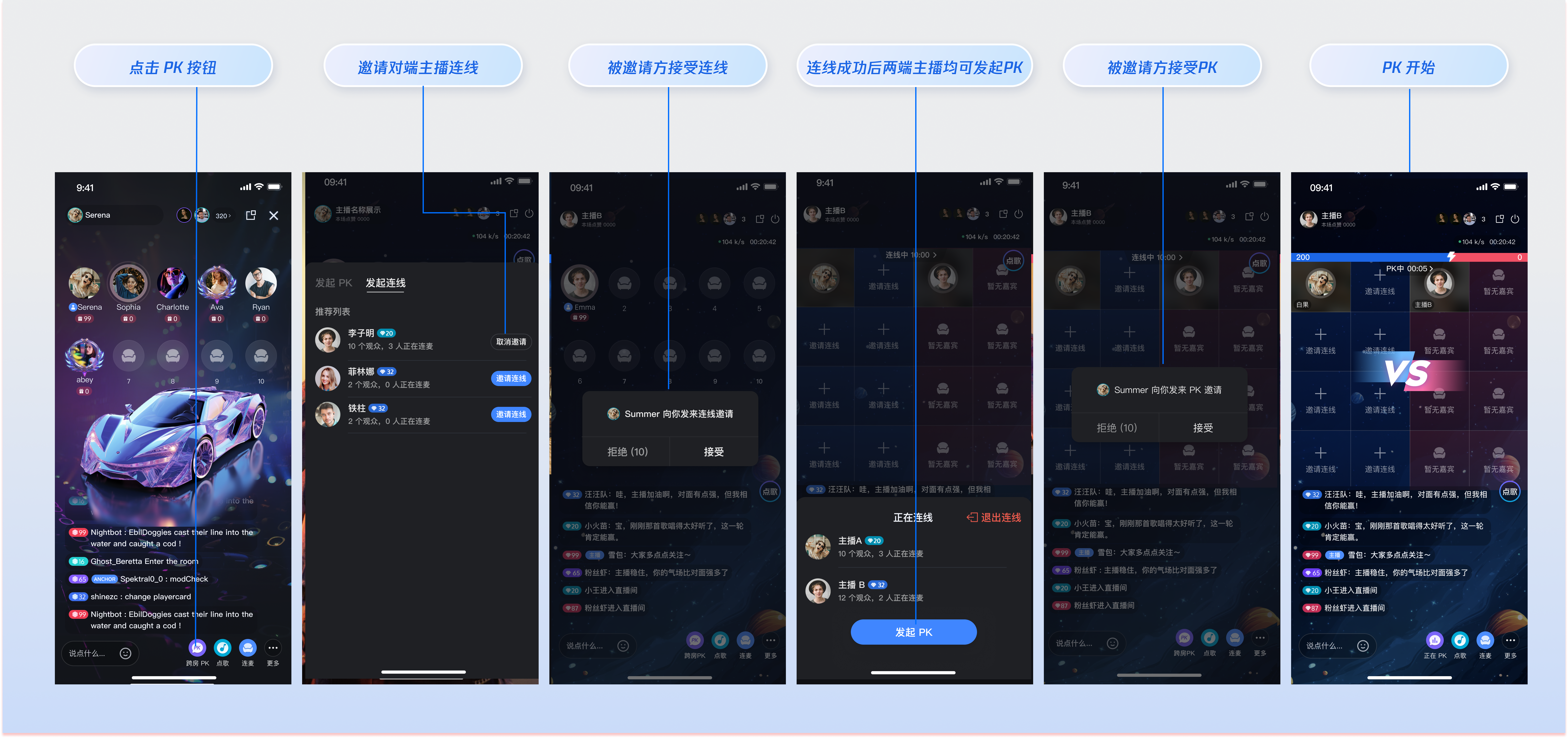
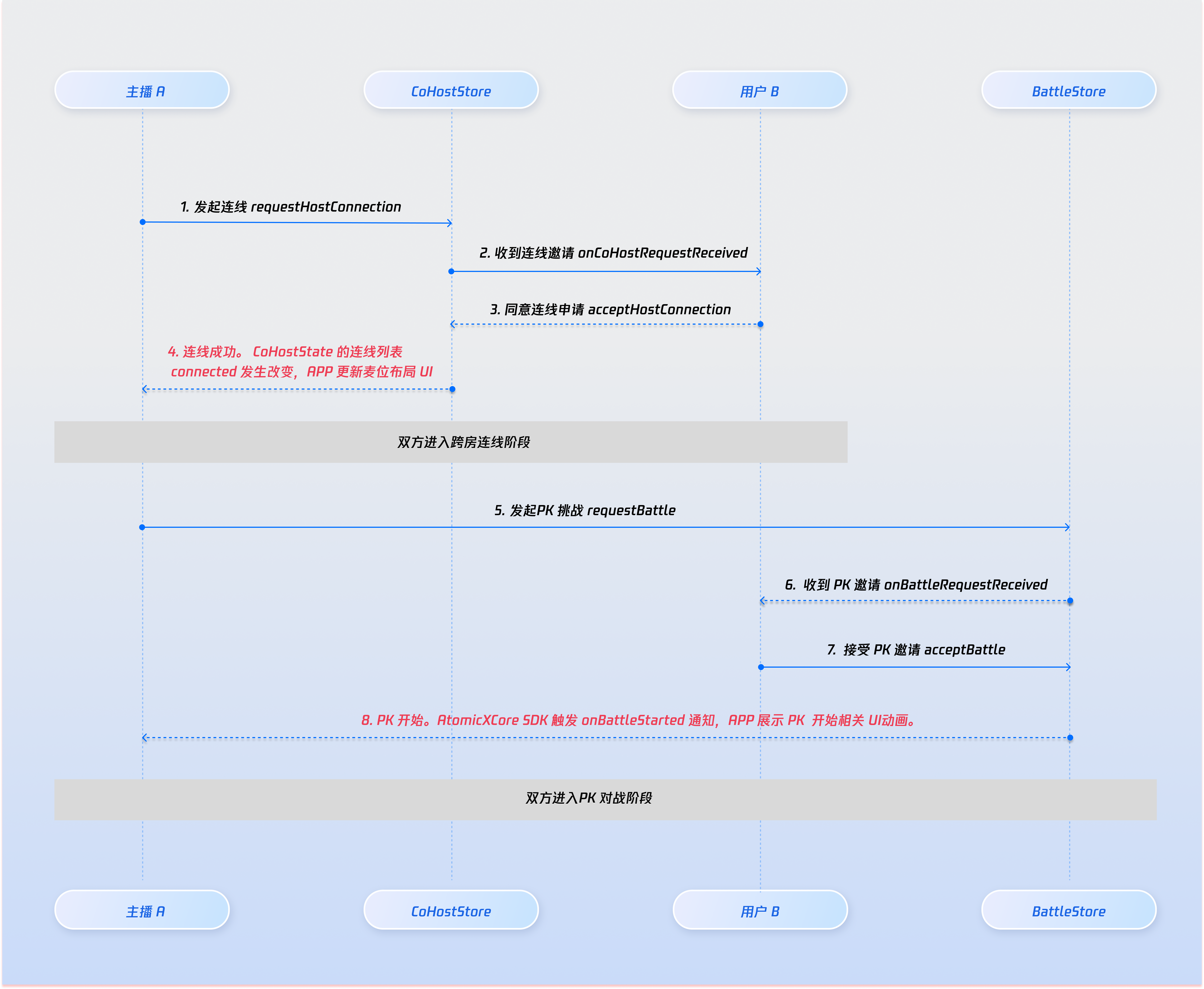
AtomicXCore 支持您设置 PK 的时长、是否需要对端主播同意才开始 PK 以及发起 PK 时携带扩展信息。您可以调用 BattleStore 的 requestBattle 接口发起 PK 邀请。BattleConfig 的 duration 字段时, PK 默认时长为 5 分钟。BattleConfig 的 needResponse 字段为 false,当邀请发出后 PK 会立即开始。BattleConfig 的 needResponse 字段为 false 时,requestBattle 接口的 timeout 字段必须设置为 0。BattleEventPublisher 的 onBattleRequestTimeout 回调;参与连线的所有主播依然可以继续发起下一场 PK。var battleStore: BattleStore {return BattleStore.create(liveID: liveID)}// 对方主播的 User IDlet targetUserID = ""let config = BattleConfig(duration: 30, // PK 持续 30 秒needResponse: true, // 需要对方响应extensionInfo: "")battleStore.requestBattle(config: config, userIDList: [targetUserID], timeout: 10) { [weak self] result inguard let self else { return }switch result {case .success(let (battleInfo,_)):break;case .failure(_):break}}
BattleEventPublisher 的 onBattleRequestReceived 回调,您可以在这个回调中给对端主播的 UI 提醒 “有人邀请您 PK”。battleStore.battleEventPublisher.receive(on: RunLoop.main).sink { [weak self] event inguard let self = self else { return }switch event {// 您会收到如下事件,并且获知BattleID,以及邀请者信息case .onBattleRequestReceived(let battleID, let inviter, let invitee):breakdefault:break}}.store(in: &cancellableSet)
BattleEventPublisher 的 onBattleStarted 回调之后,可以在 UI 上渲染 PK 进度条。needResponse 设置为 false, 则当邀请成功发出后,会自动进入 PK 状态。needResponse 设置为 true,则当被邀请的所有对端主播都调用 BattleStore 的 acceptBattle 接口同意后进入 PK 状态。needResponse 设置为 true,若对端主播同意 PK,则已加入 PK 的主播会收到 BattleEventPublisher 的 onUserJoinBattle 回调。BattleEventPublisher 的 onBattleStarted 回调。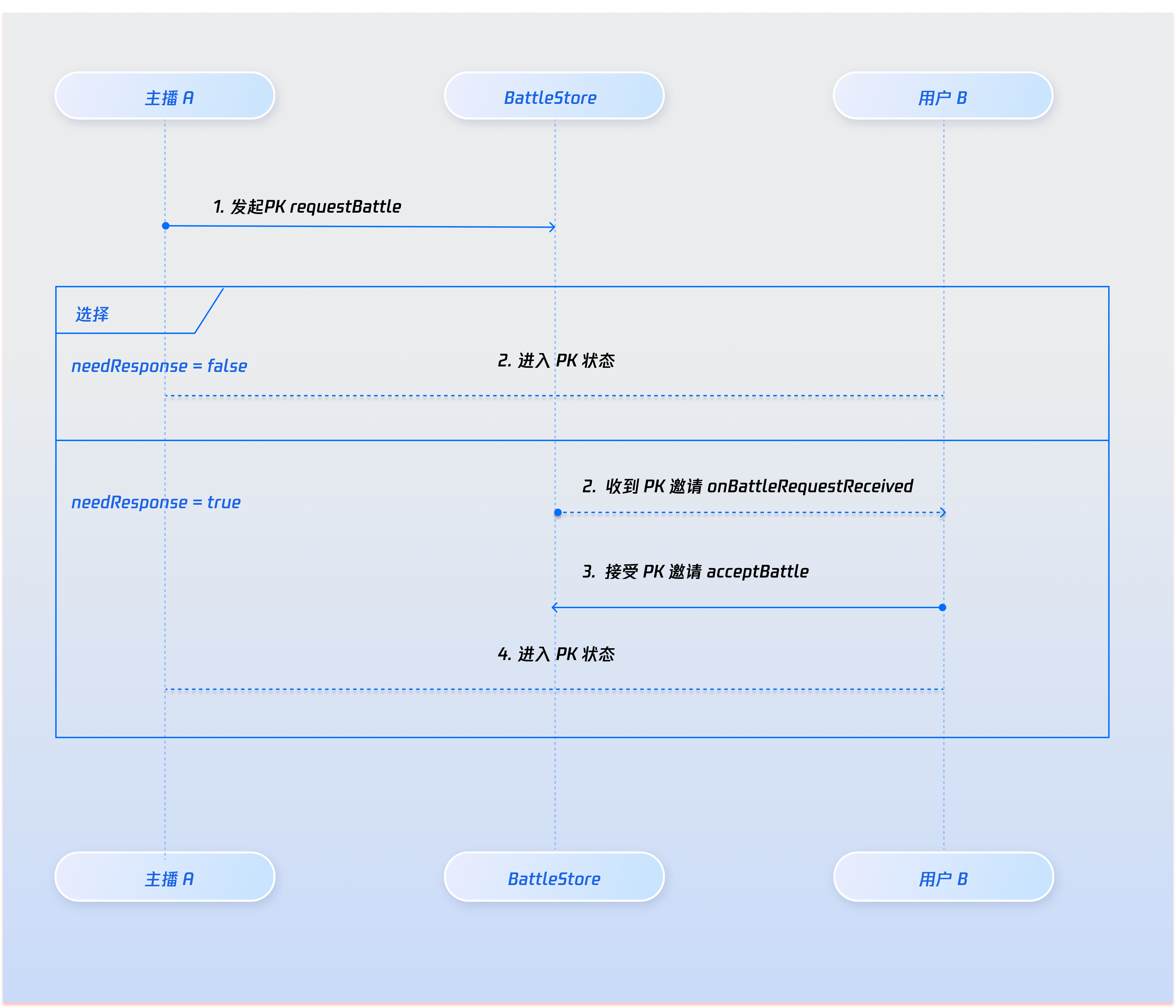
BattleConfig 中的 duration 到时间后,PK 会自动结束,所有参与 PK 的主播均会收到 BattleEventPublisher 的 onBattleEnded 回调;BattleStore 的 exitBattle 退出 PK,其他主播依然处于 PK 中不受影响,且会收到 BattleEventPublisher 的 onUserExitBattle 回调,您可以在这个回调中提醒 “有人退出 PK”;如果在 PK 的 duration 还未结束之前,其余人都主动调用 BattleStore 的 exitBattle 结束 PK 后,整个 PK 同样也会提前结束,最后一个 PK 主播也会收到 BattleEventPublisher 的 onUserExitBattle 回调。var battleStore: BattleStore {return BattleStore.create(liveID: liveID)}guard let battleID = battleStore.state.value.currentBattleInfo?.battleID else { return }battleStore.exitBattle(battleID: battleID, completion: { [weak self] result inguard let self = self else { return }switch result {case .success():breakcase .failure(let error):break}})
BattleEventPublisher 的 onBattleEnded 回调触发时),您可以通过该回调在 UI 上展示 PK 结束,并区分出胜负(详见区分胜负章节)CoHostStore 的 exitHostConnection 结束连线。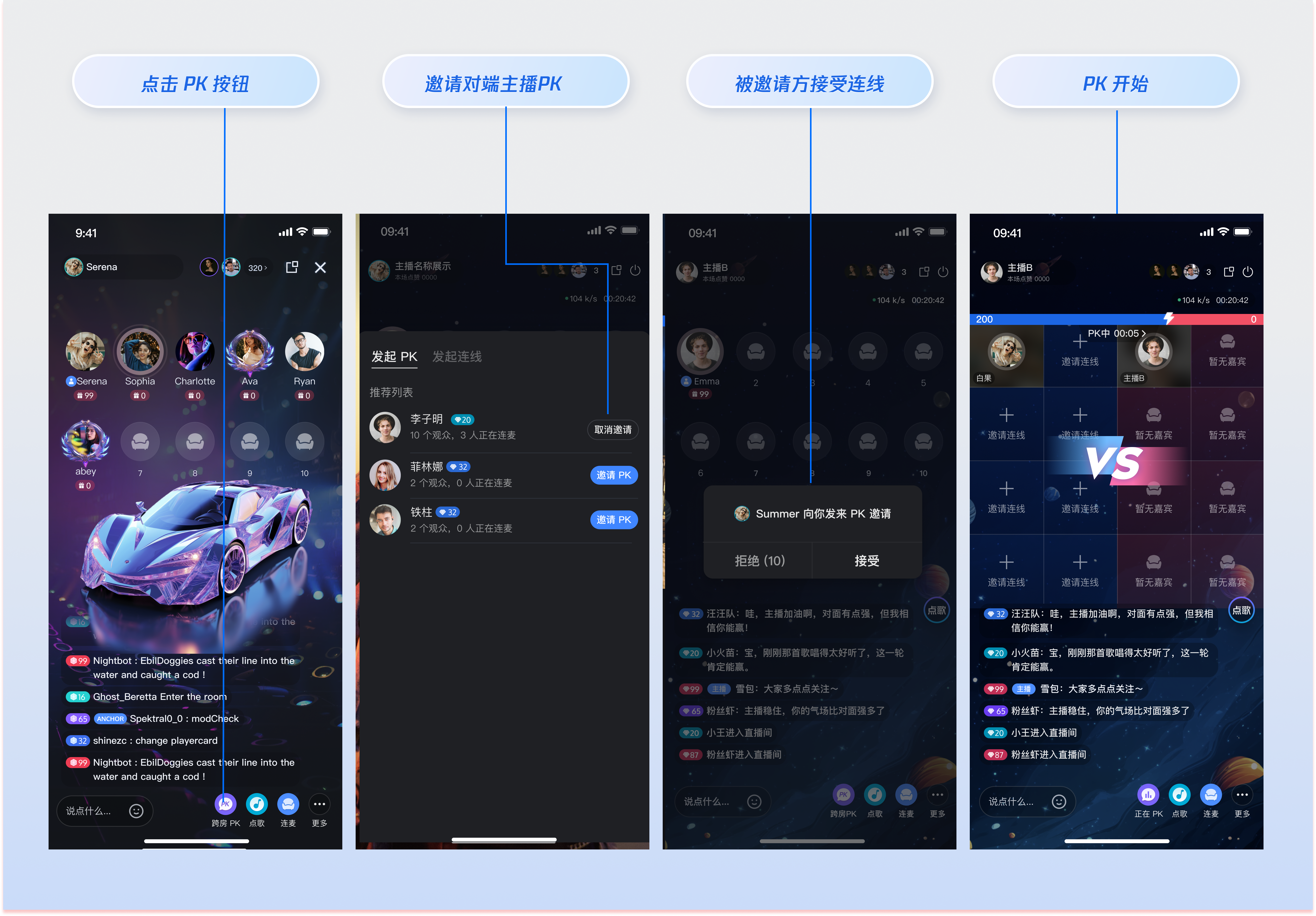
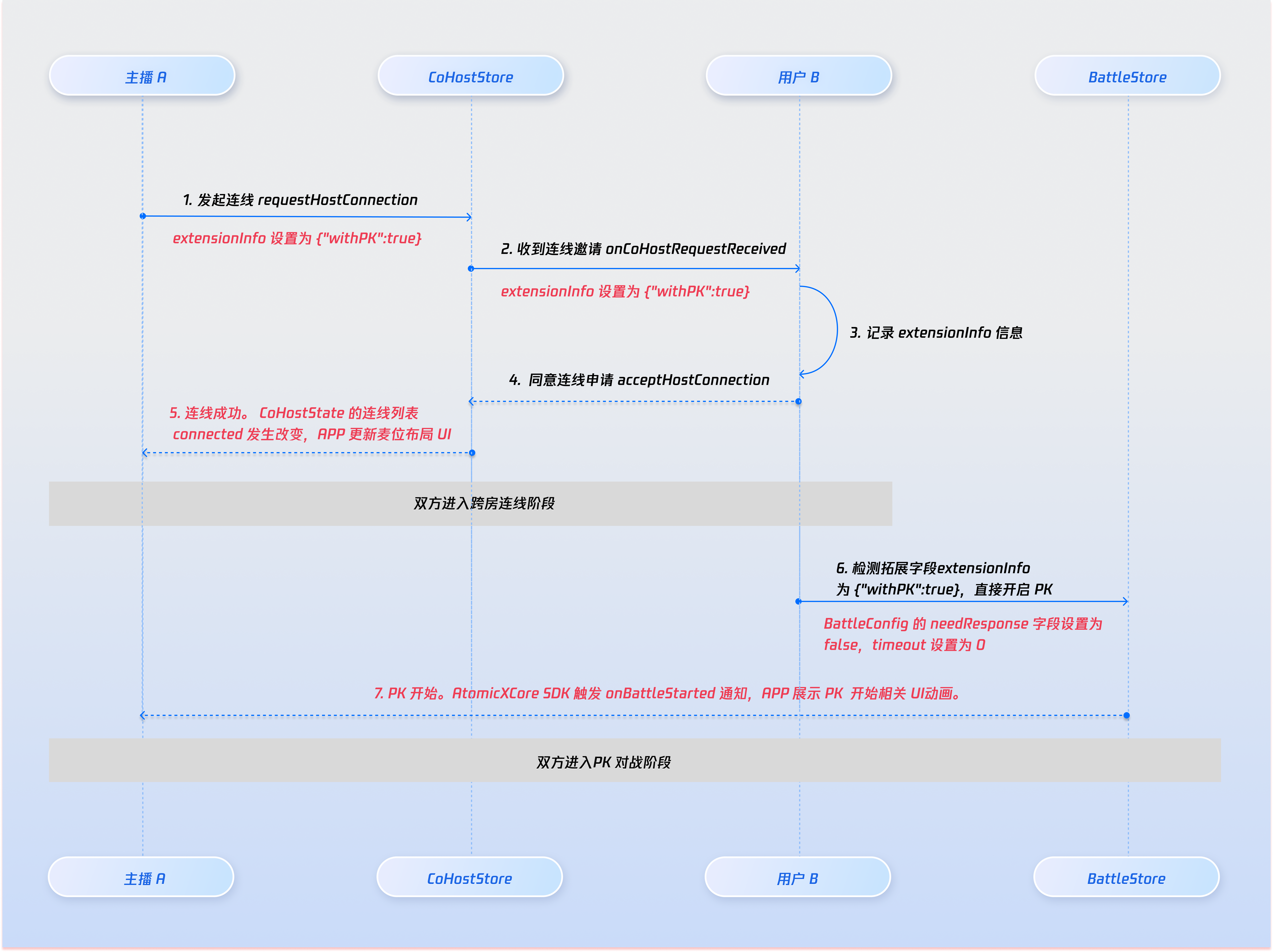
CoHostStore 的 requestHostConnection 接口设置extraInfo字段来标识当前的连线发起后需要同步发起 PK,用于对端主播 UI 提示信息的区分。extraInfo设置为 {"withPK:true"} 时,对端主播收到连线请求后 UI 提示 “主播向您发起 PK”。extraInfo设置为 {"withPK:false"} 时,对端主播收到连线请求后 UI 提示 “主播邀请您参与跨房连线”。import AtomicXCore// 从 LiveListStore 中获取的目标房间 IDlet targetHostLiveID = "target_host_room_id"// 使用 6v6 语聊房静态布局为例let layoutTemplate = .hostStaticVoice6v6let timeout: TimeInterval = 10 // 邀请超时时间(秒)let extraInfo: String = "" // 额外的业务信息,用于“直连 PK”时携带标识coHostStore.requestHostConnection(targetHost: targetHostLiveID,layoutTemplate: layoutTemplate,timeout: timeout,extraInfo: extraInfo,completion: { [weak self] result inguard let self = self else { return }switch result {case .success():print("邀请发送成功")breakcase .failure(let error):print("邀请发送失败: \\(error.code),\\(error.message)")}})
coHostEventPublisher 的 onCoHostRequestReceived 回调,对端主播可以监听这个回调并在 UI 上提醒 “主播邀请您参与连线互动”。var coHostStore: CoHostStore {return CoHostStore.create(liveID: liveID)}coHostStore.coHostEventPublisher.receive(on: RunLoop.main).sink { [weak self] event inguard let self = self else { return }switch event {// 您会收到如下事件,获知邀请者信息和扩展信息case .onCoHostRequestReceived(let inviter, let extensionInfo):break;default:break}}.store(in: &cancellableSet)
CoHostStore 的 acceptHostConnection 和 rejectHostConnection 接口分别同意或拒绝连线邀请。import AtomicXCoreimport Combinevar coHostStore: CoHostStore {return CoHostStore.create(liveID: liveID)}coHostStore.coHostEventPublisher.receive(on: RunLoop.main).sink { [weak self] event inguard let self = self else { return }switch event {case .onCoHostRequestReceived(let inviter, let extensionInfo):// 接受连线请求coHostStore.acceptHostConnection(fromHostLiveID: inviter.liveID) { [weak self] result inguard let self = self else { return }switch result {case .success():breakcase .failure(let error):break}}// 拒绝连线请求// coHostStore.rejectHostConnection(fromHostLiveID: inviter.liveID) { [weak self] result in// guard let self = self else { return }// switch result {// case .success():// break// case .failure(let error):// break// }// }default:break}}.store(in: &cancellableSet)
coHostEventPublisher 的 onCoHostRequestAccepted 回调,此时可以在当前回调中立即调用 BattleStore 的 requestBattle 接口发起一场无需对端主播同意(也即 BattleConfig 的 needResponse 为 false)的 PK。import AtomicXCoreimport Combinevar coHostStore: CoHostStore {return CoHostStore.create(liveID: liveID)}coHostStore.coHostEventPublisher.receive(on: RunLoop.main).sink { [weak self] event inguard let self = self else { return }switch event {case .onCoHostRequestAccepted(let invitee):// needResponse 为false即代表无需对方同意let config = BattleConfig(duration: 30, needResponse: false, extensionInfo: "")battleStore.requestBattle(config: config, userIDList: [invitee.userID], timeout: 0) { [weak self] result inguard let self else { return }switch result {case .success:breakcase .failure(let error):break}}default:break}}.store(in: &cancellableSet)
礼物类型 | 分数计算规则 | 示例 |
基础礼物 | 礼物价值 × 5 | 10元礼物 → 50分 |
中级礼物 | 礼物价值 × 8 | 50元礼物 → 400分 |
高级礼物 | 礼物价值 × 12 | 100元礼物 → 1200分 |
特效礼物 | 固定高分数 | 520元礼物 → 1314分 |
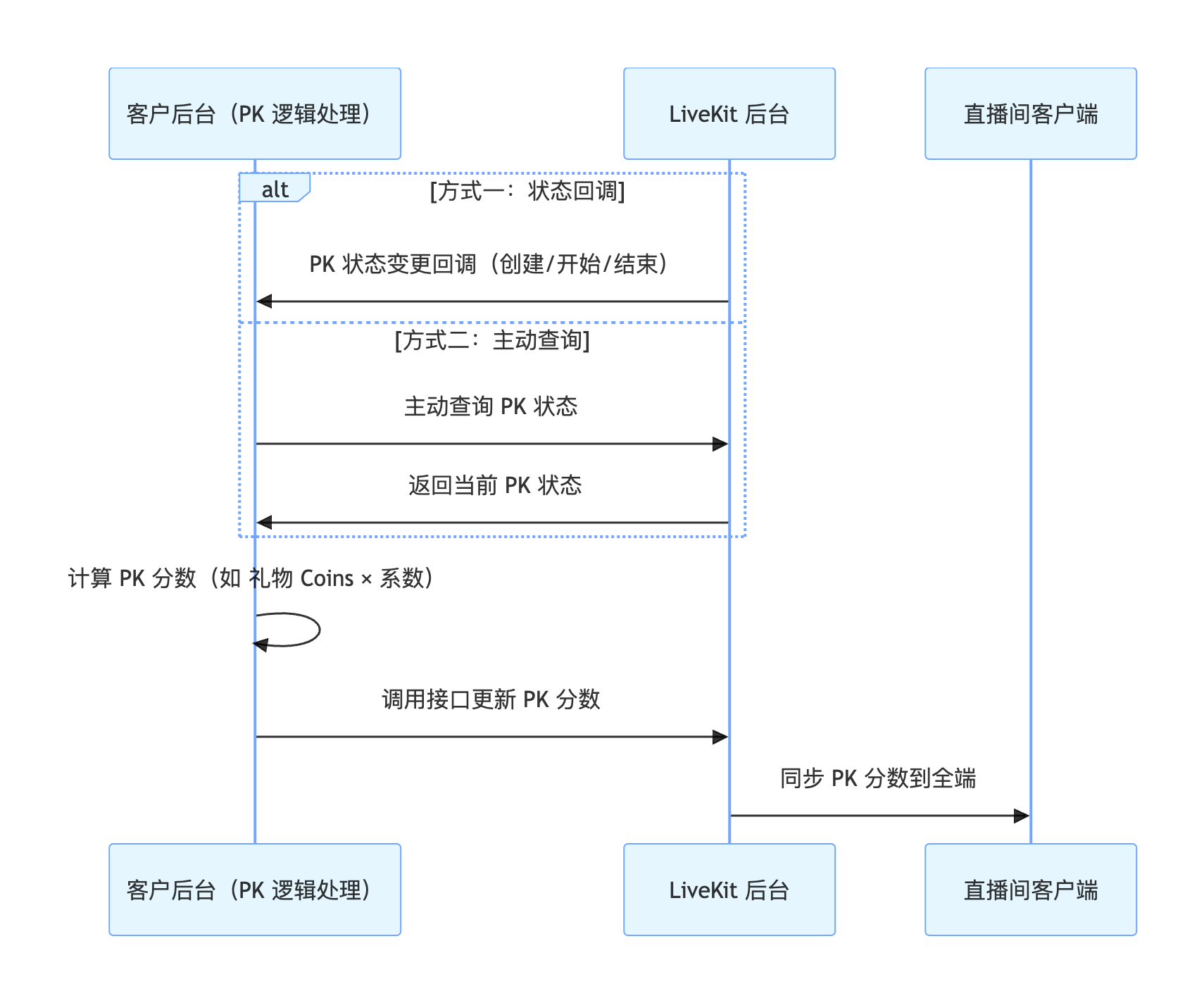
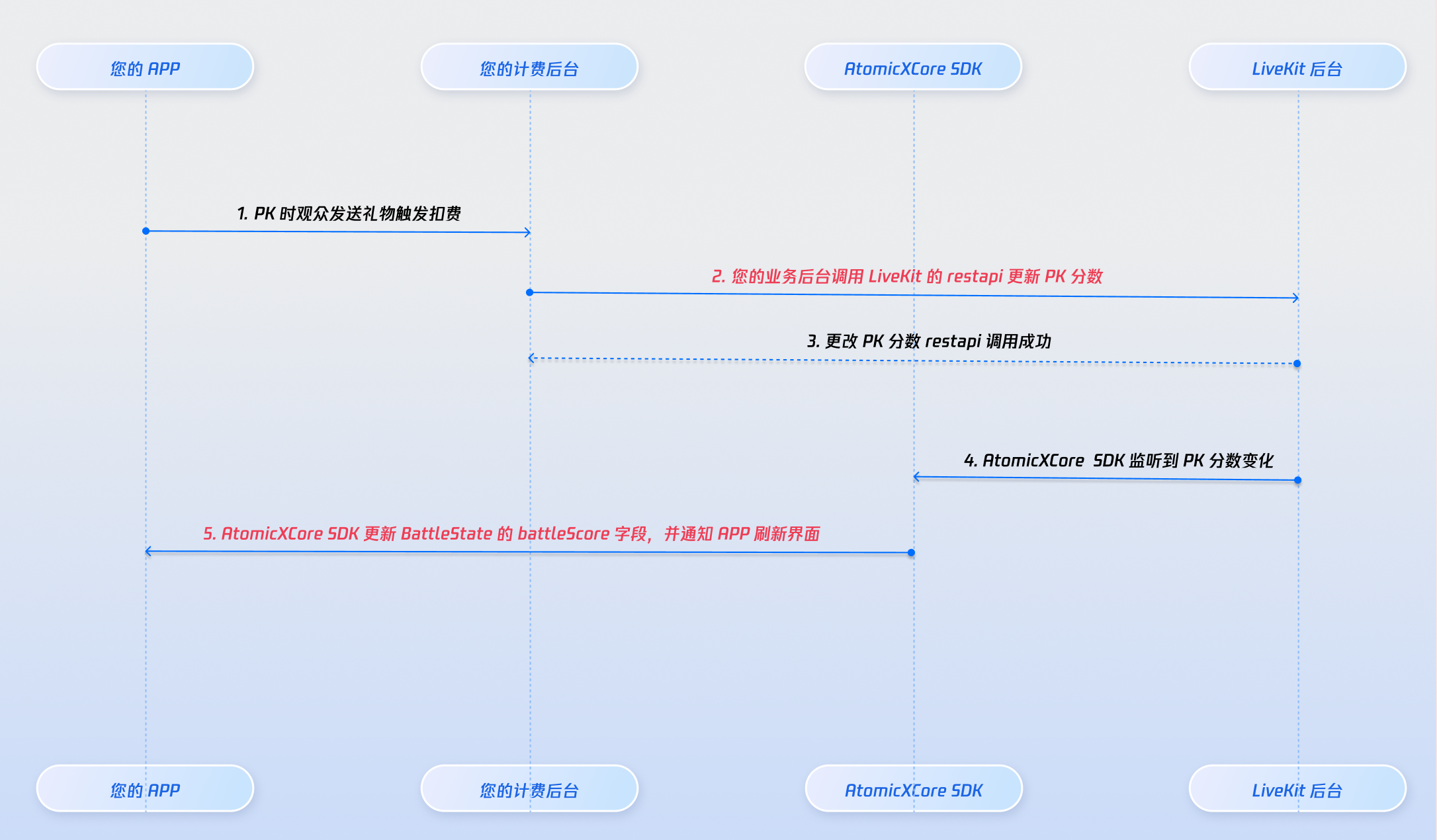
BattleState 的 battleScore 均会发生改变。您可以在 battleScore 发生改变的时候,更新 PK 进度条中的分值。battleStore.state.subscribe(StatePublisherSelector(keyPath: \\BattleState.battleScore)).receive(on: RunLoop.main).sink { [weak self] battleScore inguard let self = self else { return }// 您可以在此处更新 PK 进度条中的分值。}.store(in: &cancellableSet)
CoHostStore、BattleStore、LiveListStore 和 LiveSeatStore 及其相关类的所有公开接口、属性和方法的详细信息,请参阅随 AtomicXCore 框架的官方 API 文档。Store/Component | 功能描述 | API 文档 |
CoHostStore | 主播连线生命周期管理: 负责管理和协调主播间连线的生命周期,包括发起连线邀请、处理接受/拒绝、连线状态切换、连线中的视频流管理以及断开连线等任务。 | |
BattleStore | 主播 PK 对战生命周期管理: 负责管理主播间的限时 PK 对战全生命周期,包括发起 PK 邀请、开始对战、实时更新 PK 分数、PK 结束结算胜负以及惩罚时间等流程。 | |
LiveListStore | 直播间全生命周期管理:查询房间列表,修改直播信息等。 | |
LiveSeatStore | 麦位状态管理: 管理房间内所有麦位状态(包括连线状态下的跨房间麦位),用于监听用户上下麦、麦克风、麦位状态等信息。 |
battleEventPublisher 的 onBattleEnded 回调后,根据 BattleState 的 battleScore 来判别胜负。虽然此时 PK 业务结束,但连线依然处于进行中,您可以自定义 30 秒的时间用于惩罚环节,待 30 秒倒计时结束之后断开连线。文档反馈