tencent cloud

Cloud Virtual Machine

Release Notes and Announcements
Release Notes
Public Image Release Notes
Official End of Support Plan for the Operating System
Announcements

Product Introduction
CVM Overview
Strengths
Basic Concepts
Regions and Zones
Tutorial
Service Regions and Service Providers
Billing
Billing Overview
Billing Modes
Billing Items
Billing Mode Conversion Overview
Purchasing Instances
Configuration Adjustment Billing Guide
Overdue Payments
Getting Started
Purchasing a Customized Linux Instance
Purchasing a Customized Windows Instance
User Guide
Operation Guide Overview
Use Limits
Instances
Spot Instances
Reserved Instances
Images
Storage
Backup and Restoration
Network
Security
Passwords/Keys
Monitoring and Alarms
Ops Management
Convenience Features
Migrating a Server
Online Migration
Migration Consultation
Troubleshooting
CVM Login Failures
Windows Instance Login Failures
Linux Instance Login Failures
Other Login Failures
Instance Running Failures
Linux Instance Memory Failures
Network Failures
Use Cases
Suggestions on CVM Model Selection
Environment Building
Website Building
Application Building
Visual GUI Building
Uploading Local Files to CVM
Network Performance Test
Other Practical Tutorials
API Documentation
History
Introduction
API Category
Making API Requests
Region APIs
Instance APIs
Cloud Hosting Cluster APIs
Image APIs
Instance Launch Template APIs
Placement Group APIs
Key APIs
Security Group APIs
Network APIs
Data Types
Error Codes
Security and Compliance
CAM
Network
FAQs
Regions and Zones
Billing
Instances
Storage
Images
Server Migration
Network
Security
Operating Systems
Ops and Monitoring
CAM
NTP Service
Scenarios
Agreements
CVM Service Level Agreements
Red Hat Enterprise Linux Image Service Agreement
Public IP Service Level Agreement
Glossary

Configuring a Public Gateway

PDF
Focus Mode
Font Size
Last updated: 2024-01-08 09:37:01
Warning:
Using a single CVM instance as the public gateway has the risk of single point of failure. We recommend you use NAT Gateway in the production environment.
As of December 6, 2019, Tencent Cloud will no longer support configuring a CVM instance as the public gateway on the CVM purchase page. If you need to configure a gateway, follow the instructions below.

Overview

If some of your CVM instances in a Tencent Cloud VPC do not have common public IPs but you need to access the public network, you can use a CVM instance with a common public IP or EIP. The public gateway CVM instance translates the source IP for outbound traffic. When other CVM instances access the public network through the public gateway CVM instance, the source IPs will be translated into the public IP of the public gateway CVM instance.

Prerequisites

You have logged in to the CVM console.
As a public gateway CVM instance can forward route forwarding requests only from subnets other than the one it resides, it must be in different subnets from the CVM instances that need to access the public network through it.
A public gateway CVM instance must be a Linux CVM instance, as a Windows CVM instance cannot be used as a public gateway.

Directions

Step 1. Bind an EIP (optional)

Note:
Skip this step if the public gateway CVM already has a public IP.
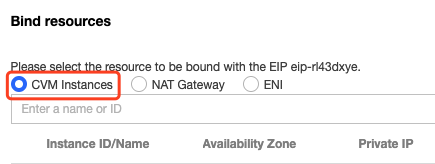
1. Log in to the CVM console and select EIP on the left sidebar.
2. Locate the target EIP and select More > Bind in the Operation column.

3. In the pop-up window, select a CVM instance to be configured and bind it to the EIP.


Step 2. Configure a route table for the gateway subnet

Note:
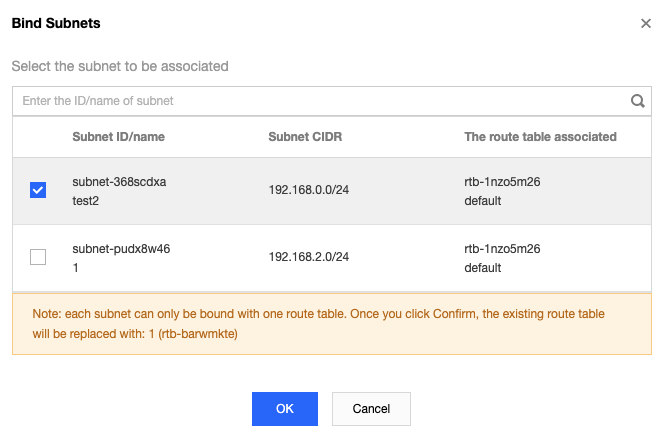
The gateway subnet and other subnets cannot share the same route table. You need to create a separate route table for the gateway subnet and associate them.
2. Associate the route table with the subnet where the public gateway CVM resides.


Step 3. Configure a route table for other subnets

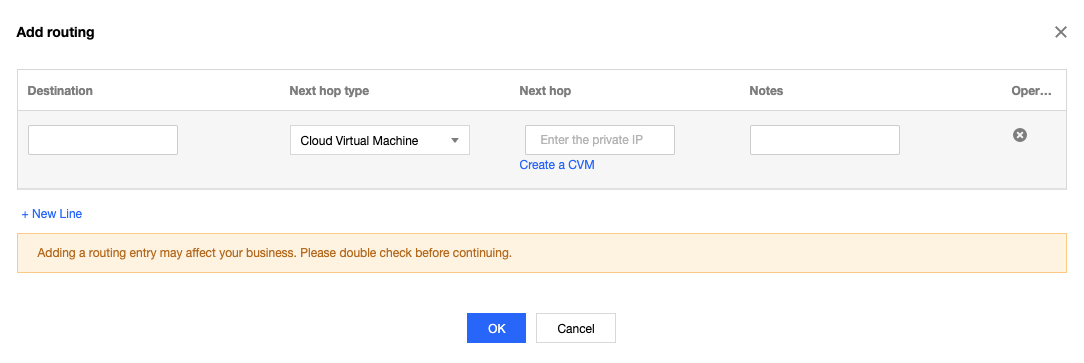
Configure a route table for other subnets and a default route through the public gateway CVM instance, so that the CVM instances within these subnets can access the public network through the route forwarding capability of the public gateway. Add the following routing policies to the route table:
Destination: The public IP you want to access.
Next hop type: CVM.
Next hop: Private IP of the CVM instance to which the EIP is bound in step 1. For more information, see Managing Routing Policies.


Step 4. Configure a public gateway

1. Log in to the public gateway CVM instance and perform the following operations to enable the network forwarding and NAT proxy features:
1.1 Run the following command to create the vpcGateway.sh script in usr/local/sbin.
vim /usr/local/sbin/vpcGateway.sh
1.2 Press i to switch to the edit mode and add the following code to the script.
#!/bin/bash
echo "----------------------------------------------------"
echo " `date`"
echo "(1)ip_forward config......"
file="/etc/sysctl.conf"
grep -i "^net\\.ipv4\\.ip_forward.*" $file &>/dev/null && sed -i \\
's/net\\.ipv4\\.ip_forward.*/net\\.ipv4\\.ip_forward = 1/' $file || \\
echo "net.ipv4.ip_forward = 1" >> $file
echo 1 >/proc/sys/net/ipv4/ip_forward
[ `cat /proc/sys/net/ipv4/ip_forward` -eq 1 ] && echo "-->ip_forward:Success" || \\
echo "-->ip_forward:Fail"
echo "(2)Iptables set......"
iptables -t nat -A POSTROUTING -j MASQUERADE && echo "-->nat:Success" || echo "-->nat:Fail"
iptables -t mangle -A POSTROUTING -p tcp -j TCPOPTSTRIP --strip-options timestamp && \\
echo "-->mangle:Success" || echo "-->mangle:Fail"
echo "(3)nf_conntrack config......"
echo 262144 > /sys/module/nf_conntrack/parameters/hashsize
[ `cat /sys/module/nf_conntrack/parameters/hashsize` -eq 262144 ] && \\
echo "-->hashsize:Success" || echo "-->hashsize:Fail"
echo 1048576 > /proc/sys/net/netfilter/nf_conntrack_max
[ `cat /proc/sys/net/netfilter/nf_conntrack_max` -eq 1048576 ] && \\
echo "-->nf_conntrack_max:Success" || echo "-->nf_conntrack_max:Fail"
echo 10800 >/proc/sys/net/netfilter/nf_conntrack_tcp_timeout_established \\
[ `cat /proc/sys/net/netfilter/nf_conntrack_tcp_timeout_established` -eq 10800 ] \\
&& echo "-->nf_conntrack_tcp_timeout_established:Success" || \\
echo "-->nf_conntrack_tcp_timeout_established:Fail"
1.3 Click Esc and enter :wq to save and close the file.
1.4 Run the following command to set the script permission.
chmod +x /usr/local/sbin/vpcGateway.sh
echo "/usr/local/sbin/vpcGateway.sh >/tmp/vpcGateway.log 2>&1" >> /etc/rc.local
2. Set the RPS of the public gateway.
2.1 Run the following command to create the set_rps.sh script in usr/local/sbin.
vim /usr/local/sbin/set_rps.sh
2.2 Press i to switch to the edit mode and add the following code to the script.
# !/bin/bash
echo "--------------------------------------------"
date
mask=0
i=0
total_nic_queues=0
get_all_mask() {
local cpu_nums=$1
if [ $cpu_nums -gt 32 ]; then
mask_tail=""
mask_low32="ffffffff"
idx=$((cpu_nums / 32))
cpu_reset=$((cpu_nums - idx * 32))
if [ $cpu_reset -eq 0 ]; then
mask=$mask_low32
for ((i = 2; i <= idx; i++)); do
mask="$mask,$mask_low32"
done
else
for ((i = 1; i <= idx; i++)); do
mask_tail="$mask_tail,$mask_low32"
done
mask_head_num=$((2 ** cpu_reset - 1))
mask=$(printf "%x%s" $mask_head_num $mask_tail)
fi
else
mask_num=$((2 ** cpu_nums - 1))
mask=$(printf "%x" $mask_num)
fi
echo $mask
}
set_rps() {
if ! command -v ethtool &>/dev/null; then
source /etc/profile
fi
ethtool=$(which ethtool)
cpu_nums=$(cat /proc/cpuinfo | grep processor | wc -l)
if [ $cpu_nums -eq 0 ]; then
exit 0
fi
mask=$(get_all_mask $cpu_nums)
echo "cpu number:$cpu_nums mask:0x$mask"
ethSet=$(ls -d /sys/class/net/eth*)
for entry in $ethSet; do
eth=$(basename $entry)
nic_queues=$(ls -l /sys/class/net/$eth/queues/ | grep rx- | wc -l)
if (($nic_queues == 0)); then
continue
fi
cat /proc/interrupts | grep "LiquidIO.*rxtx" &>/dev/null
if [ $? -ne 0 ]; then # not smartnic
#multi queue don't set rps
max_combined=$(
$ethtool -l $eth 2>/dev/null | grep -i "combined" | head -n 1 | awk '{print $2}'
)
#if ethtool -l $eth goes wrong.
[[ ! "$max_combined" =~ ^[0-9]+$ ]] && max_combined=1
if [ ${max_combined} -ge ${cpu_nums} ]; then
echo "$eth has equally nic queue as cpu, don't set rps for it..."
continue
fi
else
echo "$eth is smartnic, set rps for it..."
fi
echo "eth:$eth queues:$nic_queues"
total_nic_queues=$(($total_nic_queues + $nic_queues))
i=0
while (($i < $nic_queues)); do
echo $mask >/sys/class/net/$eth/queues/rx-$i/rps_cpus
echo 4096 >/sys/class/net/$eth/queues/rx-$i/rps_flow_cnt
i=$(($i + 1))
done
done
flow_entries=$((total_nic_queues * 4096))
echo "total_nic_queues:$total_nic_queues flow_entries:$flow_entries"
echo $flow_entries >/proc/sys/net/core/rps_sock_flow_entries
}
set_rps
2.3 Click Esc and enter :wq to save and close the file.
2.4 Run the following command to set the script permission.
chmod +x /usr/local/sbin/set_rps.sh
echo "/usr/local/sbin/set_rps.sh >/tmp/setRps.log 2>&1" >> /etc/rc.local
chmod +x /etc/rc.d/rc.local
3. Restart the public gateway CVM instance to apply the configuration. Then, test whether a CVM instance without a public IP can access the public network.

Help and Support

Was this page helpful?

Help us improve! Rate your documentation experience in 5 mins.

Feedback