tencent cloud

Cloud Load Balancer

Release Notes and Announcements
CLB Release Notes
Product Announcements
Product Introduction
Overview
Strengths
Use Cases
Principles
Product Comparison
Use Limits
Service Regions and Service Providers
Purchase Guide
Billing Overview
Billing
CLB Resource Package
Purchase Methods
Payment Overdue
Product Attribute Selection
Getting Started
Getting Started with Domain Name-Based CLB
Getting Started with CLB
Getting Started with IPv6 CLB
Deploying Nginx on CentOS
Deploying Java Web on CentOS
Operation Guide
CLB Instance
CLB Listener
Real Server
Health Check
Certificate Management
Log Management
Monitoring and Alarm
Cloud Access Management
Classic CLB
Practical Tutorial
Deploy certificate to CLB (mutual authentication)
Enabling Gzip Compression & Testing
HTTPS Forwarding Configurations
Obtaining Real Client IPs
Best Practices for Configuring Load Balancing Monitoring Alerts
Implementing HA Across Multiple AZs
Load Balancing Algorithm Selection and Weight Configuration Examples
Configuring WAF protection for CLB listening domain names
Configure IAP to authenticate web access to the CLB domain and path
Configure IAP to authenticate programmatic access to CLB's domain and path
Ops Guide
Solution to Excessive Clients in TIME_WAIT Status
Load Balancer HTTPS Service Performance Test
Stress Testing FAQ
CLB Certificate Operation Permissions
Troubleshooting
UDP Health Check Exception
API Documentation
History
Introduction
API Category
Instance APIs
Listener APIs
Backend Service APIs
Target Group APIs
Redirection APIs
Other APIs
Classic CLB APIs
Load Balancing APIs
Making API Requests
Data Types
Error Codes
CLB API 2017
FAQs
Billing
CLB Configuration
Troubleshooting Health Check Issues
HTTPS
WS/WSS Protocol Support
HTTP/2 Protocol Support
Default Domain Name Blocking Prompt
Service Level Agreement
Contact Us
Glossary

Releasing Idle CLB Instances

PDF
Focus Mode
Font Size
Last updated: 2024-01-04 09:44:16
When a pay-as-you-go instance is not configured with a listener or bound to a real server seven days after the creation, it’s considered as an idle instance. To reduce unnecessary charges, please release idle instances in time.

Restrictions

CLB supports batch release of idle instances in the same region only.

Directions

Note:
The idle instance data can be cached for one day. Make sure that the instance to be released is not in use to prevent a release error.
1. Log in to the CLB Console and click Idle Instance on the left sidebar.
2. Select a region in the upper left corner of the idle instance page, find the target instance in the idle instance list, and click Delete in the Operation column on the right.
3. (Optional) Select all instances on the left side of the idle instance list, and click Delete at the top of the page.
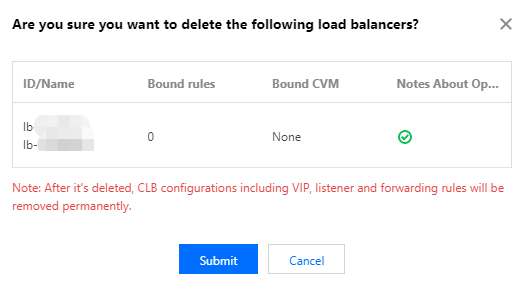
4. In the pop-up window, confirm the instance information and click OK.


Help and Support

Was this page helpful?

Help us improve! Rate your documentation experience in 5 mins.

Feedback