tencent cloud

Content Delivery Network

Updates and Announcements
Release Notes
Announcements
User Tutorial
Product Introduction
Product Overview
Strengths
Use Cases
Term
Use Limits
CDN Performance Descriptions (Spot-check)
Purchase Guide
CDN Purchase Guide
ECDN Purchase Guide
Getting Started
Configuring CDN from Scratch
Adding Domain Names
CNAME Configuration
Domain Name Ownership Verification
FAQs about Domain Name Connection
Configuration Guide
Domain Management
Domain Name Configurations
Statistical Analysis
Purge and Prefetch
Log Management
EdgeOne
Service Query
Offline Cache
Permission Management
Permission Configuration
Console Permissions
Activate Real-time Logging as Sub-account/Collaborator
Use Cases
Accelerating Resources on COS with CDN
Practical Tutorial
Guide to Using the EdgeOne Tool for Migrating Content Delivery Network (CDN) Related Services
CDN - CVM
CDN - COS
Configuring CNAME via DNSPod
Regularly Storing CDN Logs
API Documentation
History
Introduction
API Category
Content Management APIs
Real-time Log APIs
Service Query APIs
Data Query APIs
Making API Requests
Log Query APIs
StopCdnDomain
Configuration Management APIs
Obsoleted APIs
Other APIs
Data Types
Error Codes
FAQ
Features
Billing
FAQs about Domain Name Connection
Cache Configuration FAQs
Purge and Prefetch
Statistical Analysis
FAQs about HTTPS
Connection
Errors
Troubleshooting Methods
Status Codes and Solutions
Node Cache Inconsistency
Slow Access Speed After CDN Activation
Low Traffic Hit Rate
404 Status Code
Page Display - CORS error
Resource Cache Failure
Service Level Agreement
Glossary

Origin-pull Node Query

PDF
Focus Mode
Font Size
Last updated: 2024-12-30 21:51:54

Description

Tencent Cloud CDN allows you to query the IPs or IP ranges of origin-pull nodes by specifying an acceleration domain name.

Use Cases

You can query the IPs or IP ranges of origin-pull nodes based on your requirements for business access control.

Directions
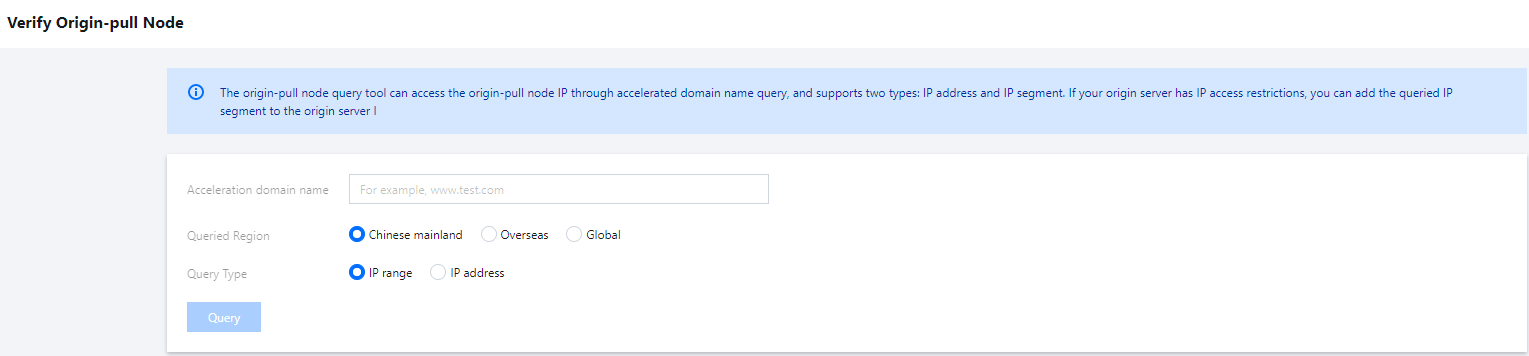
Log in to the CDN console and choose Service Query > Verify Origin-pull Node on the left sidebar.

Use instructions:
Specify a valid acceleration domain name that is connected to CDN and enabled.
When you configure the Queried Region parameter, select the acceleration region that corresponds to your acceleration domain name.
Specify whether to query the IPs or IP ranges of origin-pull nodes based on your actual business needs.
ISP information is not supported if you select Overseas as Queried Region.
You can download the query results to your local device.

Help and Support

Was this page helpful?

Help us improve! Rate your documentation experience in 5 mins.

Feedback