제품 업데이트
Tencent Cloud 오디오/비디오 단말 SDK 재생 업그레이드 및 권한 부여 인증 추가
TRTC 월간 구독 패키지 출시 관련 안내
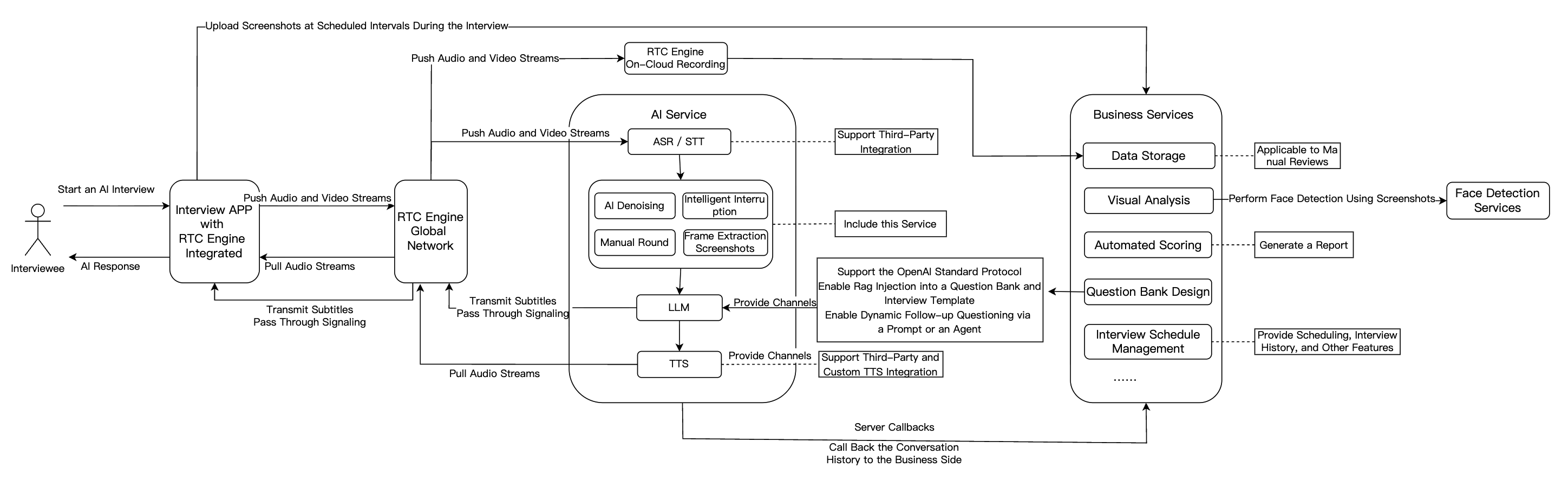
Feature Module | Application in AI Interview Scenarios |
Real-Time Audio/Video | RTC Engine delivers high-quality, low-latency audio/video connections. Supports 720P/1080P/2K HD video and 48kHz high-fidelity audio for smooth interaction that simulates real interview scenarios regardless of network conditions. |
Conversational AI | Enables flexible integration with multiple LLM services for real-time AI-user audio/video interaction. Built on Tencent RTC's global low-latency network for natural, realistic conversations with easy integration. |
Large Language Model (LLM) | Understands candidate responses, extracts key points, dynamically generates follow-up questions, and enables personalized interview processes. Automatically adjusts scoring criteria for different roles, improving fairness and accuracy. |
Text-to-Speech (TTS) | Supports third-party TTS services, multiple languages, and voice styles. Simulates various tones and personalities to closely mimic human interviewers and enhance candidate experience. |
Instant Messaging (Chat) | Uses Chat to transmit essential business signaling. |
Interview Management Backend | Includes question bank and interview design, automated scoring, data storage, visual analytics, and interview scheduling capabilities. |
AppID from Account InformationSecretId and SecretKey from API Key ManagementSecretKey is only visible during creation—save it immediately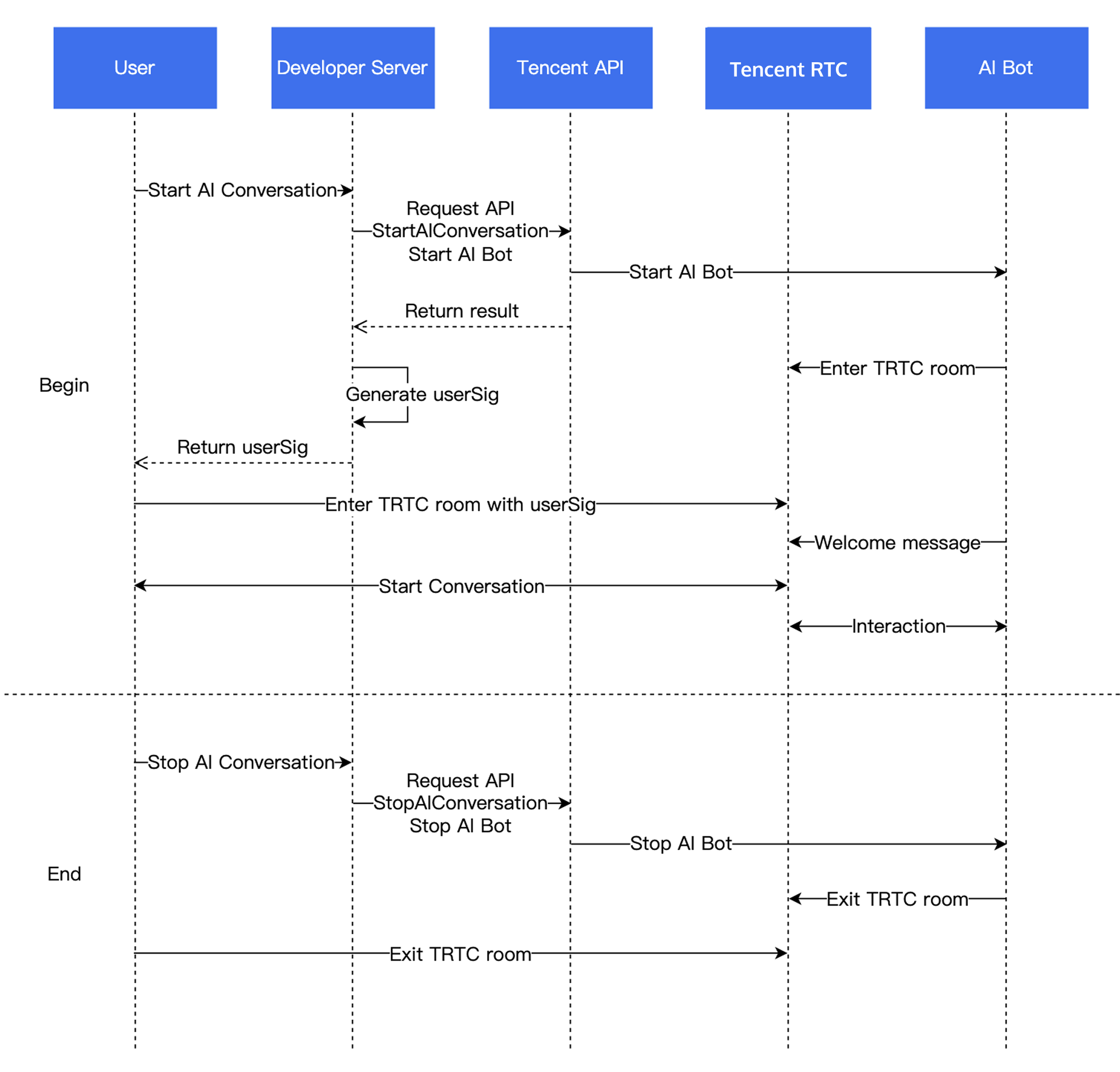
quality parameter specifies the capture mode. “Quality” here refers to the scenario, not just fidelity, but also the optimal setting depends on your use case.SPEECH mode; it prioritizes voice extraction, aggressively suppresses background noise, and handles poor network conditions well.// Enable capture via microphone and set the mode to SPEECH mode (strong denoising capability and resistance to poor network conditions).mCloud.startLocalAudio(TRTCCloudDef.TRTC_AUDIO_QUALITY_SPEECH );
self.trtcCloud = [TRTCCloud sharedInstance];// Enable capture via microphone and set the mode to SPEECH mode (strong denoising capability and resistance to poor network conditions).[self.trtcCloud startLocalAudio:TRTCAudioQualitySpeech];
// Enable capture via microphone and set the mode to SPEECH mode (strong denoising capability and resistance to poor network conditions).trtcCloud.startLocalAudio(TRTCAudioQuality.speech);
await trtc.startLocalAudio();
SPEECH mode is recommended for Conversational AI.// Enable capture via microphone and set the mode to SPEECH mode.// Provide strong denoising capability and resistance to poor network conditions.ITRTCCloud* trtcCloud = CRTCWindowsApp::GetInstance()->trtc_cloud_;trtcCloud->startLocalAudio(TRTCAudioQualitySpeech);
SPEECH mode is recommended for Conversational AI.// Enable capture via microphone and set the mode to SPEECH mode.// Provide strong denoising capability and resistance to poor network conditions.AppDelegate *appDelegate = (AppDelegate *)[[NSApplication sharedApplication] delegate];[appDelegate.trtcCloud startLocalAudio:TRTCAudioQualitySpeech];
LLMConfig and TTSConfig with the parameters from Prerequisites.LLMConfig by using an LLM that follows the OpenAI standard protocol as an example.Name | Type | Required | Description |
LLMType | String | Yes | LLM type. Fill in openai for LLMs that comply with the OpenAI API protocol. |
Model | String | Yes | Specific model name, such as gpt-4o and deepseek-chat. |
APIKey | String | Yes | LLM APIKey. |
APIUrl | String | Yes | LLM APIUrl. |
Streaming | Boolean | No | Whether streaming is used. Default: false. Recommended: true. |
SystemPrompt | String | No | System prompts. |
Timeout | Float | No | Timeout period. Value range: 1–50. Default value: 3 seconds (Unit: second). |
History | Integer | No | Set the context rounds for LLM. Default value: 0 (No context management is provided). Maximum value: 50 (Context management is provided for the most recent 50 rounds). |
MaxTokens | Integer | No | Maximum token limit for output text. |
Temperature | Float | No | Sampling temperature. |
TopP | Float | No | Selection range for sampling. This parameter controls the diversity of output tokens. |
UserMessages | Object[] | No | User prompt. |
MetaInfo | Object | No | Custom parameters. These parameters will be contained in the request body and passed to the LLM. |
"LLMConfig": {"LLMType": "openai","Model": "gpt-4o","APIKey": "api-key","APIUrl": "https://api.openai.com/v1/chat/completions","Streaming": true,"SystemPrompt": "You are a personal assistant","Timeout": 3.0,"History": 5,"MetaInfo": {},"MaxTokens": 4096,"Temperature": 0.8,"TopP": 0.8,"UserMessages": [{"Role": "user","Content": "content"},{"Role": "assistant","Content": "content"}]
{"TTSType": "tencent", // TTS type in String format. Valid values: "tencent" and "minixmax". Other vendors will be supported in future versions."AppId": Your application ID, // Required. Integer value."SecretId": "Your key ID", // Required. String value."SecretKey": "Your key", // Required. String value."VoiceType": 101001, // Required. Integer value. Voice ID, including standard timbre and premium timbre. Premium timbre offers higher realism with different pricing from standard timbre. Please refer to the TTS billing overview. For the complete voice ID list, see the TTS timbre list."Speed": 1.25, // Optional. Integer. Speaking rate, range: [-2,6], corresponding to different speeds: -2: 0.6x -1: 0.8x 0: 1.0x (default) 1: 1.2x 2: 1.5x 6: 2.5x. For more refined rates, keep 2 decimal places such as 0.5/1.25/2.81. Parameter value to actual speed conversion can be found in speech speed conversion."Volume": 5, // Optional. Integer value. Volume level. Range: [0, 10], corresponding to 11 severity levels. Default value: 0, representing normal volume."PrimaryLanguage": 1, // Optional. Primary language in integer format. 1: Chinese (default value); 2: English; 3: Japanese."FastVoiceType": "xxxx" // Optional. Fast voice cloning parameter in String format."EmotionCategory":"angry",// Optional. String value. This parameter controls the emotion of the synthesized audio and is only available for multi-emotion timbres. Example values: neutral and sad."EmotionIntensity":150 // Optional. Integer value. This parameter controls the emotion intensity of the synthesized audio. Value range: [50, 200]. Default value: 100. This parameter takes effect only when EmotionCategory is not empty.}
RoomId must match the client's RoomId (including type: number/string). The chatbot and user must be in the same room.TargetUserId must match the client's UserId.LLMConfig and TTSConfig are JSON strings—configure them properly to successfully start the conversation.STTConfig.VadLevel to 2 or 3 when calling the Start AI Conversation Task API.VadSilenceTime Tuning: Metric Name | Description |
asr_latency | ASR latency. This metric includes the time set by VadSilenceTime when Conversational AI is started. |
llm_network_latency | Network latency of LLM requests. |
llm_first_token | LLM first-token duration, including network latency. |
tts_network_latency | Network latency of TTS requests. |
tts_first_frame_latency | TTS first-frame duration, including network latency. |
tts_discontinuity | Number of occurrences of TTS request discontinuity. Discontinuity indicates that no result is returned for the next request after the current TTS streaming request is completed. This is usually caused by high TTS latency. |
interruption | This metric indicates that this round of conversation is interrupted. |
llm_first_token(LLM first packet latency)LLMConfig.Streaming = true for voice conversations to minimize latencytts_first_frame_latency(TTS first packet latency){"type": 10000, // 10000 indicates real-time subtitles are delivered."sender": "user_a", // userid of the speaker."receiver": [], // List of receiver userid. The message is actually broadcast within the room."payload": {"text":"", // Text recognized by ASR."start_time":"00:00:01", // Start time of a sentence."end_time":"00:00:02", // End time of a sentence."roundid": "xxxxx", // Unique identifier of a conversation round."end": true // If the value is true, the sentence is a complete sentence.}}
{"type": 10001, // Chatbot status."sender": "user_a", // userid of the sender, which is the chatbot ID in this case."receiver": [], // List of receiver userid. The message is actually broadcast within the room."payload": {"roundid": "xxx", // Unique identifier of a conversation round."timestamp": 123,"state": 1, // 1: Listening; 2: Thinking; 3: Speaking; 4: Interrupted; 5: Finished speaking.}}
@Overridepublic void onRecvCustomCmdMsg(String userId, int cmdID, int seq, byte[] message) {String data = new String(message, StandardCharsets.UTF_8);try {JSONObject jsonData = new JSONObject(data);Log.i(TAG, String.format("receive custom msg from %s cmdId: %d seq: %d data: %s", userId, cmdID, seq, data));} catch (JSONException e) {Log.e(TAG, "onRecvCustomCmdMsg err");throw new RuntimeException(e);}}
func onRecvCustomCmdMsgUserId(_ userId: String, cmdID: Int, seq: UInt32, message: Data) {if cmdID == 1 {do {if let jsonObject = try JSONSerialization.jsonObject(with: message, options: []) as? [String: Any] {print("Dictionary: \\(jsonObject)")} else {print("The data is not a dictionary.")}} catch {print("Error parsing JSON: \\(error)")}}}
trtcClient.on(TRTC.EVENT.CUSTOM_MESSAGE, (event) => {let data = new TextDecoder().decode(event.data);let jsonData = JSON.parse(data);console.log(`receive custom msg from ${event.userId} cmdId: ${event.cmdId} seq: ${event.seq} data: ${data}`);if (jsonData.type == 10000 && jsonData.payload.end == false) {// Subtitle intermediate state.} else if (jsonData.type == 10000 && jsonData.payload.end == true) {// That is all for this sentence.}});
void onRecvCustomCmdMsg(const char* userId, int cmdID, int seq,const uint8_t* message, uint32_t msgLen) {std::string data;if (message != nullptr && msgLen > 0) {data.assign(reinterpret_cast<const char*>(message), msgLen);}if (cmdID == 1) {try {auto j = nlohmann::json::parse(data);std::cout << "Dictionary: " << j.dump() << std::endl;} catch (const std::exception& e) {std::cerr << "Error parsing JSON: " << e.what() << std::endl;}return;}}
void onRecvCustomCmdMsg(String userId, int cmdID, int seq, String message) {if (cmdID == 1) {try {final decoded = json.decode(message);if (decoded is Map<String, dynamic>) {print('Dictionary: $decoded');} else {print('The data is not a dictionary. Raw: $decoded');}} catch (e) {print('Error parsing JSON: $e');}return;}}
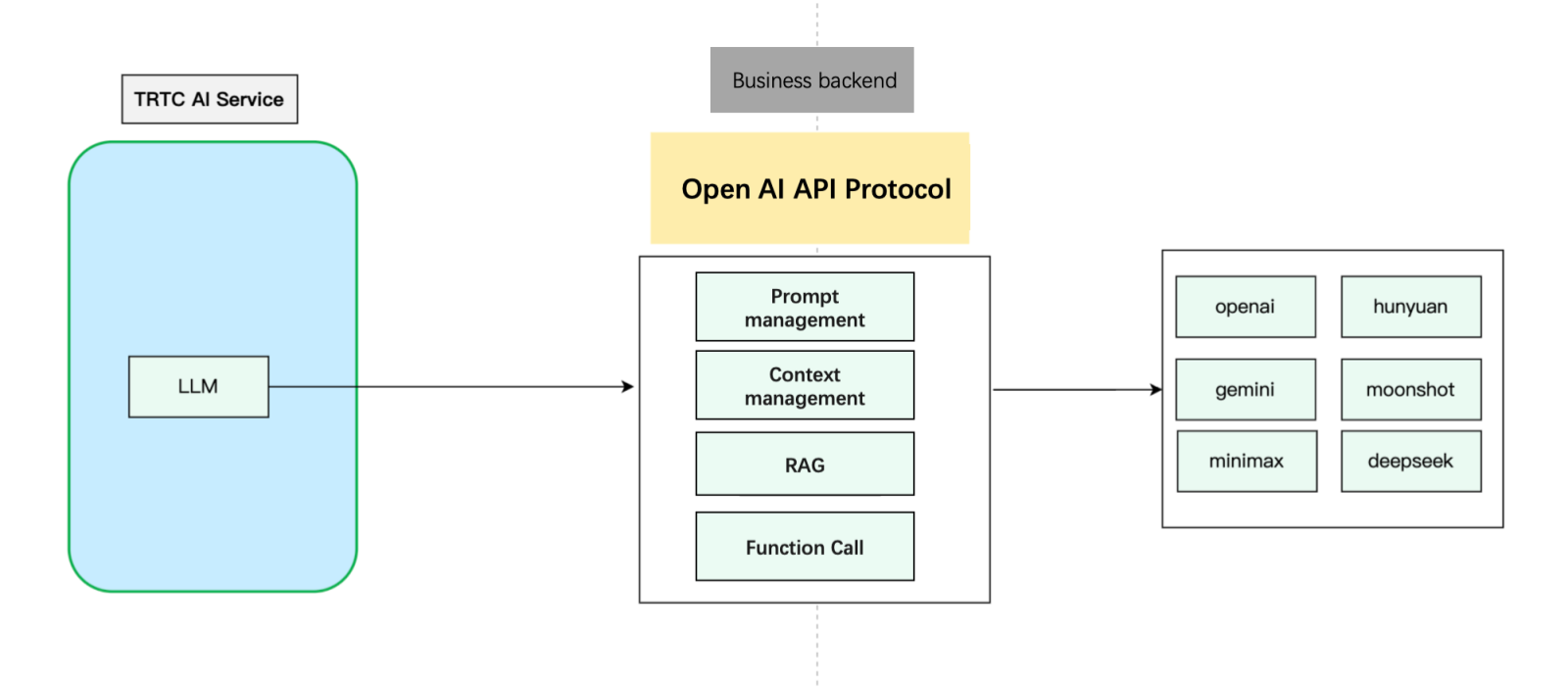
import timefrom fastapi import FastAPI, HTTPExceptionfrom fastapi.middleware.cors import CORSMiddlewarefrom pydantic import BaseModelfrom typing import List, Optionalfrom langchain_core.messages import HumanMessage, SystemMessagefrom langchain_openai import ChatOpenAIapp = FastAPI(debug=True)# Add CORS middleware.app.add_middleware(CORSMiddleware,allow_origins=["*"],allow_credentials=True,allow_methods=["*"],allow_headers=["*"],)class Message(BaseModel):role: strcontent: strclass ChatRequest(BaseModel):model: strmessages: List[Message]temperature: Optional[float] = 0.7class ChatResponse(BaseModel):id: strobject: strcreated: intmodel: strchoices: List[dict]usage: dict@app.post("/v1/chat/completions")async def chat_completions(request: ChatRequest):try:# Convert the request message to the LangChain message format.langchain_messages = []for msg in request.messages:if msg.role == "system":langchain_messages.append(SystemMessage(content=msg.content))elif msg.role == "user":langchain_messages.append(HumanMessage(content=msg.content))# add more historys# Use the ChatOpenAI model from LangChain.chat = ChatOpenAI(temperature=request.temperature,model_name=request.model)response = chat(langchain_messages)print(response)# Construct a response that conforms to the OpenAI API format.return ChatResponse(id="chatcmpl-" + "".join([str(ord(c))for c in response.content[:8]]),object="chat.completion",created=int(time.time()),model=request.model,choices=[{"index": 0,"message": {"role": "assistant","content": response.content},"finish_reason": "stop"}],usage={"prompt_tokens": -1, # LangChain does not provide this information. Thus, we use a placeholder value."completion_tokens": -1,"total_tokens": -1})except Exception as e:raise HTTPException(status_code=500, detail=str(e))if __name__ == "__main__":import uvicornuvicorn.run(app, host="0.0.0.0", port=8000)
metainfo field to the model’s response. When the AI service detects metainfo, it pushes it to the client SDK via Custom Message.chat.completion.chunk objects, return a meta.info chunk:{"id":"chatcmpl-123","object":"chat.completion.chunk","created":1694268190,"model":"gpt-xxxx", "system_fingerprint": "fp_xxxx", "choices":[{"index":0,"delta":{"role":"assistant","content":""},"logprobs":null,"finish_reason":null}]}{"id":"chatcmpl-123","object":"chat.completion.chunk","created":1694268190,"model":"gpt-xxxx", "system_fingerprint": "fp_xxxx", "choices":[{"index":0,"delta":{"content":"Hello"},"logprobs":null,"finish_reason":null}]}// Add the following custom message.{"id":"chatcmpl-123","type":"meta.info","created":1694268190,"metainfo": {}}{"id":"chatcmpl-123","object":"chat.completion.chunk","created":1694268190,"model":"gpt-xxxx", "system_fingerprint": "fp_xxxx", "choices":[{"index":0,"delta":{},"logprobs":null,"finish_reason":"stop"}]}
metainfo, it will distribute the data via the Custom Message feature of RTC Engine. The client can receive the data through the onRecvCustomCmdMsg API in the SDK callback.{"type": 10002, // Custom message."sender": "user_a", // userid of the sender, which is the chatbot ID in this case."receiver": [], // List of receiver userid. The message is actually broadcast within the room."roundid": "xxxxxx","payload": {} // metainfo}
AgentConfig.TurnDetectionMode to 1 in StartAIConversation to enable manual round mode. The client decides when to trigger the next conversation round after receiving subtitles.Parameter | Type | Description |
TurnDetectionMode | Integer | Control the trigger mode for a new round of conversation, default is 0. - 0 means a new round of conversation is automatically triggered once the server speech recognition detects a complete sentence. - 1 means the client determines whether to manually send a chat signaling trigger for a new round of conversation upon receiving a caption message. Example value: 0 |
{"type": 20000, // Custom text message sent by the client."sender": "user_a", // Sender userid. The server will check whether the userid is valid."receiver": ["user_bot"], // List of receiver userid. Fill in the chatbot userid. The server will check whether the userid is valid."payload": {"id": "uuid", // Message ID. You can use a UUID. The ID is used for troubleshooting."message": "xxx", // Message content."timestamp": 123 // Timestamp. The timestamp is used for troubleshooting.}}
public void sendMessage() {try {int cmdID = 0x2;long time = System.currentTimeMillis();String timeStamp = String.valueOf(time/1000);JSONObject payLoadContent = new JSONObject();payLoadContent.put("timestamp", timeStamp);payLoadContent.put("message", message);payLoadContent.put("id", String.valueOf(GenerateTestUserSig.SDKAPPID) + "_" + mRoomId);String[] receivers = new String[]{robotUserId};JSONObject interruptContent = new JSONObject();interruptContent.put("type", 20000);interruptContent.put("sender", mUserId);interruptContent.put("receiver", new JSONArray(receivers));interruptContent.put("payload", payLoadContent);String interruptString = interruptContent.toString();byte[] data = interruptString.getBytes("UTF-8");Log.i(TAG, "sendInterruptCode :" + interruptString);mTRTCCloud.sendCustomCmdMsg(cmdID, data, true, true);} catch (UnsupportedEncodingException e) {e.printStackTrace();} catch (JSONException e) {throw new RuntimeException(e);}}
@objc func sendMessage() {let cmdId = 0x2let timestamp = Int(Date().timeIntervalSince1970 * 1000)let payload = ["id": userId + "_\\(roomId)" + "_\\(timestamp)", // Message ID. You can use a UUID. The ID is used for troubleshooting."timestamp": timestamp, // Timestamp. The timestamp is used for troubleshooting."message": "xxx" // Message content.] as [String : Any]let dict = ["type": 20001,"sender": userId,"receiver": [botId],"payload": payload] as [String : Any]do {let jsonData = try JSONSerialization.data(withJSONObject: dict, options: [])self.trtcCloud.sendCustomCmdMsg(cmdId, data: jsonData, reliable: true, ordered: true)} catch {print("Error serializing dictionary to JSON: \\(error)")}}
const message = {"type": 20000,"sender": "user_a","receiver": ["user_bot"],"payload": {"id": "uuid","timestamp": 123,"message": "xxx", // Message content.}};trtc.sendCustomMessage({cmdId: 2,data: new TextEncoder().encode(JSON.stringify(message)).buffer});
AgentConfig.InterruptSpeechDuration and STTConfig.VadSilenceTime parameters in StartAIConversation to reduce the interruption latency. We also recommend enabling the Far-Field Voice Suppression to reduce the likelihood of false interruptions.Parameter | Type | Description |
AgentConfig.InterruptSpeechDuration | Integer | Used when InterruptMode is 0. Unit: millisecond. Default value: 500 ms. This means that the server will interrupt when it detects continuous human speech for the specified InterruptSpeechDuration duration. Example value: 500. |
STTConfig.VadSilenceTime | Integer | The time for ASR VAD ranges from 240 to 2000, with a default of 1000 (unit: ms). A smaller value enables faster sentence segmentation in speech recognition. Example value: 500. |
RoomId values match exactly (both value and type: number vs string)TargetUserId from API matches client's UserIdService Category | Error code | Error Description |
ASR | 30100 | Request timeout. |
| 30102 | Internal error. |
LLM | 30200 | LLM request timeout. |
| 30201 | LLM request frequency limited. |
| 30202 | LLM service return failure. |
TTS | 30300 | TTS request timeout. |
| 30301 | TTS request frequency limited. |
| 30302 | TTS service return failure. |
LLM error Timeout on reading data from socket indicates LLM request timeout.Timeout in LLMConfig (default: 3 seconds)TencentTTS chunk error {'Response': {'RequestId': 'xxxxxx', 'Error': {'Code': 'AuthorizationFailed', 'Message': "Please check http header 'Authorization' field or request parameter"}}}
APPID, SecretId, and SecretKey are filled in correctly.AgentConfig.FilterOneWord is true (default). Set to false in StartAIConversation to enable.Parameter | Type | Description |
FilterOneWord | Boolean | Whether to filter out single-word sentences from the user. true: Filter; false: Not filter. Default value: true. Example value: true. |
Enumeration | Value | Description |
ERR_TRTC_INVALID_USER_SIG | -3320 | Room entry parameter UserSig is incorrect. Please check if TRTCParams.userSig is empty. |
ERR_TRTC_USER_SIG_CHECK_FAILED | -100018 | UserSig verification failed. Check if the parameter TRTCParams.userSig is filled in correctly or has expired. |
Enumeration | Value | Description |
ERR_TRTC_CONNECT_SERVER_TIMEOUT | -3308 | The room entry request times out. Check whether the Internet connection is lost or if a VPN is enabled. You may also attempt to switch to 4G for testing. |
ERR_TRTC_INVALID_SDK_APPID | -3317 | The room entry parameter SDKAppId is incorrect. Check whether TRTCParams.sdkAppId is empty. |
ERR_TRTC_INVALID_ROOM_ID | -3318 | The room entry parameter roomId is incorrect. Check if TRTCParams.roomId or TRTCParams.strRoomId is empty. Note that roomId and strRoomId cannot be used interchangeably. |
ERR_TRTC_INVALID_USER_ID | -3319 | The room entry parameter UserID is incorrect. Check if TRTCParams.userId is empty. |
ERR_TRTC_ENTER_ROOM_REFUSED | -3340 | Room entry request denied. Check if called consecutively enterRoom to enter room with the same ID. |
Enumeration | Value | Description |
ERR_MIC_START_FAIL | -1302 | Failed to turn the microphone on. This may occur when there is a problem with the microphone configuration program (driver) on Windows or macOS. Disable and re-enable the microphone, restart the microphone, or update the configuration program. |
ERR_SPEAKER_START_FAIL | -1321 | Failed to turn the speaker on. This may occur when there is a problem with the speaker configuration program (driver) on Windows or macOS. Disable and re-enable the speaker, restart the speaker, or update the configuration program. |
ERR_MIC_OCCUPY | -1319 | The microphone is occupied. For example, when the user is currently having a call on a mobile device, the microphone will fail to turn on. |
System Level | Product Name | Application Scenarios |
Access layer | Provides low-latency, high-quality real-time audio and video interaction solutions, serving as the foundational capability for audio and video call scenarios. | |
Access layer | Completes the transmission of key business signaling. | |
Cloud Services | Enables real-time audio and video interactions between AI and users and develops Conversational AI capabilities tailored to business scenarios. | |
Cloud Services | Provides identity authentication and anti-cheating capabilities. | |
Model | Serves as the brain of intelligent customer services and offers multiple agent development frameworks such as LLM+RAG, Workflow, and Multi-agent. | |
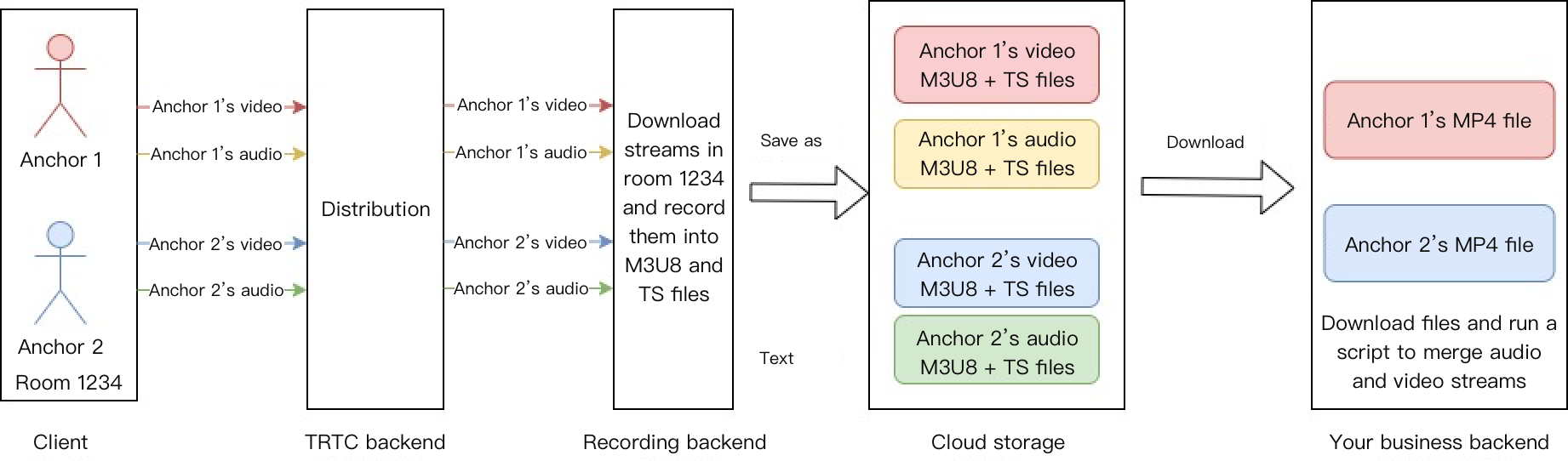
Data Storage | Provides storage services for audio recording files and audio slicing files. |
피드백