tencent cloud

Cloud HDFS

Product Introduction
Purchase Guide
Getting Started
Operation Guide
Creating CHDFS Instance
Creating Permission Group
Creating Permission Rule
Creating Mount Point
Mounting CHDFS Instance
Authorizing Access with CAM
Accessing CHDFS Through Java Code
Deleting File System
Practical Tutorial
Using CHDFS as Druid's Deep Storage
Migrating Data from Native HDFS to CHDFS
Importing or Exporting CHDFS with DataX
Guide to Configuring CHDFS for CDH
CHDFS Ranger Permission System Solution
API Documentation
History
Introduction
API Category
Making API Requests
Restoration task APIs
Permission rule APIs
Permission group APIs
Other APIs
Mount point APIs
Lifecycle rule APIs
File system APIs
Data Types
Error Codes
FAQs
Glossary
Related Protocol
Privacy Policy
Data Processing And Security Agreement

Deleting File System

PDF
Mode fokus
Ukuran font
Terakhir diperbarui: 2022-03-30 09:30:26
This document describes how to delete a file system in the CHDFS console.
Note:
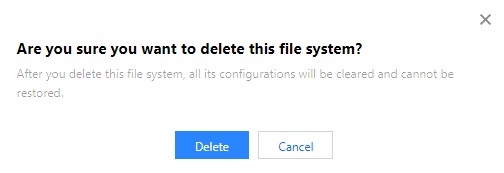
After a file system is deleted, all the configuration under it will be cleared and cannot be restored; therefore, please do so with caution.

Directions

1. Log in to the CHDFS console.
2. On the left sidebar, click File Systems.
3. On the file system page, select the region of the target file system, such as Guangzhou.

4. Find the file system to be deleted in the file system list and click Delete on the right.

5. In the pop-up window, click Delete.

Bantuan dan Dukungan

Apakah halaman ini membantu?

masukan