tencent cloud

Cloud Contact Center

Announcement
What's New
Cloud Contact Center Terminology Update
What is Tencent Cloud Contact Center
Overview
Feature List
Terms Introduction
Handling Firewall Restrictions
AI Voicebot
Billing Guide
Voice Call Billing Overview
Desk Billing Overview
View Billing
Refund Policy
New User Guide
Voice Guide
Desk Guide
Use Case
Inbound: Customer Experience
Outbound: Telemarketing
Auto Dialer: Voice Notification
Integration Use Case (SDK)
Administrator Guide
Voice Guide
Desk Guide
Member Guide
Voice Guide
Desk Guide
AI Voice Agent Guide
Introducing AI Voice Agent
AI Voice Agent Practical Tutorial
Set Up Your AI Voice Agent
Activate AI Voice Agent Call
AI Voice Agent Call Logs
Developer Guide
SDK Development Guide
Data Push
Voice API Reference
History
Introduction
API Category
Making API Requests
Agent APIs
Skill Group APIs
Number APIs
Dual Call APIs
Predictive Outbound Call APIs
SIP Phone APIs
Call Service Record APIs
Billing APIs
Other APIs
Outbound Call APIs
Speech Intelligent Agent APIs
Data Types
Error Codes
Desk API Reference
API Reference
Callback Configuration
FAQs
Data Deletion Guide
Legal
Privacy Policy
Data Processing And Security Agreement
Service Level Agreements
TENCENT CLOUD CONTACT CENTRE TERMS OF USE
Glossary
Contact Us

Service Record Storage and Access

PDF
Mode fokus
Ukuran font
Terakhir diperbarui: 2024-04-01 16:57:53

Service Record Free Storage

Cloud Contact Center provides service records related to calls with free storage for 3 months by default. Enterprises can use the API pull or push feature to obtain service records to local storage.

Service record pull

Cloud Contact Center supports pulling service records through the API. You can refer to the API document Access Call Service Records and Recordings for detailed operation steps.

Service records push

Cloud Contact Center supports pushing service records to the enterprise-designated address. Steps for enabling the push feature for service records are as follows. For details on push format, refer to Data Push - Telephone CDR Data Push.
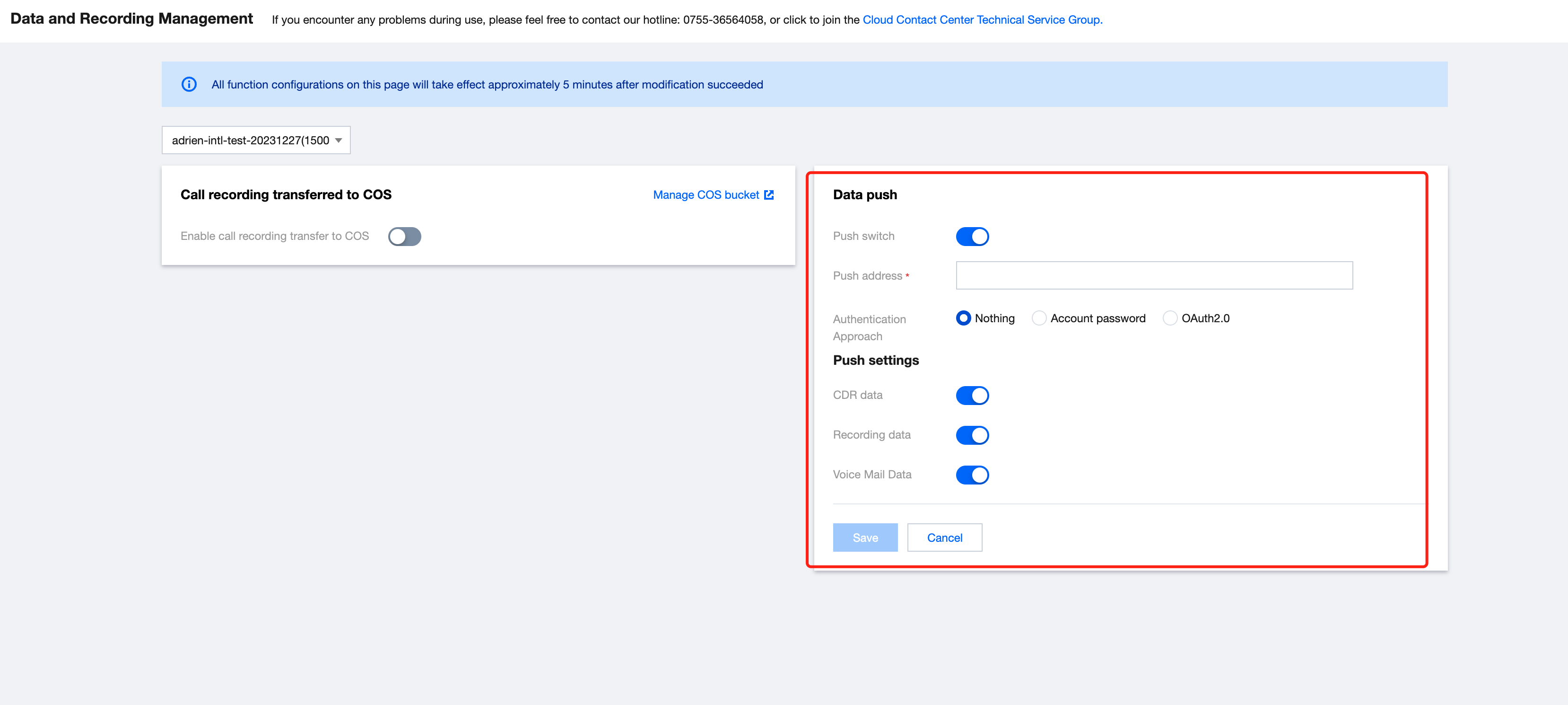
1. Log in to the Tencent Cloud Contact Center Console, click Data and Recordings Management
2. In the data push settings, click Modify, and turn on the Data Push switch:
Push Address: Refer to About Third-Party Provided URL in the Preliminary Explanation of Data Push.
Authentication Approach: Refer to About Authentication in the Preliminary Explanation of Data Push.
CDR Data: For details on the push protocol, refer to Telephone CDR Data Push.
Recording Data: For details on the push protocol, refer to Telephone Call Recording Data Push.


Bantuan dan Dukungan

Apakah halaman ini membantu?

masukan