Creating a Direct Connect Gateway
Download
Mode fokus
Ukuran font
This document describes how to create a direct connect gateway and provides information on the inbound route.
Prerequisites
Apply for a connection. For more information, see Applying for a Connection.
If you want to use VPC, set up a VPC. For more information, see Building Up an IPv4 VPC.
If you want to use CCN, set up a CCN instance. For more information, see Creating a CCN Instance.
If you want to use NAT Direct Connect Gateway, create a VPC NAT gateway.
Note:
NAT Direct Connect Gateway is available only for users who are added to the corresponding allowlist. To use the feature, please submit a ticket. For more information about the comparison between the old and new methods for configuring the mapping parameters of NAT Direct Connect Gateway, see Overview.
Use Limits
A standard direct connect gateway supports propagating secondary CIDR blocks. Note the following limits:
Up to 10 secondary CIDR blocks can be propagated.
This feature is unavailable to a NAT direct connect gateway.
Directions
1. Log in to the Direct Connect console, and click Direct connect gateway in the left sidebar.
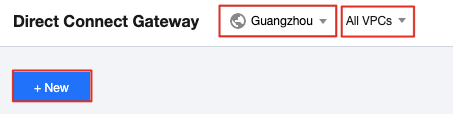
2. Select a region and VPC at the top of the Direct connect gateway page, and click + New.
3. Specify gateway parameters in the pop-up window and click OK.
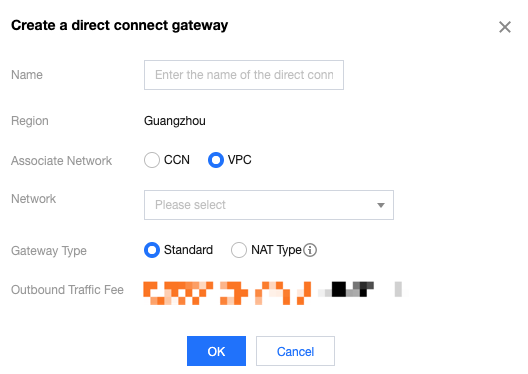
Field | Description |
Name | Enter a name for the direct connect gateway. |
AZ | Select the AZ. |
Associated Network | Select the type of the direct connect gateway. Valid values: CCN, VPC, and NAT. |
Network | Select an instance to which the created direct connect gateway associate based on the selected network type. |
Gateway type | If `VPC` is selected for Associated Network, the network address translation feature is not supported. If `NAT` is selected for Associated Network, the network address translation feature is supported and you need to configure the translation rules for the NAT gateway. |
Inbound Routes
The destination of the inbound routes (from your IDC to a Tencent Cloud VPC) are affected by both the creation time of the direct connect gateway and dedicated tunnel mode. For more information, see Direct Connect Gateway Overview.
Gateway type | Creation Time | Dedicated Tunnel Mode | IDC Routes to Tencent Cloud |
VPC-based direct connect gateway | No limit | Static | The inbound routing policy is configured in the local router. |
| | BGP | The IDC automatically obtains the VPC CIDR block based on the BGP protocol. |
CCN-based direct connect gateway | Before 00:00:00 on September 15, 2020 | Static | The inbound routing policy is configured in the local router. |
| | BGP | The IDC automatically obtains the subnet CIDR block based on the BGP protocol. |
| After 00:00:00 on September 15, 2020 | Static | The inbound routing policy is configured in the local router. |
| | BGP | The IDC automatically obtains the VPC CIDR block based on the BGP protocol. |
NAT direct connect gateway | No limit | Static | The inbound routing rule is configured in the local router.The next hop of the VPC route must point to a VPC NAT gateway. |
| | BGP | The next hop of the VPC route must point to a VPC NAT gateway. |
Related Operations
After creating a CCN-based direct connect gateway, you need to add IDC IP ranges to the direct connect gateway to implement network communication. For more information, see Publishing IDC IP Ranges to CCN.
After creating a VPC-based direct connect gateway, you need to configure the VPC route table to implement network communication. For more information, see Configuring the Route Table.
Bantuan dan Dukungan
Apakah halaman ini membantu?
Anda juga dapat Menghubungi Penjualan atau Mengirimkan Tiket untuk meminta bantuan.
masukan