Associating Instances with Security Groups
Download
Mode fokus
Ukuran font
A security group is an instance-level firewall provided by Tencent Cloud for controlling inbound traffic of TencentDB. You can associate a security group with an instance when purchasing it or later in the console.
In TencentDB for PostgreSQL, primary instances, read-only instances, and read-only instance groups (RO groups) can use security groups which are independent from each other.
Note:
A TencentDB for PostgreSQL instance can associate with up to five security groups.
The security group of an RO group controls the access address of the RO group itself rather than the access addresses of the read-only instances in this RO group. For example, if the access from an IP is allowed by the security group of an RO group but denied by that of a read-only instance in the RO group, this IP can still access to the read-only instance using the access address of the RO group instead of the access address of the read-only instance.
Prerequisites
You have created security groups for TencentDB instances in the security group console. For more information, please see Managing Security Groups.
Associating Security Groups with Primary/Read-Only Instances
1. Log in to the TencentDB for PostgreSQL console. In the instance list, click the ID of the instance to be associated and enter the instance management page.
2. On the Security Group page, click Configure Security Group.
3. In the pop-up dialog box, select the security group to be associated and click OK.
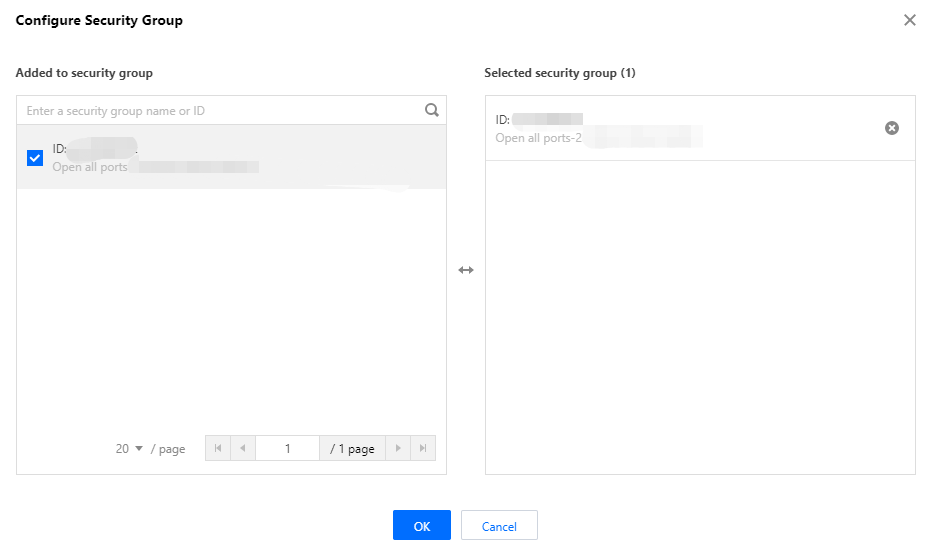
Associating Security Groups with RO Groups
1. Log in to the TencentDB for PostgreSQL console. In the instance list, click the ID of a read-only instance in the desired RO group and enter the instance management page.
2. On the Security Group page, select RO Group for Object Type in the Security Group Object section and click Configure Security Group in the Associated Security Group section.
3. In the pop-up dialog box, select the security group to be associated and click OK.
Adjusting the Priorities of Security Groups
You can associate up to five security groups with a TencentDB instance. If you have associated multiple security groups, these security groups are executed based on their priorities. You can adjust the priorities as follows.
1. Log in to the TencentDB for PostgreSQL console, click an instance ID in the instance list, and enter the instance management page.
2. Select the Security Group page.
3. In the Associated Security Group section, click Edit, and click the Move up or Move down icon in the Operation column to adjust the priorities. A security group ranking higher in the list has a higher priority. Configurations of all the security groups are connected by OR. If the configurations of two security groups conflict, whichever has a higher priority will prevail.
4. After adjusting the priority, click Save.
Bantuan dan Dukungan
Apakah halaman ini membantu?
Anda juga dapat Menghubungi Penjualan atau Mengirimkan Tiket untuk meminta bantuan.
masukan