Configuring TencentDB for PostgreSQL as GitLab's External Data Source
Download
Mode fokus
Ukuran font
Background
GitLab is a GitHub-like self-hosting Git repository management system service for you to implement internal management of Git repositories. It helps you keep your code confidential and easily modify the deployed code, with the following strengths:
It provides GitLab Community Edition for you to locate code on servers.
It provides an unlimited number of private and public repositories free of charge.
It allows you to share a small amount of code in your project as needed instead of the entire project.
The latest GitLab version (12.1) currently supports only PostgreSQL rather than MySQL as the metadatabase for the following reasons:
MySQL doesn't support
WITH until version 8.To increase MySQL's limits on columns, the operations will be extremely complicated, which may cause MySQL to reject storing data.
MySQL doesn't allow you to restrict the length of fields of TEXT type.
MySQL doesn't support partition indexes.
In contrast, PostgreSQL supports all the above scenarios. Therefore, GitLab integrates PostgreSQL in its installation package. However, integrated database services may have certain security risks for some enterprises, and their database reliability and availability cannot be guaranteed. To ensure the reliability of the code hosting service, some businesses and enterprises choose to use stable external database services. However, GitLab supports Patroni-based high-availability databases only on GitLab HA Repmgr edition, and it incurs high costs to maintain the cluster on your own. In this case, you can use TencentDB for PostgreSQL to greatly simplify such maintenance operations.
This document describes how to replace the embedded database service in GitLab with TencentDB for PostgreSQL.
Step 1. Install GitLab
1. Prepare resources
CentOS Linux release 7.6.1810 (Core).
gitlab-ce 14.9.3.
One CVM instance with over 4 GB memory and over 50 GB disk. We recommend you use
/opt to mount an independent data disk.One TencentDB for PostgreSQL instance. Configure its specification based on your actual conditions. You can use an instance with a low specification initially and scale it up later as needed. Select the instance version based on the GitLab version.
2. Download GitLab
Click here and find the target GitLab installation package, download it, and upload it to the target server.
3. Install GitLab
Use the
root account to run the following statements to install GitLab. If a message indicating that the dependency packages are not installed is displayed in the last step, you can directly use yum or other installation tools to install them.curl https://packages.gitlab.com/install/repositories/gitlab/gitlabce/script.rpm.sh > gitlab-ee_install.shsh gitlab-ee_install.shexport EXTERNAL_URL=https://gitlab.example.comyum install -y curl policycoreutils-python openssh-server cronierpm -ivh gitlab-ce-13.10.2-ce.0.el7.x86_64.rpm
Step 2. Initialize the PostgreSQL data source
1. You can directly use a cloud database service, such as TencentDB for PostgreSQL. To create a TencentDB for PostgreSQL instance, see Creating TencentDB for PostgreSQL Instance.
Note:
The database must be created or installed with the same version as GitLab; otherwise, a version mismatch error will be reported during GitLab initialization, causing database creation to fail.
GitLab Version | Earliest Supported PostgreSQL Version |
13.0 | 11 |
14.0 | 12 |
2. Use the client to log in to TencentDB for PostgreSQL. You can use psql to check whether the database can be directly accessed, and if not, check the network connection and security group configuration.
psql -U <database admin> -p <port> -d postgres -h <access address>
3. First, create an account to be used by GitLab in the database, such as
gitlab. Note that the account must have the superuser privileges or admin privileges granted by TencentDB such as pg_tencentdb_superuser.create user gitlab login password 'gitlab_****_password#123';grant gitlab to <current admin account>; grant pg_tencentdb_superuser to gitlab;
4. Create a database to be managed and used by
gitlab.create database gitlab owner=gitlab ENCODING = 'UTF8';
Note:
The GitLab database must support the
pg_trgm, btree_gist, and plpgsql extensions, which don't need to be created in advance. They will be automatically created during GitLab initialization, but you should ensure that they can be created successfully.Step 3. Modify the GitLab metadatabase to TencentDB for PostgreSQL
1. Log in to the server where GitLab is installed, find the GitLab configuration file, which is
/etc/gitlab/gitlab.rb by default. The file has no configuration information by default. You can run the following command to view it:# cat /etc/gitlab/gitlab.rb |grep -v ^# | grep -v ^$external_url 'http://gitlab.example.com'
2. Add the following information at the end of the file to add the TencentDB for PostgreSQL data source to GitLab:
## postgresql connect## Set this parameter to `false`, indicating to disable the embedded PostgreSQL data source and use an external one.postgresql['enable'] = falsegitlab_rails['db_adapter'] = "postgresql"gitlab_rails['db_encoding'] = "utf8"## Database namegitlab_rails['db_database'] = "gitlab"gitlab_rails['db_pool'] = 100 ## Database usergitlab_rails['db_username'] = "gitlab"## Password, which can be changed as neededgitlab_rails['db_password'] = "gitlab_Test_password#123" ## Access addressgitlab_rails['db_host'] = "gz-tdcpg-ep-6kvx6p19.sql.tencentcdb.com" ## Access portgitlab_rails['db_port'] = "25870"
Note that if the access address is set to a domain name, the following message will be displayed during initialization:
ActiveRecord::ConnectionNotEstablished: could not translate host name "gz-tdcpgep-6kvx6p19.sql.tencentcdb.com " to address: Name or service not knownIf the database access address is a domain name, run the
ping command to find the IP address of the domain name or a DNS server that can resolve it. We recommend you not directly modify an access domain name to an IP address, as in scenarios where a domain name is used, the database backend is usually configured with load balancing or high availability. In this case, you can directly configure the DNS server or host on the server. If the database service changes, you can directly modify the DNS service or host to avoid modifying the GitLab service.Step 4. Initialize, log in to, and use GitLab
1. Run the following command to use GitLab, which may take a while, so wait patiently. When
gitlab Reconfigured! is displayed, GitLab has been initialized.gitlab-ctl reconfigure
2. Run the following command to start GitLab:
gitlab-ctl startok
3. You can access GitLab at the following URL. If access fails, it may be caused by the server firewall.
Sample address:
http://{accessible server IP address}/users/sign_in
The login page is as shown below: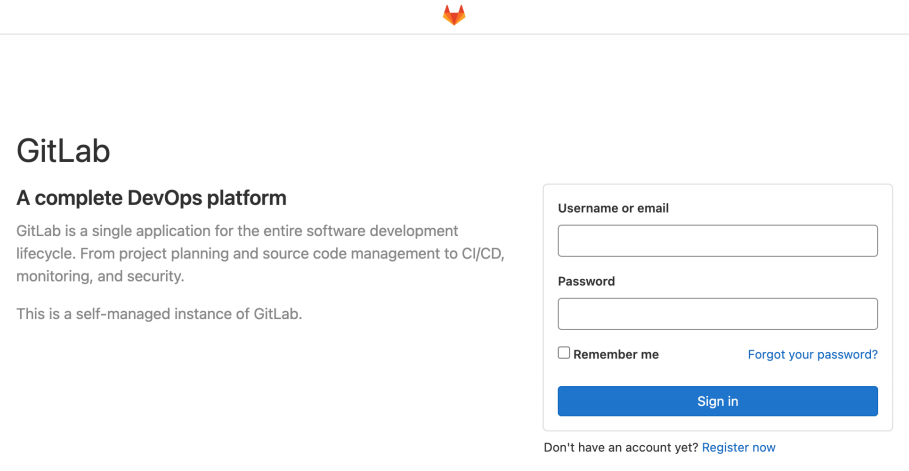
4. The initial login account is
root. The following message will be displayed for the initial password upon the completion of initialization:Password stored to /etc/gitlab/initial_root_password. This file will becleaned up in first reconfigure run after 24 hours.
Note:
You can find the initial password in this file on the server. After login, remember to change the password.
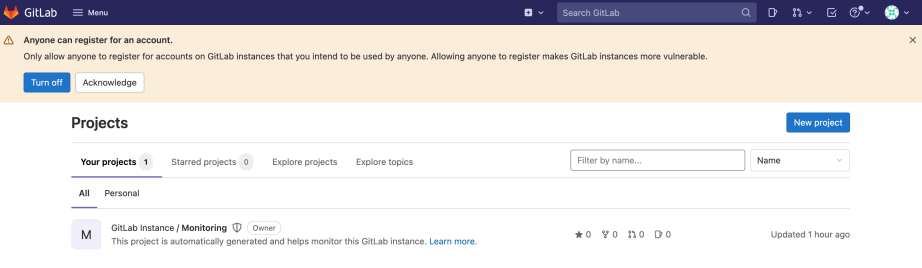
At this point, GitLab has been installed and can be used normally.
Bantuan dan Dukungan
Apakah halaman ini membantu?
Anda juga dapat Menghubungi Penjualan atau Mengirimkan Tiket untuk meminta bantuan.
masukan