As the network infrastructure gets improved, various major platforms see an explosive growth of image and video content volumes. While enjoying the profits of web and app traffic, creators and platforms also face the risks of unauthorized content use and infringement upon intellectual property rights. To address these problems, CI provides advanced features such as document watermark, visible and blind watermarks for images and videos, and video DNA. These features make an easy-to-connect and cost-effective one-stop copyright protection solution suitable in various business scenarios.
Overview of Image Copyright Protection Solutions
Visible image watermark
Visible image watermarks have been widely used on various social media and UGC platforms. The characteristics and strengths of CI's visible watermark feature are as detailed below:
Text and image watermarks are supported.
Tiled watermark is supported.
It is easy to connect. Its GUI-based console allows you to preview the watermark effect in real time.
You can configure the watermark style and perform multiple image processing operations in one single API call.
The watermark is highly visible and has a good warning effect.
You can implement image processing during download by adding relevant parameters to the image download link in COS as instructed in the product documentation. Below is a sample image link:
Visible watermarks are suitable for scenarios where the brand awareness is high and the image copyright needs to be highlighted, such as product images. This solution has many strengths, including high cost-effectiveness, ease of configuration, and low processing latency. However, if a visible watermark is smeared or covered, the image will lose the protection. Moreover, it also compromises the visual experience. If you have high requirements for the watermark protection capabilities and image quality, you can choose the blind watermark solution as described below.
Blind image watermark
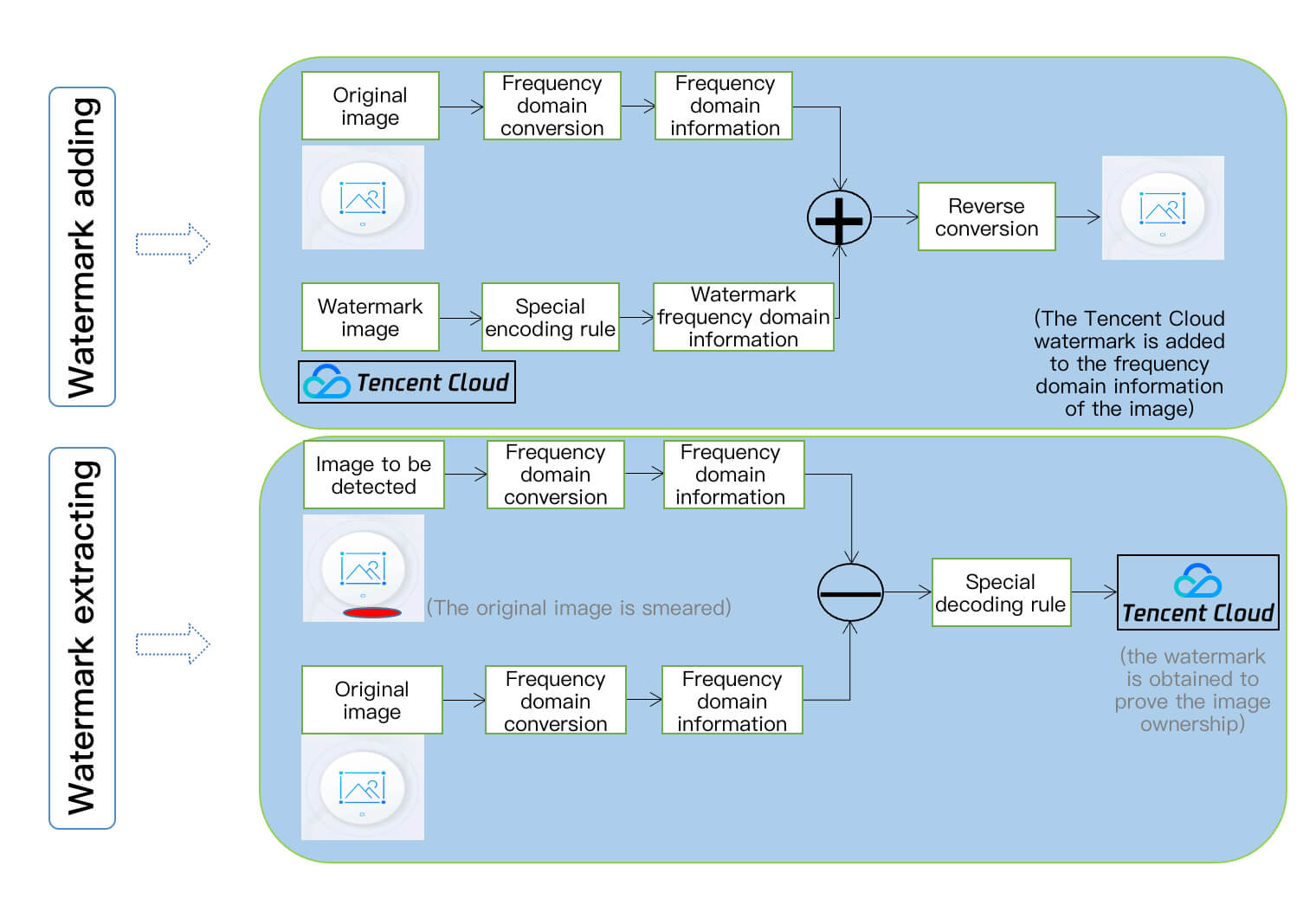
The blind watermark feature is a more secure watermark mode. It allows you to add a watermark to the input image information without displaying the watermark or significantly affecting the image quality. If you think your image might have been stolen, you can extract the blind watermark from the suspected image to prove that the image belongs to you. A blind watermark has powerful protection capabilities. Even if an image is rotated, cropped, smeared, or compressed, the decoding algorithm can still extract the watermark information in most cases. The processes of adding and extracting a blind watermark are as shown below:
Overview of Video Copyright Protection Solutions
CI can hide images and strings in a video in a way they can hardly be detected or modified. By identifying the watermark hidden in the video content, you can confirm the content creator, copyright owner, and spreaders and check whether the video content is tampered with. Such watermarks are difficult to detect or modify, yet they don't compromise the video integrity and watch experience.
A digital watermark is transparent, robust, secure, and traceable. Currently, CI's digital watermark service well protects the copyright of content in Tencent services such as Tencent Video and WeChat Channels and has been certified by ChinaDRM.
You can also customize the digital watermark content. The effects before and after a digital watermark is added are as shown below:
Note:
In addition to the video digital watermark feature, CI also offers other copyright protection solutions like video DNA and video encryption. To try them out, contact us for application.
Overview of File Copyright Protection Solutions
CI provides the following two file copyright protection solutions for your choice as needed:
Using image processing to convert files to watermarked images
CI's file transcoding feature can transcode a COS file to images by adding parameters to the file download link. It can add a custom watermark at the same time by adding watermark parameters to the link. This feature implements lightweight file distribution while preventing the file content from being stolen. Below is a sample file link:
The file-to-HTML conversion feature allows you to directly view the file content on a webpage while retaining file interactions, such as animations and transitions in slides as well as sheet switch in spreadsheets on the webpage. You can also add relevant parameters to the file link to convert the file and configure watermark and copy protection features. Below is a sample file link:
You can upload a PDF file to a bucket and call the PDF watermark API to add a watermark to it. In addition, you can also set the bucket access permission to private-read and generate a signature for the file link with parameters. This prevents the original file from being read without authorization.
Note:
This API is currently in beta. To try it out, contact us for application.