Node Function
Option Node belongs to Information Collection Node, supporting asking users and collecting information through tab format, suitable for situations with clear and limited options. Workflow execution will be interrupted for user interaction.
Directions
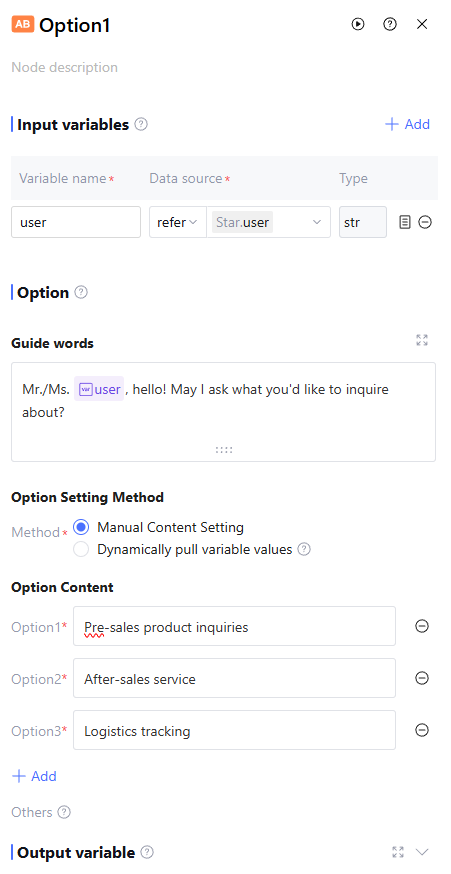
Input Variables
Input variables take effect only within the same node and cannot be used cross-node. Support up to 50 input variables to meet scene requirements. Click "Add" to configure input variables as follows.
|
Variable Name | The variable name can only contain letters, digits, or underscores, must start with a letter or underscore. Required. |
Description | Description of this variable. Optional |
Data source | The data source of this variable supports two options: "refer" and "input". "Refer" allows selecting output variables from all preceding nodes, while "input" supports manually filling in a fixed value. Required. |
Type | The data type of this variable cannot be selected and defaults to the variable type of "refer" or the string type of "input". |
Model Settings
Support configuring the model for option identification in the configuration tab. In actual use, only large models that the account has permission for can be selected (read Model Marketplace to enable large model permission). The model purpose is as follows: Identify and extract option content from user dialogue.
Generate follow-up questions to guide users to supplement information.
Guide words
Support guidance on the configuration tab to ask or prompt user. The prompt input box supports referencing the node's input variable by entering "/".
Option Settings Method
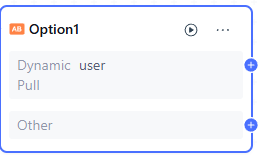
Support "Manual Content Setting" and "Dynamically pull variable values".
|
Manual Content Setting | Enter fixed options in the input box for option content. The input box supports referring to the node's input variable by entering "/". Up to 20 options can be added. |
Dynamically pull variable values | Support using array<string> type variables as options, showing the corresponding number of options at runtime based on variable values. Support selecting array<string> type output variables from all preceding nodes. |
Others | The system provides the "Other" option by default. When users answer questions through dialogue but the response does not match the configured options, select the "Other" option. |
Prompt
Support user input to constrain model option selection. Input "/" to reference the current node's input variable.
Version: Supports saving the current prompt content draft as a version and filling in the version description. Saved versions can be viewed and copied in View Version Record. The version record only shows versions created under the current prompt content box. Supports selecting two versions in Content Comparison to view their prompt content differences.
Template: A preset role directive format template. It is recommended to fill in according to the template for better effect. After writing the directive, you can also click Template > Save as Template to save the written directive as a template.
AI one-click optimization: After initial character design is done, click one-click optimization to optimize the character design content. The model will optimize settings based on the content of input, enabling it to better complete requirements.
Note:
The AI one-click optimization feature will consume the user's token resources.
Output Variable
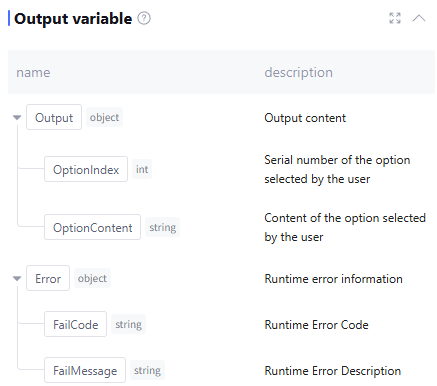
The output variable processed by this node by default includes two variables: the option number selected by users and the option content, as well as runtime error info Error (data type is object, this field is empty when running normally). Manual addition by users is not supported.
Application Example
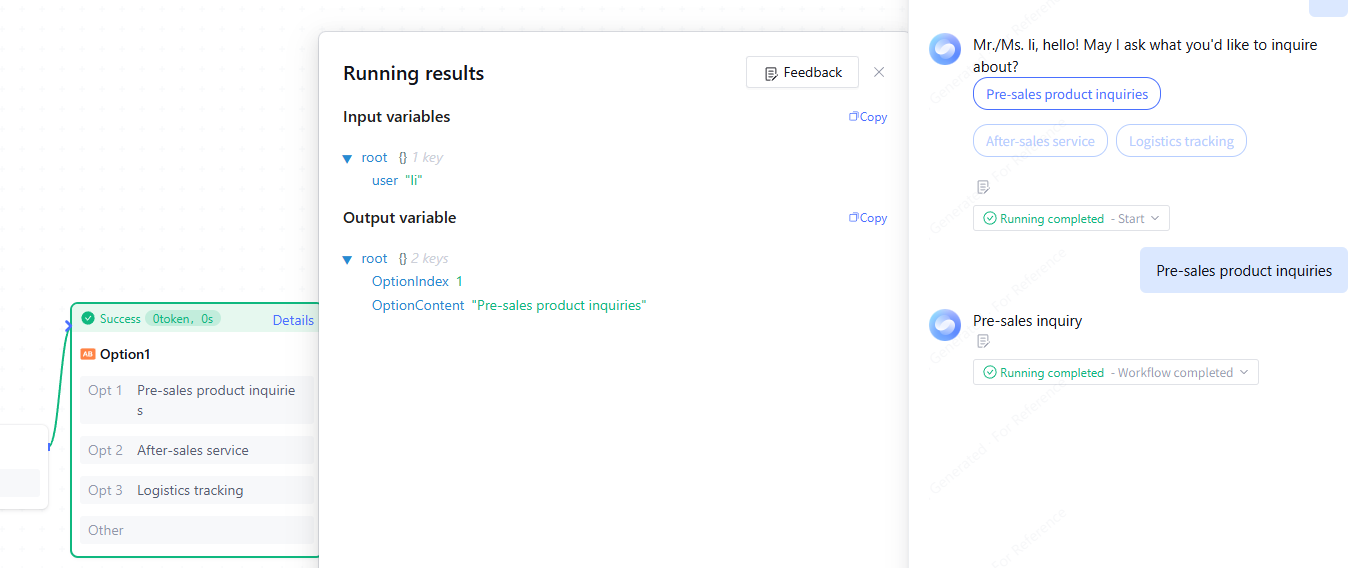
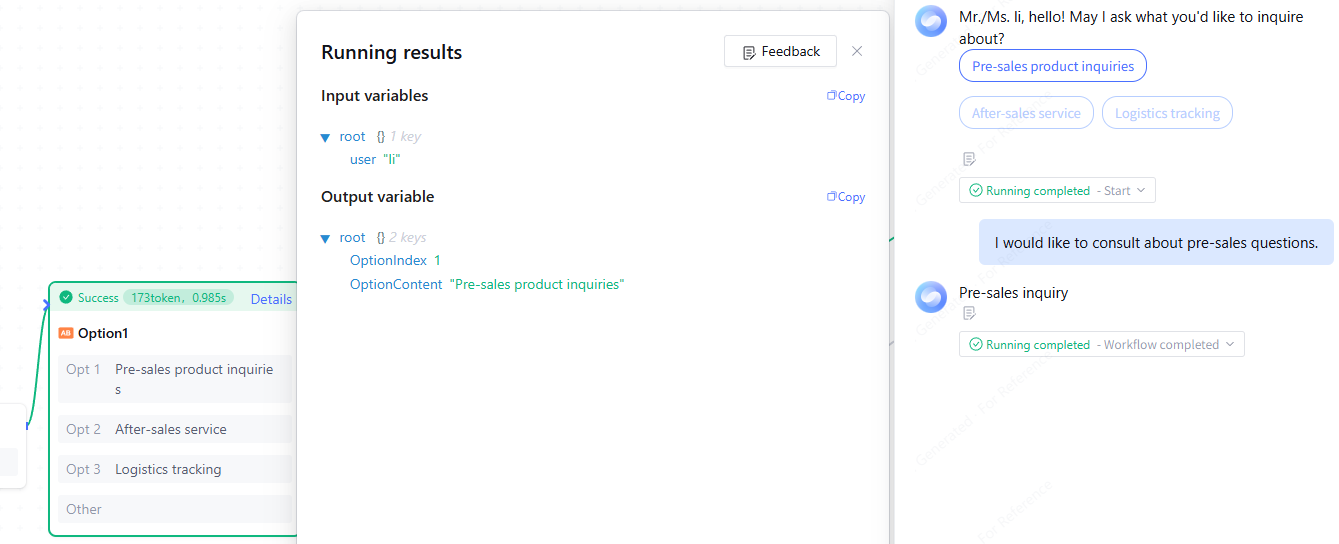
When handling user product inquiries, use the tab node to collect the problem type, offering three options: "Pre-sales product inquiries", "After-sales service", and "Logistics tracking".
User Interaction Format
Option have two interaction forms on the user end.
1. Mouse click: Select the necessary option on the tab, and the system will automatically identify and circulate backward.
2. Natural language expression: Input natural language in the dialog box, and the system will automatically identify semantics and match corresponding options. If matched to an option, it will circulate backward with this option. If less than matched, it will circulate backward with the "Other" option.
FAQs
Why is there only one branch option under Dynamic Pull Variable Value configuration?
Dynamically pull variable values as options, which will only serve as a branch option. It is advisable to subsequently connect "conditional branching, intent judgment" and other nodes after "dynamic pull" to enable judgment-based diversion based on business needs.