tencent cloud

TDSQL Boundless

Release Notes
Product Introduction
Overview
Scenarios
Product Architecture
Instance Types
Compatibility Notes
Kernel Features
Kernel Overview
Kernel Version Release Notes
Functionality Features
Performance Features
Billing
Billing Overview
Purchase Method
Pricing Details
Renewal
Overdue Payments
Refund
Getting Started
Creating an Instance
Connect to Instances
User Guide
Data Migration
Data Subscription
Instance Management
Configuration Change
Parameter Configuration
Account Management
Security Group
Backup and Restoration
Database Auditing
Tag Management
Use Cases
Technical Evolution and Usage Practices of Online DDL
Lock Mechanism Analysis and Troubleshooting Practices
Data Intelligent Scheduling and Related Practices for Performance Optimization
TDSQL Boundless Selection Guide and Practical Tutorial
Developer Guide
Developer Guide (MySQL Compatibility Mode)
Developer Guide (HBase Compatibility Mode)
Performance Tuning
Performance Tuning Overview
SQL Tuning
DDL Tuning
Performance White Paper
Performance Overview
TPC-C Test
Sysbench Test
API Documentation
History
Introduction
API Category
Making API Requests
Instance APIs
Security Group APIs
Task APIs
Backup APIs
Rollback APIs
Parameter APIs
Database APIs
Data Types
Error Codes
General Reference
System Architecture
SQL Reference
Database Parameter Description
TPC-H benchmark data model reference
Error Code Information
Security and Compliance
FAQs
Agreements
Service Level Agreement
Terms of Service
Privacy Policy
Data Processing And Security Agreement
Contact Us
Glossary

Restarting an Instance

PDF
フォーカスモード
フォントサイズ
最終更新日: 2026-02-10 10:27:27
When routine maintenance is required for the instance, such as clearing the database buffer, applying configuration changes, or addressing performance issues, the instance can be manually restarted.

Must-Knows

Business Impact: After the instance is restarted, current connections will be interrupted, uncommitted transactions will be rolled back, and service interruption may occur. Exercise caution when performing this operation. The restart process may take several minutes; perform it during off-peak business hours.
Operation Method: To ensure the stability and reliability of the restart operation, it is recommended to use the feature for restarting instances officially provided by Tencent Cloud.
Network Unchanged: After a restart, the instance's private IP address remains unchanged.

Operation Steps

1. Log in to TDSQL Boundless console, in Instance List, select single or multiple instances that need to be restarted, and click Restart.
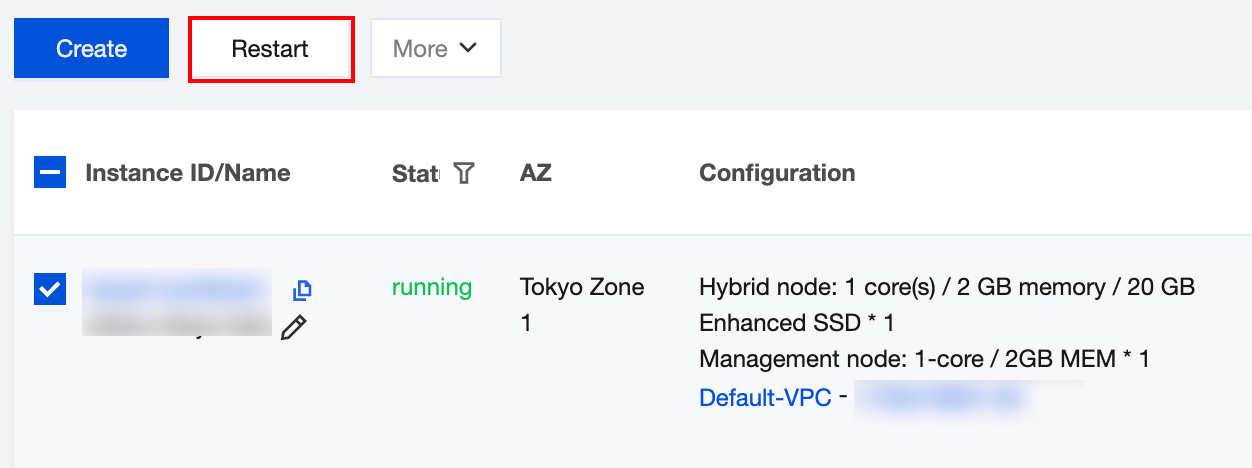
2. In the pop-up dialog box, confirm the information of the instance(s) to be restarted, click OK to restart a single instance or restart instances in batches.
When the instance status changes from restarting to running, it indicates that the restart is complete.

ヘルプとサポート

この記事はお役に立ちましたか?

フィードバック