Creating Traffic Mirror
Download
フォーカスモード
フォントサイズ
A traffic mirror provides a traffic collection service that enables you to filter the traffic from the specified ENI by using quintuple and other rules. Then you can copy the filtered traffic to CVM instances in the same VPC. This feature is applicable to use cases including security audit, risk monitoring, troubleshooting, and business analysis. This document describes how to create a traffic mirror.
Note:
The traffic mirror feature is currently in beta test. To try it out, submit a ticket for application. Save the link to the Traffic Mirror console for later logins; otherwise, you may need to apply again.
Prerequisites
Make sure that the source IP and target ENI are in the same VPC and that the source IP has a route table pointing to the target ENI.
Directions
Step 1. Create a traffic mirror source
1. Log in to the VPC console.
2. Click Diagnostic Tools > Traffic Mirror on the left sidebar and select the target region.
3. Click +New.
Note:
Up to five traffic mirrors can be created in a VPC.
4. In the pop-up window, configure as follows:
Enter the traffic mirror name (up to 60 characters).
Choose Network.
Select ENI for Collection Scope. That is, all traffic in the VPC will be collected, excluding the traffic of the ENI that is bound to the receiving IPs. If you select this option, you need to select the specific ENI.

Select Collection type: Select the traffic direction as needed. There are three options: All traffic, Traffic out, and Traffic in.
Select Traffic filtering: Select a method to filter out unnecessary traffic and keep the mirror small and lightweight.
N/A: All traffic configured will be collected.
Quintuple: The traffic that meets quintuple conditions will be collected. After selecting this option, specify Protocol, Source IP range, Destination IP range, Source port, and Destination port. You can click Add to create another filter. Only the traffic that meets all of the filters will be collected.

The next hop is the NAT gateway: Collect traffic whose next hop address is the NAT gateway. After selecting this option, select the specific NAT gateway next to Condition.
5. After completing the configuration, click Next.
Step 2. Create a traffic mirror target
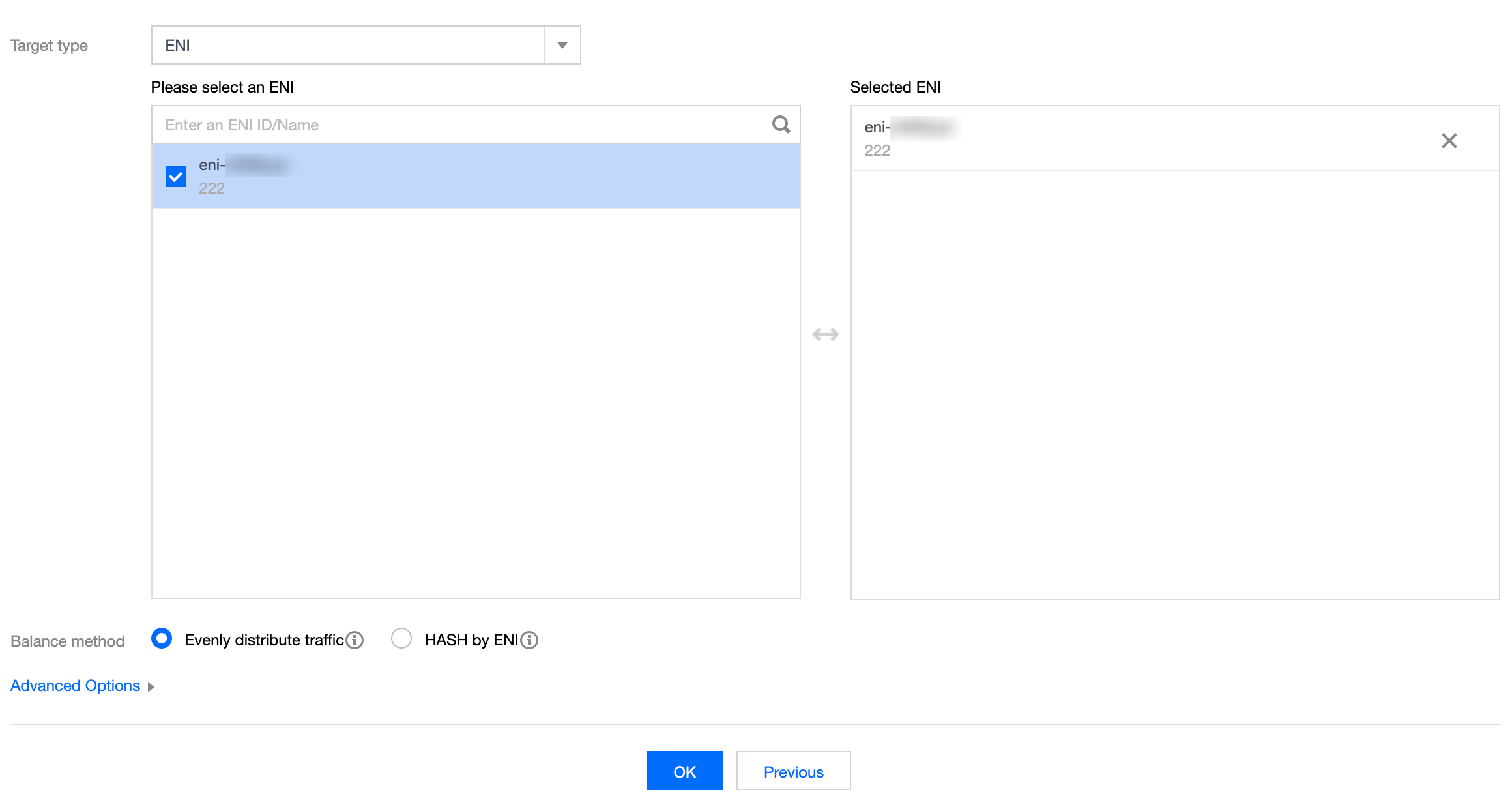
1. On the Create Traffic Mirror Target page, configure the following items:
Target type: Select the target ENI to receive the forwarded traffic.
Note:
At least one target ENI needs to be selected.
Traffic to the target ENI from inside the VPC will not be collected.
Balance method:
Evenly distribute traffic: All traffic is distributed among all target ENIs evenly.
HASH by ENI: Traffic from an ENI is always forwarded to a fixed target ENI.
2. Click OK.
Result Validation
Note:
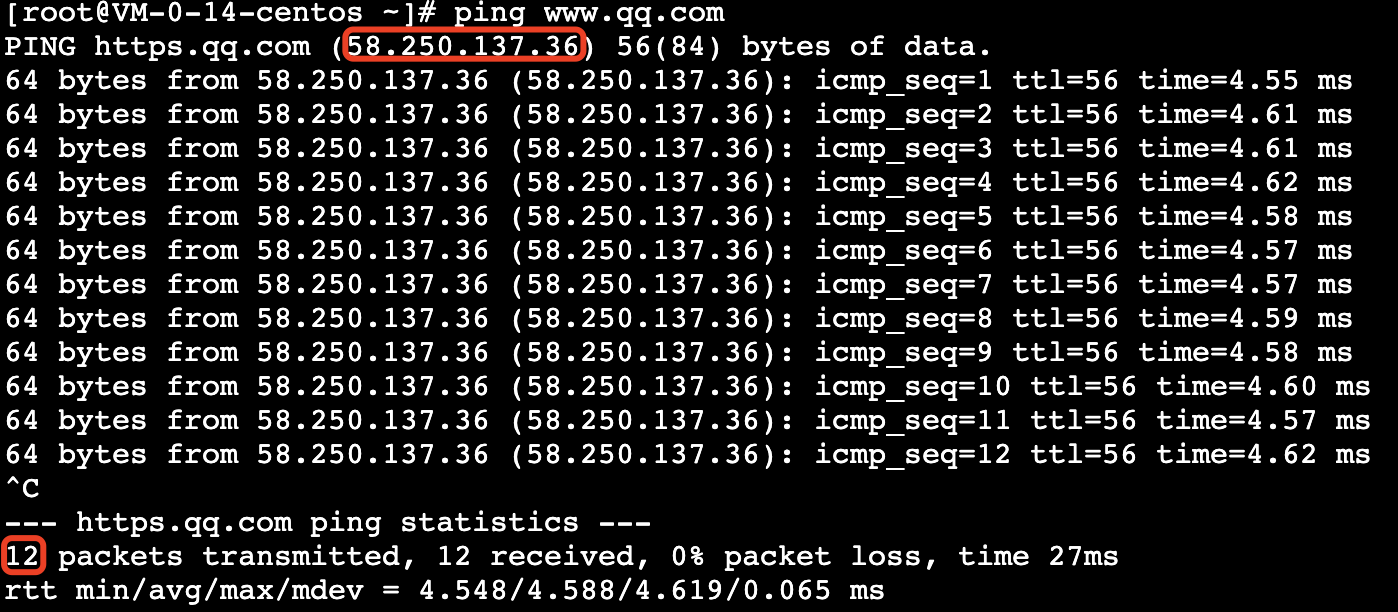
This document takes creating a traffic mirror that collects the outbound traffic of the 10.0.0.14 ENI accessing the www.qq.com website as an example.
1. Return to the Traffic Mirror page. If the created traffic mirror is displayed in the list with Collect Traffic enabled, it has been created successfully.

2. Perform the following steps to verify whether the collected traffic is mirrored to the receiving IP.
2.1 Generate the ENI traffic. For example, you can log in to the source CVM and run the "ping public IP" command.
Source data:
2.2 Log in to the destination CVM and run the following command to capture data and save it as a
.cap or .pcap file. This document uses the .pcap file as an example.tcpdump -i eth0 -w capture-2020-10-27.pcap # Enter the actual filename.
Destination packets:

2.3 Use a terminal simulator (such as SecureCRT) to log in to the destination CVM and export the file saved in Step 2.2.
sz -bye capture-2020-10-27.pcap
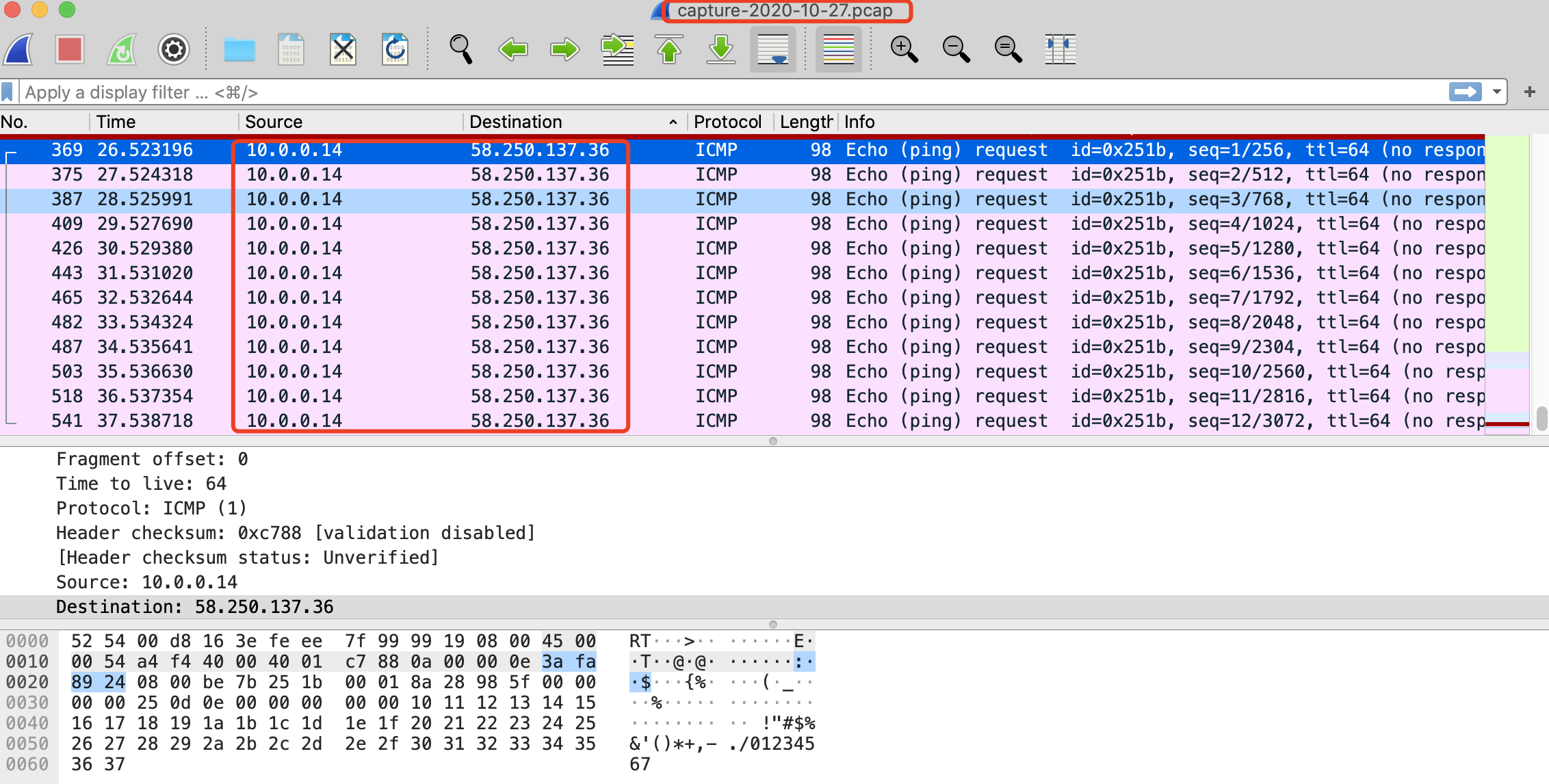
2.4 Use a packet parser (such as Wireshark) to get the data from the downloaded
capture-2020-10-27.pcap file. In this sample, 12 mirrored packets of the source CVM instance are obtained from the destination CVM instance.Packet verification:
3. If an abnormal packet is obtained or packets cannot be obtained, submit a ticket for assistance.
Subsequent Operations
フィードバック