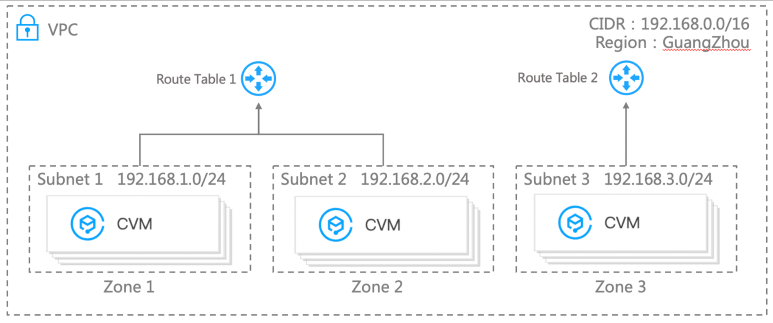
A Virtual Private Cloud (VPC) is a logically isolated network space that can be customized for resources in Tencent Cloud such as CVM and TencentDB to enhance their security and meet the needs in different use cases.
This document describes the core components, connection methods, and security of VPCs.
Core Components
A VPC has three core components: VPC IP range, subnet, and route table.
Tencent Cloud VPC supports CIDR blocks in any of the following private IP ranges:
10.0.0.0 - 10.255.255.255 (the mask range must be 12 to 28)
172.16.0.0 - 172.31.255.255 (the mask range must be 12 to 28)
192.168.0.0 - 192.168.255.255 (the mask range must be 16 to 28)
Note:
The VPC CIDR block (primary) cannot be modified after creation. When the primary CIDR block cannot support business allocation, you can create a secondary one to expand the IP range. For more information on the secondary CIDR block, see Editing IPv4 CIDR Blocks.
Subnet
A VPC consists of at least one subnet. All Tencent Cloud resources in a VPC (such as CVM and TencentDB instances) must be deployed in a subnet, and the subnet CIDR block must be within the VPC CIDR block.
A VPC is set up at the region level (such as Guangzhou), while a subnet is set up at the availability zone level (such as Guangzhou Zone 1). You can divide a VPC into one or more subnets. Subnets in the same VPC can interconnect with one another by default, while subnets in different VPCs are isolated by default.
Route table
When you create a VPC, the system automatically generates a default route table to ensure that all subnets in the same VPC are interconnected. If the routing policies in the default route table cannot meet your business needs, you can create a custom route table.
For more information on route tables, see Overview.
VPC Connection
Tencent Cloud provides a wide range of VPC connection solutions for different use cases:
CVM and TencentDB instances in a VPC can connect to the public network via an EIP or NAT gateway.
VPCs can communicate with each other through a peering connection or over CCN.
VPCs and local IDCs can be interconnected through VPN Connections or Direct Connect or over CCN.
VPC Security
A VPC is a logically isolated network space in the cloud. Different VPCs are isolated from each other to protect business security.
Security group: A security group is a stateful virtual firewall for filtering packets. As an important means of network security isolation, it can be used to control the outbound and inbound traffic for instances.
Network Access Control List (ACL): A network ACL is a stateless virtual firewall for filtering packets at the subnet level. It can be used to control the inbound and outbound data streams for subnets at the protocol and port granularities.
Cloud Access Management (CAM): CAM helps you securely manage the access permissions for all your Tencent Cloud resources. It allows you to manage access to VPCs. For example, it allows you to control user access to VPCs through identity management and policy management.