An instance can be isolated when you no longer use it. Once isolated, the instance can neither be used nor accessed (but is not eliminated yet), and will be moved to the recycle bin, where you can restore or terminate it or it will be automatically terminated upon expiration. Even though the instance is isolated, the space occupied by its resources is not freed up, and it still has the minimal data replicas.
You can log in to the console, select the pay-as-you-go instance from the instance list, click Terminate/Return to return it manually. After the instance is returned, it is in the *Isolated status and will be retained for 3 days, during which it cannot be accessed but can be restored in the recycle bin.
You can log in to the console, select the dedicated cluster instance in the instance list, click Terminate/Return to return it manually. After the instance is returned, it is in the *Isolated status and will be retained for 3 days, during which it cannot be accessed. To restore it, you can do so in the recycle bin list.
After an instance is returned, once its status has changed to Isolated, it will no longer generate fees.
Note:
After an instance is isolated, its IP will be released, and you may not get back the original IP after the instance is restored.
After an instance is isolated, you cannot upgrade it, modify its parameters, create or modify an account for it, roll it back, or rename it.
Directions
1. Log in to the MariaDB console. In the instance list, select an instance, and click More > Terminate/Return at the top.
2. In the pop-up dialog box, indicate your consent and click OK.
Then the instance becomes "Isolated" and is moved to the recycle bin.
Restoring Instances
An isolated instance can be restored to its normal running status, which may take several minutes. The restored instance may have a new IP rather than the original IP before isolation.
Directions
1. Log in to the TencentDB for MariaDB console, locate the instance in the recycle bin list, and click Restore/Start up.
2. In the pop-up window, click OK.
Terminating Instances
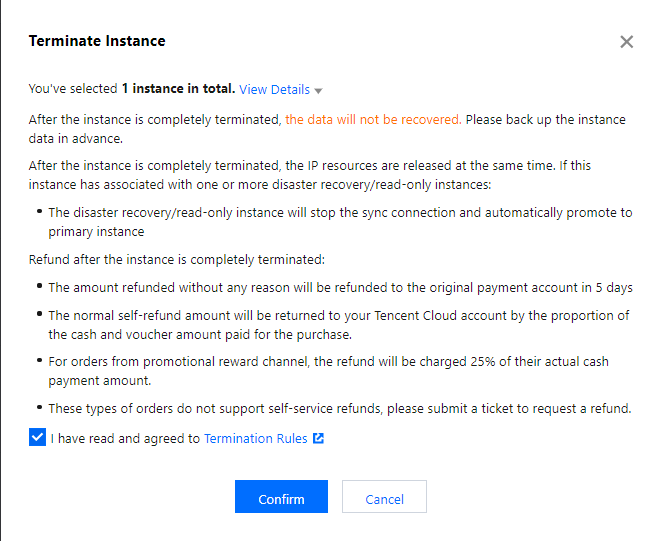
If you don't need an instance anymore, you can return it. Once returned, it is in the "Isolated" status and moved to the recycle bin, where it will be automatically terminated upon expiration, or you can click Eliminate Now to completely terminate it.
Notes
After an instance is terminated, its data will not be recoverable. You need to back up the data in advance.
After an instance is terminated, its IP resources will be released simultaneously, and its disaster recovery instance will stop the sync connection and will be automatically promoted to primary instance.
After an instance is terminated completely, the refund procedures are as detailed below:
For instances that meet the 5-day no-questions-asked refund policy, the payment will be returned to your Tencent Cloud account.
For normal instances, the payment will be returned to your Tencent Cloud account by the proportion of the cash and gift cards paid for the purchase.
For an order placed from promotion rewarding channels, 25% of the actual cash payment amount will be deducted from the refund amount as service charges. Currently, self-service refund is unavailable for such kind of orders, you can submit a ticket to apply for the refund.