tencent cloud

TencentDB for MariaDB

Release Notes and Announcements
Release Notes
Announcements
Product Introduction
Overview
Strengths
Use Cases
System Architecture
Instance Types
Instance Architecture
TDSQL Edition
Database Version
Purchase Guide
Billing Overview
Pricing
Refund
Payment Overdue
Upgrade Pricing
Backup Space Billing
Getting Started
Creating Instance
Managing Account
Accessing Instance
Operation Guide
Precautions
Instance Management
Disaster Recovery Read-Only Instance
Account Management
Read/Write Separation
Changing Networks
Backup and Rollback
Migrating Data
Database Sync(Legacy)
Security Management
Monitoring and Alarms
Killing Threads
Parameter Templates and Settings
Database Audit
Practical Tutorial
Programming and Usage Specification
Programming and Usage Specification of Distributed Version
Using Hotspot Update for Flash Sales
Security White Paper
Platform Security Features
Tenant Security Features
Development Guide
Functional Limitations
Performance Test
Intra-city Active-Active Solution
Binlog Consumption Format
Slow Query Analysis
Database Audit
Syntax Supported
API Documentation
History
Introduction
API Category
Making API Requests
Security Group APIs
Other APIs
Account APIs
Parameter Management APIs
Monitoring Management APIs
Instance Management APIs
Backup and Restoration APIs
Data Types
Error Codes
FAQs
Product
Account Login
Features
Performance
Backup
Ops
Disk Overuse
IO Metric Exception
General References
Standards and Certification
Main Specification Performance Description
Performance Comparison Data for Strong Sync
Glossary

Cloning Account

PDF
フォーカスモード
フォントサイズ
最終更新日: 2024-01-11 15:28:38

Overview

You can clone a database account in the TencentDB for MariaDB console, and retain its original account password to provide different permissions.

Directions

1. Log in to the TencentDB for MariaDB console. In the instance list, click an instance ID or Manage in the Operation column to enter the instance management page.
2. On the database management page, select the Account Management tab, find the account for which to reset the password, and click Clone Account.


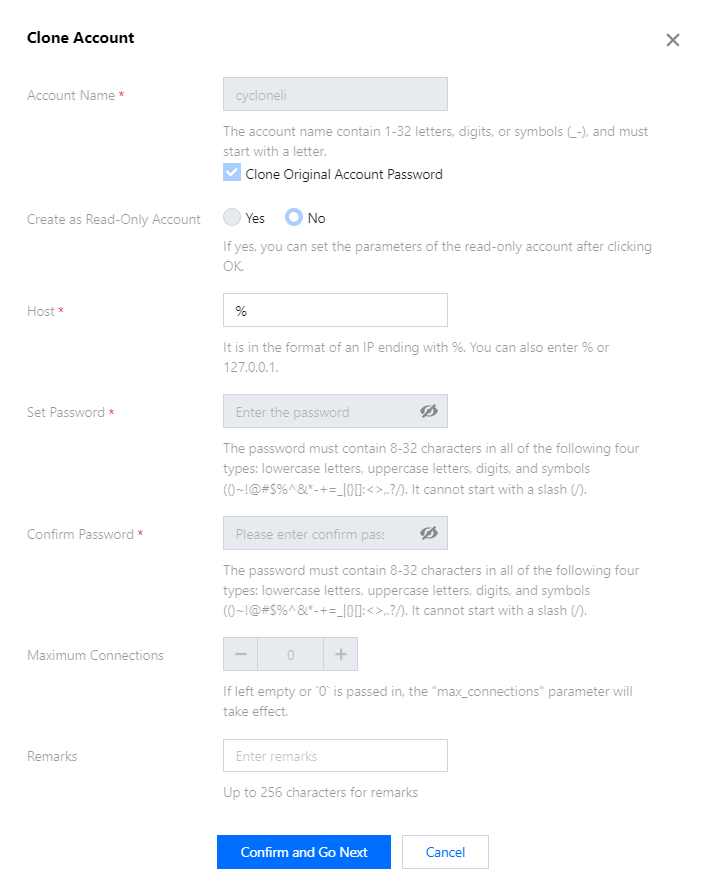
3. In the pop-up window, enter the primary server IP, account name, and password (the name and password can be the same as that of the original account), then click Confirm and Go Next.


4. Return to the account management page to view the cloned account.

API Name
Description
Clones an account


ヘルプとサポート

この記事はお役に立ちましたか?

フィードバック