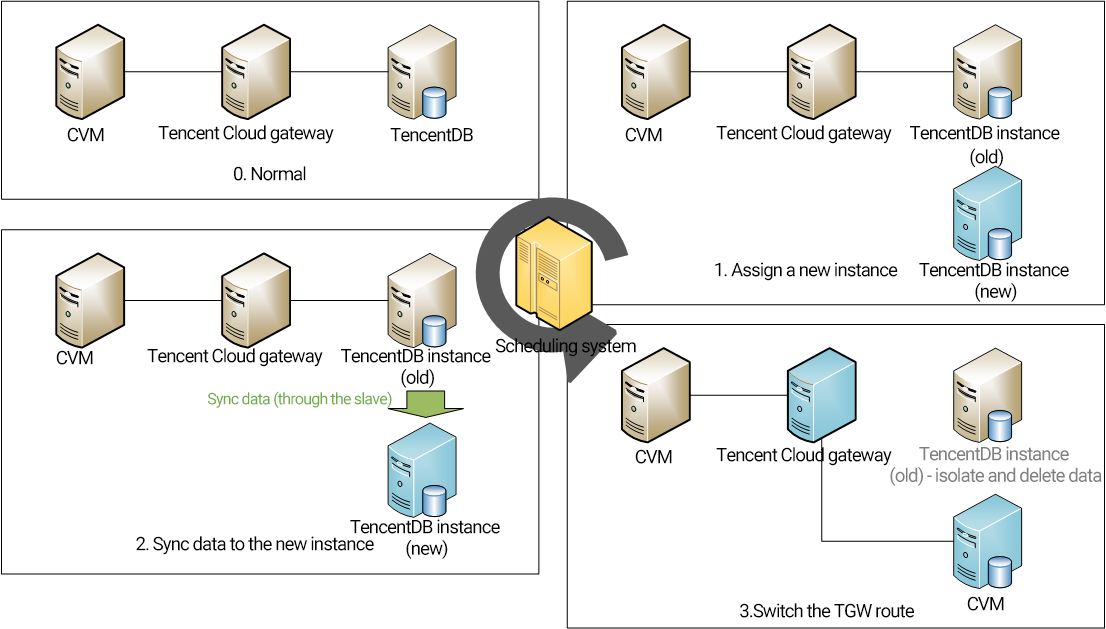
After you click Adjusted Configuration in the console, the Tencent Cloud Ops management system will generally perform the following steps:
1. Assign a new instance (the "new instance") based on the required configuration.
2. Sync the data and configuration of the instance to be adjusted (the "old instance") to the new instance.
3. After the sync is completed, switch the route in the Tencent Cloud gateway to the new instance for continued use.
Changing instance specifications
Note:
You can still use the old instance as usual during the adjustment, such as importing or exporting data.
The name, access IP, and access port of the instance remain unchanged after the adjustment.
When the adjustment is completed, the database will be disconnected for several seconds. We recommend that you implement an automatic reconnection feature in your program.
During the adjustment, try avoiding operations such as modifying global parameters, instance name, or user password of the database.
1. Log in to the TencentDB for MariaDB console, find the target instance in the instance list, and select More > Adjust Configurations in the Operation column.
2. On the Adjust Configurations page, select the target specification, disk capacity, and switch time and click Adjust Configurations.
TencentDB for MariaDB supports scheduled switch for configuration adjustment, which allows you to switch the database to its new specification at a specified time (usually during off-peak hours).
Note:
Scheduled switch
: You can choose to switch the database to its new configuration at a specified time, which is usually during off-peak hours and must be within 72 hours.
Generally, the switch time has a deviation of about 15 minutes, as there may be high amounts of write requests to large transactions, which will affect the data sync progress. In this case, the system will first guarantee sync between the new and old instances instead of performing the scheduled switch.
To ensure a successful switch, you can select the option for retry upon failure, and the system will try switching again two hours after a switch failure.
Configuration adjustment fees
If you upgrade a database instance, the price difference between original and upgraded specifications is deducted from your account. If the account balance is insufficient, you need to top it up. The upgraded instance will be billed by the new specification.