Exception Analysis and Solution of Redisson Client Timeout Reconnection
Download
聚焦模式
字号
This article aims to briefly discuss the business blocking issues encountered by the Redisson client during network fluctuations and service failover, and proposes a simple and effective business layer solution to inspire solutions to similar problems.
Overview
When the Redisson client is used connect to a Tencent Cloud Distributed Cache instance, the VPC gateway fails and the failure lasts nearly 10 seconds. To restore the network connection, the faulty network device is isolated and the network link is recovered. Although the number of connections is restored to the normal business level, error reports for businesses affected by the network failure are still reported continuously. Only after the client is restarted and the system re-establishes the connection with the Redis database, business requests return to normal.
Exception Analysis
Based on the process of the exception, the scenario is replicated to access error logs and deeply analyze the internal working mechanism of Redisson connections, to locate potential issues.
Replicating the Issue
For the complex scenario of continuous network jitter, to facilitate testing and clear presentation, iptables rules are configured on the CVM to block access to Redis services, thereby simulating the effect of network jitter. Then, the block is lifted, the network link is restored, and error logs from business requests are collected.
1. To ensure that code clarity and ease of understanding, design a simple Redisson client example to connect to a Tencent Cloud Distributed Cache server, and execute a simple while loop upon successful connection to simulate a continuous task.
Note:
In the following code, set the Redis server's address, port, password, and timeout (3000ms) information in the
config-file.yaml configuration file. Based on the configuration information, establish a connection to Redis.This example is based on Redisson 3.23.4, and different versions of Redisson may have some variations. You are advised to consult or inquire with Redisson's official for analysis.
package org.example; import org.redisson.Redisson; import org.redisson.api.RAtomicLong; import org.redisson.api.RedissonClient; import org.redisson.config.Config; import org.redisson.connection.balancer.RoundRobinLoadBalancer; import java.io.File; import java.io.IOException; public class Main { public static void main(String[] args) throws IOException { boolean connected = false; RedissonClient redisson = null; while (!connected) { try { Config config = Config.fromYAML(new File("/data/home/sharmaxia/redissontest/src/main/resources/config-file.yaml")); redisson = Redisson.create(config); connected = true; } catch (Exception e) { e.printStackTrace(); try { Thread.sleep(1000); } catch (InterruptedException ex) { Thread.currentThread().interrupt(); // Actively interrupt the current thread to retrieve a connection from the connection pool again } } } int i = 0; while (i++ < 1000000) { try { RAtomicLong atomicLong = redisson.getAtomicLong(Integer.toString(i)); atomicLong.getAndDecrement(); } catch (Exception e) { e.printStackTrace(); try { Thread.sleep(1000); } catch (InterruptedException ex) { Thread.currentThread().interrupt(); // Actively interrupt the current thread to retrieve a connection from the connection pool again } i--; } } redisson.shutdown(); } }// Import Redisson-related packagesimport org.redisson.Redisson;import org.redisson.api.RAtomicLong;import org.redisson.api.RedissonClient;import org.redisson.config.Config;import org.redisson.connection.balancer.RoundRobinLoadBalancer;// Import Java IO-related packagesimport java.io.File;import java.io.IOException;public class Main {public static void main(String[] args) throws IOException {// Read Redisson's configuration information from a YAML fileConfig config = Config.fromYAML(new File("/data/home/test**/redissontest/src/main/resources/config-file.yaml"));RedissonClient redisson = Redisson.create(config);// Initialize a counter variableint i = 0;// Loop 1,000,000 timeswhile(i++ < 1000000){// Access an atomic long object, where the key is the current counter's valueRAtomicLong atomicLong = redisson.getAtomicLong(Integer.toString(i));// Perform an atomic decrement by 1 on the value of the atomic long objectatomicLong.getAndDecrement();}// Close the Redisson clientredisson.shutdown();}}
2. After the client starts normally and runs for a short period, modify the iptables configuration to block connections to Redis.
sudo iptables -A INPUT -s 10.0.16.6 -p tcp --sport 6379 -m conntrack --ctstate NEW,ESTABLISHED -j DROP
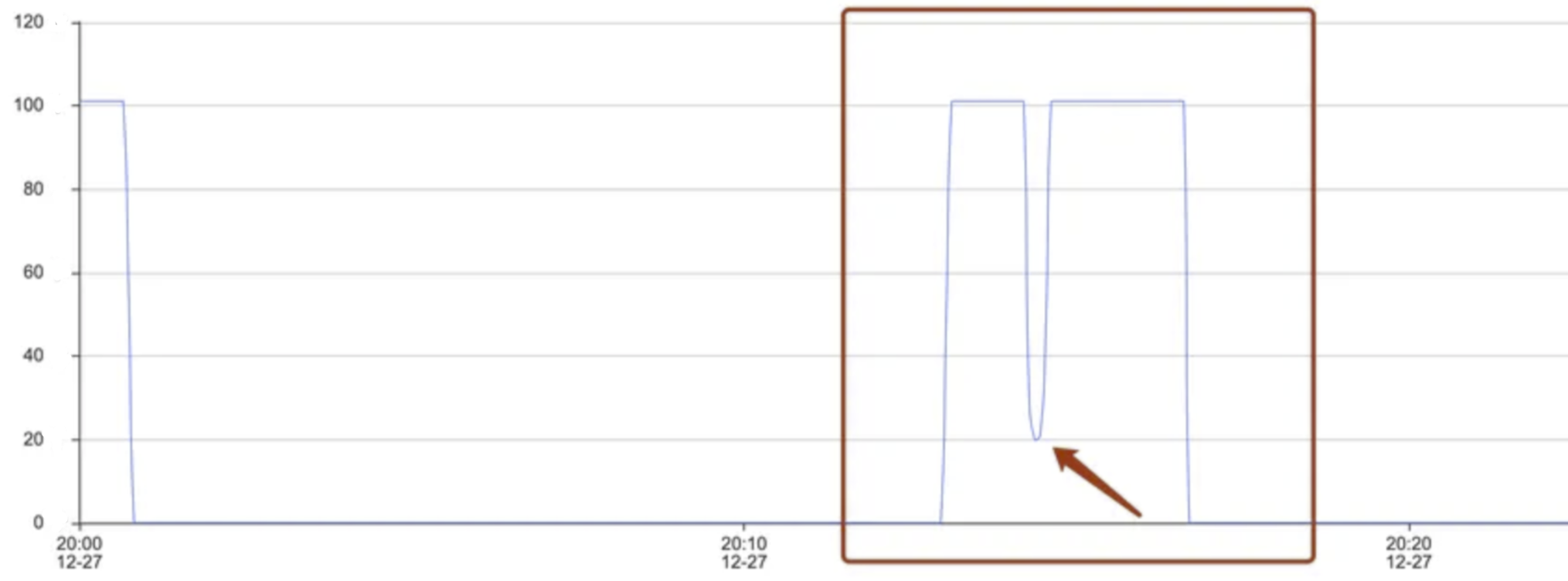
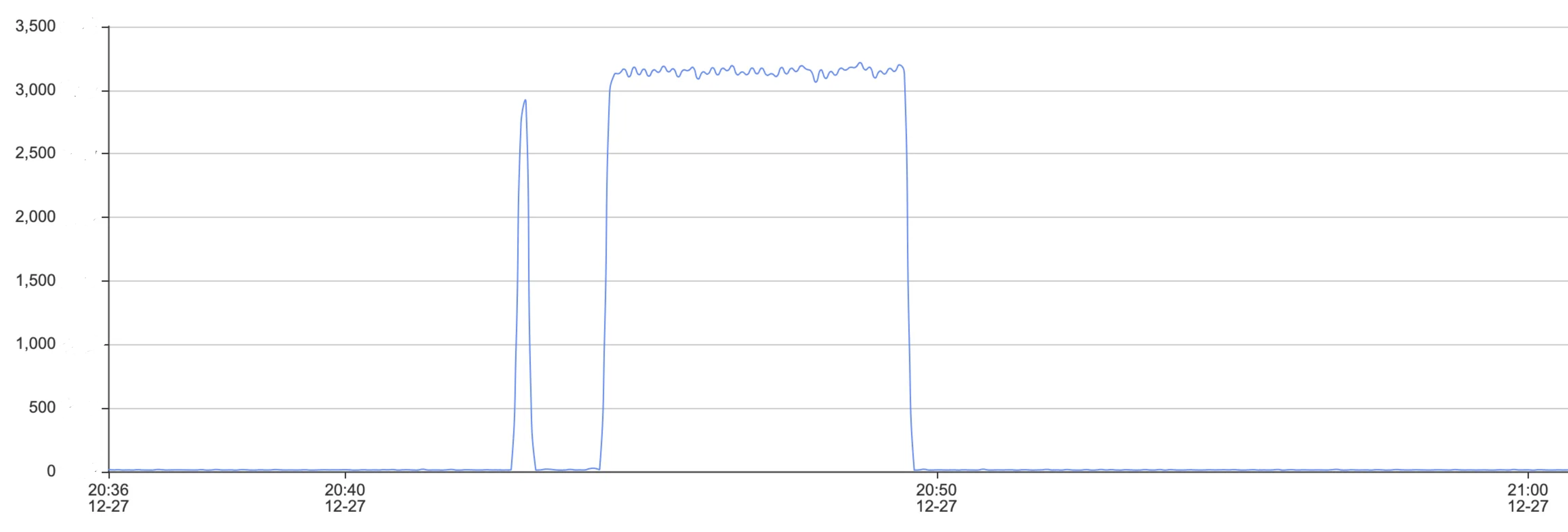
3. On the Tencent Cloud Distributed Cache console, in the System Monitoring page, check the Connections metric. This metric shows a straight-line downward trend, as shown in the following figure.
4. Execute the following command to modify the iptables configuration, remove the connection block, and restore the network.
sudo iptables -D INPUT -s 10.0.16.6 -p tcp --sport 6379 -m conntrack --ctstate NEW,ESTABLISHED -j DROP
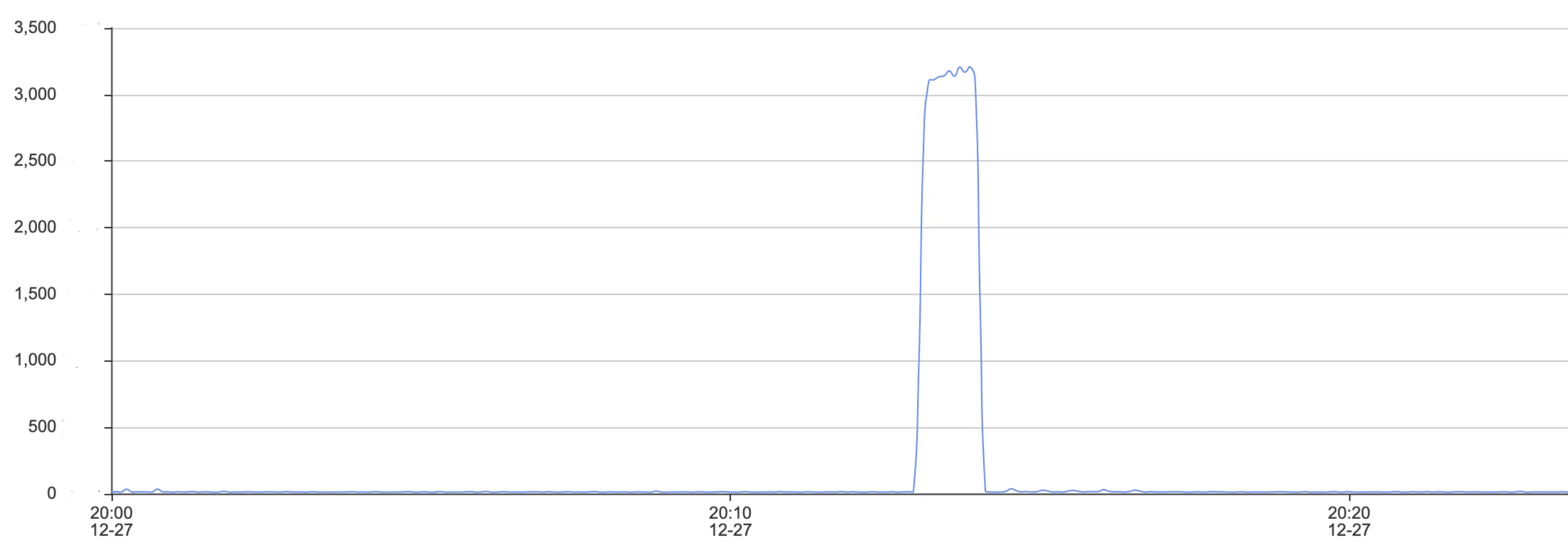
5. After the network becomes normal, quickly perform reconnection on the client. On the Redis console, in the System Monitoring page, peek at the metric again. The Number of Connections returns to the original level, but the overall requests are still abnormal, as shown in the following figure.
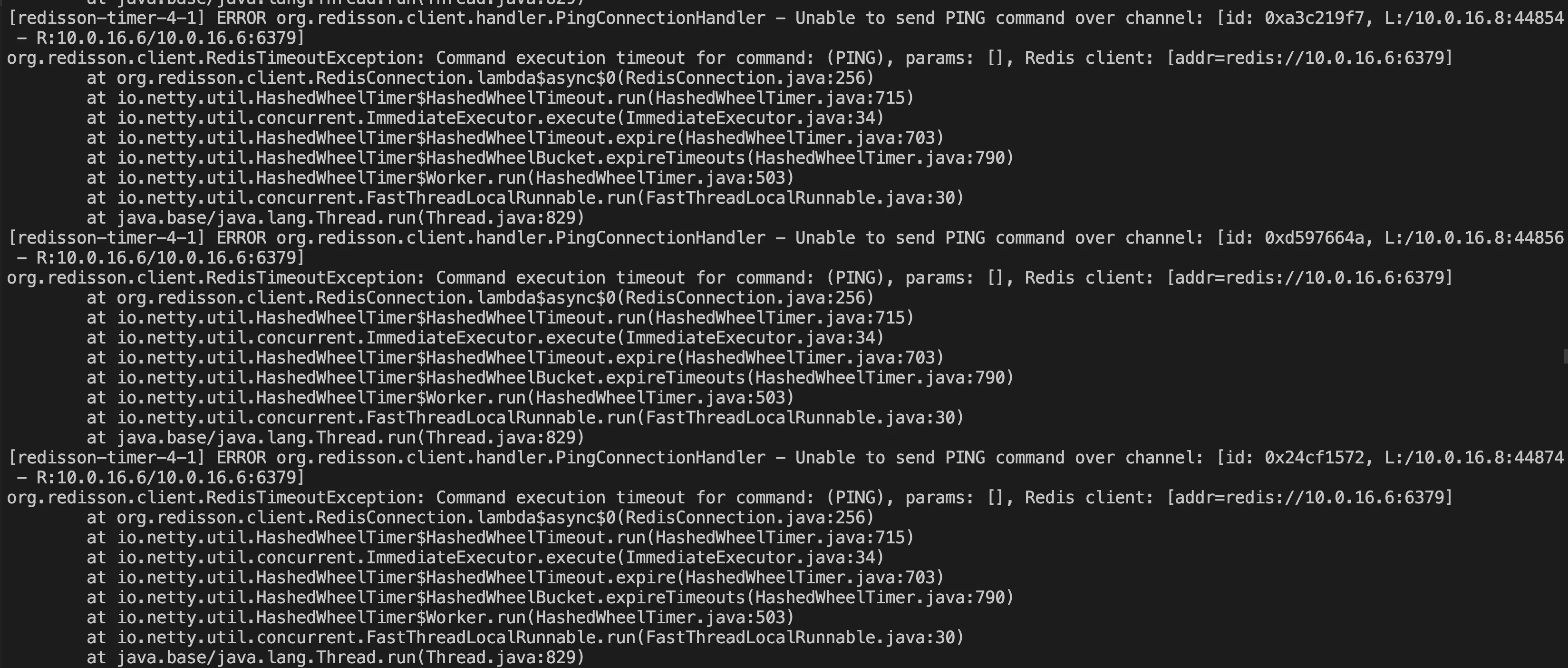
6. Obtain the abnormal log information, as shown in the following figure.
Source Code Analysis
Based on the error messages, the code is analyzed one by one to locate the issue. Redisson does not attempt to re-access a new channel after encountering an exception during reconnection, leading to continuous request errors.
1. In the error message
Unable to send PING command over channel, check the PingConnectionHandler code, as shown in the following figure. It shows that after the Ping reconnect detection fails with an error, ctx.channel().close() is executed to close the abnormal channel, and connection.getRedisClient().getConfig().getFailedNodeDetector().onPingFailed(); is executed to check the current connection client's status.if(connection.getUsage() == 0 && future != null && (future.cancel(false) || cause(future) != null)) { Throwable cause = cause(future); if (!(cause instanceof RedisRetryException)) { if (!future.isCancelled()) { log.error("Unable to send PING command over channel: {}", ctx.channel(), cause); } log.debug("channel: {} closed due to PING response timeout set in {} ms", ctx.channel(), config.getPingConnectionInterval()); ctx.channel().close(); connection.getRedisClient().getConfig().getFailedNodeDetector().onPingFailed(); } else { connection.getRedisClient().getConfig().getFailedNodeDetector().onPingSuccessful(); sendPing(ctx); } } else { connection.getRedisClient().getConfig().getFailedNodeDetector().onPingSuccessful(); sendPing(ctx); }Throwable cause = cause(future);if (!(cause instanceof RedisRetryException)) {if (!future.isCancelled()) {log.error("Unable to send PING command over channel: {}", ctx.channel(), cause);}log.debug("channel: {} closed due to PING response timeout set in {} ms", ctx.channel(), config.getPingConnectionInterval());ctx.channel().close();connection.getRedisClient().getConfig().getFailedNodeDetector().onPingFailed();} else {connection.getRedisClient().getConfig().getFailedNodeDetector().onPingSuccessful();sendPing(ctx);}} else {connection.getRedisClient().getConfig().getFailedNodeDetector().onPingSuccessful();sendPing(ctx);}
2. Further analyze the Connection source
RedisConnection connection = RedisConnection.getFrom(ctx.channel()); and check the constructor for creating the connection RedisConnection(), as shown in the following figure. This function updates the channel attributes and records the last use time of the connection but does not switch to a new channel for connection attempts.public <C> RedisConnection(RedisClient redisClient, Channel channel, CompletableFuture<C> connectionPromise) { this.redisClient = redisClient; this.connectionPromise = connectionPromise; updateChannel(channel); lastUsageTime = System.nanoTime(); LOG.debug("Connection created {}", redisClient); }this.redisClient = redisClient;this.connectionPromise = connectionPromise;updateChannel(channel);lastUsageTime = System.nanoTime();LOG.debug("Connection created {}", redisClient);}// updateChannel updates the attributes of the Channelpublic void updateChannel(Channel channel) { if (channel == null) { throw new NullPointerException(); } this.channel = channel; channel.attr(CONNECTION).set(this); }if (channel == null) {throw new NullPointerException();}this.channel = channel;channel.attr(CONNECTION).set(this);}
3. If cluster information is updated, the following error message will be displayed.
ERROR org.redisson.cluster.ClusterConnectionManager - Can't update cluster stateorg.redisson.client.RedisTimeoutException: Command execution timeout for command: (CLUSTER NODES), params: [], Redis client: [addr=redis://10.0.16.7:6379] at org.redisson.client.RedisConnection.lambda$async$0(RedisConnection.java:256) at io.netty.util.HashedWheelTimer$HashedWheelTimeout.run(HashedWheelTimer.java:715) at io.netty.util.concurrent.ImmediateExecutor.execute(ImmediateExecutor.java:34) at io.netty.util.HashedWheelTimer$HashedWheelTimeout.expire(HashedWheelTimer.java:703) at io.netty.util.HashedWheelTimer$HashedWheelBucket.expireTimeouts(HashedWheelTimer.java:790) at io.netty.util.HashedWheelTimer$Worker.run(HashedWheelTimer.java:503) at io.netty.util.concurrent.FastThreadLocalRunnable.run(FastThreadLocalRunnable.java:30) at java.base/java.lang.Thread.run(Thread.java:829)
4. In
ClusterConnectionManager.java, you can locate the error message fragment related to updating the cluster. It shows that after the Can't update cluster state exception occurs, only the change in cluster status is checked, without retrieving a new connection from the connection pool for operation, and the operation of returning is directly performed.private void checkClusterState(ClusterServersConfig cfg, Iterator<RedisURI> iterator, AtomicReference<Throwable> lastException) { if (!iterator.hasNext()) { if (lastException.get() != null) { log.error("Can't update cluster state", lastException.get()); }if (!iterator.hasNext()) {if (lastException.get() != null) {log.error("Can't update cluster state", lastException.get());}// Check for changes in cluster status scheduleClusterChangeCheck(cfg); return; } ...... }scheduleClusterChangeCheck(cfg);return;}......}
Solutions
Based on the above issue, adjust the business-side code. In case of an exceptional connection, actively interrupt the current connection thread, perform the Channel and connection configuration again, and attempt a reconnection.
Code Adjustment
Based on the code, when the issue was reproduced, optimize the following code to include operations for exceptional reconnection.
package org.example; import org.redisson.Redisson; import org.redisson.api.RAtomicLong; import org.redisson.api.RedissonClient; import org.redisson.config.Config; import org.redisson.connection.balancer.RoundRobinLoadBalancer; import java.io.File; import java.io.IOException; public class Main { public static void main(String[] args) throws IOException { boolean connected = false; RedissonClient redisson = null; while (!connected) { try { Config config = Config.fromYAML(new File("/data/home/sharmaxia/redissontest/src/main/resources/config-file.yaml")); redisson = Redisson.create(config); connected = true; } catch (Exception e) { e.printStackTrace(); try { Thread.sleep(1000); } catch (InterruptedException ex) { Thread.currentThread().interrupt(); // Actively interrupt the current thread to retrieve a connection from the connection pool again } } } int i = 0; while (i++ < 1000000) { try { RAtomicLong atomicLong = redisson.getAtomicLong(Integer.toString(i)); atomicLong.getAndDecrement(); } catch (Exception e) { e.printStackTrace(); try { Thread.sleep(1000); } catch (InterruptedException ex) { Thread.currentThread().interrupt(); // Actively interrupt the current thread to retrieve a connection from the connection pool again } i--; } } redisson.shutdown(); } }import org.redisson.Redisson;import org.redisson.api.RAtomicLong;import org.redisson.api.RedissonClient;import org.redisson.config.Config;import org.redisson.connection.balancer.RoundRobinLoadBalancer;import java.io.File;import java.io.IOException;public class Main {public static void main(String[] args) throws IOException {boolean connected = false;RedissonClient redisson = null;while (!connected) {try {Config config = Config.fromYAML(new File("/data/home/sharmaxia/redissontest/src/main/resources/config-file.yaml"));redisson = Redisson.create(config);connected = true;} catch (Exception e) {e.printStackTrace();try {Thread.sleep(1000);} catch (InterruptedException ex) {Thread.currentThread().interrupt(); // Actively interrupt the current thread to re-obtain a connection from the connection pool}}}int i = 0;while (i++ < 1000000) {try {RAtomicLong atomicLong = redisson.getAtomicLong(Integer.toString(i));atomicLong.getAndDecrement();} catch (Exception e) {e.printStackTrace();try {Thread.sleep(1000);} catch (InterruptedException ex) {Thread.currentThread().interrupt(); // Actively interrupt the current thread to re-obtain a connection from the connection pool}i--;}}redisson.shutdown();}}
Result Verification
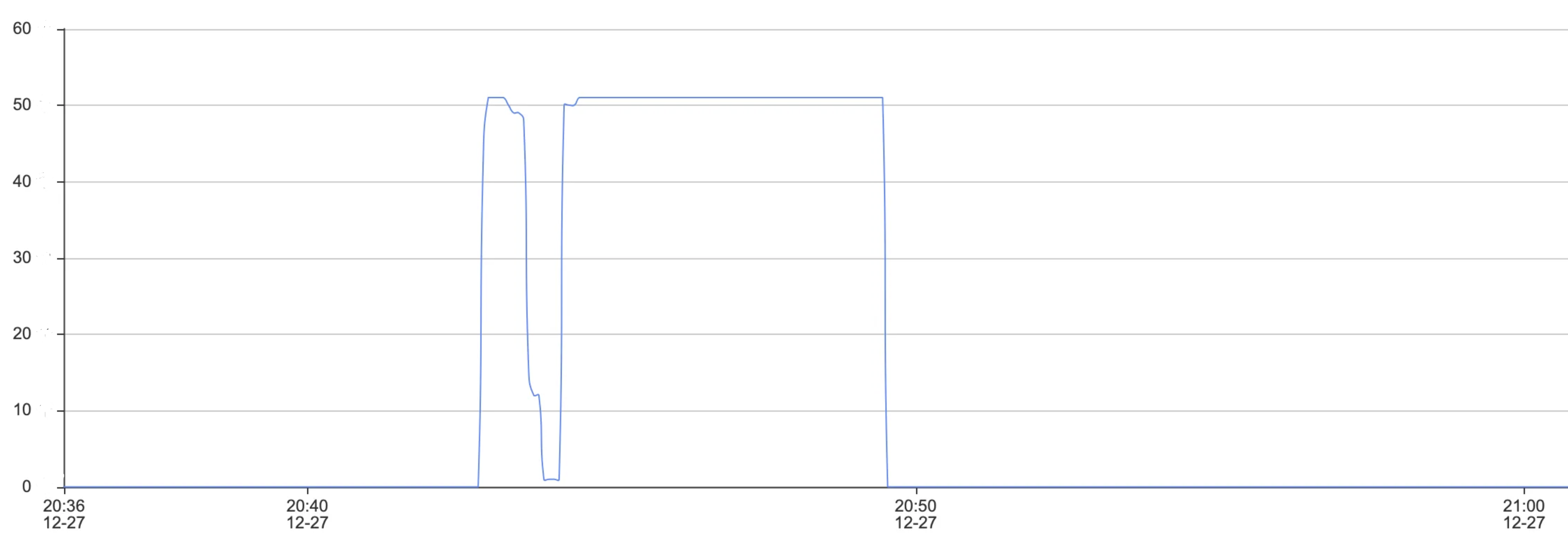
Check the number of connections and the total number of requests and ensure that the business has returned to normal, to verify that adjustments to the code have resolved the issue of business disruptions caused by Redisson client timeout reconnection exceptions.
Number of Connections
Total Requests
文档反馈