TXPlayerSubtitleRenderModel
Download
フォーカスモード
フォントサイズ
TXPlayerSubtitleRenderModel Overview
Subtitle rendering parameters for on-demand player
Field Details
canvasWidth
canvasWidth and canvasHeight are the dimensions of the subtitle render canvas. The ratio of canvasWidth to canvasHeight must match the aspect ratio of the video; otherwise, the rendered text will be deformed. If not set, the player will use the current video's size as the render canvas size.
@property(nonatomic, assign) int canvasWidth;
canvasHeight
canvasWidth and canvasHeight define the size of the subtitle render canvas. The ratio between canvasWidth and canvasHeight must align with the video's aspect ratio; otherwise, the rendered text will be distorted. If not specified, the player will use the current video's dimensions as the render canvas size.
@property(nonatomic, assign) int canvasHeight;
familyName
Font family name. iOS defaults to "Helvetica". A non-empty string is considered set, while an empty string is considered not set.
@property(nonatomic, copy) NSString *familyName;
fontSize
Font size. If fontSize is set, canvasWidth and canvasHeight must also be set; otherwise, the internal system won't know what size to reference for rendering text. If fontSize is not set, the internal system will use the default font size.
@property(nonatomic, assign) float fontSize;
fontScale
Font scaling, specifically for VTT. After setting fontScale, the final font size will be multiplied by fontScale to fit the video width. The default value of fontScale is 1.0.
@property(nonatomic, assign) float fontScale;
fontColor
Text color, ARGB format. If not set, the default is opaque white (0xFFFFFFFF).
@property(nonatomic, assign) uint32_t fontColor;
outlineWidth
Stroke width. If not set, the internal will use the default stroke width.
@property(nonatomic, assign) float outlineWidth;
outlineColor
Stroke color, ARGB format. If not set, the default is opaque black (0xFF000000).
@property(nonatomic, assign) uint32_t outlineColor;
isBondFontStyle
Whether it is bold, the default value is normal font.
@property(nonatomic, assign) BOOL isBondFontStyle;
lineSpace
Line spacing. If lineSpace is set, canvasWidth and canvasHeight must be set. If not set, the internal will use the default line spacing.
@property(nonatomic, assign) float lineSpace;
startMargin
startMargin, endMargin, and verticalMargin define the drawing area of subtitles. If not set, the settings in the subtitle file are used. If the subtitle file does not define them either, the default values are used.
Note:
Once set, if the subtitle file defines one or more of the parameters startMargin, endMargin, and yMargin, they will override the corresponding parameters in the subtitle file.
The following diagram illustrates the meaning of these parameters in horizontal writing direction. Use the notes for each parameter to understand them.
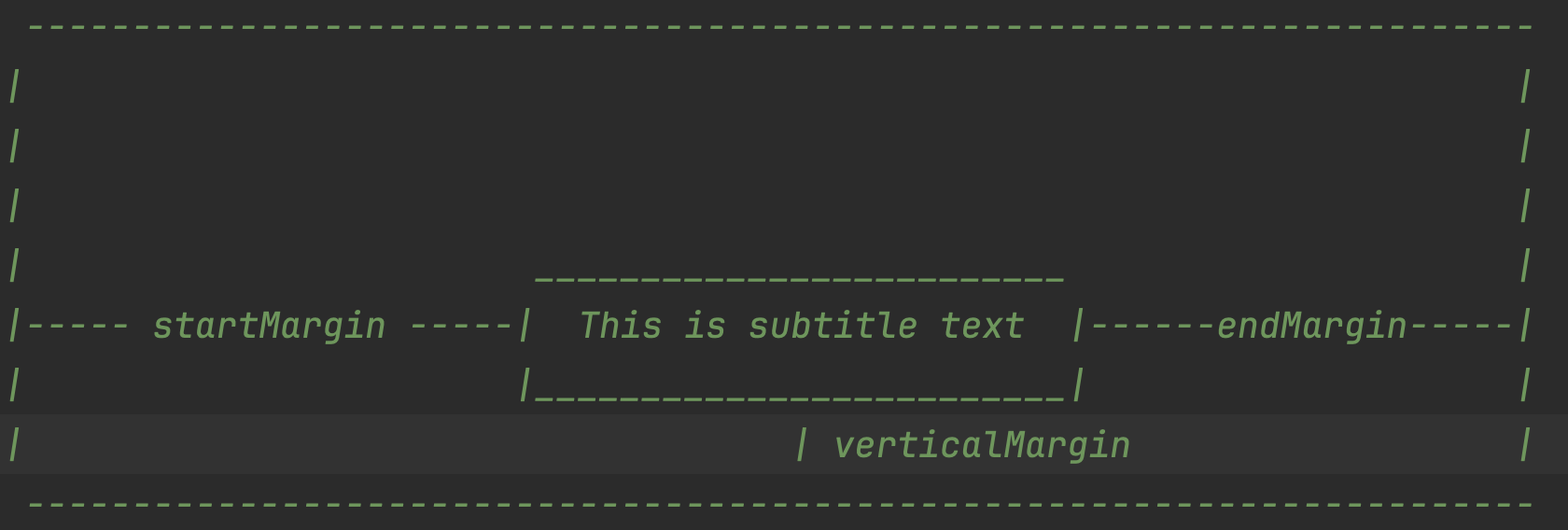
The margin along the direction of subtitle text content varies in meaning based on different writing directions. startMargin is a proportional value with a range of [0, 1], representing the proportion relative to the size of the video image.
For horizontal writing direction, startMargin represents the distance from the left side of the subtitle to the left side of the video image. For example, startMargin=0.05 means the margin is 0.05 times the video width (5%).
For vertical writing direction (regardless of right-to-left or left-to-right), startMargin represents the distance from the top of the subtitle to the top of the video image. For example, startMargin=0.05 means the margin is 0.05 times the video height (5%).
@property(nonatomic, assign) float startMargin;
endMargin
The margin along the direction of subtitle text content varies in meaning based on different writing directions. endMargin is a proportional value with a range of [0, 1], representing the proportion relative to the size of the video image.
For horizontal writing direction, endMargin represents the distance from the right side of the subtitle to the right side of the video image. For example, endMargin=0.05 means the margin is 0.05 times the video width (5%).
For vertical writing direction (regardless of right-to-left or left-to-right), endMargin represents the distance from the bottom of the subtitle to the bottom of the video image. For example, endMargin=0.05 means the margin is 0.05 times the video height (5%).
@property(nonatomic, assign) float endMargin;
verticalMargin
Margin for vertical subtitle text direction varies based on writing direction. verticalMargin is a proportional value with a range of [0, 1], representing the proportion relative to the video image size.
For horizontal writing direction, yMargin represents the distance from the bottom of the subtitle to the bottom of the video image. For example, yMargin=0.05 means the margin is 0.05 times the video height (5%).
For vertical, right-to-left writing direction, yMargin represents the distance from the right side of the subtitle to the right side of the video image. For example, yMargin=0.05 means the margin is 0.05 times the video width (5%).
For vertical, left-to-right writing direction, yMargin represents the distance from the left side of the subtitle to the left side of the video image. For example, yMargin=0.05 means the margin is 0.05 times the video width (5%).
@property(nonatomic, assign) float verticalMargin;
フィードバック