With the prosperity of the Kafka community, more and more users have started to use Kafka for activities such as log collection, big data analysis, and streaming data processing. CKafka has made the following optimizations on open-source Kafka:
It features distributed architecture, high scalability, and high throughput based on Apache Kafka.
It is 100% compatible with Apache Kafka APIs (0.9 and 0.10).
It offers all features of Kafka with no need for deployment.
It encapsulates all cluster details, eliminating the need for OPS on your side.
Its message engine is optimized to deliver a performance 50% higher than that of open-source Kafka.
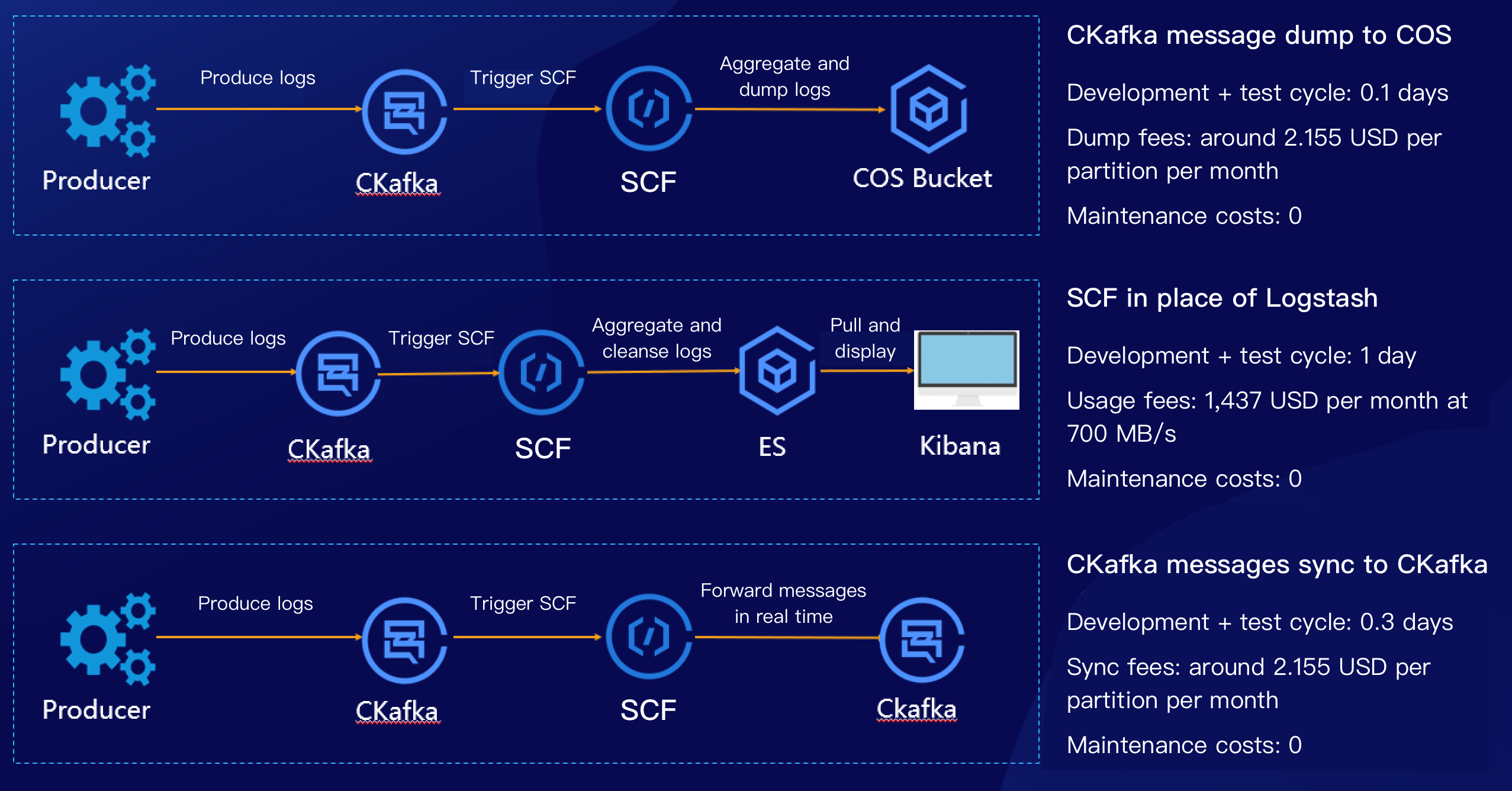
SCF has been deeply integrated with CKafka, and a lot of practical features have been launched. With the help of SCF and CKafka trigger, it is easy to dump CKafka messages to COS, ES, and TencentDB. This document describes how to use SCF in place of Logstash to dump CKafka messages to ES as shown below:
How It Works
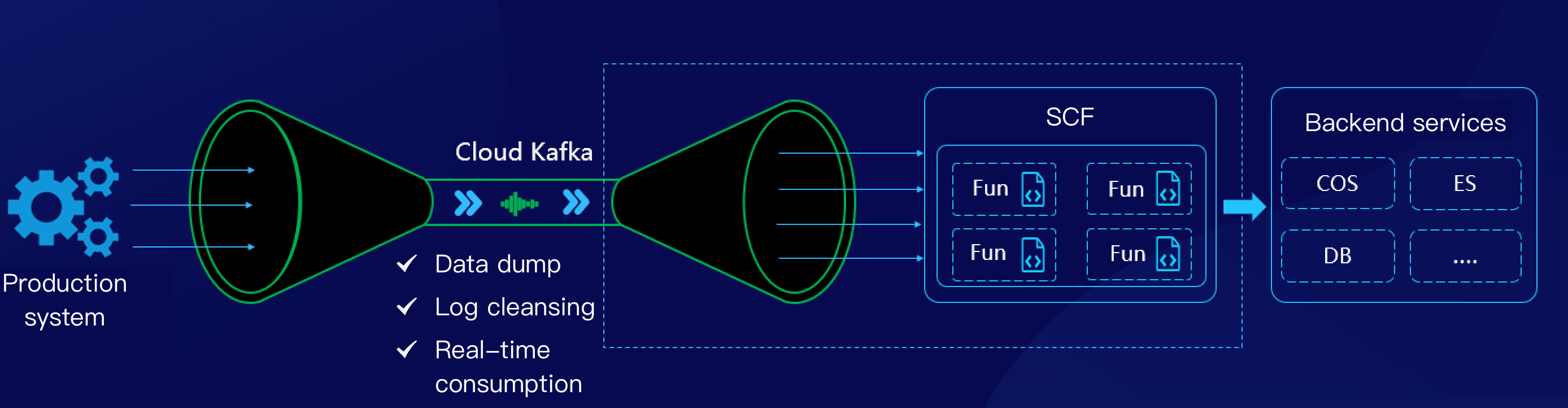
SCF can consume messages in CKafka in real time in various scenarios such as data storage, log cleansing, and real-time consumption, and the data dump feature has been integrated in the CKafka console and can be enabled quickly, making it easier to use as shown below:
Scheme Advantages
Compared to a CVM-based self-created CKafka consumer, SCF has the following advantages:
You can enable the CKafka trigger quickly in the SCF console to automatically create a consumer, and SCF will maintain the high availability of components.
The CKafka trigger itself supports many practical configurations, such as the offset position, 1–10,000 messages to be aggregated, and 1–10,000 retry attempts.
Business logic developed based on SCF naturally supports auto scaling, eliminating the need to build and maintain server clusters.
Compared to CVM-based self-created Logstash service, SCF has the following advantages:
SCF comes with a consumer component that allows for aggregation.
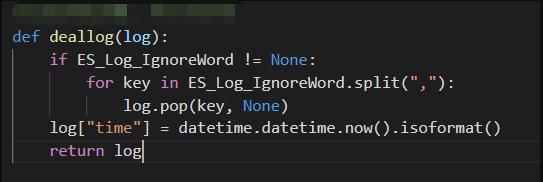
The scalable function template of SCF provides message aggregation and partial cleansing capabilities.
SCF clusters are highly available and support log monitoring, enabling you to launch your business more quickly.
SCF is pay-as-you-go and more cost effective than self-created clusters, saving 50% of costs.
Prerequisites
This document uses the Guangzhou region as an example:
You need to activate Elasticsearch Service.
You need to activate the CKafka service.
Directions
Creating function and CKafka trigger
1. Log in to the Serverless console and click Function Service on the left sidebar.
2. Select the region where to create a function at the top of the Function Service page and click Create to enter the function creation process.
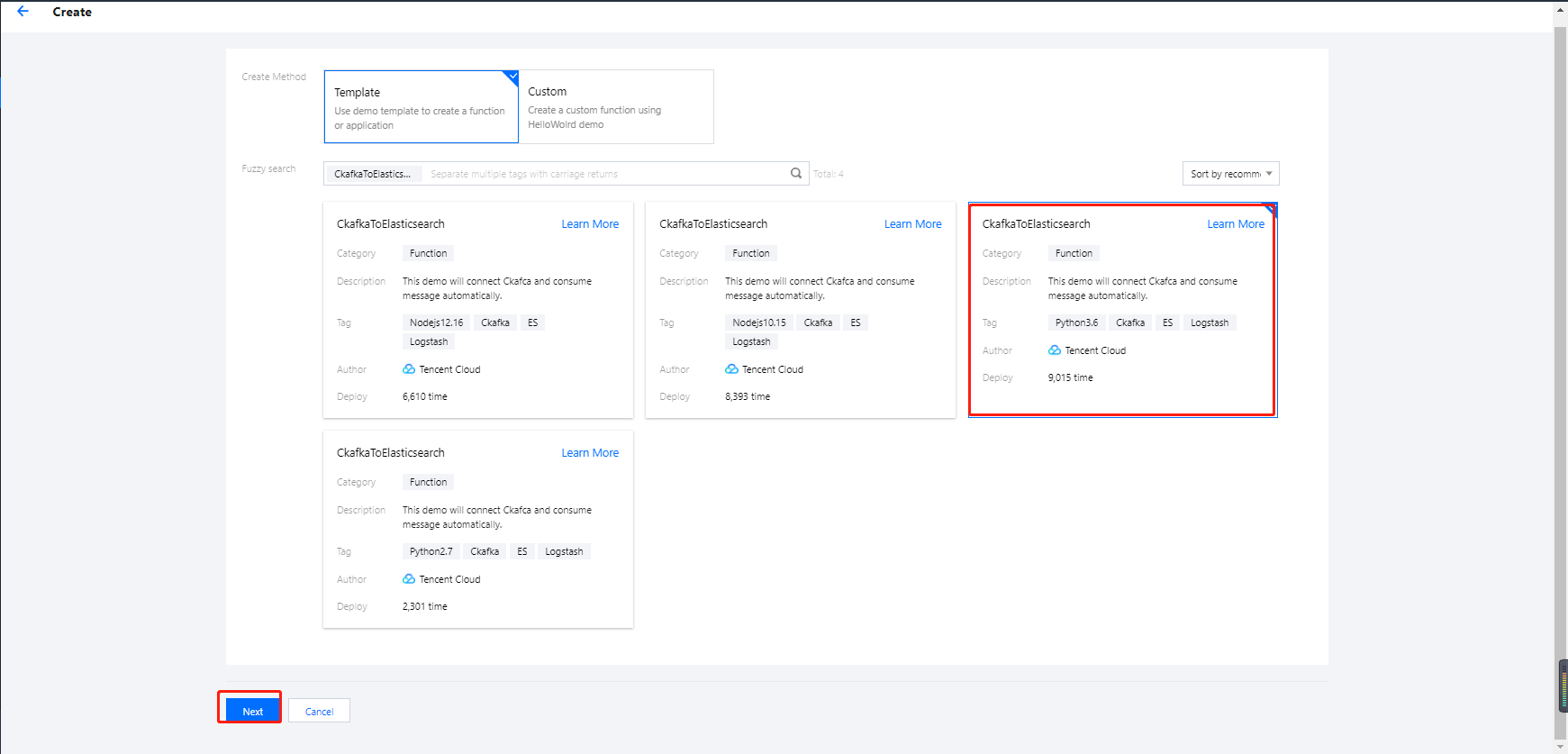
3. Select a function template as follows on the Create Function page and click Next as shown below:
Creation method: select Template.
Fuzzy search: enter CkafkaToElasticsearch and search. This document uses the Python 3.6 runtime environment as an example.
Click Learn More in the template to view relevant information in the Template Details pop-up window, which can be downloaded.
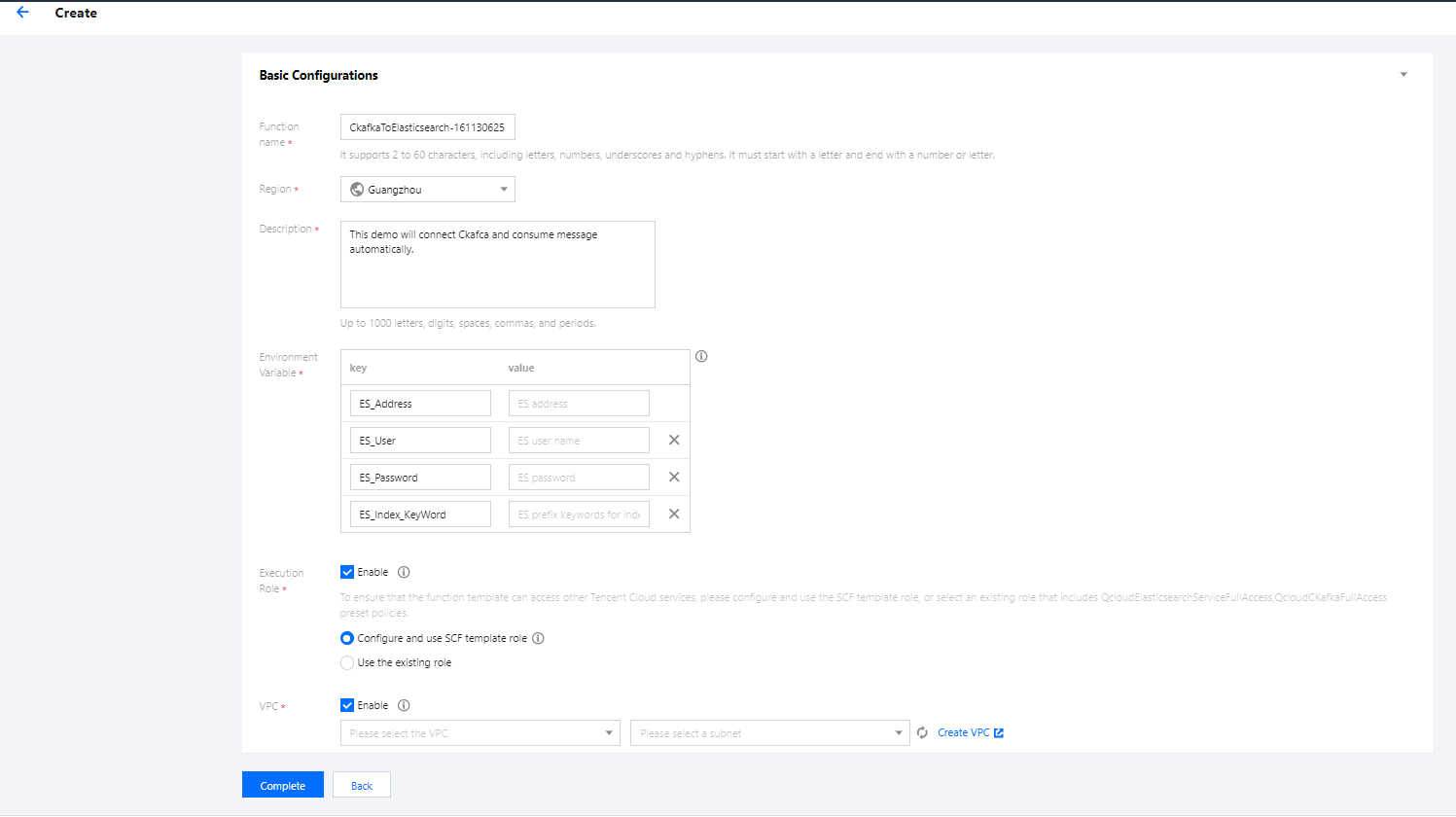
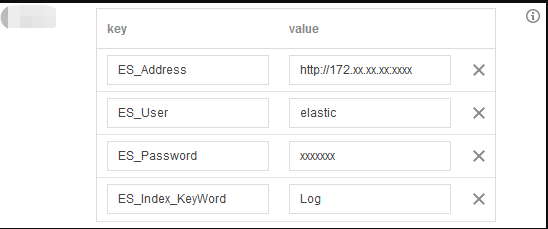
4. In the Basic Configurations section, the function name has been automatically generated and can be modified as needed. Follow the prompts to configure environment variables, execution role, and VPC as shown below:
Environment Variable: add the following environment variables and configure them as shown below:
key
value
Required
ES_Address
ES address.
Yes
ES_User
ES username, which is `elastic` by default.
Yes
ES_Password
ES password.
Yes
ES_Index_KeyWord
ES keyword index.
Yes
ES_Log_IgnoreWord
Keyword to be deleted. If this parameter is left empty, all keywords will be written. For example, you can enter `name` or `password`.
No
ES_Index_TimeFormat
Index by day or hour. If this parameter is left empty, the index will be by day. For example, you can enter `hour`.
No
Execution Role: check Enable, select Configure and use SCF template role, and the system will automatically create and select an SCF template execution role associated with full access permissions of ES and CKafka. You can also check Use the existing role and select an existing role that has the above permissions in the drop-down list. This document takes Configure and use SCF template role as an example.
VPC: check Enable and select the VPC of ES.
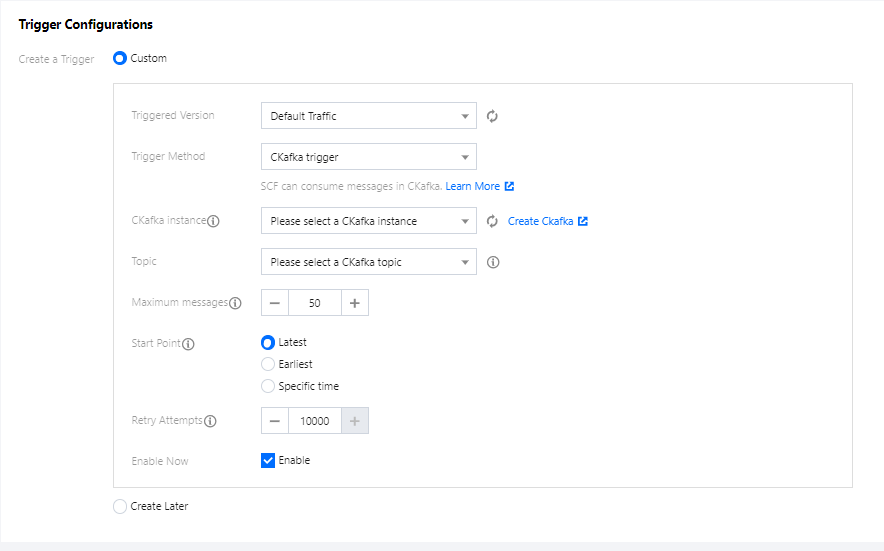
5. In the Trigger Configurations section, select Custom and enter relevant
information according to the displayed parameters as shown below:
The main parameter information is as follows. Keep the remaining parameters as default:
Trigger Method: select CKafka trigger.
CKafka Instance and Topic: select the corresponding topic as needed.
Start Point: select Earliest.
6. Click Complete.
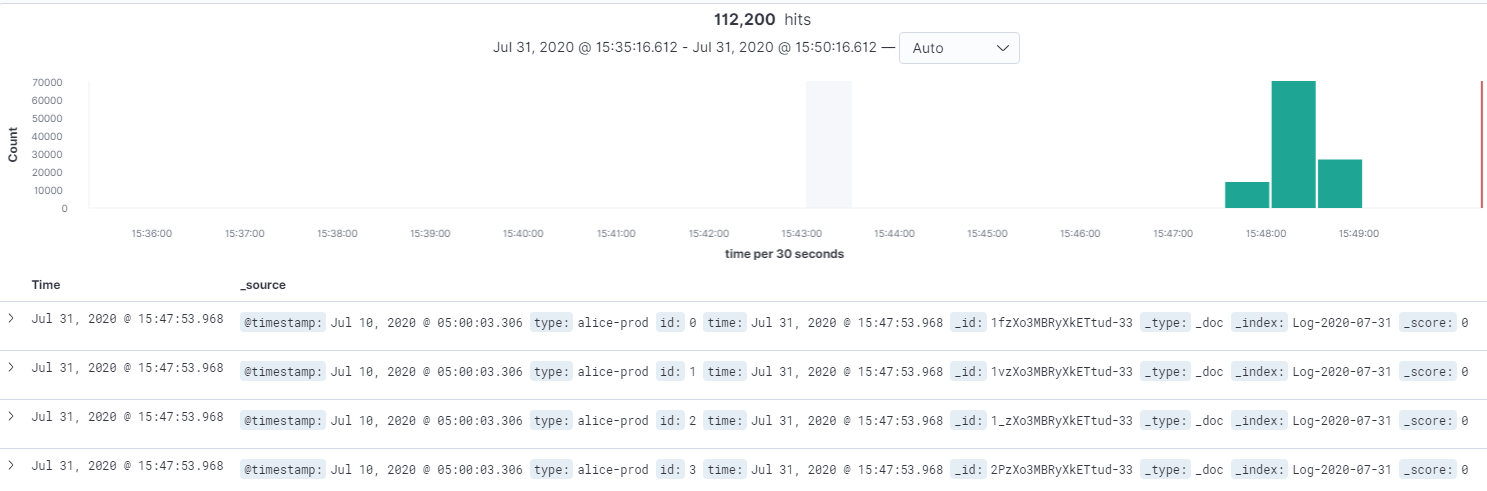
Viewing ES and function execution logs
Note:
If you have not ingested actual data into CKafka, you can use the client tool to simulate message production.
Select Log Query on the sidebar of the function to view the function execution log.