TUILiveKit delivers a complete solution for live streaming gift interactions, including gift asset management, gift billing callbacks, gift effect playback, and gift data statistics. This guide walks you through implementing interactive gifting features in your live room, with support for deep customization to fit your business requirements.
Note:
This guide introduces the gift system for UI-based integration. If you are integrating without UI components, please refer to the following integration approaches:
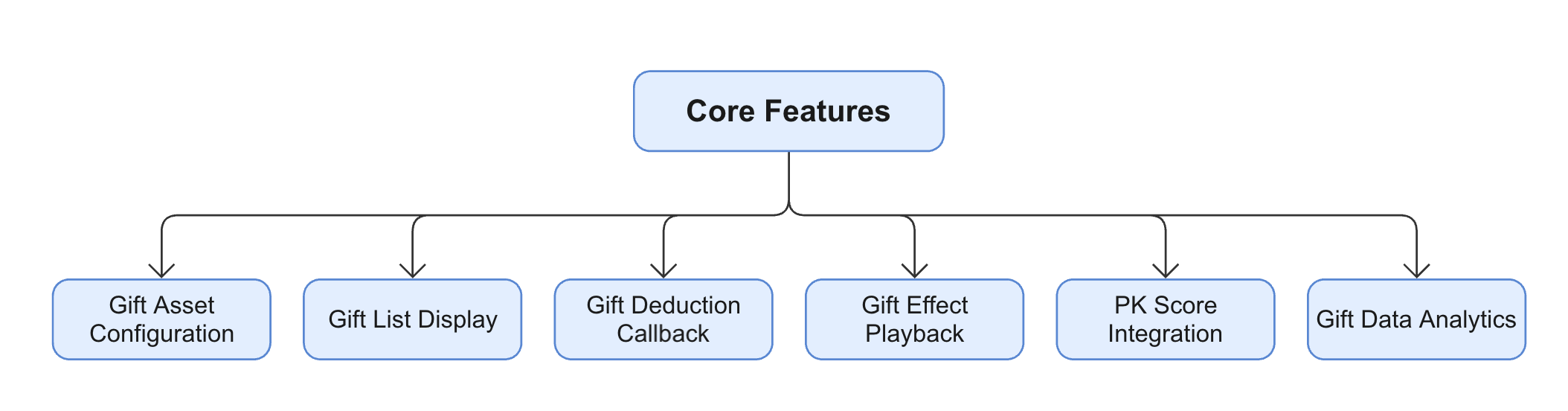
Core Features
Gift Asset Configuration: Manage gift information, gift categories, and multi-language configurations via server-side APIs.
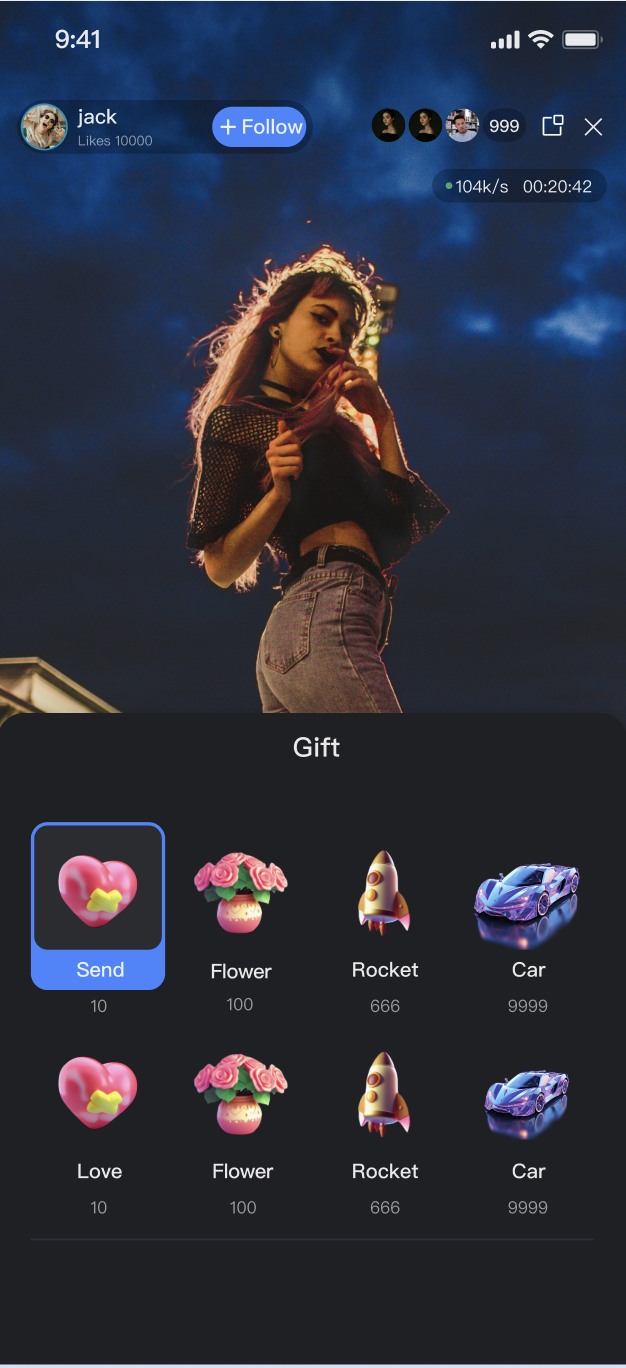
Gift List Display: Provides an out-of-the-box gift panel and playback component, supporting a complete user interaction flow.
Gift Deduction Callback: Seamlessly integrates with your billing system to complete balance verification and deduction processes.
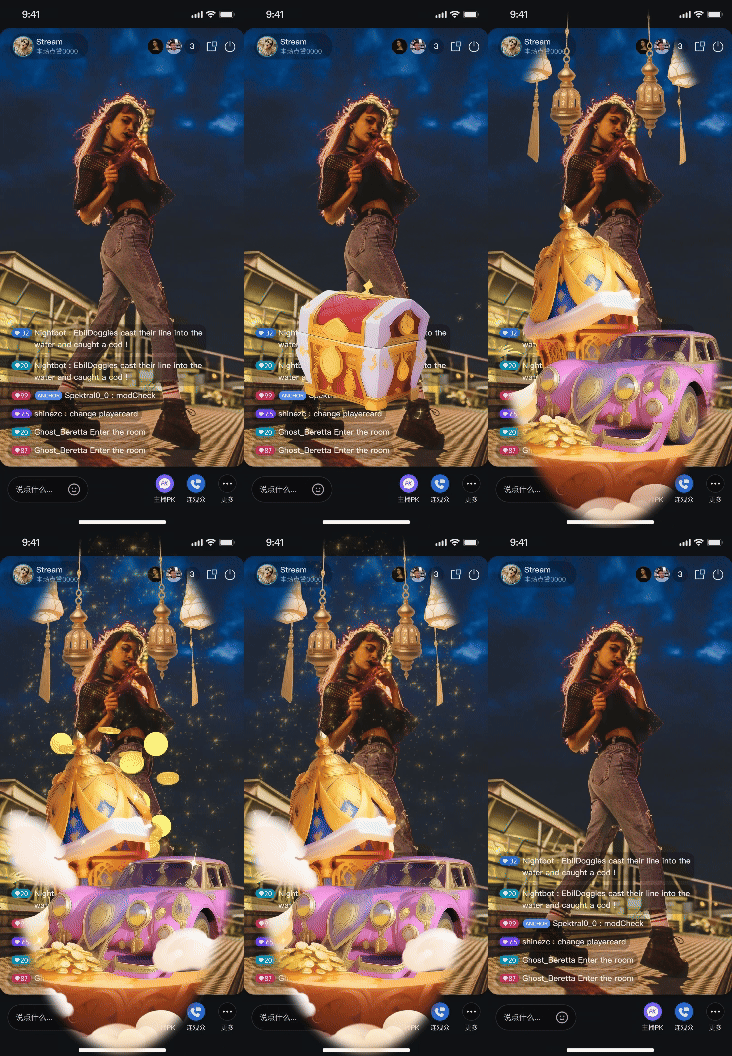
Gift Effect Playback: Offers both basic and Gift AR to meet different performance requirements.
PK Score Integration: Supports real-time linkage between gift value and host PK scores.
Gift Data Analytics: Provides comprehensive gift data statistics and query capabilities.
Demo Effect
Quick Start
Step 1: Activate the Service
Note:
To use the gifting system, activate either the Free Trial, or Pro edition. The number of configurable gifts depends on the selected package. For details, see the Gift System section in Feature and Billing Description. Step 2: Code Integration
Complete TUILiveKit code integration before using the gift system. Multiple integration options are available; see Integration Method Description for details. After integration, both host and audience pages will include the Gift List page and gift effect playback by default. |
Video Live Streaming | Platform Version Requirement: TUILiveKit >= 3.2.0 |
Voice Chat Room | Platform Version Requirement: TUILiveKit >= 3.2.0 |
UI Customization | Platform Android: See Live Gift Components to integrate the Gift Selection Panel and Gift Playback Component. |
Feature Usage
For live streaming, the gift system should be integrated with your billing and data statistics systems. This section explains how to customize the system for your business.
1. Configuring Custom Gifts
Through the TUILiveKit server-side REST API, you can fully manage the gift inventory, achieving personalized customization of the gift system to meet the needs of different business scenarios.
Custom gift configuration is only supported through server-side REST API calls. For more configuration details, please refer to the
Configuration Sequence Diagram
Overview of REST API Interfaces
|
Gift Management | Add Gift Information | |
| Delete Gift Information | |
| Query Gift Information | |
Gift Category Management | Add Gift Category Information | |
| Delete Specific Gift Category Information | |
| Get Specific Gift Category Information | |
Gift Relationship Management | Add Relationship between a Specific Gift Category and Gift | |
| Delete Relationship between a Specific Gift Category and Gift | |
| Get Gift Relationships under a Specific Gift Category | |
Gift Multi-language Management | Add Gift Multi-language Information | |
| Delete Specific Gift Multi-language Information | |
| Get Gift Multi-language Information | |
| Add Gift Category Multi-language Information | |
| Delete Specific Gift Category Multi-language Information | |
| Get Gift Category Multi-language Information | |
2. Billing and Gift Deduction Process
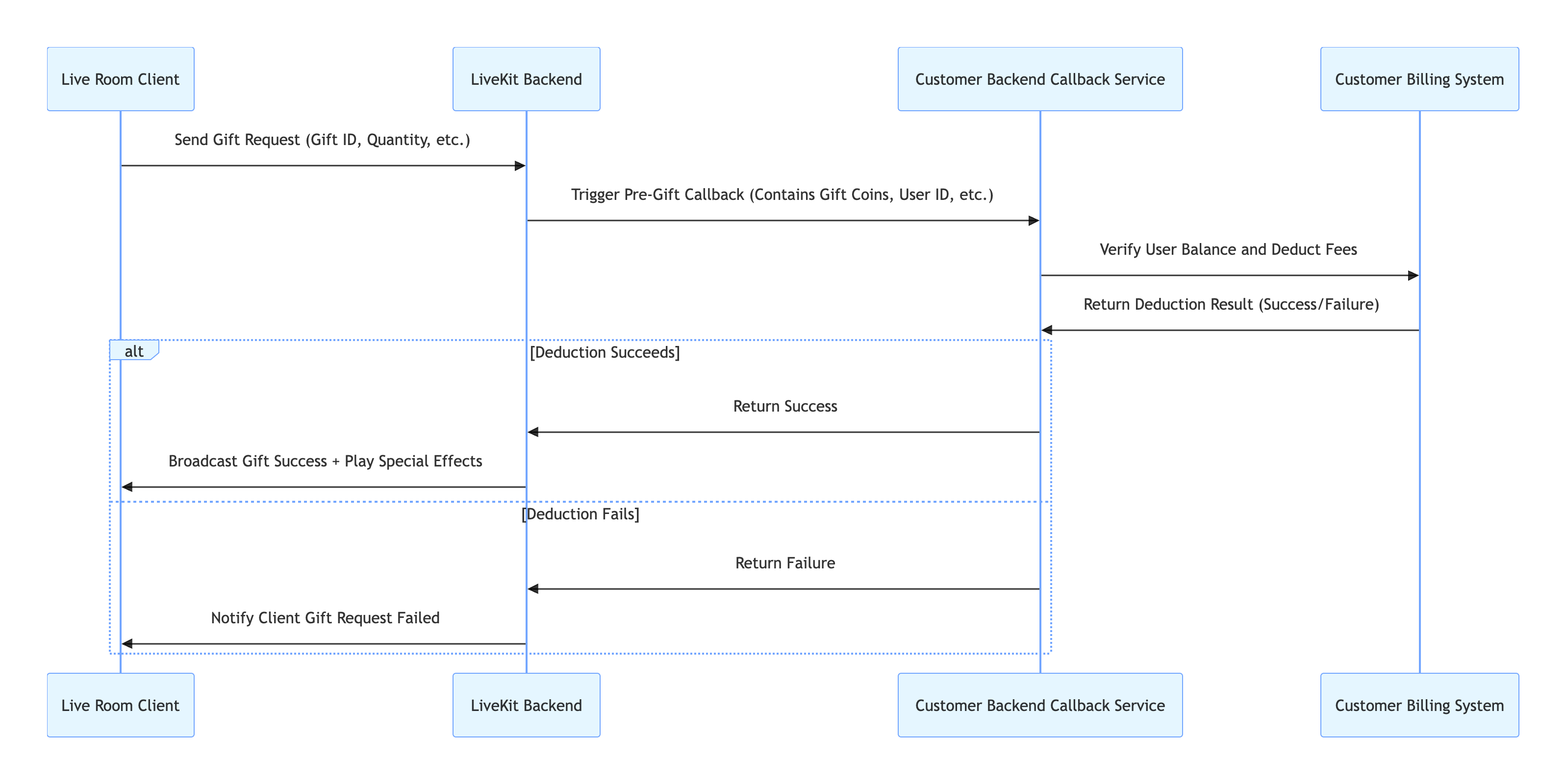
TUILiveKit does not have a built-in billing system. It needs to be integrated with your own billing system to complete the entire flow of "user sends gift → balance check → deduction → result synchronization".
Call Flow Diagram
Key Process
1. Client Initiates Gifting: The user completes the gift sending interaction on the GiftListPanel component in the live room client.
2. TUILiveKit Triggers Callback: The TUILiveKit backend calls the callback URL you configured, passing the gifting information (such as gift Coins, user identifier, etc.) to your backend.
3. Billing System Balance Deduction and Verification: Your backend system calls your customer billing system to verify if the user's balance is sufficient and performs the actual deduction.
4. Deduction Result Returned to TUILiveKit: Your backend returns the deduction result (success/failure) to the TUILiveKit backend.
5. TUILiveKit Synchronizes with Client: If the deduction is successful, the TUILiveKit backend broadcasts the gifting result to all clients in the room and triggers the playback of the gift effect animation. If the deduction fails, the TUILiveKit backend notifies the initiating client that the "gift sending request failed".
Overview of REST API Interfaces
|
Callback Configuration - Callback before sending a gift | The customer's backend can use this callback to decide whether to pass pre-gifting checks, etc. | |
3. Data Analytics
We provide comprehensive gift data analytics capabilities to help you understand gift distribution, user behavior trends, and business operational effectiveness.
Call Flow Diagram
Key Process
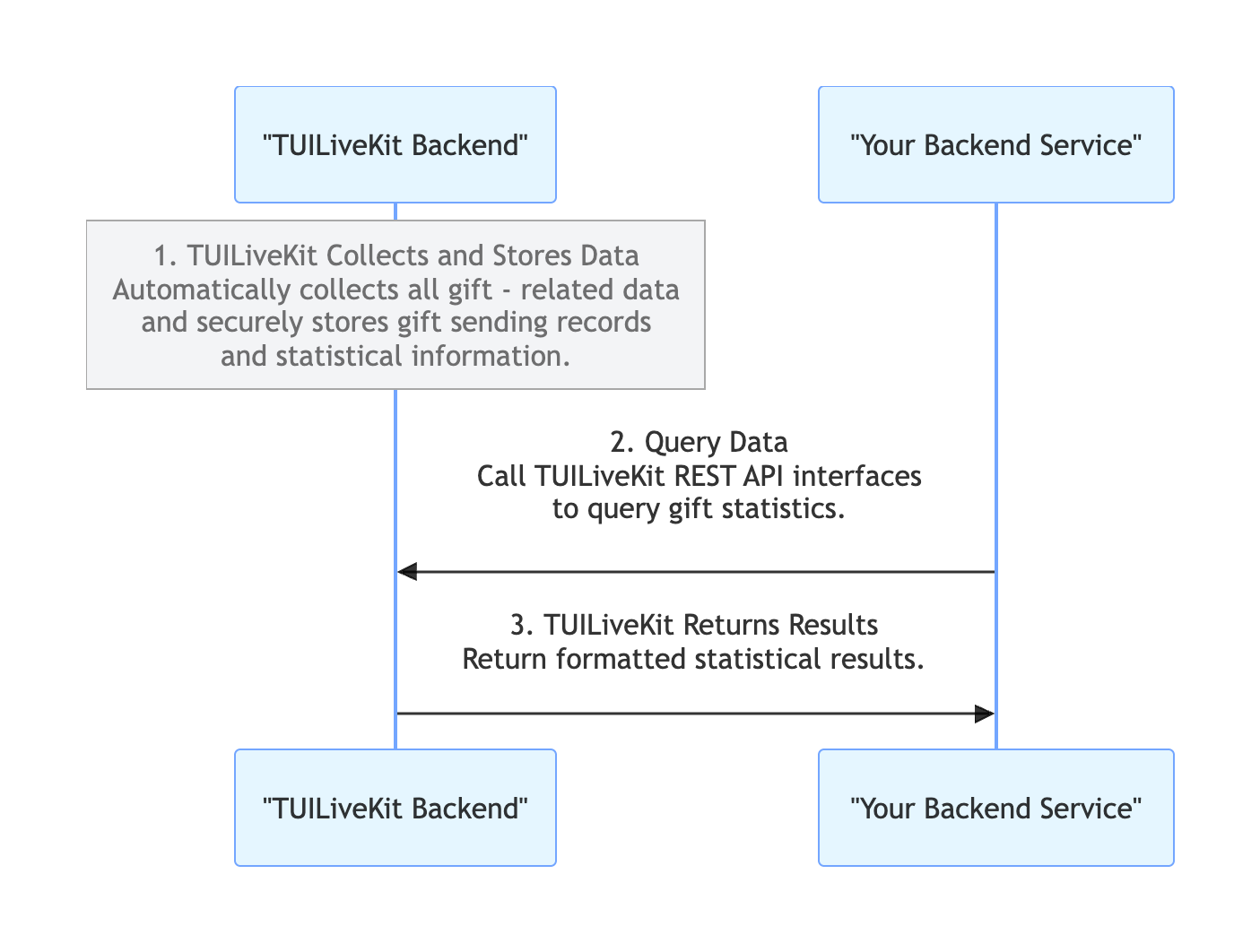
1. TUILiveKit Collects and Stores Data: The TUILiveKit backend automatically collects all gift-related data and securely stores gift sending records and statistical information.
2. Query Data: Your backend service can call TUILiveKit REST API interfaces to query gift statistics.
3. TUILiveKit Returns Results: The TUILiveKit backend returns the formatted statistical results to your backend.Overview of REST API Interfaces
Overview of REST API Interfaces
|
Active Interface - Query Gift Statistics | Use this interface to get the gift receiving statistics for a specific user. | |
4. PK Score Integration (Optional)
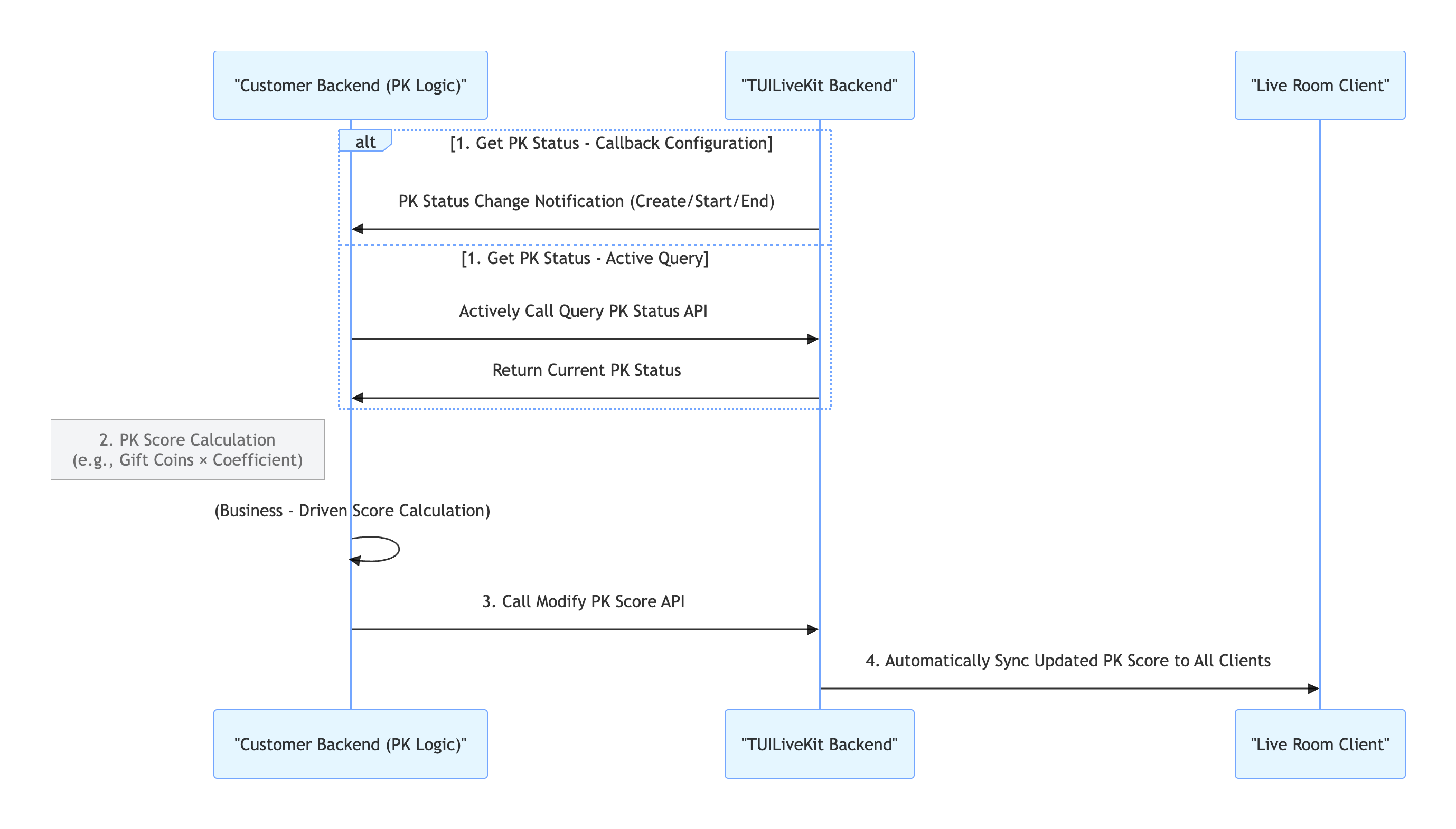
Typically, in live host PK scenarios, the value of gifts received by a host needs to be linked to their PK score (e.g., a viewer sends a "rocket" gift, and the host's PK score increases by 500 points). This enhances the competitiveness of PK and the atmosphere of the live stream through gift interaction.
Note:
The PK score system in the TUILiveKit backend uses a pure numerical calculation and accumulation mechanism. Therefore, you need to complete the PK score calculation according to your own operational strategies and business needs before calling the update interface. You can refer to the following PK score calculation example:
|
Basic Gift | Gift value × 5 | 1 USD gift → 50 points |
Intermediate Gift | Gift value × 8 | 5 USD gift → 400 points |
Senior Gift | Gift value × 12 | 10 USD gift → 1,200 points |
Special Effect Gift | Fixed high score | 99 USD gift → 12000 points
|
Call Flow Diagram
Key Process
1. Get PK Status:
Callback Configuration: You can configure the PK Status Callback, allowing the TUILiveKit backend to actively notify your system of the PK status when a PK starts or ends. Active Query: Your backend service can actively call the Query PK Status interface to check the current PK status at any time. 2. PK Score Calculation: Your backend service calculates the PK score increment based on business rules (like the example above).
3. PK Score Update: Your backend service calls the Modify PK Score interface to update the PK score in the TUILiveKit backend. 4. TUILiveKit Synchronizes with Client: The TUILiveKit backend automatically synchronizes the updated PK score to all clients.
Overview of REST API Interfaces
|
Active Interface - Query PK Status | Use this interface to check if the current room is in a PK. | |
Active Interface - Modify PK Score | Update the calculated PK value through this interface. | |
Callback Configuration - Callback when PK starts | The customer's backend can be timely informed when a PK starts through this callback. | |
Callback Configuration - Callback when PK ends | The customer's backend can be timely informed when a PK ends through this callback. | |
5. Gift AR SDK (Optional)
TUILiveKit provides two types of gift effect players: Basic Effects Player (built-in) and Gift AR SDK (requires extra integration).
|
Billing | Free | |
integration method | Built-in by default | |
Animation support | Like animation Barrage animation Full-screen animation | Like animation Barrage animation Full-screen animation |
Animation Format | Only supports SVGA | SVGA, PAG, WebP, PAG, Lottie, PNG, MP4, VAP, etc. |
Performance | Supports SVGA files <=10MB | Supports larger animation files. Performance overhead is lower when playing complex effects, ensuring smooth playback of multiple animations simultaneously, especially on low-end devices. |
Gift AR SDK Integration
You only need to follow the steps below to integrate the TUILiveKit advanced effects playback capability.
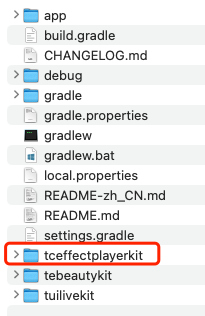
1. Download Component:Download and unzip TUILiveKit, and copy the Android/tceffectplayerkit folder into your project, at the same level as your app directory. 2. Integrate Component:Edit your project's settings.gradle file and add the following code:
include ':tceffectplayerkit'
3. Initialize Authentication: In your app's initialization location, call the method from TCMediaXBase for authentication. To get the LicenseUrl and LicenseKey, please see the License Guide. TCMediaXBase.getInstance().setLicense(context,
"LicenseUrl",
"LicenseKey",
new ILicenseCallback() {
@Override
public void onResult(int error, String message) {
Log.i("TCMediaXBase", "setLicense result: " + error + " " + message);
}
});
4. After completing the above steps, TUILiveKit will automatically switch to the advanced effects player. You do not need to do anything else.
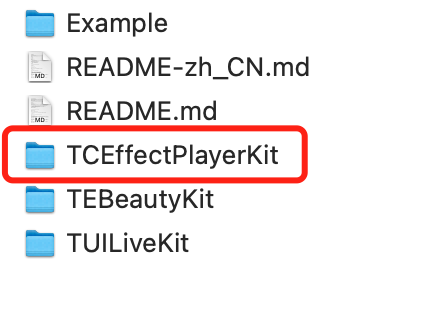
1. Download Component:Download and unzip TUILiveKit, and copy the iOS/TCEffectPlayerKit folder into your project, at the same level as your Podfile. 2. Integrate Component:Edit your Podfile, add the following code, and run pod install in the terminal:
pod 'TCEffectPlayerKit', :podspec => './TCEffectPlayerKit/TCEffectPlayerKit.podspec'
3. Initialize Authentication:In your app's initialization location, call the method from TCMediaXBase for authentication. To get the LicenseUrl and LicenseKey, please see the License Guide.
import TCMediaX
func application(_ application: UIApplication,
didFinishLaunchingWithOptions launchOptions: [UIApplication.LaunchOptionsKey: Any]?) -> Bool {
TCMediaXBase.getInstance().setDelegate(self)
TCMediaXBase.getInstance().setLicenceURL("LicenseURL", key: "LicenseKEY")
return true
}
func onLicenseCheckCallback(_ errcode: Int32, withParam param: [AnyHashable : Any]) {
debugPrint("[TCMediaXBase] setLicense result: errcode:\\(errcode), param:\\(param)")
}
4. After completing the above steps, TUILiveKit will automatically switch to the advanced effects player. You do not need to do anything else.
FAQ
Do I need to develop the billing system myself?
Yes. TUILiveKit integrates with your billing system via a callback mechanism. You need to implement your own user account system, handle the deduction verification callback, and manage the points distribution rules.
Do I need to care about PK integration? How does it work?
Yes, you need to care about it. The PK score system provided by TUILiveKit is based on a pure numerical accumulation mechanism. You need to calculate the PK score increase for each gift according to your business needs, and then call the TUILiveKit interface to update the score. TUILiveKit will automatically synchronize the score to the client.
How do I configure gifts if I only have a client and no server?
If you do not have your own server, you can use API tools like Postman or Apifox to directly call the REST APIs provided by TUILiveKit to configure the gift list.
Will gift notifications be blocked by muting or frequency control?
No. Gift notifications are not affected by muting or frequency control, ensuring reliable delivery.
What should I do if the special effect playback is lagging?
Please check if your SVGA file size is less than 10MB. If the file is too large, you might consider upgrading to the Gift AR SDK for better performance.