tencent cloud

Elastic MapReduce

Release Notes and Announcements
Release Notes
Announcements
Security Announcements
Product Introduction
Overview
Strengths
Architecture
Features
Use Cases
Constraints and Limits
Technical Support Scope
Product release
Purchase Guide
EMR on CVM Billing Instructions
EMR on TKE Billing Instructions
EMR Serverless HBase Billing Instructions
Getting Started
EMR on CVM Quick Start
EMR on TKE Quick Start
EMR on CVM Operation Guide
Planning Cluster
Administrative rights
Configuring Cluster
Managing Cluster
Managing Service
Monitoring and Alarms
TCInsight
EMR on TKE Operation Guide
Introduction to EMR on TKE
Configuring Cluster
Cluster Management
Service Management
Monitoring and Ops
Application Analysis
EMR Serverless HBase Operation Guide
EMR Serverless HBase Product Introduction
Quotas and Limits
Planning an Instance
Managing an Instance
Monitoring and Alarms
Development Guide
EMR Development Guide
Hadoop Development Guide
Spark Development Guide
Hbase Development Guide
Phoenix on Hbase Development Guide
Hive Development Guide
Presto Development Guide
Sqoop Development Guide
Hue Development Guide
Oozie Development Guide
Flume Development Guide
Kerberos Development Guide
Knox Development Guide
Alluxio Development Guide
Kylin Development Guide
Livy Development Guide
Kyuubi Development Guide
Zeppelin Development Guide
Hudi Development Guide
Superset Development Guide
Impala Development Guide
Druid Development Guide
TensorFlow Development Guide
Kudu Development Guide
Ranger Development Guide
Kafka Development Guide
Iceberg Development Guide
StarRocks Development Guide
Flink Development Guide
JupyterLab Development Guide
MLflow Development Guide
Practical Tutorial
Practice of EMR on CVM Ops
Data Migration
Practical Tutorial on Custom Scaling
API Documentation
History
Introduction
API Category
Cluster Resource Management APIs
Cluster Services APIs
User Management APIs
Data Inquiry APIs
Scaling APIs
Configuration APIs
Other APIs
Serverless HBase APIs
YARN Resource Scheduling APIs
Making API Requests
Data Types
Error Codes
FAQs
EMR on CVM
Service Level Agreement
Contact Us

Using Alluxio in Tencent Cloud

PDF
포커스 모드
폰트 크기
마지막 업데이트 시간: 2025-01-03 14:56:32

Overview

Tencent Cloud EMR comes with the ready-to-use Alluxio service, helping you accelerate distributed memory-level caching and simplify data management. You can also use the configuration delivery feature to configure multi-level caching and manage metadata via the EMR console or APIs. In addition, EMR offers one-stop monitoring and alarming.

Preparations

Tencent Cloud EMR Hadoop Standard v2.1.0 or above.
For specific Alluxio versions supported in EMR, see Component Version.

Creating an Alluxio-based EMR Cluster

This section describes how to create a ready-to-use Alluxio-based EMR cluster. You can create an EMR cluster via the purchase page or API.

Creating a cluster via the purchase page

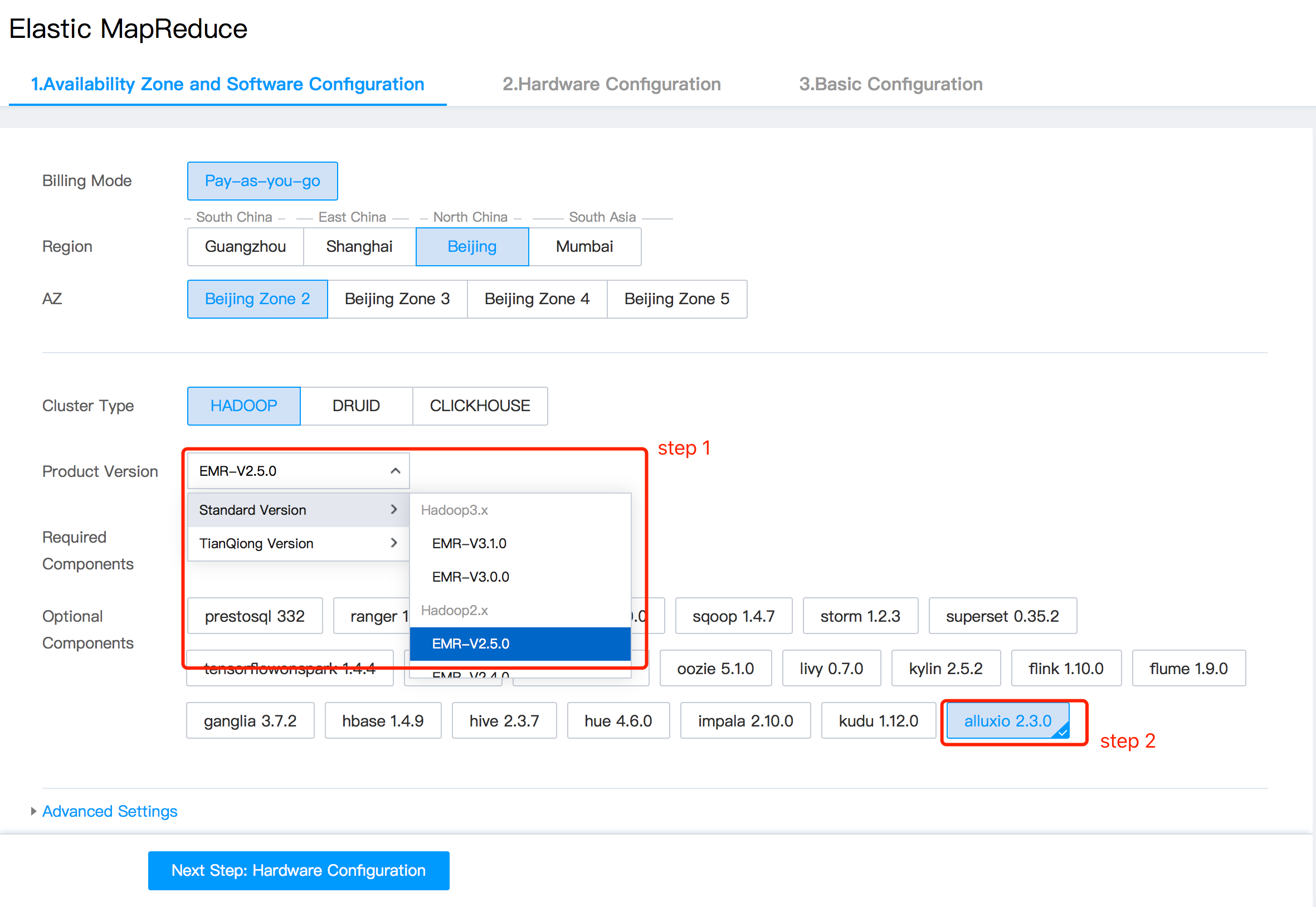
Go to the EMR purchase page, choose an Alluxio-supported version, and select the Alluxio component in Optional Components.

Select other options as needed to meet your business needs. For reference, see Creating EMR Cluster.

Creating a cluster via API

Tencent Cloud EMR also allows you to build a big data cluster based on Alluxio. For details, see DescribeClusterNodes.

Basic Configurations

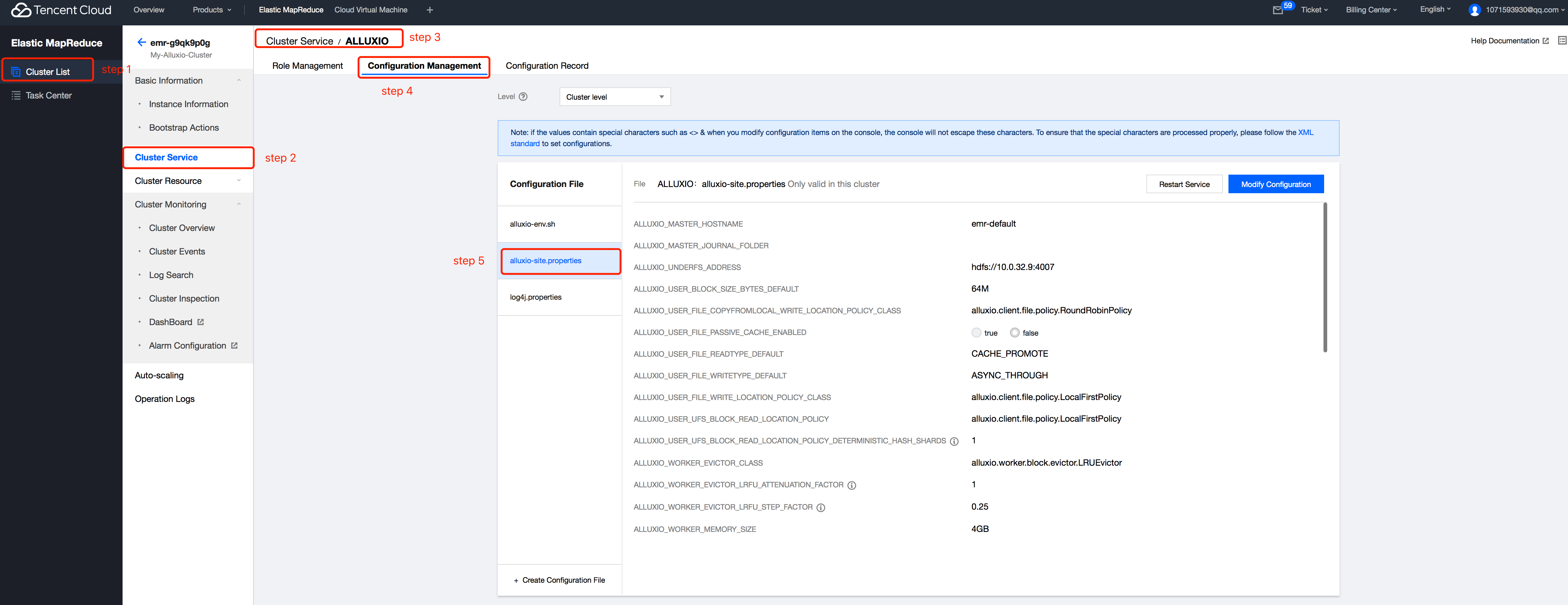
When you create an EMR cluster containing the Alluxio component, HDFS will be mounted to Alluxio and memory will be used for single-level (level 0) storage by default. You can use the configuration delivery feature to change the storage mode to multi-level storage or make other optimizations.

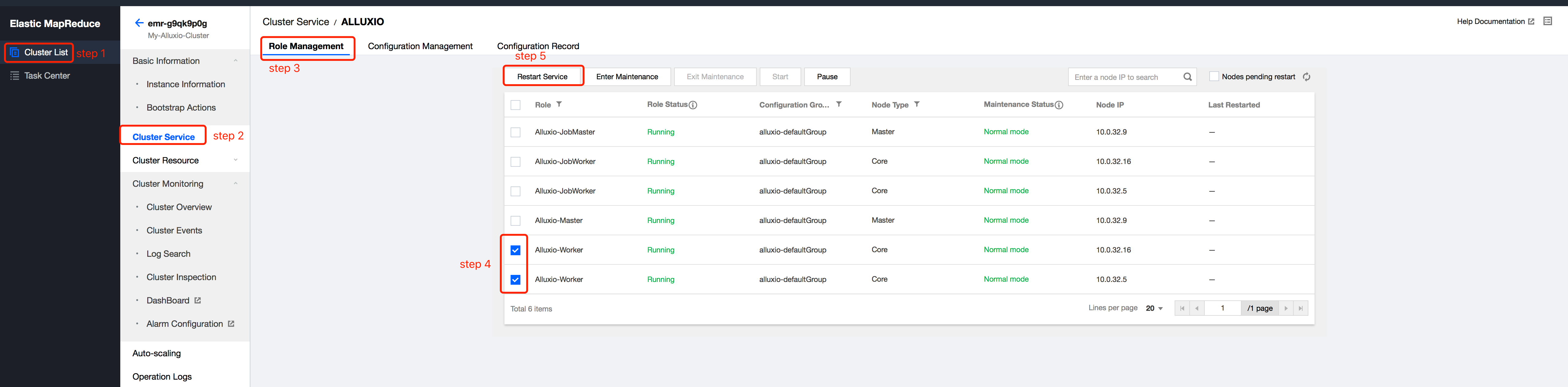
After delivering configurations, you need to restart the Alluxio service for some configurations to take effect.

For more details on configuration delivery and restarting policies, see Configuration Management and Restarting Services.

Storage and compute separation based on Alluxio acceleration

Tencent Cloud EMR provides the compute and storage separation capability based on Tencent Cloud COS. By default, when directly accessing the data in COS, applications do not have node-level data locality or cross-application caching. Alluxio acceleration helps alleviate these issues.
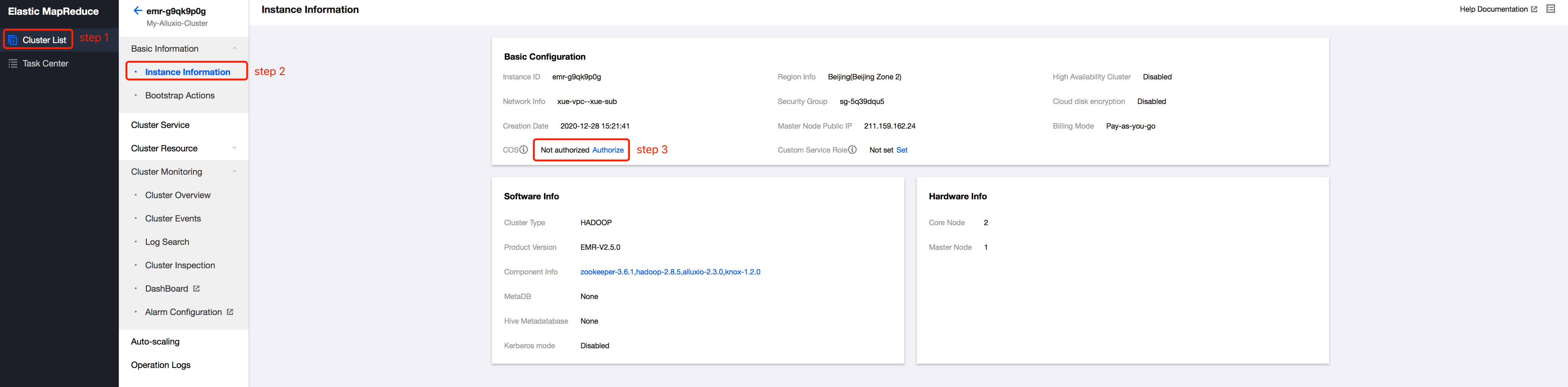
COS is deployed on Tencent Cloud EMR clusters by default and serves as the dependent JAR package of UFS. You only need to grant EMR clusters the permission to access COS and mount COS to Alluxio.

Authorization

If COS is not enabled for the current cluster, you can go to CAM console > Roles to grant permission. After authorization, EMR nodes can access the data in COS using temporary keys.


Mounting

Log in to any machine of EMR and mount COS to Alluxio.
bin/alluxio fs mount <alluxio-path> <source-path>
//TODO,
For more information on using Alluxio in Tencent Cloud EMR, see Alluxio Development Documentation.

도움말 및 지원

문제 해결에 도움이 되었나요?

피드백