The HDFS federation management feature is currently made available through an allowlist. To use it, submit a ticket for application.
HDFS federation management architecture
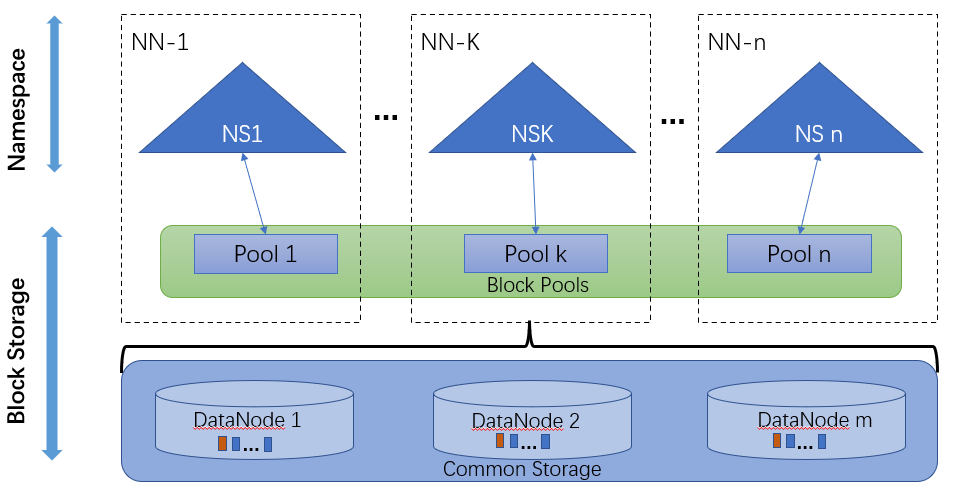
In order to scale the name service horizontally, HDFS federation uses multiple independent NameNodes/nameSpaces. The DataNodes are used as common storage for blocks by all the NameNodes. Each DataNode registers with all the NameNodes in the cluster. DataNodes send periodic heartbeats and block reports. They also handle commands from the NameNodes.
To make it easier to manage multiple namespaces, HDFS ViewFs federation uses the classic client-side mount table (a feature of open-source ViewFs). Different paths of applications are mapped to specific NameServices on the client, so as to achieve storage separation or performance separation. This mechanism distributes files and loads but requires more human intervention (clear planning) to implement ideal load balancing.
How router-based federation works
Router-based federation provides a software layer to manage multiple namespaces. Compared with ViewFs which maintains the mount table information on the client, it is truly transparent to the client, because the mapping information will be additionally saved and persisted.
HDFS Federation Management Configuration
You need to consider two factors: the required number of NameServices and the mount method of the business data directory.
Planning principles for the number of NameServices
1. One NameService can store up to 100 million files securely. After this limit is exceeded, its access speed and read/write throughput will be greatly reduced. Therefore, if you expect to store more than 100 million files, you need to add an extra NameService.
2. For an application that reads/writes HDFS heavily, it is necessary to allocate a separate NameService to process its requests. This ensures that the data in the application can exclusively use all the processing capabilities of the NameService and avoids the impact on other applications.
3. For an application that demands high reliability, you can allocate an independent NameService to it, because it may be prevented from accessing HDFS and thus rendered unstable if the reads/writes of other applications are too frequent.
Planning principles for the mount method of business data directories
1. Mount the data directories of the services associated with the business data to the same NameService, because cross-NameService file reads/writes are slow and may reduce the application's file storage performance.
2. For a service that involves a large amount of data but is not associated with other services, you can directly use only one NameService.
3. For a small business, we recommend you mount its directories directly to the default NameService (HDFS${clusterid}), so as to eliminate the need of data migration and simplify the federation configuration.
4. We recommend you map only first-level directories to NameServices in order to reduce the configuration complexity.
Scheme Comparison
ViewFs federation configuration method
1. Directly use ViewFs
Strengths: Unified views are provided, and different applications can be used in the same way.
Shortcomings: Changes to ViewFs mount tables require all applications using the cluster to read the latest mount point synchronously.
2. Specify the NameService
Strengths: You don't need to modify the configurations of all applications.
Shortcomings: You need to specify directories for different components and applications, which makes the coupling of component paths more complicated.
Router-based federation configuration method
1. Directly use router-based federation
Strengths: Unified views are provided, and different applications can be used in the same way. Changes to router-based federation mount tables take effect directly, so applications using the cluster don't need to update the mount tables synchronously.
Shortcomings: The DFSRouter forwarding layer is added, which slightly affects the performance.
2. Specify the NameService
Strengths: You don't need to modify the configurations of all applications.
Shortcomings: You need to specify directories for different components and applications, which makes the coupling of component paths more complicated.