If you need to migrate your HDFS raw data to EMR, you can achieve this using either of the following: migrate data with Tencent Cloud Object Storage (COS) service as a transfer stop; migrate data with DistCp, a built-in tool of Hadoop for large inter/intra-cluster copying. This document describes how to migrate data with the second method.
DistCp (distributed copy) is a file migration tool that comes with Hadoop. It uses MapReduce to effect its distribution, error handling and recovery, and reporting. It expands a list of files and directories into input to map tasks, each of which will copy a partition of the files specified in the source list. To use DistCp, your cluster and the EMR cluster must be connected over network.
To migrate data with DistCp, perform the following steps:
Step 1. Configure a Network
Migrating local self-built HDFS files to EMR
The migration of local self-built HDFS files to an EMR cluster requires a direct connection for network connectivity. You can contact Tencent Cloud technical team for assistance.
Migrating self-built HDFS files in CVM to EMR
If the network where the CVM instance resides and the one where the EMR cluster resides are in the same VPC, the files can be transferred freely.
Otherwise, a peering connection is required for network connectivity.
Using a peering connection
IP CIDR block 1: Subnet A 192.168.1.0/24 in VPC1 of Guangzhou.
IP CIDR block 2: Subnet B 10.0.1.0/24 in VPC2 of Beijing.
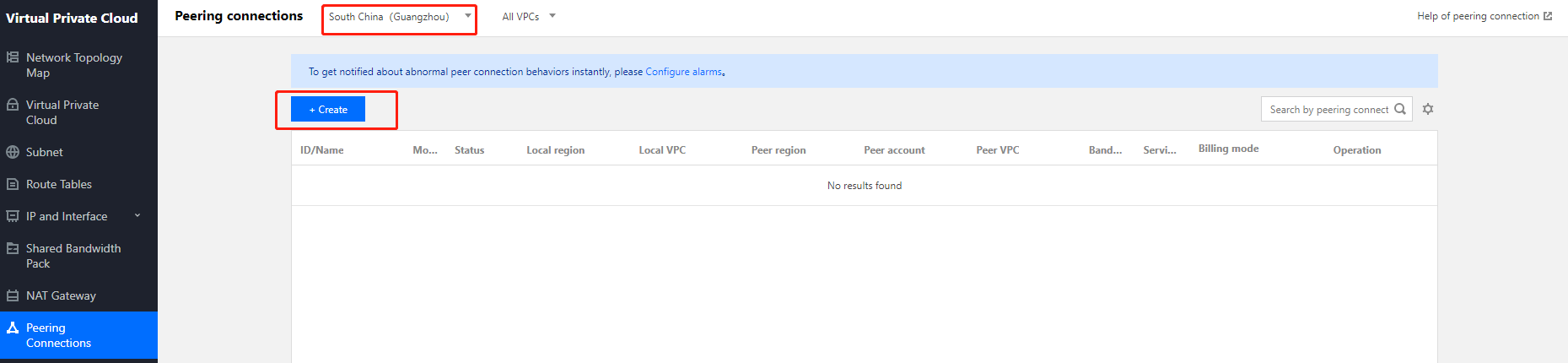
1. Log in to the VPC console, enter the Peering Connections page, select the region Guangzhou at the top of the page, select VPC1, and click + Create.
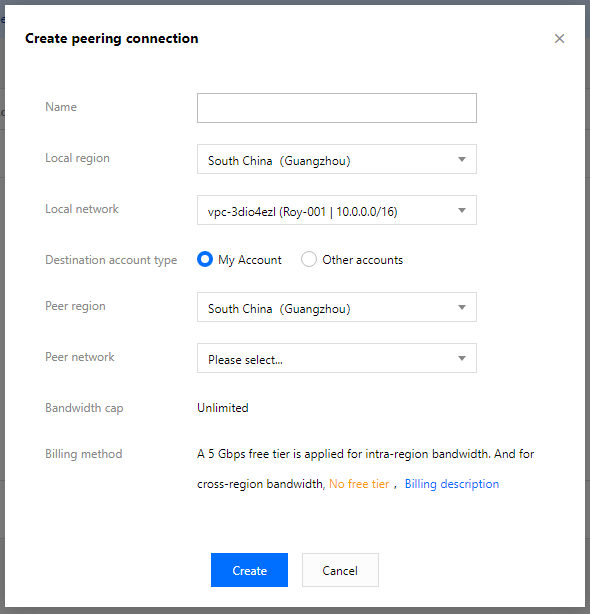
2. On the peering connection creation page, configure the following fields:
Name: Enter a peering connection name, such as PeerConn.
Local region: Enter a local region, such as Guangzhou.
Local network: Enter a local network, such as VPC1.
Destination account type: Select the account of the peer network. If the two networks in Guangzhou and Beijing are under the same account, select My account; otherwise, select Other accounts.
Note:
If both the local and peer networks are in the same region (such as Guangzhou), the communication is free of charge, and you do not need to set the bandwidth cap. Otherwise, fees will be incurred and you can set the bandwidth cap.
Peer region: Enter a peer region, such as Beijing.
4. Configure the local and peer route tables for the peering connection.
Log in to the VPC console and select Subnet to enter the subnet management page. Click the ID of the route table associated with the specified subnet (such as subnet VPC1 in Guangzhou) on the local end of the peering connection to enter the route table details page.
Click Add route policy.
Enter the destination CIDR block (such as 10.0.1.0/24 for VPC2 in Beijing), select Peering connections for the next hop type, and select the created peering connection (PeerConn) for the next hop.
You've configured the route table from Guangzhou VPC1 to Beijing VPC2 in the previous steps. Now you need to repeat the steps above to configure the route table from Beijing VPC2 to Guangzhou VPC1.
After the route tables are configured, IP CIDR blocks in different VPCs can communicate with each other.
Step 2. Execute copying
# Copy the specified folder from one cluster to another
# If too many files need to be specified, use -f parameter to separate them.
Note:
For the commands above, the source and destination versions must be the same.
The copying will fail if another client is writing data to the source file or the source file was moved (the FileNotFoundException error message will occur); rewriting the source file will fail if it is being copied to the destination.